Your bidding setting changes how hard Amazon spends your budget. In 2026, that matters more because Sponsored Products CPCs hit $1.34, up 34% year over year, while Amazon’s pacing system now tends to spend earlier in the day.
If I had to boil this down, I’d say:
- Use Dynamic bids - down only when I want tighter cost control
- Use Dynamic bids - up and down when I want more sales and can handle higher CPCs
- Use Fixed bids when I want clean test data or steadier bid behavior
- Check margin, break-even ACoS, and inventory before I switch anything
- Be careful with placement multipliers, because they can stack with Amazon’s bid changes
Here’s the simple takeaway: pick the bidding model based on goal, margin, and stock level - not guesswork, or use top PPC tools to automate the process. If my ACoS is near break-even, I lean conservative. If the product converts well and margin is healthy, I can be more aggressive. If stock is tight, I slow spend.
Dynamic Bidding and Placement Settings | That Amazon Ads Masterclass Lesson 3.2

sbb-itb-89b8f36
Quick comparison
| Bidding option | What Amazon does | Best starting use (or consult top PPC agencies) |
|---|---|---|
| Dynamic bids - down only | Cuts bids when a click looks less likely to convert | Margin control, lower-risk spend, low-stock situations |
| Dynamic bids - up and down | Increases or lowers bids based on conversion odds | Growth, ranking pushes, proven products |
| Fixed bids | Uses my set bid without auto-adjustments | Launch tests, branded exact, cleaner data reads |
One more point: I wouldn’t judge a change too fast. On a campaign with decent volume, I’d usually wait 14 to 30 days before deciding whether the new bidding model is working.
How Amazon's Three Bidding Options Work
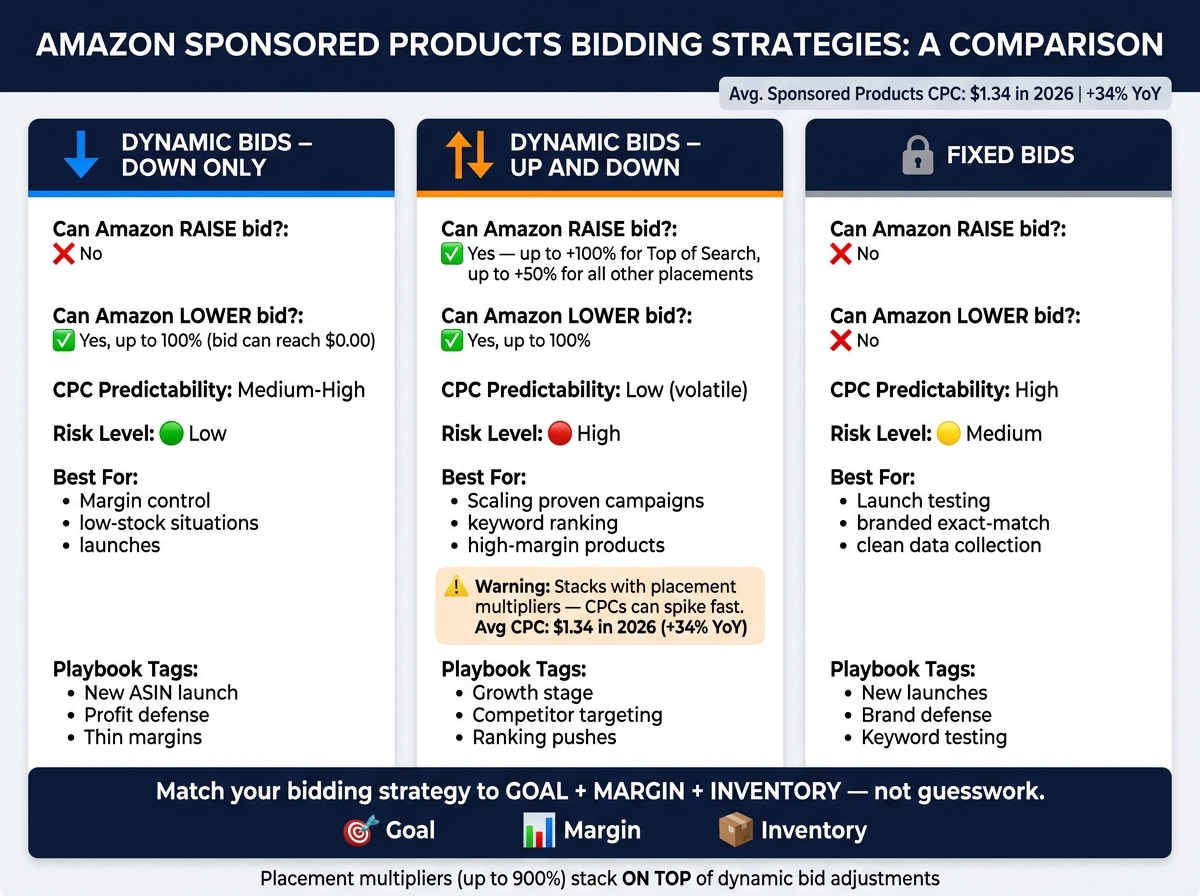
Amazon Dynamic Bidding Strategies Compared: Down Only vs Up & Down vs Fixed
Each bidding strategy gives Amazon a different amount of control over your base bid. That matters because the setting you choose affects spend, CPC stability, and how much room Amazon has to chase conversions. If you're trying to line up bidding with margin targets or inventory limits, this is where the choice starts.
Dynamic Bids – Down Only
With Down Only, Amazon can reduce your bid by as much as 100%, which means your effective CPC can drop to $0.00 in auctions it sees as weak. It will never push your bid above your base bid.
This is the most conservative option of the three. In plain terms, it gives Amazon permission to pull back when traffic looks low-intent, without letting it spend harder on your behalf.
Dynamic Bids – Up and Down
Up and Down gives Amazon room to move your bid both ways. If Amazon expects a better chance of conversion, it can increase your bid by as much as 100% for top-of-search placements and by as much as 50% for all other placements. It can also cut your bid when conversion odds look weak.
One thing to watch: these changes can stack with other settings. If you use bid by placement multipliers too, Amazon's bid adjustments sit on top of those multipliers. That can push CPCs up fast.
This option is built for conversion volume within a set budget, but it needs close watch - especially when clicks are already expensive. Sponsored Products CPCs averaged $1.34 in 2026, up 34% year over year.
Fixed Bids
With Fixed Bids, Amazon uses your exact bid in every auction. There are no automatic increases or decreases based on predicted conversion rate.
That makes CPC behavior more predictable. It's a good fit for controlled tests, branded keyword campaigns, and mature exact-match terms where you already trust your past conversion data and don't want Amazon's system pushing costs higher.
The downside is simple: Amazon applies the same bid to both strong and weak auctions. So while you get more control, you can also pay too much for low-intent clicks. That tradeoff hits hardest when cost control matters most.
| Strategy | Amazon Can Raise Bid | Amazon Can Lower Bid | Best Fit |
|---|---|---|---|
| Down Only | No | Yes, up to 100% | Launches |
| Up and Down | Yes, up to 100% (top of search) / 50% (other) | Yes, up to 100% | Scaling mature campaigns |
| Fixed Bids | No | No | Brand defense and tests |
Where to Set Dynamic Bidding in Amazon Campaign Setup
Selecting a Bidding Strategy When Creating a Campaign
In Seller Central, go to Campaign Manager and create a Sponsored Products campaign. This is where you set the level of bid control discussed above.
Under Campaign Bidding Strategy, pick one of these options:
- Dynamic bids – down only
- Dynamic bids – up and down
- Fixed bids
That choice applies to the entire campaign.
Below Fixed bids, you can also set placement multipliers. These stack on top of your bidding strategy and can go as high as 900% for top-of-search or product page placements. You can use the same setting later on live campaigns too.
Changing the Strategy on Existing Campaigns
To change the bidding strategy on a live campaign, open the campaign in Campaign Manager and click the Campaign Settings tab.
Don’t switch too soon. On a medium-volume campaign, wait 14 to 30 days before changing bidding models. That first stretch gives you enough performance metrics to judge what’s working.
If you need to make edits in bulk, use Bulk Operations and update the Bidding Strategy column in the spreadsheet. Leave the Record ID unchanged.
After setup, the next call is simple: choose which model to start with.
How to Choose a Starting Model by Goal, Margin, and Inventory
Match the Bidding Strategy to the Campaign Goal
Your bidding model should match the main job of the campaign.
If you're launching a product, start with Fixed Bids. That gives you cleaner early data, which makes it easier to judge conversion quality before you make bid changes. After that, use margin and inventory to decide whether to stay put or switch.
| Goal | Best starting strategy | Best-fit campaign type |
|---|---|---|
| Protect margin | Dynamic bids – down only | Mature products, thin margins, brand defense |
| Drive sales growth | Dynamic bids – up and down | Keyword ranking, high-margin products, competitor budget analysis |
| Gather clean launch data | Fixed bids | New launches, keyword testing, branded exact-match campaigns |
Use Margin and Break-Even ACoS as Bid Guardrails
Use break-even ACoS as your ceiling, based on gross margin and all variable costs.
Here’s the plain-English version: if your current ACoS is already close to that ceiling, you don’t have much room for mistakes. In that case, Dynamic Bids – Down Only is the safer place to start because it can lower bids by up to 100% when the chance of conversion looks low.
If your margin is stronger, Dynamic Bids – Up and Down makes more sense for products in a growth stage. You can afford to push harder when the math still works.
Factor In Inventory Position Before Increasing Spend
Inventory changes how aggressive you can be with bids.
- Tight inventory: slow spend or lean toward Down Only
- Excess inventory: increase bids and use Up and Down
- Out of stock: pause the campaign
That way, the bidding choice isn't just a setting in the ad console. It becomes a practical plan for launch, control, or scale.
Playbooks and Key Takeaways
Starting Playbooks for Launch, Scale, and Profit Defense
Once your goal, margin, and inventory are set, these playbooks are a good starting point.
New ASIN launch: Start with Dynamic Bids – Down Only so you can gather data without burning through spend. If you want tighter manual control in the first two weeks, use Fixed Bids to control spend and collect cleaner keyword data.
Scaling a proven campaign: When conversion data levels out, switch to Dynamic Bids – Up and Down. Then add placement modifiers only in spots where top-of-search traffic converts at a better rate.
Profit defense: Use Down Only to protect margin. Use Up and Down for aggressive brand defense only if your margin can handle higher CPCs.
When to Use Tools or Agency Support
As campaign volume grows, bid management stops being just a strategy job and turns into a process problem. Manual bid management gets harder as the number of campaigns climbs.
Top PPC automation tools can help in two main ways:
- They extend historical data storage beyond Amazon's 60-90 day window.
- They make bulk bid updates much easier.
Before you hand anything over to automation, document your baseline ACoS, conversion rates, and CPC volatility. That step matters. Rules built on guesswork usually create more problems than they fix.
Conclusion: Simple Rules for Choosing Amazon Dynamic Bidding
The simplest rule is to match the bidding mode to your risk tolerance. Choose based on goal, margin, and inventory. Start simple, let the data build, then adjust.
FAQs
When should I switch bidding models?
Switch bidding models based on your campaign’s data maturity and goals. For new campaigns, start with dynamic bidding so you can gather performance data and see how the market responds. Give it a few weeks, then tighten your approach based on what the numbers show.
Use fixed bids for stable, high-data campaigns where cost control matters - like brand defense or mature products. Use dynamic up and down when you’re going after competitive conquesting. Review performance every two to four weeks so bids stay in line with margins and results.
How do placement modifiers affect dynamic bids?
Placement modifiers - also called bid-by-placement adjustments - give you one more way to control bids alongside dynamic bidding.
Here’s the difference:
- Dynamic bidding changes bids in real time based on the chance of a conversion.
- Placement modifiers let you increase bids by up to 900% for specific placements, like top of search or product pages.
Used together, they do two different jobs. Dynamic bidding helps you reach the right shoppers. Placement modifiers help you win stronger ad positions that can support conversions.
Which bid strategy fits low-margin products?
For low-margin products, Dynamic Bids – Down Only is usually the best option.
With this setting, Amazon lowers your bid when it expects a click is less likely to turn into a sale. That matters when margins are tight and every extra ad dollar counts.
Because Amazon never pushes your bid above your set maximum, this approach helps protect profit. It's a smart fit for established products where margin control matters more than pushing hard for growth.