API integration simplifies PPC reporting by automating data collection from platforms like Google Ads and Microsoft Advertising. Instead of manually gathering metrics, APIs provide direct access to data, saving time and enabling deeper analysis. Here's what you need to know:
- What is API integration? APIs link your tools to ad platforms, allowing you to request performance metrics (e.g., clicks, conversions, ad spend) without using dashboards.
- Why use APIs? They automate repetitive tasks, provide real-time updates, and access hidden metrics unavailable in standard interfaces.
- Key platforms: Google Ads uses GAQL for queries and supports batch operations for large-scale updates. Microsoft Advertising provides detailed demographic reports and retains data for up to 36 months.
- Setup essentials: Secure OAuth 2.0 credentials, developer tokens, and follow platform-specific documentation to configure API requests.
- Challenges: Handle data delays, API limits, and errors (authentication issues, throttling) with proper logging, caching, and retry strategies.
APIs are vital for agencies managing multiple campaigns, offering scalable reporting and optimization tools and actionable insights.
Major PPC Platforms with API Access
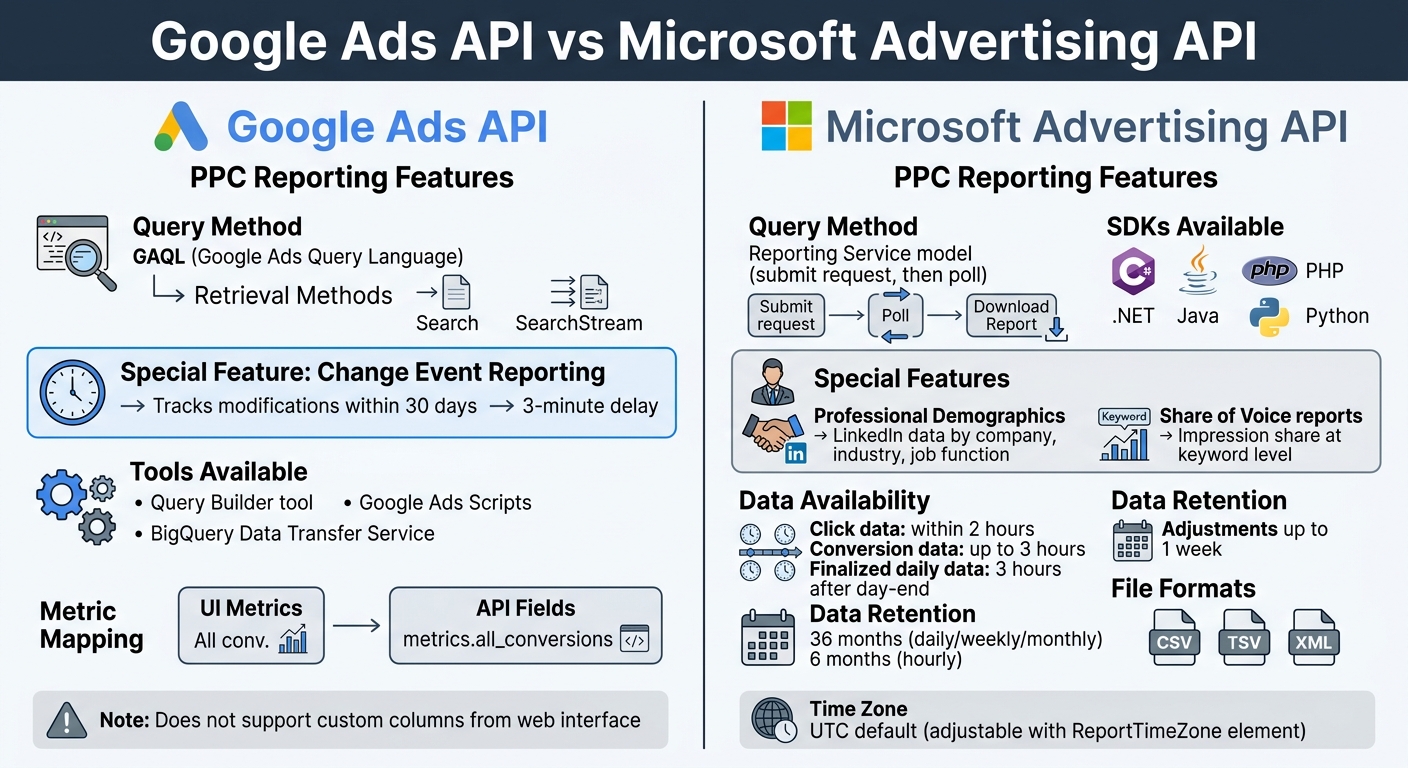
Google Ads vs Microsoft Advertising API Comparison Chart
Common APIs for PPC Reporting
Both Google Ads and Microsoft Advertising provide robust APIs tailored for performance reporting, each with distinct methods for retrieving data.
The Google Ads API uses GAQL (Google Ads Query Language) with two primary methods: Search and SearchStream. It also includes a feature called Change Event Reporting, which tracks all modifications to account resources within the past 30 days. However, there’s a slight delay - new changes typically appear within three minutes.
On the other hand, Microsoft Advertising employs a Reporting Service model. This involves submitting custom report requests and then polling the system until the report is ready. To streamline the process, the platform offers SDKs for languages like .NET, Java, PHP, and Python. Unique features include Professional Demographics reporting, which uses LinkedIn data to break down campaign performance by company, industry, and job function. Additionally, Share of Voice reports provide insights on impression share losses at the keyword level.
A key difference lies in data availability timelines. For Microsoft Advertising:
- Click data is usually accessible within two hours.
- Conversion data may take up to three hours.
- Finalized data for the previous day is typically ready three hours after day-end, though some adjustments might take up to a week.
Microsoft retains daily, weekly, and monthly performance data for 36 months, while hourly data is stored for six months. Understanding these timelines can help you plan your reporting workflows more effectively.
Finding and Reading API Documentation
To fully harness these APIs, clear and detailed documentation is essential.
Both platforms provide extensive resources, but their approaches differ. Google Ads offers a Query Builder tool to help create GAQL queries, mapping UI metrics to API fields. For instance, the interface metric "All conv." corresponds to metrics.all_conversions in the API. It’s worth noting that the API doesn’t support custom columns created in the web interface.
Microsoft Advertising provides detailed documentation on "Reporting Data Objects", which outlines available filters and scopes for reports. When submitting a report request, you can specify your preferred file format (CSV, TSV, or XML) and choose to exclude headers or footers for easier parsing. Reports use UTC time by default, but the ReportTimeZone element can adjust relative date ranges like "Yesterday" accordingly.
For those less experienced with full API integrations, Google suggests alternatives like Google Ads Scripts or the BigQuery Data Transfer Service.
Becoming proficient with both APIs and their documentation is essential for creating efficient, real-time PPC reporting systems.
sbb-itb-89b8f36
How to Set Up API Integration for PPC Reporting
Getting API Keys and Authentication
Setting up API integration is essential for real-time PPC reporting and thorough campaign analysis. The first step is to obtain the necessary platform credentials and implement secure OAuth 2.0 authentication.
For Google Ads, start by using your MCC (My Client Center) account to retrieve a 22-character developer token from the API Center. Next, create a project in the Google Cloud Console, enable the Google Ads API, and generate OAuth 2.0 credentials. You can choose between a Client ID and Client Secret for user-based access or a Service Account with a JSON key file for automated reporting.
For Microsoft Advertising, log in with Super Admin credentials on the Microsoft Advertising Developer Portal to request a Universal developer token. Register your application through the Microsoft identity platform to obtain a Client ID. Then, use the platform's authorization URL to prompt user consent and generate Access and Refresh tokens. You can find your Customer ID and Account ID either in the web UI URL or via the Customer Management API.
Both platforms rely on OAuth 2.0 authentication, and tokens typically expire every hour. To maintain uninterrupted access, use refresh tokens or service accounts. Microsoft also offers a sandbox environment for testing, complete with a universal test token (BBD37VB98).
Avoid hardcoding credentials directly into your scripts. Instead, store them securely in configuration files like google-ads.yaml or use environment variables. For Google Ads, developer tokens initially provide "Test Account Access." To access live production data, you’ll need to apply for either Basic or Standard access. Basic Access allows up to 15,000 operations per day, while Standard Access supports unlimited operations, making it ideal for large-scale reporting.
Once your credentials are in place, you can configure API calls to extract the campaign metrics you need.
Setting Up API Data Requests
With authentication complete, you can begin structuring API calls to pull accurate performance data. For Google Ads, use the GoogleAdsService.Search or SearchStream methods to execute GAQL queries and retrieve performance metrics. If you're working with client accounts through a manager account, make sure to include the manager's customer ID in the login-customer-id HTTP header to avoid permission issues. The SearchStream method is particularly useful for handling large datasets efficiently, as it delivers data in a single stream.
For Microsoft Advertising, ensure that your API requests reference the system-generated account ID rather than the 8-character account number visible in the web interface.
Always log the request-id from each API response for troubleshooting purposes. When testing data-modifying requests, set validate_only to true to check for errors without impacting live accounts. Official cross-platform ad performance tracking client libraries for languages like Java, Python, and PHP simplify tasks such as token refreshing and error handling.
Managing PPC API Data Effectively
Checking Data Accuracy
Once you've connected to the API, the next step is making sure the data you're pulling is accurate and addressing any API limitations. To start, compare the data against actual campaign performance, but skip using the platform's UI for this. The UI often organizes metrics by import date, which can create misleading comparisons. Instead, use Adalysis or rely on offline diagnostics for a clearer picture.
Pay attention to the unique request-id included in every API response. This identifier is essential for troubleshooting because it helps support teams locate specific requests that might be causing issues. Keep in mind that conversion reporting can lag by 15 to 48 hours, especially for attribution models beyond last-click. Another important detail: Google Ads only keeps Google Click IDs (GCLIDs) for 90 days, so any conversion uploads after that period will fail.
Watch out for implicit segmentation errors, too. Some API reports automatically include fields like resource names, which can make unique records appear as duplicates if those fields aren't properly mapped in your database. Also, make sure your time zone settings are aligned. Google Ads statistics are based on the account's local time zone, and they even adjust automatically for Daylight Savings Time.
Dealing with API Limits and Errors
Handling errors effectively is key to managing API data. Different errors require different responses:
- Authentication errors mean your tokens are no longer valid.
- Validation errors indicate problems with your input that need fixing before retrying.
- Retryable errors, like server issues, often resolve themselves.
For errors such as UNAVAILABLE or DEADLINE_EXCEEDED, use exponential backoff with jitter. This means waiting progressively longer between retries - 1 second, then 2 seconds, then 4 seconds - while adding random delays to avoid overwhelming the API.
Be aware of Google Ads API usage limits. The platform allows 1,600 requests per minute per developer token and 1,000 requests per minute per customer ID. If you exceed these thresholds, you'll get a RESOURCE_EXHAUSTED error. To manage this, monitor the query_resource_consumption field in your report responses to track query "cost". If you're temporarily throttled, wait 5 minutes before retrying. For more prolonged throttling, increase the wait time to 30 minutes.
| gRPC Code | HTTP Code | Error Type | Recommended Action |
|---|---|---|---|
| 3 | 400 | INVALID_ARGUMENT |
Fix request parameters; do not retry |
| 8 | 429 | RESOURCE_EXHAUSTED |
Wait and use exponential backoff |
| 14 | 503 | UNAVAILABLE |
Retry with exponential backoff and jitter |
| 13 | 500 | INTERNAL |
Retry with backoff |
To reduce the number of API calls, cache frequently accessed data locally. Use change-event services to sync only updated objects instead of fetching entire datasets repeatedly. Focus on retrieving columns that change often, like metrics, while storing less dynamic attributes (e.g., campaign names) locally. Schedule periodic sync jobs to update these less frequently changing fields. These strategies will help you manage your API data more efficiently and avoid unnecessary errors. For more resources on optimizing your workflow, check out our PPC marketing directory of tools and agencies.
Summary and Further Resources
Main Points on API Integration
API integration is a game-changer for PPC performance reporting. It streamlines the process by automating data retrieval from multiple platforms directly into your systems. This eliminates the need for manual report downloads and repetitive dashboard navigation, making cross-platform analysis much more efficient.
However, it's important to note that real-time data access doesn’t always mean metrics are immediately finalized. Modern advertising APIs use a pass-through architecture, which sends requests directly to providers without storing the data. Meanwhile, platforms update metrics asynchronously, meaning data like spend and conversions might take hours - or even days - to fully update.
To successfully integrate APIs, you'll need OAuth 2.0 credentials, a developer token, and familiarity with query languages like GAQL. Whether you choose lightweight tools or full-scale API implementations will depend on your team’s technical expertise and the scope of your operations.
This summary highlights the core topics of data access, the timing of updates, and the technical requirements discussed in this article. If you’re looking for more guidance, check out the resources below.
Visit the Top PPC Marketing Directory
Feeling overwhelmed by the idea of custom API integrations? The Top PPC Marketing Directory (https://ppcmarketinghub.com) is a great place to find expert solutions for PPC campaign management, performance tracking, and cross-platform reporting. This directory connects you with pre-built tools and specialized agencies that can handle the technical complexity for you, saving you from the high costs of in-house development as APIs continue to evolve.
Whether you’re looking for all-in-one management platforms, tools for extracting specific data, or agencies that can integrate CRM data for offline conversion tracking, the directory lets you compare options tailored to your technical needs and budget. Most businesses using professional PPC services invest between $11,001 and $15,000, and they’ve seen a 76% boost in performance as a result.
FAQs
Should I use Search or SearchStream in the Google Ads API?
When working with Google Ads API, selecting the right method for data retrieval depends on your specific needs:
-
GoogleAdsService.SearchStream: This method streams all results in a single response, making it a great option for retrieving large datasets quickly and efficiently. It's particularly useful when you need to process bulk data without worrying about pagination. -
Search: If you prefer paginated responses for easier handling, this is the better choice. It’s ideal for smaller or segmented queries where managing data in chunks is more practical.
The right method depends on the scale of your data and how you plan to process it.
How can I prevent PPC API tokens from expiring in production?
To maintain active PPC API tokens, it's crucial to use a refresh token to automatically renew your OAuth2 access tokens. When setting up your OAuth flow, make sure to request offline access. This step is essential for obtaining a long-lived refresh token.
Once you have the refresh token, store it securely - this is non-negotiable. Then, set up your system to programmatically refresh access tokens before they expire. This approach ensures a seamless experience for production accounts, as refresh tokens stay valid indefinitely unless they are explicitly revoked.
Why don’t my API metrics match the numbers in the ad platform UI?
Discrepancies between API metrics and the ad platform's user interface can happen for several reasons. These might include differences in how data is calculated, delays in synchronization, or variations in filtering and segmentation methods. Even when settings seem perfectly aligned, mismatches are fairly typical - Microsoft Advertising APIs, for example, often report such inconsistencies. To address this, it's important to consult the platform's documentation to better understand why these differences might occur.