Want to improve your ad performance? Auction Insights in Google Ads and Microsoft Advertising can help you understand how your ads stack up against competitors. This tool provides data on who’s bidding on the same keywords, how often their ads appear with yours, and who’s outperforming you using top PPC tools. By using this information, businesses have seen a 15–22% improvement in top-of-page impression share in just 60 days.
Key Takeaways:
- What it is: Auction Insights compares your ad performance to competitors targeting the same keywords.
- Metrics to know: Impression Share, Overlap Rate, Outranking Share, Position Above Rate, Top of Page Rate, and Absolute Top of Page Rate.
- Why it matters: It reveals how competition affects your costs and ad placements, helping you adjust bids and targeting for better results.
- How to use it: Focus on improving Quality Score, reallocating budgets, and strategically adjusting bids based on competitor behavior, or partnering with top PPC agencies for expert management.
Quick Tips:
- Focus on Quality Score: A higher score can improve ad rank without increasing costs.
- Monitor trends: Track competitor activity over time to spot opportunities.
- Refine targeting: Use match types, device adjustments, and geographic modifiers to stay ahead.
Auction Insights isn’t just about tracking competitors - it’s about using their data to make smarter, more profitable decisions for your campaigns.
How to Use Google Ads Auction Insights - (5 Metrics To Beat Competitors Faster)
sbb-itb-89b8f36
What You Need to Know About Auction Insights
Google Ads Auction Insights: 6 Key Metrics Explained
What Are Auction Insights?
Auction Insights is a tool that lets you compare your ad performance against competitors bidding on the same keywords. It works across Search, Shopping, and Performance Max campaigns, and you can generate reports at various levels - account, campaign, ad group, or keyword.
The competitors listed in Auction Insights are not necessarily your direct business rivals but rather those competing for the same keywords. As Google Ads Coach Jyll Saskin Gales puts it:
"It's quite common for your 'auction competitors' to be slightly different from who you might consider your 'real world' competitors."
This distinction is important. For instance, a local law firm might find that a national legal directory is its top auction competitor, even though they aren’t traditional rivals. The report focuses on your keyword landscape rather than your broader market competition.
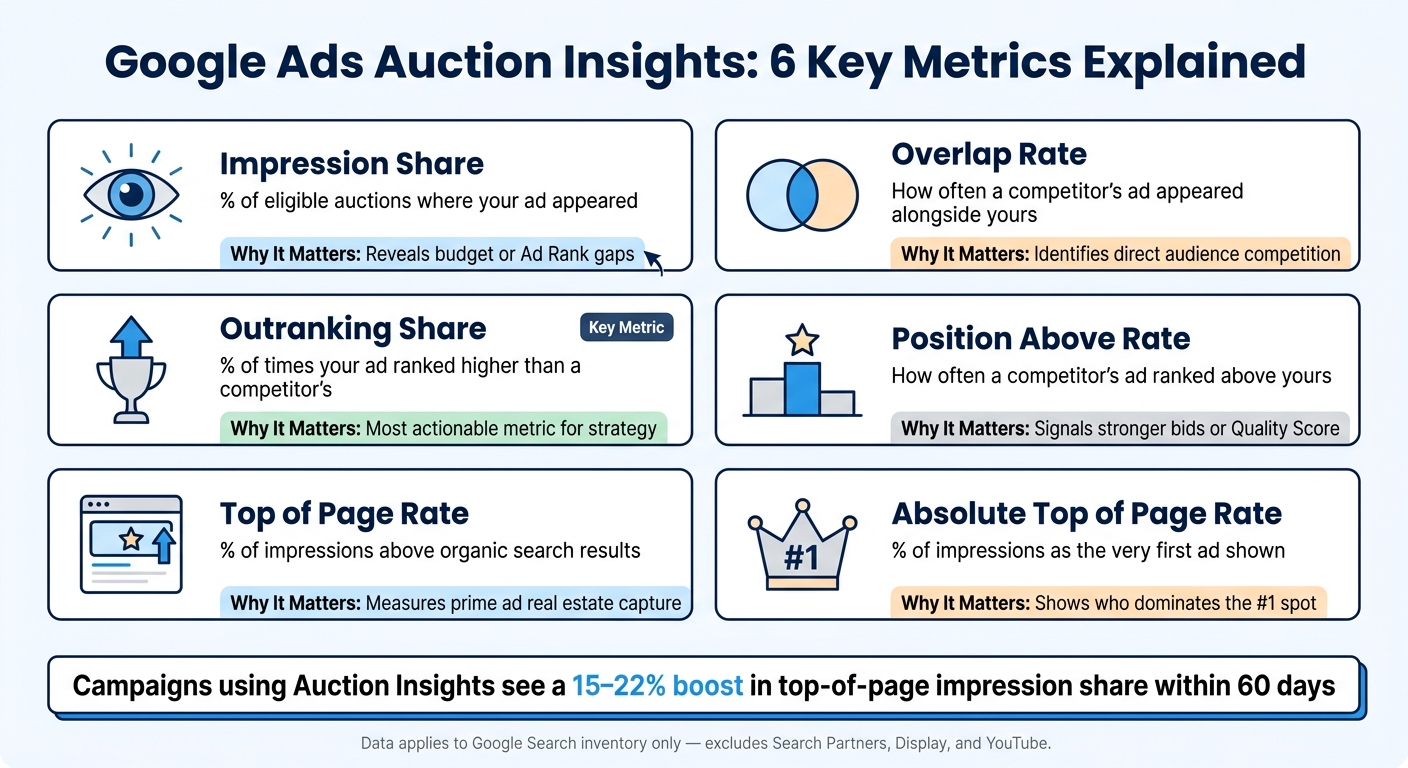
For Search campaigns, Auction Insights provides six key metrics:
| Metric | What It Measures |
|---|---|
| Impression Share | The percentage of eligible auctions where your ad appeared |
| Overlap Rate | How often a competitor's ad appeared alongside yours |
| Outranking Share | How often your ad ranked higher than a competitor's |
| Position Above Rate | How often a competitor's ad ranked higher than yours in shared auctions |
| Top of Page Rate | The percentage of impressions where your ad appeared above organic results |
| Absolute Top of Page Rate | The percentage of impressions where your ad appeared as the very first ad |
Keep in mind, this report is only available if your search impression share exceeds 10%. If you’re just starting out or running a very narrow campaign, you may not see data immediately.
Once you understand how the tool works, the next step is figuring out how to use this data to improve your return on investment (ROI).
Why Competitor Analysis Affects Your ROI
Metrics like cost-per-click, conversion rate, and Quality Score are important, but they don’t tell the whole story. Your campaign’s performance is also shaped by the competitive environment. Auction Insights bridges that gap, showing how external factors - like competitor behavior - impact your costs and ad placements.
"Relying solely on your data is like playing chess with only half the pieces." - The Designs Firm
For example, if a well-funded competitor enters the auction, your costs might rise, and your impression share could drop - even if you haven’t changed your strategy. Auction Insights helps you spot these shifts. A 60% Overlap Rate, for instance, means a competitor appears in 6 out of every 10 auctions, signaling increased competition for your audience.
But it’s not all bad news. This data can also uncover opportunities. For example, smaller competitors often run out of budget by mid-day, leaving gaps for you to capture impressions at a lower cost. Knowing when and where competitors are less active lets you adjust your spending strategically, which can be a game-changer for improving ROI. Using smart recommendations to improve Google Ads performance can help you act on these insights faster.
Key Auction Insights Metrics for Competitor Analysis
Core Metrics and What They Mean
Auction Insights metrics each tell a unique story about your competitive landscape. By understanding what these metrics measure, you can turn insights into actionable strategies rather than just observing the data.
| Metric | What It Tells You | Why It Matters |
|---|---|---|
| Impression Share | The percentage of times your ad appeared out of total eligible auctions | Indicates your overall visibility in the market and highlights if you're losing ground due to budget or Ad Rank issues |
| Overlap Rate | How often a competitor’s ad appeared alongside yours | Points to direct competition targeting the same audience |
| Outranking Share | The percentage of times your ad ranked higher than a competitor’s | A clear indicator of whether you're outperforming specific rivals |
| Position Above Rate | How often a competitor’s ad ranked higher than yours in shared auctions | A high rate suggests they likely have stronger bids or a better Quality Score |
| Top of Page Rate | How often your ad appeared above organic search results | Reflects how often you're securing prime ad real estate |
| Absolute Top of Page Rate | How often your ad was the very first one displayed | Highlights who dominates the #1 spot and at what cost |
Keep in mind that Auction Insights data applies exclusively to Google Search inventory. Metrics for Search Partners, Display, and YouTube are not included, making this data a focused view of your paid search performance.
Armed with these metrics, you can fine-tune your bidding strategies to better compete.
How to Use These Metrics to Adjust Bids
Each metric provides clues for refining your bidding approach:
Impression Share is a great starting point. If yours is low, figure out if the issue is related to budget constraints or Ad Rank. To improve, focus on raising your Quality Score by enhancing ad relevance and optimizing landing pages. Alternatively, shift your budget from low-performing broad match keywords to high-converting exact match terms.
Outranking Share is one of the most actionable metrics. According to LeadsuiteNow:
"Outranking Share is the metric most advertisers ignore and the one that translates most directly into strategic action."
If your Outranking Share is under 40% for high-intent keywords, focus on improving your Quality Score first. This means refining landing page speed, ad copy relevance, and user experience before increasing bids. These steps help you minimize wasted spend while strengthening your competitive edge.
Position Above Rate and Absolute Top of Page Rate work together to inform whether chasing the #1 spot is worth the cost. The top position typically costs 35–45% more per click than positions 2–3, yet conversion rates only improve by 8–12%. For most general keywords, holding positions 2–3 with a 50–60% Impression Share often delivers better cost-per-acquisition results. Save aggressive bidding for branded or competitor-comparison keywords where top placement offers clear value.
Adding a device-specific analysis can further refine your strategy. For instance, if a competitor has a high Position Above Rate on desktop but a low Outranking Share on mobile, they might be neglecting mobile bid adjustments. In this case, applying a 15–25% mobile bid increase can help you capture high-intent mobile traffic that your competitor is missing.
These insights provide a strong foundation for optimizing your bids and sharpening your targeting strategies.
Turning Competitor Data into Better Bids and Targeting
How to Adjust Bids Based on Competitor Activity
Auction Insights data becomes truly useful when it informs specific bid strategies. The key is to respond strategically to what the data reveals.
For instance, if you notice a high Overlap Rate but low Outranking Share, resist the urge to raise bids right away. Instead, take a closer look at your Quality Score. As LeadsuiteNow explains:
"A Quality Score improvement from 5 to 8 can improve Ad Rank equivalently to a 30-40% bid increase, at no additional cost."
Addressing Quality Score issues first can save you money while improving performance. Only after resolving these issues should you consider increasing bid caps on your most valuable keywords. On the other hand, if your Impression Share loss is budget-related (as indicated in the "Search Lost IS (Budget)" column), reallocate funds from underperforming broad match keywords to exact match terms, a strategy often recommended by top PPC marketing agencies. This approach is often more effective than simply raising your daily budget.
Time-based bidding adjustments can also give you an edge. For example, if a competitor shows moderate Impression Share but a high Position Above Rate - indicating aggressive bidding that depletes their budget mid-day - adjust your bids positively during off-peak hours, such as between 11 AM–2 PM or after 6 PM. Campaigns that apply this strategy often see a 15–22% increase in top-of-page impression share within 60 days.
For those using Smart Bidding strategies, consider employing Target Impression Share for brand defense. While Target CPA or Target ROAS may prioritize efficiency, they can result in lower ad positions - something to avoid if competitors are targeting your branded keywords.
Beyond adjusting bids, fine-tuning your targeting can further strengthen your competitive position.
Refining Targeting to Gain a Competitive Edge
Targeting adjustments, when paired with bid optimizations, can significantly improve efficiency and results.
Start with match type adjustments. If your Overlap Rate is below 30%, it’s likely you and your competitors are focusing on different keyword variations. This is a signal to refine your match types, shifting budget from broad match to phrase and exact match for high-overlap terms. This approach minimizes wasted spend and ensures your ads appear for the high-intent searches your competitors are targeting.
Geographic bid modifiers are another powerful tool. Use the Auction Insights report to identify regions with less competition. Slight bid increases in these areas can help you gain more Impression Share at a lower cost.
Lastly, don’t overlook device-level targeting opportunities. Segment your Auction Insights data by device. If competitors dominate desktop but neglect mobile, apply a +15–25% mobile bid adjustment to capture high-intent traffic at a lower cost. Similarly, if competitor activity drops off during weekends - especially in B2B campaigns - maintain visibility with more aggressive weekend bids.
These targeted adjustments, based on competitor data, can directly enhance your ROI while keeping your campaigns competitive.
Tracking Competitor Trends Over Time
Adjusting bids and targeting is just the start - tracking competitor trends over time takes your strategy to the next level. While a single Auction Insights snapshot gives you a momentary view, monitoring changes over time paints a much clearer picture. As LeadsuiteNow explains:
"The real intelligence comes from reading Auction Insights as a pattern over time, not as a single snapshot."
For example, a sudden spike in a competitor's Impression Share could signal a bigger ad budget or a new product launch. On the other hand, a steady drop might indicate they’re scaling back, giving you the chance to grab traffic at a lower cost.
How to Build a Competitor Monitoring Framework
Start with a consistent review schedule. For campaigns with high budgets or frequent activity, weekly Auction Insights reviews can help you catch shifts as they happen. Smaller accounts might only need monthly or quarterly reviews to identify meaningful trends. Jyll Saskin Gales, a Google Ads Coach, shares her approach:
"I check the full Auction Insights report monthly or quarterly."
Take it a step further by exporting your data into tools like Google Sheets, Excel, or Looker Studio. Visual dashboards can help you map out metrics like Impression Share and Outranking Share over time, making it easier to identify patterns. For instance, you might notice a competitor increasing ad spend before the holidays or a new player entering your auction space. Tim Jensen, Marketing Lead at M&T Bank, offers this tip:
"Identify brands suddenly appearing on the radar or increasing their overlap with you in search results, and monitor the impact on your campaigns when competitors are more or less aggressive."
Another smart move is segmenting data by time of day. Many small to mid-sized businesses (SMBs) run out of daily ad budgets between 11:00 AM and 2:00 PM, and again after 6:00 PM. Recognizing these patterns allows you to adjust bids strategically during periods when competitors are less active, rather than reacting to one-off anomalies. These steps lay the groundwork for deeper analysis with external tools.
Tools and Resources for Deeper Competitor Analysis
Once your monitoring framework is in place, external tools can add another layer of insight. The Google Ads Transparency Center, for example, lets you explore competitor ad creatives and messaging. Meanwhile, platforms like SpyFu and SEMrush provide keyword intelligence, uncovering long-tail keywords that might not appear in Auction Insights. Using these tools alongside your Auction Insights data can refine your bid strategies and improve ROI.
If you’re considering specialized support, the Top PPC Marketing Directory is a great resource. It lists tools and agencies that focus on bid management, performance tracking, and campaign optimization. By combining native platform reports with external data and expert services, you’ll gain a deeper understanding of your competitive landscape and make smarter, data-driven decisions for your campaigns.
Conclusion: Using Auction Insights to Make Better Decisions
Auction Insights is a game-changer in paid search. It transforms raw competitive data into actionable insights, helping you identify your competitors, understand where you're excelling, and pinpoint areas where revenue opportunities might be slipping through the cracks.
By digging into key metrics and adjusting bids and targeting based on competitor behavior, you can protect your brand terms, secure cost-effective ad placements, and take advantage of competitor weaknesses. This approach can lead to measurable gains - campaigns that incorporate Auction Insights into their bid strategies often experience a 15–22% boost in top-of-page impression share within just 60 days. Regularly monitoring these metrics ensures your strategies remain relevant and effective, offering guidance for both immediate and future adjustments.
Instead of trying to outbid every competitor on every keyword, focus your efforts where they matter most. Aim to maintain a 90%+ Impression Share for your brand terms, target positions 2–3 for general category keywords to balance cost and visibility, and seize opportunities on mobile or during times when you perform a competitor budget analysis to see when their funds run dry.
Ready to turn these insights into action? Start optimizing your campaigns with the Top PPC Marketing Directory. This resource connects you with trusted tools and agencies specializing in bid management, competitor analysis, performance tracking, and campaign optimization - all the essentials for leveraging Auction Insights effectively.
FAQs
Why can’t I see Auction Insights data for my campaign?
Auction Insights data might not show up if your campaign’s search impression share falls below 10% or if you're focusing on Search Partners. This report is exclusive to Google Search inventory and needs enough data to provide insights. Make sure your campaign aligns with these requirements to view the data.
Which Auction Insights metrics should I act on first to improve ROI?
To improve your ROI, keep a close eye on metrics like Impression Share, Outranking Share, and Overlap Rate. Here's why they matter:
- Impression Share tells you how visible your ads are compared to the total opportunities available. It's a great way to gauge whether you're reaching your audience as much as you could be.
- Outranking Share shows how often your competitors' ads are placed higher than yours. This insight helps you understand where you're falling short in competitive positioning.
- Overlap Rate reveals how often your ads appear alongside those of your competitors. It’s a useful indicator of how your targeting overlaps with theirs.
By analyzing these metrics, you can fine-tune your bidding and targeting strategies. The result? Smarter ad placements and better returns on your investment.
How can I use Auction Insights to find cheaper opportunities by time, device, or location?
To make the most of Auction Insights data, dive into the campaign, ad group, or keyword level to uncover where competitors might not be as active. Pay close attention to metrics like:
- Impression Share: This shows how often your ads appear compared to others. A higher share could indicate less competition during certain times or in specific locations.
- Overlap Rate: This reveals how frequently your ads and competitors' ads appear together. A lower overlap rate might signal opportunities to dominate certain spaces.
- Outranking Share: This metric indicates how often your ads rank higher than competitors' ads. If this is high, you could exploit these moments for better visibility.
Use this data to identify patterns - such as times of day, device types, or geographic areas - where competition dips. Once you've pinpointed these opportunities, adjust your bids or refine your targeting to secure ad placements at a lower cost. This approach can help stretch your budget further while boosting your return on investment.