Audience bid adjustments let you control how much you're willing to pay for specific audience segments in your ad campaigns. By increasing or decreasing bids based on user behavior, demographics, or interests, you can focus your budget on the people most likely to convert. For example, you might raise bids for users who abandoned their cart or lower them for groups with low conversion rates.
Key Takeaways:
- How it works: Adjust your base bid (e.g., $1.00) by a percentage (+20% makes it $1.20) to target specific audiences.
- Common audience types: Remarketing lists, Customer Match, In-Market, and Affinity audiences.
- Benefits: Better ROI, improved campaign performance, and more efficient ad spend.
- Setup tips: Start with small adjustments (+/-10%), use historical data for insights, and monitor performance regularly.
By fine-tuning bids, you can allocate resources where they matter most, avoiding wasted spend while driving better results.
What Are Audience Bid Adjustments?
Definition and Purpose
Audience bid adjustments allow advertisers to tweak their base bids - either increasing or decreasing them - to target specific audience segments more effectively. These adjustments focus on characteristics like interests, demographics, and past interactions with your brand, unlike adjustments for location, devices, or ad scheduling.
The goal? To allocate more of your advertising budget to users who are more likely to convert while pulling back on those less likely to engage.
"Using audiences in search can help drive efficiencies, performance, and engagement from your target audience. You can choose to show your ads more often to certain demographics or interest groups." - Sophie Fell, Head of Paid Media, Two Trees
Common Audience Types
Google Ads provides several audience categories to help you fine-tune your campaigns and achieve different objectives. Here’s a closer look at a few key types:
- Remarketing Audiences (Your Data): These focus on users who’ve interacted with your website or app before. However, you’ll need at least 1,000 active members to meet privacy requirements before using these lists in search campaigns.
- Customer Match: This feature lets you directly target your existing customers by uploading CRM data, like email addresses or phone numbers.
- In-Market Audiences: These are users actively researching or considering products, making them ideal for driving immediate conversions.
- Affinity Audiences: Designed for broader awareness, these target individuals based on long-term interests and habits - think categories like "motorcycle enthusiasts" or "home improvement fans."
You can also adjust bids based on demographics such as age, gender, or household income. Interestingly, a Google benchmark report revealed that only 9.64% of top-tier agencies use demographic bidding in their campaigns, leaving plenty of room for brands to stand out.
sbb-itb-89b8f36
Bid Adjustments | Ultimate Google Ads Guide
How Audience Bid Adjustments Work
How Audience Bid Adjustments Work: Calculation Examples
Understanding Bid Multipliers
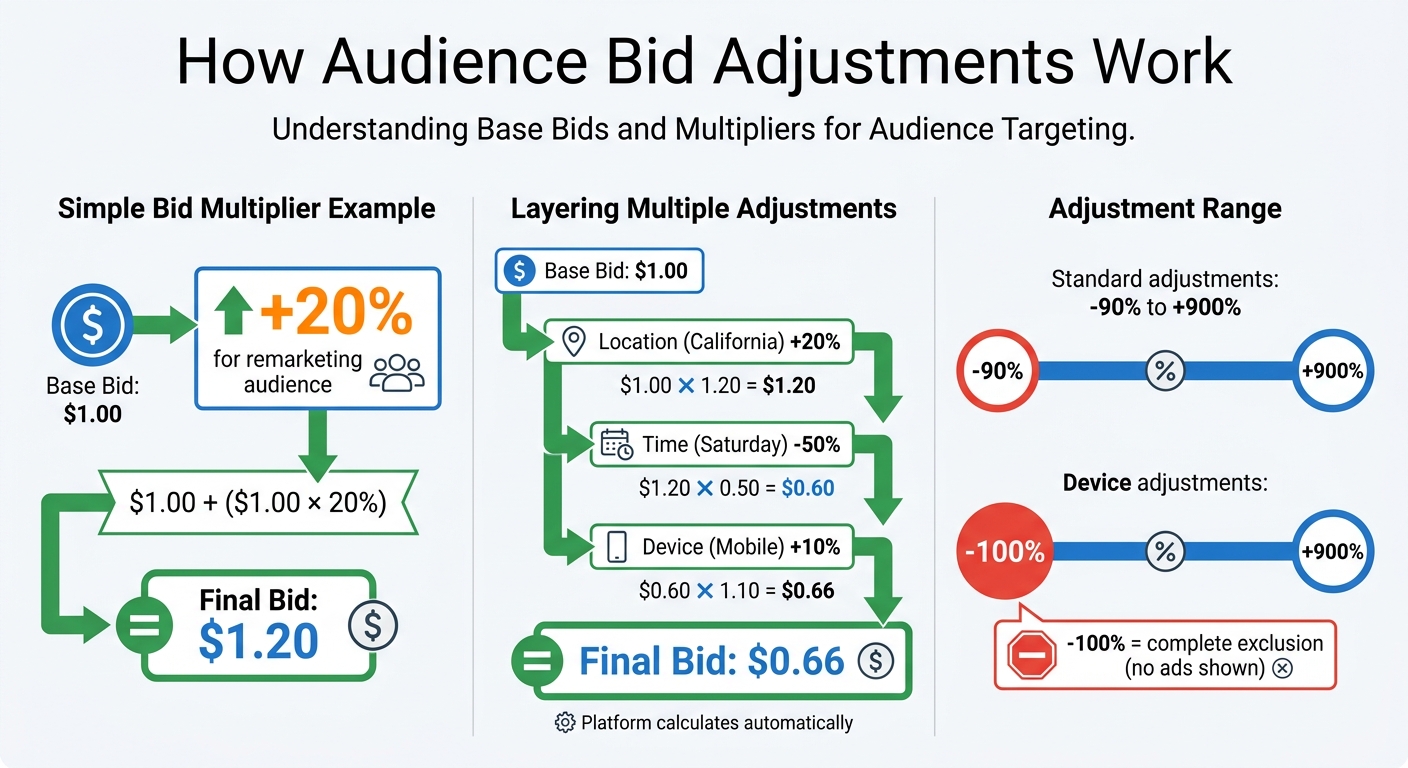
Bid multipliers are a way to tweak your base bid by increasing or decreasing it by a percentage. Here’s how it works: if your base bid is $1.00 and you add a +20% adjustment for a remarketing audience, your new bid becomes $1.20 ($1.00 + [$1.00 x 20%]).
Both Google Ads and Microsoft Advertising let you set bid adjustments that range from -90% to +900%. This gives you the flexibility to cut back on spending for underperforming groups or boost your bids for audiences that are more likely to convert. The platform handles the math for you, calculating the final bid automatically.
When using Smart Bidding strategies like Target CPA or Target ROAS, these adjustments don’t directly change bids but instead act as signals to guide the system.
These multipliers also blend effortlessly with other targeting settings.
Combining with Other Targeting Options
Audience bid adjustments can be layered with other modifiers, such as location, device, and ad scheduling adjustments. For instance, let’s say your base bid is $1.00. You apply a +20% adjustment for California, a -50% adjustment for Saturdays, and a +10% adjustment for mobile devices. The final bid is calculated as follows:
$1.00 x 1.20 x 0.50 x 1.10 = $0.66.
| Targeting Factor | Adjustment | Calculation (on $1.00 Base Bid) | Resulting Bid |
|---|---|---|---|
| Base Bid | N/A | $1.00 | $1.00 |
| Location (California) | +20% | $1.00 + ($1.00 x 20%) | $1.20 |
| Time (Saturday) | -50% | $1.20 x 0.50 | $0.60 |
| Device (Mobile) | +10% | $0.60 + ($0.60 x 10%) | $0.66 |
Benefits of Audience Bid Adjustments
Higher Return on Investment
Audience bid adjustments allow you to channel your budget toward audience segments that deliver better results - like returning visitors or specific demographics - while reducing spend on less effective clicks.
By lowering bids or excluding audiences unlikely to convert, you avoid wasting money on clicks that don’t generate revenue. Take this example: a software company might analyze its data and find that startup CEOs are far more likely to purchase premium products than freelancers. By increasing bid adjustments for startup CEOs, the company ensures its budget targets the audience most likely to drive revenue.
"Bid adjustments help businesses market to their desired audience at a more granular level and prioritize audience members more likely to convert." - Basis Technologies
A real-world case illustrates this. In 2018, Big Tree Marketing worked with a hiking boot retailer and uncovered that, while men clicked more often, women had a higher conversion rate. They split their "Hiking Boots" campaign into male and female segments, applying a +20% to +30% bid modifier for women. Alongside tailored ad copy and landing pages, this approach boosted click-through rates and shifted spend toward the most profitable group.
This targeted spending doesn’t just improve ROI - it sets the stage for stronger overall campaign performance.
Better Campaign Performance
Audience bid adjustments don’t stop at improving ROI; they also make your campaigns more efficient. By combining audience insights with tailored ad copy and landing pages, you increase relevance, click-through rates (CTR), and even Quality Score. For advertisers using top PPC tools for automated bidding, which rely on audience data, the results can be impressive - these strategies typically drive an average 20% increase in conversions compared to manual bidding.
This shift toward audience-focused targeting mirrors a broader industry trend. PPC strategies are evolving beyond keyword-based campaigns into AI-powered systems that rely on audience intent signals to boost performance. Feeding your campaigns with audience adjustment data enables automated tools to detect valuable patterns and predict conversions with greater accuracy.
"Using bid modifiers to optimize campaign spend will quickly become widespread best practice." - David Sinton, Managing Partner, Big Tree Marketing
How to Set Up Audience Bid Adjustments
Finding Audience Settings
To get started, click on the Campaigns icon and select Audiences from the Audiences, keywords, and content drop-down menu. This will show you all your audience segments along with their performance metrics.
If you're looking to make adjustments for specific devices, go to When and where ads showed under the Insights and reports menu. For more advanced options - like call interaction adjustments or combined demographic targeting - check out Advanced bid adjustments in the same menu. However, keep in mind that some campaign types, such as App and Performance Max, rely on AI and don’t allow manual bid changes.
Setting Bid Adjustments
Once you're in the Audiences section, locate the audience segment you want to adjust and click the pencil icon in the Bid adj. column. Enter your desired percentage adjustment. The range for most adjustments is ‑90% to +900%, while device-specific adjustments allow for ‑100% to +900%. Selecting ‑100% completely excludes that segment from seeing your ads. To remove an adjustment, simply click the pencil icon again, clear the percentage, and hit Save.
A good rule of thumb is to start with Observation mode. This lets you gather data over 30 to 60 days without limiting your campaign's reach. Once you’ve identified which segments perform best, you can switch them to Targeting mode and apply positive bid adjustments to allocate your budget more effectively. After making these changes, be sure to monitor results and refine your strategy as needed.
Tracking and Optimizing Performance
After applying bid adjustments, keep a close eye on their effect. The Audiences tab in the Campaigns menu provides detailed performance reports for each segment. Using Observation mode initially gives you baseline data to compare against your overall account performance. This helps confirm whether your adjustments are driving the desired results.
Start small with adjustments - such as increasing bids by 10% - and gradually test higher percentages like 20% to find the sweet spot for each segment. Because audience behaviors and competition can change, it’s essential to review and tweak your bid adjustments regularly, rather than setting them and forgetting about them. Use the Auction Insights tab to understand whether performance changes stem from your adjustments or shifts in competitor activity. For larger accounts managing multiple campaigns, tools like Smart Bidding or Google Ads Scripts can help automate audience bid management on a broader scale.
Best Practices for Audience Bid Adjustments
Start with Small Changes
When fine-tuning your audience bid adjustments, it's best to begin cautiously. Start with modest changes - think ±10% - to gauge their impact without throwing your budget into disarray. Once you see consistent results, you can gradually increase adjustments to +20% or +30% for audience segments that reliably deliver conversions.
Avoid making extreme changes, like ±100%, as these can lead to unpredictable spending patterns and potentially lower returns. Treat each adjustment as a small test, making incremental changes while keeping a close eye on performance metrics.
Use Historical Performance Data
Your past campaign data holds the key to smarter bid adjustments. Look for patterns in demographics - for example, specific age groups or genders that might have lower click volumes but higher conversion values (often identified through expert competitor analysis). These groups often represent untapped opportunities and are excellent candidates for positive bid adjustments.
Take advantage of tools like Google's Bid Simulators, which provide estimates on how different bid levels could have influenced impressions, clicks, and conversions over the past seven days. Another valuable metric is historical impression share. If you notice a high-performing audience segment with limited visibility, it’s a strong indicator to increase bids.
"Using bid modifiers to optimize campaign spend will quickly become widespread best practice." - David Sinton, Managing Partner, Big Tree Marketing
Leverage these insights to make immediate improvements to your strategy.
Test and Adjust Regularly
Audience preferences and market conditions are always shifting, which means your bid adjustments need regular attention. A strategy that worked six months ago might not hold up today.
"Audience bid modifiers aren't something you can research, set, and then forget about. Audiences, competition, and the overall market landscape are constantly changing." - Basis Technologies
Set up a consistent schedule to review your campaign performance. If you're managing a large account with countless campaigns, manual adjustments may not be practical. In these cases, tools like Smart Bidding or automated scripts or Google Ads optimization tools can help you dynamically adjust bids in real time. This ongoing process ensures your campaigns remain efficient and deliver a strong return on investment.
Common Mistakes to Avoid
Making Excessive Bid Changes
Making extreme bid adjustments, like increasing or decreasing bids by 100%, can seriously disrupt campaign performance. Such aggressive changes, especially without proper testing, can either deplete your budget too quickly or cause you to miss out on valuable clicks. For instance, a -100% adjustment completely eliminates bids for a segment, meaning your ads won’t appear for those users at all.
Additionally, multiple bid adjustments can combine and multiply, potentially pushing your bids far beyond what you expected. While Google caps combined adjustments at a 900% increase, even smaller adjustments can stack up and unexpectedly drain your daily budget. To avoid surprises, carefully monitor your campaign after making changes and ensure your adjustments align with your overall goals.
Failing to Review Performance Metrics
If you treat bid adjustments as a "set it and forget it" task, you’re setting yourself up for inefficiency. Sarah Vlietstra, Senior Paid Search Strategist at ZATO PPC Marketing, emphasizes:
"Make sure you have enough data to show that increasing or decreasing bids on a segment of data will impact your campaigns positively".
To make informed decisions, aim to collect 60 to 90 days of data before adjusting bids. This ensures your decisions are based on reliable trends rather than short-term fluctuations. Don’t stop at small improvements - experiment with higher or lower adjustments to uncover the best cost efficiencies. You can also use top PPC marketing tools to automate these optimizations. As Basis Technologies advises:
"You might think that your optimization work is done, but you really don't know if that bid adjustment was the most efficient and effective strategy to improve performance".
Overlooking Audience Overlap
Audience overlap can complicate bid adjustments. For example, a single user might belong to both a remarketing list and an in-market audience. When this happens, Google multiplies the bid adjustments for those segments, potentially leading to overly high bids that drain your budget on just one click. This overlap also makes it harder to pinpoint which adjustment is driving performance.
To manage this, start by placing overlapping audience segments in Observation mode for 2 to 4 weeks. This allows you to gather baseline data without committing to specific bid changes. During this period, track metrics like click-through rates and conversions to determine which segments truly deserve bid increases. Keep in mind that remarketing lists need at least 1,000 active members within the last 30 days to qualify for search campaigns. Attempting adjustments on smaller lists can result in unreliable data, skewing your results and wasting resources.
Conclusion
Audience bid adjustments allow you to focus your budget where it counts: on the people most likely to convert. Instead of treating every click the same, you can allocate more resources to high-intent segments and scale back on those that underperform. This approach reduces wasted spend and improves the effectiveness of your PPC campaigns.
The move from keyword-focused to audience-focused advertising isn't just a passing phase - it represents the direction paid search is heading. As Matt Lane from ClickedOn explains:
"In 2026, the advertisers who win are those who understand both the mechanics and the strategy behind audience targeting, not just which buttons to click".
Whether you're leveraging remarketing lists, in-market audiences, or first-party Customer Match data, the strategy remains the same: start small, test thoroughly, and refine based on actual results. A good starting point is to use Observation mode for new audiences over 2–4 weeks, making gradual adjustments as you analyze performance.
For tools that can simplify bid management, keyword research, or performance tracking, the Top PPC Marketing Directory is a great resource. It offers a curated list of platforms and expert agencies, covering everything from PPC bid management tools to landing page optimization solutions tailored to your goals.
FAQs
When should I use Observation vs. Targeting for audiences?
When setting up your ads, you have two main approaches: Observation and Targeting.
- Observation lets you monitor audience performance without restricting your ad reach. This is ideal if you're looking to gather insights while keeping your audience broad.
- Targeting focuses your ads on specific audience segments, narrowing your reach. This option works best when you want to tailor your campaign to a well-defined group.
Your choice depends on whether you're aiming to collect data or deliver a more personalized campaign.
Do audience bid adjustments work with Smart Bidding strategies?
Yes, audience bid adjustments work seamlessly with Smart Bidding strategies. Google Ads lets you pair automated bidding with audience segments, giving you the flexibility to fine-tune your campaigns. This combination allows for more personalized optimizations, targeting the right audience while leveraging the power of automation.
How do I prevent overlapping audiences from inflating my bids?
To keep your bids from ballooning due to overlapping audiences, it’s important to use bid adjustments wisely. Start by segmenting your audiences clearly and assigning separate bid adjustments to each group. Regularly check for overlaps and analyze performance data to tweak your strategy as needed. Careful bid management and consistent monitoring can help you avoid the pitfalls of audience overlap.