If I run Meta and Google together, I don’t try to force one setup across both. I use one launch layer for naming, budgets, approvals, tracking checks, and reporting - then I keep platform setup and optimization inside each native ad account.
Here’s the short version:
- Meta is built around campaign -> ad set -> ad
- Google starts with campaign type, intent, and bidding inputs
- Meta depends more on audience structure and ad variation testing
- Google depends more on conversion setup, values, and bidding signals
- The biggest risk on Meta is weak event setup or audience overlap
- The biggest risk on Google is wrong conversion priorities or missing conversion values
- A shared cross-platform ad performance tracking tool should help with:
- naming rules
- budget guardrails
- approval flows
- tag and event checks
- post-launch reporting tied to CAC, pipeline, and payback
If I had to sum it up in one line: standardize launch work, not platform logic.
Quick Comparison
| Area | Meta | |
|---|---|---|
| Core setup | Campaign, ad set, ad | Campaign type, asset group, conversion actions |
| Main launch focus | Audiences, placements, ad testing | Intent inputs, assets, bidding, conversion values |
| Budget logic | Daily or lifetime budgets, plus rules | Daily budgets tied to bidding goals |
| Automation style | Rules and platform delivery | Smart Bidding driven by conversion data |
| Main QA check | Pixel, CAPI, event choice, asset fit | Conversion actions, values, asset completeness |
| Early read | Spend, CPA, delivery by level in first 24-72 hours | Cost, conversions, value, asset-group and query data |
| Best use of shared tool | Launch control and reporting | Launch control and reporting |
So when I compare the two, I’m not asking which one is “better.” I’m asking a simpler question: what should one tool control, and what should stay platform-specific?
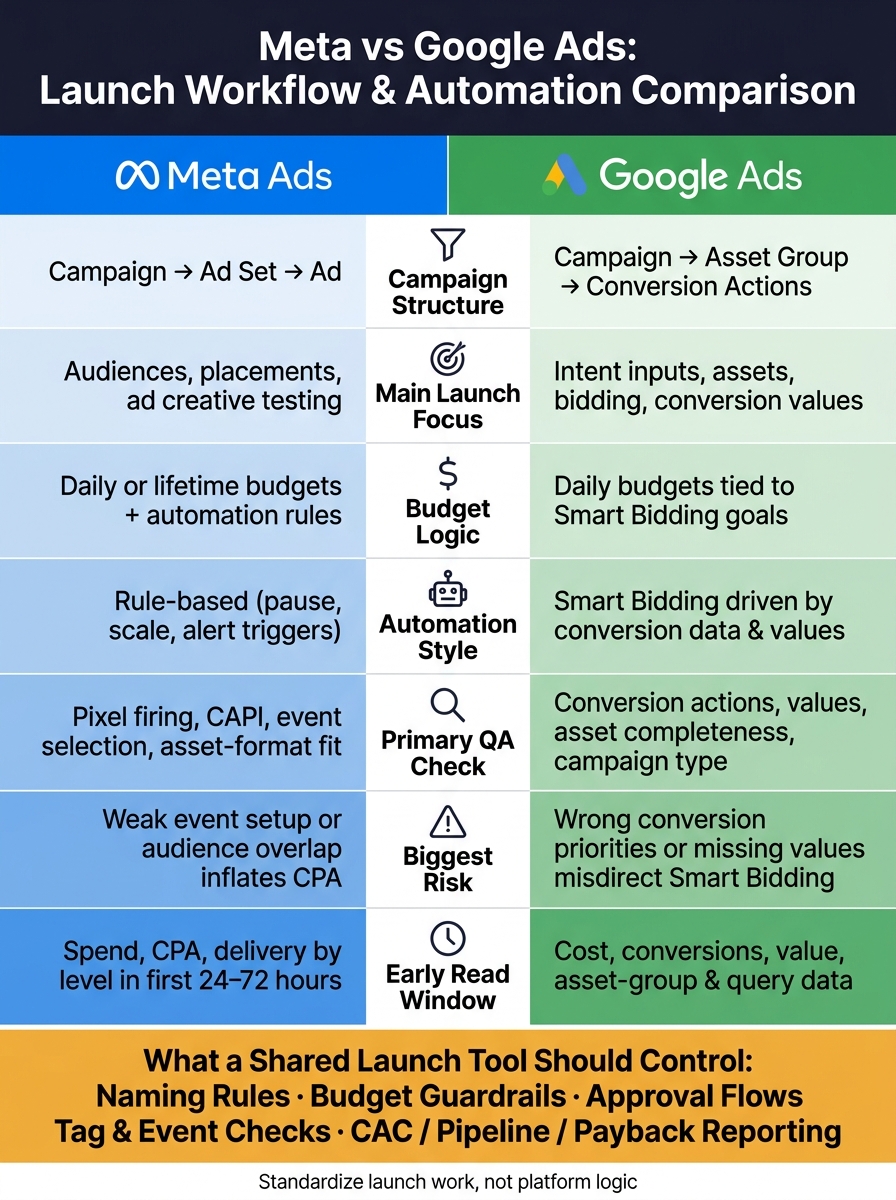
Meta vs Google Ads: Launch Workflow & Automation Comparison
Meta Ads Launch Workflow
Meta runs on a three-level hierarchy: campaign, ad set, and ad. The campaign sets the objective and can also manage budget through Advantage+ Campaign Budget. The ad set handles most of the setup work - audience, placements, schedule, budget, and the optimization event. The ad holds the creative. If you're building a launch tool or evaluating top PPC tools, it needs to line up with that structure.
Campaign, Audience, and Creative Setup
Inside Meta's setup, the ad set is where most launch choices happen.
Meta's main audience types are Core, Custom, Lookalike, and Advantage+ Audience. Prospecting and retargeting should live in separate ad sets. That keeps messaging, budgets, benchmarks, and exclusions clean. It also makes reporting much easier when you need to see what's working and what's wasting spend. For teams managing high-volume accounts, partnering with top PPC agencies can help streamline these complex workflows.
For placements, Meta gives you two paths: Advantage+ Placements or manual placement control across Facebook Feed, Instagram Feed, Stories, Reels, Messenger, and Audience Network. In most cases, use Advantage+ Placements by default. Switch to manual only when the creative is built for a specific surface or when performance data supports a narrower setup. A launch tool should catch asset-format mismatches before anything goes live. No one wants to find out after launch that a Reel asset doesn't fit the placement.
In the first 24-72 hours, test a small set of audience segments against multiple creative variants. That's usually where early signal starts to show up.
Budgets, Automation Rules, and Conversion Events
Daily budgets work well for always-on campaigns. Lifetime budgets fit fixed-date promos and cases where pacing needs tighter control. Meta spends differently depending on the budget type, so the tool should force that choice up front and show pacing projections early. That helps catch underdelivery or overspend before it turns into a bigger mess.
Meta automation is rule-based, not self-running magic. Use rules to:
- Pause ads with high CPA
- Increase budgets when ROAS hits target
- Send alerts when spend spikes
These rules can sit at the campaign, ad set, or ad level. Timing matters. If a rule checks hourly versus daily, that changes how fast the team can react to early performance swings.
Conversion event selection is one of the biggest pre-launch calls. Meta includes standard events like Purchase, Lead, AddToCart, ViewContent, InitiateCheckout, and CompleteRegistration, plus custom conversions for narrower actions. The event you pick becomes the optimization target. Before launch, check pixel and CAPI firing, then make sure the selected event lines up with the actual goal.
Post-Launch Reporting in Meta
During the first 24-72 hours, check delivery at the campaign, ad set, and ad levels. Also watch spend, CPA, and conversion volume. If spend keeps climbing and conversions don't, the usual suspects are audience overlap, targeting that's too narrow, or a mismatch between the conversion event and the goal.
The reporting view that helps most puts spend, impressions, clicks, conversions, and CPA side by side across all three levels. Filters for objective, placement, and audience segment make it easier to spot what needs attention first. Alerts for odd delivery patterns or cost spikes can cut the gap between seeing a problem and fixing it.
Google's launch workflow shifts these decisions into campaign type, intent inputs, and bidding.
sbb-itb-89b8f36
Google Ads Launch Workflow
Unlike Meta, Google starts with intent and campaign type - not audience structure. That first choice shapes where ads can run, what inputs you give the system, and which bidding paths are available.
Campaign Type, Intent Inputs, and Assets
Google's main campaign types each have a different setup flow.
Search is keyword-led. You build ad groups around tightly themed keyword lists, choose match types, and write responsive search ads. The logic is simple: someone searches, then your ad can show.
Performance Max (PMax) works differently. Instead of building around keywords, you create asset groups - sets of headlines, descriptions, images, logos, and videos tied to a theme or audience. Google then distributes those assets across its properties, including Search, YouTube, Display, Discover, Gmail, and Maps, on its own.
Demand Gen leans more on visuals. It runs across YouTube, including Shorts, Discover, Gmail, and Display, and setup focuses on creative assets and audience segments instead of search queries. It's built for discovery and engagement, not keyword-based targeting.
For PMax, audience signals and search themes are guidance, not hard targeting. For Demand Gen, audience segments and discovery-first creative matter more. That is a big difference from Meta, where audience structure usually comes first.
A practical way to set this up: create separate asset groups for each persona or offer, and fill every asset slot, including video. If formats are missing, your ads may not show on some surfaces.
Bidding, Budgets, and Conversion Value Setup
Google's Smart Bidding options - Maximize Conversions, Target CPA, Maximize Conversion Value, and Target ROAS - are tied to conversion volume or conversion value. A good starting point is Maximize Conversions or Maximize Conversion Value. After conversion volume steadies, move to tCPA or tROAS.
Budget planning should start with the goal, then work backward. If your target CPA is $200 and you want 50 leads per month, that points to about $10,000 per month, or roughly $333 per day. For PMax and Demand Gen, it helps to start a bit above the bare minimum tied to your CPA target so the learning period has enough room.
Conversion tracking is the part that makes all of this work. Only mark bottom-funnel actions as primary conversions - purchases, booked demos, and qualified leads. Upper-funnel actions like pricing page visits or content downloads should stay secondary and be used for analysis only.
Set dollar values for each primary conversion using actual revenue data. If a SaaS demo request is worth $1,000 in expected pipeline, that is the value that should go into Google Ads - not a filler number. Smart Bidding looks at both the chance of conversion and the expected value when deciding how much to bid, so bad values lead to bad bidding decisions.
Reporting Across Campaigns, Assets, and Conversions
After launch, Google Ads reporting works across three layers.
At the campaign level, track cost, conversions, conversion value, CPA, and ROAS (Conv. value/cost) so you can compare the roles Search, PMax, and Demand Gen are playing.
At the asset group level, PMax gives downloadable and segmentable reporting, plus performance labels that compare assets against others of the same type. That makes it easier to spot which creative themes are doing the heavy lifting and which ones are falling flat.
For search intent, use the search terms report and the search terms insights page to see which queries triggered your ads by campaign and asset group. PMax now separates queries that came from keywordless targeting from queries tied to your direct search themes. That split gives you a cleaner read on how much traffic is coming from Google's automation versus your own setup choices.
Tie that reporting back to CRM data so you can measure pipeline impact, not just clicks.
These setup choices create some of the biggest differences between Meta and Google in automation, control, and reporting.
Meta vs. Google: How Automation and Launch Logic Differ
Once both workflows are clear, the next issue is simple: what can top PPC advertising tools standardize across both platforms?
Meta and Google don’t automate the same things. Meta leans on creative testing. Google leans on intent and conversion signals, often requiring tools like Opteo to manage the complexity of these recommendations. That difference shows up everywhere - from setup to the first round of optimization.
Assets and Audiences
Meta needs enough ad variations to test across audiences. Google needs complete asset groups so it can serve across all available placements. In plain terms, weak creative depth on Meta slows learning. On Google, missing assets shrink surface coverage.
| Area | Meta | |
|---|---|---|
| Asset role | Creative variants for audience testing | Assets feed Google's assembly logic |
| Audience logic | Explicit - demographics, interests, lookalikes, custom audiences | Intent-led - keywords, query matching, audience signals as guidance |
| Setup risk | Too few creative variations limits testing | Incomplete asset groups reduce surface coverage |
Budgets and Conversion Setup
Meta tends to scale through rules. Google tends to scale through conversion data. So any launch tool needs to check pixels, conversion actions, and value rules before anything goes live.
This is where the biggest downstream risk sits.
On Meta, a broken pixel or the wrong optimization event weakens learning. On Google, a bad conversion action can do much more damage. If the priority is wrong, the value is missing, or attribution is off, Smart Bidding can start optimizing for the wrong outcome. And once that happens, CAC and payback can get distorted across the account.
Reporting and Operational Trade-offs
Meta reporting is fairly clean at the campaign, ad set, and ad level. Google needs a more layered read - campaign, asset group, and conversion action.
That matters because a team looking only at top-line campaign numbers in Google can miss a conversion setup issue that’s quietly pushing CPA up.
| Area | Meta | |
|---|---|---|
| Reporting structure | Campaign → Ad Set → Ad | Campaign → Asset Group → Asset + Conversion Actions |
| Early optimization | Audience-creative comparison is straightforward | Requires connecting asset labels, conversion data, and bidding signals |
| Primary QA burden | Creative QA, audience overlap control, event selection | Conversion action setup, asset completeness, campaign type discipline |
| CAC/payback risk | Weak event selection or audience overlap inflates costs | Wrong conversion priorities or missing values misdirect Smart Bidding |
| Approval complexity | Creative review, audience configuration | Asset policy compliance, conversion correctness, campaign type fit |
That gap sets the boundary for any shared launch tool. Some parts can be standardized. Some parts have to stay platform-specific. If you ignore that split, you end up forcing the same system onto two platforms that work in very different ways.
Where One Tool Can Manage Both, and How to Choose
Shared Workflows That Work Across Meta and Google
Those workflow differences change the question. It’s not whether Meta and Google should be managed in the exact same way. It’s which launch tasks can be standardized without forcing the same setup on both platforms.
Meta and Google still make a strong case for one shared launch layer. Cross-platform launch tools work best when they handle the parts that stay the same across both systems - bulk setup, shared naming rules, budget controls, and approvals.
A simple rule helps here: use one layer for launch coordination and the native UI for optimization.
In Google, that usually means keeping campaign-type choices, search-term analysis, asset-group tuning, and bidding diagnostics in Google Ads. (For those also using Bing, see how Google Ads vs Microsoft Advertising compare.) In Meta, it means handling ad set structure, audience setup, creative combinations, and event configuration inside Meta.
How to Evaluate Which Tool Fits Your Team
Use these checks to separate orchestration from native optimization:
- Official integrations: The tool should connect straight to Meta's Marketing API and Google Ads API across the campaign types your team uses.
- Launch and edit campaigns from one interface: It should let your team push campaigns live, update budgets, and apply changes across both accounts - not just pull reporting into one dashboard.
- Checks that tags fire and events map correctly: It should confirm that conversion data flows into both ad platforms and into downstream analytics.
- CAC, pipeline, and payback reporting in USD: Reporting should go past top-line lead counts and show revenue outcomes by channel.
- Permissions, approvals, and audit logs: This matters even more for agencies with many client accounts or PE-backed companies that need tighter compliance controls.
Conclusion: Match the Tool to Your Workflow Complexity
Choose the tool that cuts launch work without stripping out platform-level control. The right fit comes down to your team’s scale, account complexity, and whether reporting ties paid spend back to revenue outcomes.
A 30-day trial across two or three tools can help you measure setup-time savings and error rates before you commit.
FAQs
When should I use one launch tool for both platforms?
Use one launch or management tool for both Meta and Google Ads when you need to standardize performance metrics, compare results with accuracy, and spot cross-platform synergies.
It also helps cut fragmented reporting, manage budgets with more control, keep messaging consistent, and save time with centralized reporting and automation.
What should stay platform-specific in Meta and Google Ads?
Keep audience targeting, format choices, and bidding tactics platform-specific. Google Ads is built to capture high-intent search traffic through keywords. Meta Ads, on the other hand, is better suited to demand creation through visual storytelling and interest-based targeting.
The same rule applies to attribution windows and native tools. Use each platform on its own terms - for example, Meta’s 7-day click window, Google’s Performance Planner, and Meta’s Advantage+.
Which setup mistakes hurt performance most on each platform?
On Google Ads, the main problems are pretty simple: shaky conversion tracking, big account changes during the 1- to 2-week learning phase, weak assets, and brushing past “Limited by Budget” warnings.
On Meta, tracking issues do the most damage. A common one is relying only on the pixel instead of using Conversions API too. Slow audience suppression also causes trouble. Across both platforms, messy naming and split-up data make it hard to measure performance from one platform to the other.