I choose a PPC CTA by matching the search, the offer, and the buyer’s next step - not by picking the button that sounds best. Give your page 1 primary goal, explain the commitment before the click, and measure qualified leads or sales rather than clicks alone.
These 15 examples cover the main next steps, often supported by top PPC tools:
- Product evaluation: Start My Free Trial; Book a Personalized Demo.
- Sales and pricing: Schedule My Sales Call; Get My Custom Quote; Request My Free Estimate.
- Account diagnosis: Get My Free PPC Audit; Request My Google Ads Audit; See My Potential Savings; Request My Campaign Review.
- Research and self-service: Calculate My PPC Costs; Download the PPC Benchmark Report; Get the Paid Search Checklist; Watch the Campaign Walkthrough.
- Expert help: Talk to a PPC Specialist; Apply for a PPC Consultation.
My rule: <u>promise only what the next step delivers</u>. State the cost, timing, form requirements, and any account access or meeting required. Then test 1 CTA phrase at a time, keeping the offer and audience the same. None of these examples guarantees better results.
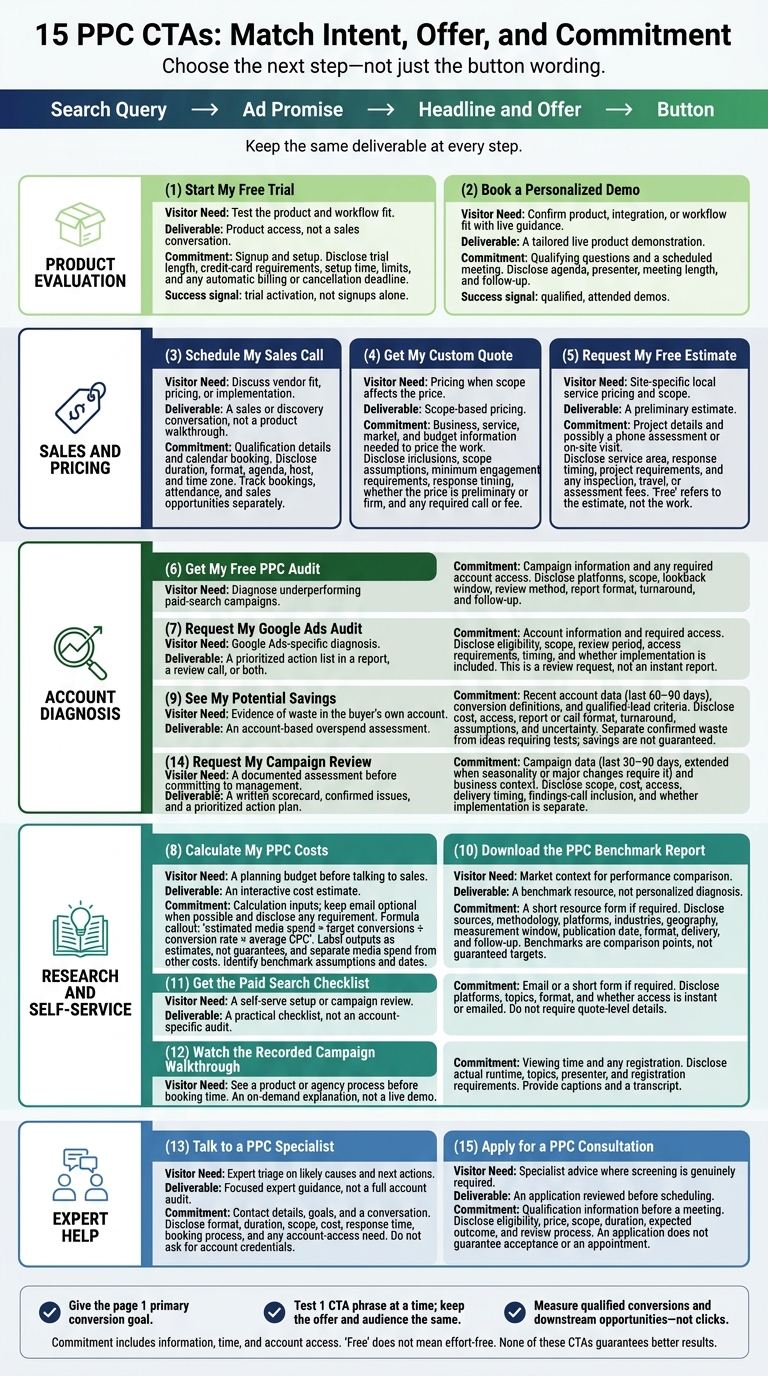
15 PPC CTAs: Match Intent, Offer, and Commitment
Best Performing Landing Page Structure for Local Service Google Ads
sbb-itb-89b8f36
Match Your CTA to Search Intent, Offer, and Buyer Stage
Build your CTA around the campaign path: search query → ad promise → headline and offer → button. Keep the same deliverable at every step.
An audit ad should lead to an audit request, not a different offer.
Match the offer to the buyer’s stage and the uncertainty they need to resolve. Buyers doing research need resources. Those weighing options need diagnostics, calculators, or top PPC agencies to provide expert audits. Buyers ready to decide need quotes or calls.
Give the page one primary conversion goal. Place the primary CTA at the top, after the value proposition, and near the bottom. Keep secondary links less prominent. Downloads, trials, and sales calls shouldn’t carry equal weight. Use a clear verb that tells buyers what action to take.
Next to the button, state what they’re committing to: an immediate resource, a review request, or a scheduled meeting. Match the amount of information the form asks for to the offer. Disclose credit-card requirements, follow-up, and meeting length before the click.
A checklist should require less information than a custom quote.
Treat first-person wording and “free” as test variables, not fixed rules. Use “free” only when there’s no charge, and explain any other requirements. Test wording without changing the offer. Measure qualified conversions, booked meetings, and sales - not clicks.
Use this filter to assess the CTA examples below.
1. Start My Free Trial
Use this CTA when a click should open the product, not start a sales conversation.
Search-intent match
“Start My Free Trial” fits product and comparison searches when visitors want to test the software. Buyers should be able to check the product’s core promise, and the page must show how the trial lets them do that.
Landing-page offer alignment
Provide immediate product access and state exactly what the trial includes: integrations, reporting features, and historical data. This CTA works only when buyers can test the software soon enough to judge whether it fits their needs.
Buyer-stage and commitment fit
Use this CTA for buyers who want to check usability and daily workflow fit before paying. Setup still takes effort. If it requires too much work, offer a demo instead. Measure trial quality by activation, not signups alone.
For PPC software, activation could mean connecting an ad account.
The button copy should make that commitment clear.
Specific wording and signup expectations
Place the trial length, credit-card requirements, setup time, and product benefit near the button. Show the steps from signup to first value. If billing starts automatically, disclose the price, billing interval, and cancellation deadline before signup.
2. Book a Personalized Demo
Use this CTA when buyers need a guided walkthrough to confirm workflow fit, rather than a hands-on trial.
Search-intent match
This CTA fits high-intent B2B searches from buyers comparing product fit, integrations, reporting, or workflows. Show the use case they searched for, not a generic overview.
Landing-page offer alignment
Promise a personalized demonstration, not a generic sales presentation. Ask 1–2 qualifying questions, then tailor the walkthrough to the answers.
A PPC manager may need budget controls; a CMO may need pipeline attribution.
Explain which parts of the demo you'll tailor, and make booking the primary action.
Buyer-stage and commitment fit
This CTA suits mid- to late-funnel buyers comparing solutions. They need proof that the product fits, not more broad claims. Put integration, security, and implementation details near the booking form. Give early-stage visitors a secondary option to take a product tour or explore a PPC marketing directory for alternative solutions.
Specific wording and next-step expectations
Test this wording against the original CTA:
Schedule a 30-Minute Demo
Make clear that the demo is a live session, and show the calendar after the form. Measure qualified, attended demos - not clicks.
For buyers who want a direct conversation instead of a product tour, use a sales-call CTA.
3. Schedule My Sales Call
Search-intent match
Use this CTA when visitors want a direct conversation rather than a walkthrough. It fits high-intent searches from buyers comparing vendors and ready to discuss pricing or fit. Repeat the ad’s service terms to keep the path from search to booking consistent.
Landing-page offer alignment
Make the call the primary offer. State the agenda: current performance, wasted spend, growth targets, and next steps. You can also use top PPC marketing tools to audit performance before the call.
Use this CTA for qualification, pricing, or implementation conversations - not product walkthroughs. Don’t call it a demo unless the rep will run one. The call itself is the deliverable and conversion, not a demo or resource download.
Buyer-stage and commitment fit
A sales appointment fits decision-stage buyers who have narrowed their options. Before choosing a vendor, they need to confirm fit, pricing, implementation, or expected results. For broad informational searches, offer an educational resource instead of requiring a sales conversation.
Specific wording and next-step expectations
“Schedule My Sales Call”
This CTA makes the next step clearer than a generic button:
“Submit.”
Connect the button to visible calendar availability. Clearly label the visitor’s time zone and let them change it. Before booking, show the call’s duration, format, agenda, and host. If an account executive leads the call, don’t promise a senior PPC strategist.
Send a calendar invitation with the meeting link and rescheduling instructions. Track bookings, attendance, and sales opportunities separately.
If the buyer wants a number before talking, direct them to a quote request.
4. Get My Custom Quote
Search-intent match
Use a quote CTA when buyers want pricing before a sales conversation and the price depends on scope. It fits searches like “PPC agency pricing” and “Google Ads management cost.” For fixed packages, “View PPC Plans” is clearer.
Landing-page offer alignment
Include recommended services, monthly fees, onboarding requirements, and scope assumptions in the quote. Ask only for details needed to price the work or route the request: name, business email, company website, desired services, target market, and current or planned monthly ad spend.
Keep additional context optional. Disclose minimum engagement requirements before buyers submit the form.
Buyer-stage and commitment fit
Use this CTA when pricing is the last blocker before a proposal or call. Show proof from similar budgets, markets, or account sizes. For visitors still researching costs, a pricing guide or calculator may be a better fit.
Specific wording and next-step expectations
“Get My Custom Quote”
Tell buyers whether they’ll receive a preliminary estimate or a firm proposal. Publish a response window you can reliably meet, such as within 2 business days, and disclose any required discovery call.
State whether the quote is free. If it requires a paid audit or strategy session, place the fee, deliverables, and any service credit beside the button.
5. Request My Free Estimate
Search-intent match
Use estimate language when buyers want site-specific pricing, not a generic quote. This CTA fits local contractor and professional-service searches where buyers need a local price estimate. Keep the service, location, and offer consistent across the ad, headline, and page.
Landing-page offer alignment
Explain what the estimate covers and whether it requires a phone assessment or an on-site visit. Show service areas and the next available appointments near the form. Ask for the service type and ZIP code first, and make photos optional.
Buyer-stage and commitment fit
An estimate fits late-stage local buyers who need pricing and scope before booking work. For urgent service searches, a call-focused CTA is usually the better next step.
Specific wording and next-step expectations
Request My Free Estimate
“Free” applies to the estimate, not the work. Use it ONLY when the estimate itself is free.
Explain how confirmation, assessment, and estimate delivery work, including response timing. Before buyers submit the form, state service-area restrictions, qualifying project requirements, and any inspection, travel, or assessment fees.
Use audit language when the goal is diagnosis rather than pricing.
6. Get My Free PPC Audit
Search-intent match
This CTA fits searches about wasted ad spend, weak conversion rates, irrelevant search terms, poor targeting, or underperforming Google Ads campaigns. Use it when the buyer wants a diagnosis, not pricing. “PPC audit” names the deliverable, and “free” states the cost. Match the page headline to the campaign problem rather than offering generic PPC advice.
Landing-page offer alignment
Spell out what the audit covers, which platforms you review, what account access you need, and the lookback window. Explain whether the review is automated, analyst-led, or both.
Buyer-stage and commitment fit
Use this offer for visitors who know their account is underperforming and are comparing providers. Account access requires trust. Show a sample findings report, explain how you handle data, and don't promise lower costs before the audit.
Specific wording and next-step expectations
State the report format, turnaround time, and qualification step. Explain whether follow-up includes an optional review call or a proposal. Get My Free PPC Audit should deliver the audit, not a sales call.
7. Request My Google Ads Audit
Search-intent match
Use this version for Google Ads-specific diagnostic searches, not general PPC searches. The offer is a review request, not an instant report. Use Google Ads language consistently in the ad, headline, and button.
Landing-page offer alignment
Focus the review on issues that waste spend or cause tracking errors. Specify which accounts or campaigns it covers and the review period. Group the scope into account setup, targeting/bidding, and landing-page/conversion alignment to identify tracking gaps, targeting waste, and budget leaks. Address conversion actions and Google tag setup separately.
Buyer-stage and commitment fit
State eligibility requirements, including campaign history or minimum spend when relevant. Ask for the Google Ads customer ID and the buyer’s top issue. Explain whether read-only access is enough. Use individual logins, not shared logins.
Specific wording and next-step expectations
Provide a prioritized action list in an emailed report, a review call, or both. State whether implementation is included. Keep “Request My Google Ads Audit” on the button, with process details beside it so the button copy stays short.
8. Calculate My PPC Costs
Search-intent match
Use a calculator CTA when buyers need a budget range before they talk to sales. It fits pricing searches such as:
Google Ads pricing, PPC budget, and cost per click.
Landing-page offer alignment
Provide a calculator or guided estimate using monthly conversion goals, expected conversion rate, and average CPC. Show the formula: estimated media spend = target conversions ÷ conversion rate × average CPC.
Separate media spend from management, setup, landing-page, and tracking costs. For Google Ads, divide the monthly budget by 30.4 to calculate an average daily budget. This makes the CTA a planning tool rather than a sales request.
Buyer-stage and commitment fit
This offer fits research and consideration. Keep email optional. If email is required, disclose that before submission.
Specific wording and next-step expectations
Tell visitors when results will appear and whether they cover media spend only. Label the outputs as estimates, not guarantees.
Distinguish visitor-entered inputs from benchmark inputs, and show the benchmark date. Note that location, competition, seasonality, and landing-page performance affect cost.
Offer this as a separate next step:
Talk to a PPC Specialist
9. See My Potential Savings
Search-intent match
Use this CTA after cost estimates, when buyers want proof of waste in their own account before talking to sales.
Landing-page offer alignment
Review the last 60–90 days of account data, including search terms, targeting, bids, and conversion tracking, to find recoverable overspend. Compare spend with qualified leads, revenue, or conversion value. Use offline conversion data to link CRM outcomes to ad spend.
Separate confirmed waste from ideas that need testing, and show the assumptions behind any savings range. Keep the offer focused on diagnosis, not price.
Buyer-stage and commitment fit
Explain whether the assessment is free or paid, what access you need, and whether the buyer gets a report, a call, or both. Specify whether you need read-only Google Ads access or an export, along with conversion definitions and qualified-lead criteria.
State which account data you access and how you handle it. The next step should move the buyer from diagnosis to a review call or report.
Specific wording and next-step expectations
Estimate where the account is overspending using recent campaign data.
Say whether an analyst reviews the account, and provide the actual turnaround time. Savings depend on tracking accuracy, competition, seasonality, and tested changes. Lower spend helps only if qualified leads and revenue hold up.
10. Download the PPC Benchmark Report
Use this CTA when buyers need market context before assessing their own account. Match their research intent rather than push a sale.
Search-intent match
This CTA fits searches such as “average Google Ads CPC” and “PPC conversion rate benchmark.” These visitors want to compare costs or performance. Offer public benchmark data, not account diagnostics or personalized estimates.
Landing-page offer alignment
Explain what the report covers before asking visitors to fill out a form: CTR, CPC, conversion rate, CPL, methodology, platforms, industries, geography, and analysis period.
Include 1 recent benchmark example that shows the sample size, date range, and industries covered. Display the publication date separately from the measurement window. Label a report based on 2025 data as 2025 data, not a current benchmark.
Buyer-stage and commitment fit
A report fits early-stage buyers who want evidence before choosing a provider. Keep the form short: first name, work email, company, and job title. Clearly mark optional fields. Before submission, disclose whether access requires a confirmation email or follow-up.
Keep the ask light. The report should start the relationship, not close it.
Specific wording and next-step expectations
Use “Download the PPC Benchmark Report,” and add the edition year only when accurate. Tell readers whether they’ll receive an immediate PDF or an emailed link.
Deliver the asset first. Make “Request a PPC performance review” an optional next step, not a condition of access. Present benchmarks as comparison points, not guaranteed targets.
11. Get the Paid Search Checklist
Search-intent match
Use this CTA for a self-serve review, not a sales conversation. “Get the Paid Search Checklist” fits visitors searching for a Google Ads or PPC checklist, rather than a diagnosis, quote, or consultation. State whether it covers Google Ads, Microsoft Advertising, or both, and whether it’s for pre-launch checks or monthly reviews.
Landing-page offer alignment
Preview what the checklist covers: keyword themes, negative keywords, responsive search ads, assets, landing-page alignment, budgets, and conversion tracking. Google recommends reviewing search terms, adding negative keywords, and aligning keywords, ads, and landing pages.
Buyer-stage and commitment fit
This low-commitment resource helps self-serve buyers check their setup before a paid review. It’s not an account-specific audit.
Keep email as the main form requirement. Don’t ask for a phone number, ad spend, or sales-call preferences. The checklist should help visitors spot missed setup steps, not promise results. That makes it a better fit than audit or call CTAs for visitors who want to check their setup first.
Specific wording and next-step expectations
Keep “Get the Paid Search Checklist” as the CTA. If the resource is a PDF, say so and explain whether visitors get it instantly or by email. Offer a campaign review as a separate, optional next step, not a condition of access.
12. Watch the Campaign Walkthrough
Search-intent match
Use this CTA when buyers want to see the process before booking a call. Watch the Recorded Campaign Walkthrough fits consideration-stage searches such as:
“PPC reporting walkthrough” or “Google Ads agency process.”
These visitors want to see how the solution works before talking to sales. Match the video topic to the search, ad, and landing-page promise.
Landing-page offer alignment
Show the product or process in action, not a company overview. For reporting software, demonstrate dashboards, attribution views, alerts, and campaign analysis. For a PPC marketing agency, show the audit, testing plan, optimization cadence, and reporting process. Use the walkthrough to pre-qualify buyers before a live demo.
Buyer-stage and commitment fit
This CTA gives buyers proof without asking them to book time. Reserve Book a Personalized Demo for visitors who need live answers about their use case, integrations, or implementation.
Specific wording and next-step expectations
Label the button Watch the Recorded Campaign Walkthrough. Beside it, state the actual runtime, topics, presenter’s name and title, and whether registration is required. Provide captions and a transcript. Use this wording only when true:
“No form required - watch now”
After the video, offer one secondary CTA, such as:
“Book a Personalized Demo” or “Request a Campaign Review.”
Keep that CTA visually secondary. Track video starts, completion milestones, and qualified demo or review requests, not just play-button clicks. Route visitors who show interest in a live discussion to a specialist conversation.
13. Talk to a PPC Specialist
Search-intent match
Use this CTA when visitors want a specialist’s opinion before booking a formal sales call. Talk to a PPC Specialist fits searches about high CPA, wasted spend, or stalled campaigns. Make the headline address that problem rather than send visitors to a generic contact page.
Landing-page offer alignment
State what the call will cover: tracking, search terms, bidding, or budget allocation. Explain what the specialist will check first. The offer is expert judgment on likely causes and the next action, not a product walkthrough.
Buyer-stage and commitment fit
This CTA suits buyers who need expert triage before a sales call or audit. Promise a brief diagnosis and next steps, without guaranteeing a lower CPA.
Specific wording and next-step expectations
Use Talk to a Google Ads Specialist for Google Ads-specific searches. Beside the button, state the call’s format, duration, scope, cost, response time, and whether visitors can book immediately.
Explain whether account access is needed and whether a paid audit may follow. Ask for the platform, spend range, and top issue so the specialist can prepare. Don’t ask for account credentials.
Measure booked consultations, attendance, and qualified opportunities, not just submissions. Keep the scope limited to diagnosis rather than a full account audit.
14. Request My Campaign Review
Search-intent match
Use this CTA for buyers who want a documented review of an existing campaign, not a sales call. You can also suggest using PPC management and optimization solutions to streamline the process. The offer sits between an audit and a live consultation, with a written assessment as the main deliverable.
Landing-page offer alignment
Explain what the review covers and what data you'll need. Specify the platforms, campaigns, and lookback window. Then assess tracking, conversion accuracy, search-term waste, ad-to-landing-page match, bidding, budget allocation, and brand/nonbrand structure.
Use the last 30–90 days of data. Extend that window to account for seasonality or major account changes.
Buyer-stage and commitment fit
This is a consideration-stage CTA for advertisers evaluating a vendor before committing to long-term management. Limit the initial form to company name, website, monthly ad spend range, primary objective, and main challenge. Collect account data after the scope is approved.
Specific wording and next-step expectations
State whether the review is free or paid. Explain how buyers can provide read-only access or upload exports. Request GA4 and CRM data only when they affect the diagnosis.
Promise a written scorecard, confirmed issues, and a prioritized action plan. Explain when you'll confirm the delivery timeline after collecting the data, whether a findings call is included, and whether implementation is included or priced separately. Keep the CTA focused on the documented review.
15. Apply for a PPC Consultation
Search-intent match
Use this CTA for searches like “enterprise PPC consultant” or “Google Ads consultant for SaaS.” It falls between a direct call and a fully gated consultation. Use ‘apply’ when buyers need screening before booking. Reserve it for offers where specialist expertise, limited capacity, or engagement requirements mean not every visitor should get a slot.
Landing-page offer alignment
Screen for fit before committing time to a meeting. Explain the scope, format, duration, attendees, and eligibility criteria up front, with eligibility listed before the form. Don’t promise a full audit when you’re offering only a strategy discussion.
Buyer-stage and commitment fit
This decision-stage CTA suits buyers evaluating a specialist. Back it with 1 or 2 relevant case studies, testimonials, and a clear description of your specialization. Ask only about the growth problem, timeline, and decision authority.
Specific wording and next-step expectations
Keep “Apply for a PPC Consultation” on the button. The application comes before the meeting. Nearby, disclose the price, eligibility, and expected outcome: advice, a proposal, or a fit check.
Submit your application. We review fit within 1 business day and send qualified applicants a scheduling link.
Use that response promise only if you can meet it. State clearly that submitting an application doesn’t guarantee acceptance or an appointment.
Compare CTA Intent and Commitment
Compare the offer, not just the button wording. None of these 15 CTAs is best in every situation. Commitment includes the information, time, and access visitors provide - not just the fields they fill out.
Use this matrix to match the CTA to the offer, buyer stage, and required commitment.
| CTA wording | Search intent | Landing-page offer | Buyer stage | Commitment level | What to disclose |
|---|---|---|---|---|---|
| Start My Free Trial | Product or platform evaluation | Time-limited or feature-limited product access | Evaluation | Moderate: account creation, often email and business details | Length, card requirement, limits, onboarding, cancellation |
| Book a Personalized Demo | Solution evaluation | Tailored live product demonstration | Evaluation / decision | High: contact details, use case, and scheduling | Agenda, presenter, meeting length, follow-up |
| Schedule My Sales Call | Vendor selection | Introductory sales or discovery call | Evaluation / decision | High: qualification details and calendar booking | Purpose, host, duration, next steps |
| Get My Custom Quote | Pricing and vendor selection | Pricing based on business needs | Decision | High: scope, budget, and contact details | Inclusions, exclusions, timing, binding status |
| Request My Free Estimate | Cost research | Preliminary cost or scope estimate | Consideration / evaluation | Moderate-high: project details and contact information | Assumptions, service limits, timing, obligations |
| Get My Free PPC Audit | Broad PPC problem-solving | Paid-search performance assessment | Consideration / evaluation | Moderate-high: campaign details and possible account access | Scope, method, reviewer, turnaround, follow-up |
| Request My Google Ads Audit | Google Ads problem-solving | Google Ads account assessment | Consideration / evaluation | Moderate-high: account information and required access | Scope, deliverables, review method, timing |
| Calculate My PPC Costs | Cost research | Interactive cost estimate | Consideration / evaluation | Moderate: inputs needed for calculation | Inputs, assumptions, estimate limits |
| See My Potential Savings | Savings research | Interactive savings estimate | Consideration / evaluation | Moderate: current spend and performance inputs | Baseline, method, no guaranteed savings |
| Download the PPC Benchmark Report | Educational research | Downloadable benchmark resource | Awareness / consideration | Low: short resource form | Sources, data period, format, delivery |
| Get the Paid Search Checklist | Educational research | Practical paid-search checklist | Awareness / consideration | Low: email or short form | Topics, format, access |
| Watch the Campaign Walkthrough | Education or solution evaluation | On-demand campaign explanation | Consideration / evaluation | Low-moderate: viewing time and any access form | Scope, presenter, runtime, registration |
| Talk to a PPC Specialist | Problem-solving or vendor selection | Expert guidance | Evaluation / decision | High: contact details, goals, and scheduling | Credentials, scope, duration, cost, follow-up |
| Request My Campaign Review | Campaign problem-solving | Human review of campaign performance | Consideration / evaluation | Moderate-high: campaign data and business context | Scope, deliverable, access, timing |
| Apply for a PPC Consultation | Specialist vendor selection | Screened consultation request | Decision | High: qualification form before scheduling | Eligibility, cost, outcome, review process |
Downloads build interest. Trials need activation. Appointments matter only when they create qualified opportunities.
Set the commitment level before building the form. A checklist shouldn't ask for quote-level details. “Free” can still mean work for the visitor: granting account access, preparing information, or joining a call. Ask only for what you need to deliver the offer or qualify the next step.
Next, measure each CTA by qualified conversions, not clicks.
Measure Qualified Conversions, Not Clicks
Once you choose the CTA, measure whether the next step delivers the outcome it promises: a trial, demo, quote, audit, or call.
Track form completion, offline qualification in the CRM, demo attendance, trial activation, quote-to-opportunity progression, and closed-won customers as separate events. Give each event an owner and timestamp. Use 1 qualification rubric for sales and 1 activation milestone for product trials. Google Ads separates offline-qualified leads from conversions that happen later in the sales cycle.
Use one denominator for each metric.
- Form completion rate = completed forms ÷ landing-page sessions
- Qualified-lead rate = qualified leads ÷ completed forms
- Demo attendance rate = attended demos ÷ booked demos
- Trial activation rate = activated trials ÷ trial starts
- Quote-to-opportunity rate = opportunities ÷ quote requests
- Cost per qualified lead = PPC spend ÷ qualified leads
Report counts alongside rates. Apply the same follow-up window so recent leads have time to progress.
Link every submission to its CRM record, CTA variant, landing page, campaign, and ad group. Preserve UTMs and the click ID when available. Import qualification and customer milestones into Google Ads. Enhanced conversions for leads can use hashed first-party information to improve matching. Break down conversion rates and costs by search query, ad group, and page. Deduplicate submissions, exclude spam using documented rules, and verify consent before sending customer data.
Test wording, not a different offer. Keep the audience, targeting, offer, form length, pricing, and major page elements steady. Before launch, choose the primary metric: qualified leads, attended demos, activated trials, or opportunities. Use a control and a minimum sample rule. Allow enough time to account for weekday patterns and CRM delays. Form completion alone does not define success.
Conclusion: Choose the Right Next Step
Use the examples above as a final check: pick the CTA that fits search intent, the offer, and the buyer’s readiness.
Spell out the commitment: how much time it takes, any qualification steps, and what happens afterward. For appointments, include the meeting time zone.
Test 1 CTA phrase at a time, keeping the offer and audience the same. Measure success by qualified conversions and downstream opportunities, not clicks.
FAQs
How do I choose a CTA for mixed-intent traffic?
Match your CTA to the visitor’s stage in the buyer journey. At the awareness stage, offer low-commitment, educational options like “Learn More” or “Explore Features.” For visitors weighing their options, use “See How It Works” or “Get a Free Demo.” Save “Start Your Free Trial” or “Buy Now” for those ready to commit.
If your page has multiple CTAs, use a clear visual hierarchy so visitors can see which action to take without feeling overwhelmed.
How much data do I need to trust a CTA test?
Reach statistical significance before declaring a winner. This typically requires thousands of visitors per variant at a 90% to 95% confidence level. Small samples can give misleading results.
Run tests for at least 1 to 2 weeks to account for daily and weekly traffic patterns. Pages with less traffic may need several weeks or months. Use professional testing tools to track conversion rates and click-through rates instead of relying on guesswork.
What if my CTA attracts mostly unqualified leads?
Track lead quality and sales impact, not just conversion volume. A high conversion rate works against you if those conversions don’t generate revenue.
Use A/B testing to compare more specific CTA language or different value propositions that help qualify visitors. A higher bounce rate can be a good sign if it means unqualified visitors leave early.
For more ways to improve CAC efficiency, check out the tools in the Top PPC Marketing Directory.