Dynamic ad scaling powered by AI sentiment analysis is transforming digital advertising.
Here’s how it works: AI tools analyze emotional cues from sources like social media and browsing behavior. Based on these insights, ads are automatically tailored in real time to match users’ emotional states. This approach replaces static campaigns with dynamic, emotion-driven strategies that adapt instantly.
Key takeaways:
- AI sentiment analysis reads user emotions (positive, negative, neutral) to guide ad delivery.
- Dynamic ad scaling creates and tests hundreds of ad variations per impression based on real-time data.
- Together, they boost performance metrics like ROAS, CTR, and CPA.
For example, Mountain Peak Outdoor saw a 412% increase in ROAS by using AI to detect user frustration with competitors and adjust ad frequency accordingly. Tools like Google Cloud Natural Language API and AI Max simplify this process, while platforms like OmniAds automate scaling decisions based on sentiment data.
To get started, focus on:
- Gathering sentiment data (e.g., reviews, social comments).
- Using tools to analyze and apply emotional insights.
- Monitoring metrics like sentiment velocity and scaling triggers.
This method ensures campaigns are responsive, efficient, and aligned with user emotions.
Core Concepts and Prerequisites for Sentiment-Driven Ad Scaling
What Sentiment Analysis Does in PPC Campaigns
Sentiment analysis uses AI to interpret the emotional tone of text, tailoring ad delivery based on whether the sentiment is positive, negative, or neutral. The real game-changer here is how emotional context influences the ads users see. For example, someone venting frustration about a competitor's product requires a completely different ad than someone casually browsing. Matching the emotional tone of users is what makes sentiment-driven campaigns stand out. As Elena Vasquez, Senior Analyst at the E-Commerce Research Institute, explains:
"The shift from demographic targeting to emotional targeting represents the biggest advancement in digital advertising since programmatic buying."
Campaigns that focus on emotional signals like "curiosity" or "satisfaction" have been shown to deliver a 67% boost in lifetime customer value (LTV) when compared to more traditional conversion-focused strategies.
Now, let’s break down the key data inputs that make this level of emotional targeting possible.
Data Inputs Required for AI Sentiment Analysis
Effective sentiment analysis relies on a combination of data sources. Below is a table outlining the three main categories of input data:
| Data Input Category | Specific Data Sources |
|---|---|
| Sentiment Data | Social media comments, customer reviews (Google, Yelp, Facebook), customer service call transcripts |
| PPC Performance Data | Keywords, ROAS, CTR, search term reports, conversion events |
| Contextual Data | Landing page content, meta tags, product feeds, audience behavioral data |
These inputs are crucial for accurately scoring sentiment and linking it to campaign performance. For example, CRM data - like purchase history, lead scores, and repeat visits - can connect emotional signals to actual revenue. By cross-referencing review text with CRM records, you can uncover which emotional triggers (e.g., "relief" versus "anxiety") resonate most with your highest-value customers.
Ad performance tends to improve dramatically - by 150% to 200% - when ad copy mirrors the language found in top customer reviews. These data inputs not only fine-tune sentiment detection but also lay the groundwork for scaling strategies.
Tools and Platforms for Implementation
One of the most popular tools for sentiment analysis is Google Cloud Natural Language API, which uses its analyzeSentiment feature to assign a sentiment score (ranging from -1.0 to 1.0) along with a magnitude that measures emotional intensity.
For Google Ads users, Social Pulse is a powerful tool that analyzes YouTube comments and stores sentiment scores in BigQuery. On the creative side, AI Max - set to roll out across Google Ads in 2026 - leverages sentiment signals to automatically generate hundreds of headline and description variations tailored to specific audience emotions.
If you're unsure where to begin, the Top PPC Marketing Directory is a helpful resource. It lists sentiment-enabled PPC tools and agencies that specialize in integrating platforms like Claude and Gemini into ad workflows. This makes it easier to compare tools and find the right fit without starting your research from scratch. Using these platforms can simplify the process of configuring and applying sentiment-based scaling strategies.
sbb-itb-89b8f36
How to Set Up and Configure AI Sentiment Analysis
Choosing a Sentiment Analysis Approach
When integrating sentiment analysis into your PPC workflow, you have three main options: prebuilt APIs, specialized ad platforms, and agentic coding environments.
Prebuilt APIs, like Google Cloud Natural Language API and IBM Watson, are simple to set up and work well for general text analysis. However, they may show reduced accuracy (15–30%) when dealing with niche or industry-specific language. Specialized ad platforms, such as Ryze AI and GetCrux, offer a middle-ground solution. These platforms are specifically designed for advertising workflows and often include emotional tagging as a built-in feature.
For those willing to dive deeper, agentic coding environments like Claude Code, which uses the Model Context Protocol (MCP), are becoming a game-changer. MCP allows AI agents to directly access your Google Ads data, eliminating the need for manual file exports. Austin Lau from Anthropic's growth team highlighted the efficiency gains:
"Anthropic's growth team reduced the time to create a single Google Ad from 30 minutes to 30 seconds using Claude Code - a 60x increase in speed to market."
However, automation without proper oversight can lead to problems. Gartner predicts that by 2027, 40% of agentic AI projects will fail due to inadequate human monitoring. To mitigate this, build in oversight checks before implementing live campaign updates.
Preparing Text Data for Sentiment Analysis
Before running sentiment analysis, your text data needs to be cleaned and standardized. Start by exporting review data from platforms like Google My Business, Facebook, and Yelp. Organize the data by key fields such as text content, star rating, date, and source platform.
Here are the essential preprocessing steps to ensure reliable results:
| Preprocessing Step | Purpose |
|---|---|
| Lowercasing | Ensures "Good" and "good" are treated as the same signal |
| Tokenization | Breaks text into words or phrases that models can interpret |
| Stop words removal | Removes filler words like "and" or "the" to reduce noise |
| Lemmatization | Converts word variations (e.g., "better") to their base form (e.g., "good") |
| Emoji handling | Transforms emojis like 😡 into sentiment signals instead of ignoring them |
Retaining emojis is crucial, as they often carry key emotional cues. Additionally, if your audience includes Spanish-speaking users - a common scenario in U.S. markets - use language detection tools to route non-English text to the appropriate model before analysis.
Storing and Verifying Sentiment Outputs
Once your data is scored, store the results with relevant metadata, such as campaign ID, date, and source text, in a structured database. Advanced systems often use dedicated entities like analysis logs, feedback records, and outcome tracking to assess whether sentiment-based decisions are driving improved performance over time.
For actionable insights, connect sentiment tags (e.g., "fear-based", "aspirational") to PPC metrics like CTR, ROAS, and CPA. For example, in 2025, the privacy app Cloaked used GetCrux to analyze emotional sentiments in their creatives. By identifying that fear-based messaging about data breaches resonated with their audience, they scaled their campaigns by 50% and reduced their CAC by 10% within just 30 days.
Before scaling campaigns, validate your sentiment variants using statistical methods like chi-square or t-tests. Additionally, conduct monthly audits of at least 200 random records to catch potential model drift. These steps ensure your sentiment analysis remains accurate and ready for dynamic ad scaling.
AI for Ads: Analyze Paid Campaigns with AI Agents
How to Apply Sentiment Data to Dynamic Ad Scaling
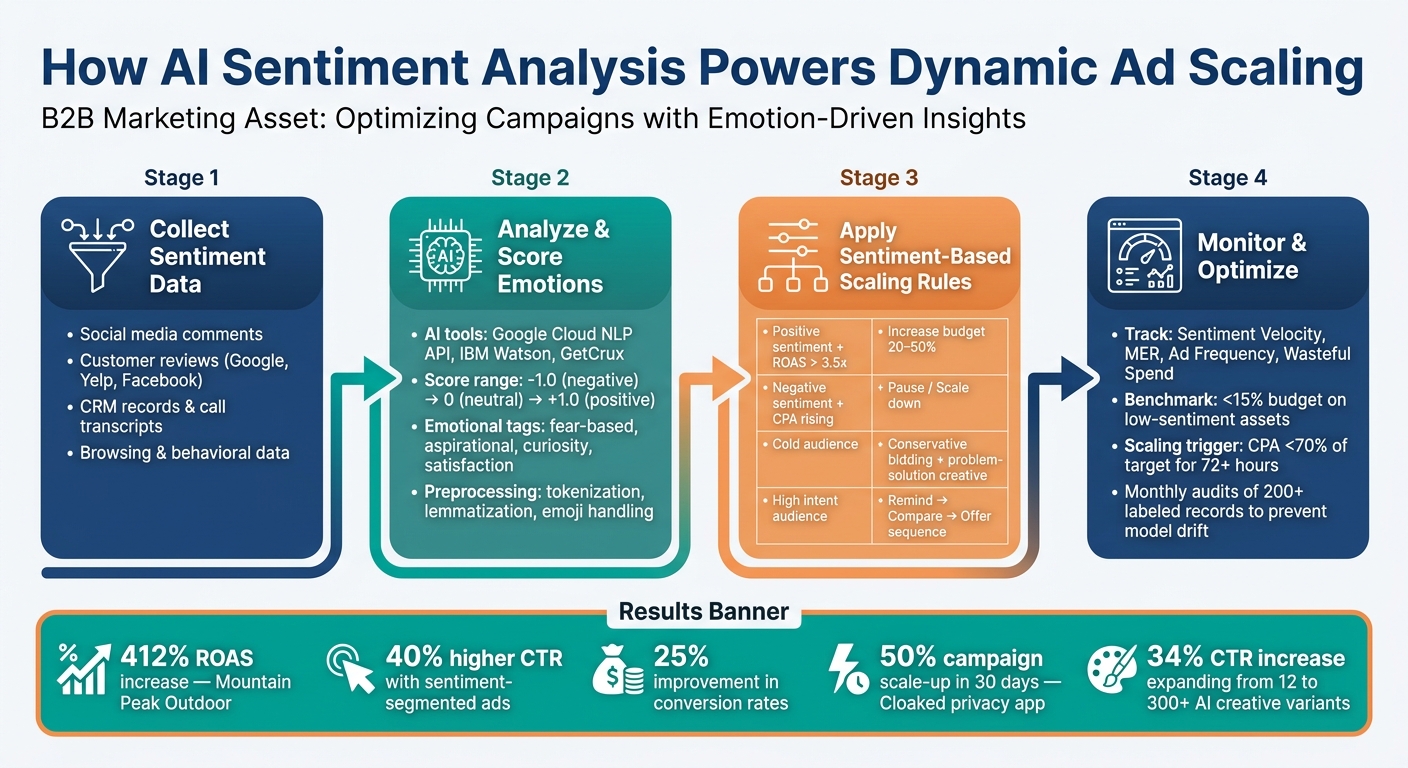
How AI Sentiment Analysis Powers Dynamic Ad Scaling
Building Sentiment-Based Scaling Rules
To make the most of sentiment data, transform verified outputs into actionable rules that adjust your bids and budgets. A simple yet effective strategy is to use a two-way logic: if sentiment improves and your ROAS (Return on Ad Spend) remains strong, scale up. On the flip side, if sentiment declines and your CPA (Cost Per Acquisition) increases, scale down.
Automation tools like n8n simplify this process. For example, you can set up a rule to pause underperforming ad groups and notify your team if ROAS drops below 2.0x for three consecutive days. At the same time, you could trigger a 20% budget increase when positive sentiment is high, and ROAS exceeds 3.5x.
Here’s a helpful framework to connect audience intent with creative and bidding strategies:
| Intent Level | Creative Strategy | Bidding Strategy |
|---|---|---|
| High (Cart/PDV) | Remind → Compare → Offer sequence | Increase ROAS targets (Bid Up) |
| Mid (Category) | Comparison proof and guides | Standard smart bidding (Hold) |
| Cold (Problem-aware) | Problem-solution creative + quiz | Conservative / Qualify first |
| Low Predicted Value | Nurture journey / Email sequencing | Cap frequency / Downbid |
This framework helps align ad content with emotional profiles, allowing for more targeted and effective campaigns.
Personalizing Ads Based on Sentiment
Sentiment data becomes even more powerful when paired with precise audience segmentation. Using a five-layer segmentation model - demographic, psychographic, behavioral, contextual, and competitive - you can craft ad copy that resonates with specific emotional profiles. For instance, a "security-focused" buyer might respond better to messaging that reduces risk, while urgency-driven copy (like FOMO) could fall flat for them. These tailored segments make dynamic ad scaling even more effective by ensuring ads align with real-time emotional contexts.
The results speak for themselves: ads segmented by sentiment see a 40% boost in click-through rates and a 25% improvement in conversion rates. Additionally, advertisers using five or more creative variants per audience report up to 35% lower CPAs.
Take the example of a home fitness brand selling adjustable dumbbells. By leveraging AI Max creative scaling, they expanded from 12 static creatives to over 300 AI-generated variants. This shift led to a 34% increase in CTR and reduced their CPA from $47 to $31 in just 60 days.
Automating these strategies ensures campaigns remain agile and responsive to shifting audience sentiment.
Automation Tools for Sentiment-Driven Scaling
Several platforms now offer built-in tools to automate sentiment-driven scaling. For instance:
- OmniAds: Features a Sentiment-Driven Budget Allocator that adjusts budgets in real time based on ad comment sentiment across platforms like Meta, Google, and TikTok.
- Vibe Saling: Provides a Sentiment Safety Shield for Reddit Ads, automatically pausing campaigns when negative thread velocity spikes. This tool has shown a 3.5x boost in engagement compared to manual monitoring.
- Google’s IFTTA Framework: Integrates sentiment APIs to manage Google Ads and DV360 campaigns in real time.
Here’s what one marketer had to say about these tools:
"AdFire cut our weekly reporting time from 12 hours to 45 minutes. The AI recommendations are freakishly good - it caught a creative fatigue issue we'd been missing for 6 weeks." - Sarah Chen, Performance Marketing Lead, Zenbody
For a side-by-side comparison of these tools, check out the Top PPC Marketing Directory. It’s a great resource for finding PPC automation platforms, bid management tools, and AI-driven ad optimization services.
How to Monitor and Optimize Sentiment-Driven Ad Scaling
Tracking Key Performance Metrics
Once you've launched your sentiment-driven scaling strategy, the next step is keeping a close eye on the right metrics. Beyond the usual suspects like standard PPC performance metrics such as CTR, CPA, and ROAS, there are sentiment-specific indicators that can give you a heads-up before bigger issues arise. Metrics like sentiment velocity, emotional intensity, and topic sentiment are especially useful for spotting early performance trends.
On the efficiency side, you’ll want to monitor your Marketing Efficiency Ratio (MER). Comparing platform-reported ROAS against your total account-level revenue helps ensure your scaling efforts aren’t eating into organic sales. Another key focus is wasteful spend - sentiment-driven optimization has been shown to reduce wasteful e-commerce spending by up to 89%. A good 2026 benchmark is to keep spending on low-sentiment assets under 15% of your total ad budget.
Here’s a quick reference table to help you track the most important metrics:
| Metric Category | Metric | Benchmark |
|---|---|---|
| Sentiment | Sentiment Velocity | Positive trend over a 7-day rolling window |
| Efficiency | Wasteful Spend | <15% of total budget on low-sentiment assets |
| Scaling | Scaling Trigger | CPA <70% of target for 72+ hours |
| Fatigue | Ad Frequency | <3.5 for cold audiences; <2.0 for warm audiences |
| Business | MER | Stable or increasing as ad spend scales |
By monitoring these metrics, you’ll have a clear picture of what’s working and where adjustments are needed.
Refining Models and Scaling Rules
As your sentiment-driven campaigns evolve, fine-tuning your models and scaling rules is critical. Consumer language and trends shift over time, so your sentiment models need regular updates. A phased approach works best:
- Days 1–7: Explore and test various assets.
- Days 8–14: Optimize the top-performing ones.
- Days 15–30: Scale winning patterns to new audiences.
To make this process smoother, utilizing automated PPC tools for bid management and tracking, create a "Winning Elements Library". This is where you catalog headlines, CTAs, and emotional triggers that consistently perform well. On the flip side, set up a "Loser Analysis Engine" to identify underperforming messaging angles, so you can avoid repeating the same mistakes.
When tweaking thresholds, rely on your own historical data rather than generic industry benchmarks. For example, review 90 days of account data to pinpoint the exact ad frequency where your CPA starts to climb. This gives you a more accurate pause trigger. For scaling, a good rule is to increase daily budgets by 30–50% when CPA stays below 70% of your target and ROAS hits or exceeds 130% of your target for three consecutive days.
Managing Risk and Bias in Sentiment Analysis
While refining sentiment models boosts performance, it’s equally important to address risks and biases. These safeguards ensure that speed doesn’t come at the expense of accuracy.
Start by setting confidence thresholds. Only automate scaling actions for classifications with a confidence level above 85%. Anything below that should go to a human reviewer or a more advanced language model. As Lorikeet explains:
"A 'negative' classification at 52% confidence is functionally uncertain. Only act on high-confidence classifications."
Pay attention to tricky areas like sarcasm, negation, and small sample sizes - they can throw off sentiment accuracy and lead to poor decisions. Retaining emojis during preprocessing is also crucial, as they often provide valuable emotional context. And before acting on any trend, double-check that it’s statistically significant.
To keep your model reliable, maintain a "golden set" of at least 200 manually labeled examples. This serves as a benchmark to regularly test your model’s accuracy and catch any performance drift before it impacts your campaigns.
Conclusion: Key Takeaways for Dynamic Ad Scaling with AI Sentiment Analysis
Sentiment-driven ad scaling has moved from concept to reality, delivering tangible results. For instance, in February 2026, Mountain Peak Outdoor, an e-commerce retailer based in Colorado, saw a staggering 412% improvement in ROAS. This success came from transitioning away from demographic assumptions to real-time emotional targeting. Their approach was methodical: starting with baseline sentiment mapping, progressing through optimization testing, and finally deploying the strategy fully while maintaining continuous adjustments.
If you're considering this approach, start small. Test sentiment analysis tools in lower-risk channels like email marketing before applying them to PPC campaigns. Once you’ve validated their effectiveness, scale your efforts strategically, guided by performance data rather than relying on generalized benchmarks.
Selecting the right tools is crucial. To simplify this process, check out the Top PPC Marketing Directory. It’s a valuable resource for finding sentiment analysis platforms, creative optimization tools, or even specialized PPC agencies tailored to your needs.
FAQs
What’s the fastest way to start using sentiment data in my PPC campaigns?
The fastest way to integrate sentiment data into your PPC campaigns is by using middleware or zero-code connectors. Tools such as Ryze AI or Adzviser can connect directly to your Google Ads account. These tools use AI to analyze performance, identify creative fatigue, and adjust ads based on emotional triggers - all within minutes. For more options, check out the Top PPC Marketing Directory to compare tools designed for campaign optimization.
How do I connect sentiment scores to bids, budgets, and scaling rules?
To connect sentiment scores with your bids and budgets, implement the Model Context Protocol (MCP) for real-time access to your advertising data. By integrating sentiment analysis into your workflows, you can automate adjustments. For example, if sentiment drops and your CPA goes over the target, you could automatically lower bids by 15%.
For a fully automated setup, consider linking tools like Claude with platforms such as n8n or Google Ads Scripts. Just remember to maintain human oversight, especially when making significant budget changes.
How can I prevent bad sentiment reads (like sarcasm) from triggering automation?
To prevent misinterpretations or sarcasm from leading to errors in automation, it’s important to take a layered approach:
- Use advanced models: Rely on transformer-based models that understand context beyond simple keywords. This ensures a deeper grasp of meaning and tone.
- Validate with data: Back up AI-generated insights with statistical sampling to confirm their accuracy and reliability.
- Establish safety checks: Cross-reference sentiment analysis with historical conversion data. If a term has historically performed well, sentiment results can be deprioritized to avoid unnecessary adjustments.
Ultimately, AI outputs should serve as guidelines rather than rigid rules. This approach gives you the flexibility to make informed decisions while maintaining control.