Pinterest Analytics is your go-to tool for improving ad performance. It provides data on impressions, clicks, saves, and conversions, helping you understand what works and what doesn’t. By analyzing this data, you can optimize your targeting, refine creative elements, and maximize your ad spend. Here’s what you need to know:
- Set up a Pinterest Business Account to access Ads Manager and analytics tools.
- Install the Pinterest Tag to track user actions like clicks and conversions.
- Monitor key metrics: impressions, click-through rate (CTR), cost per acquisition (CPA), and return on ad spend (ROAS).
- Use insights to adjust budgets, test ad variations, and refine audience targeting.
- Regularly review performance to identify trends and improve results.
Pinterest Analytics helps you make smarter decisions by turning data into actionable insights. Whether your goal is driving traffic, boosting engagement, or increasing sales, this tool empowers you to fine-tune your campaigns for better outcomes.
Audience Insights for Pinterest Ads | Create BETTER Ads with your Audience Insights!
sbb-itb-89b8f36
Setting Up Pinterest Ads Manager and Pinterest Tag
To access Pinterest Analytics, you'll need two things: a Pinterest Business Account and a properly installed Pinterest Tag. The business account gives you access to Ads Manager and analytics tools, while the tag tracks user actions like browsing, adding items to a cart, or completing purchases.
Creating a Pinterest Business Account
A Pinterest Business Account is the foundation of any analytics-driven ad strategy. The good news? It’s free to set up. You can either create a new business account or convert an existing personal account. If you choose to convert, you’ll keep your Pins and followers and even have the option to revert back later.
Keep in mind, though, that the setup process requires a desktop computer - mobile devices don’t support creating new business accounts. Once your account is active, make it a priority to claim your website. This step unlocks advanced analytics and lets you track how well Pins from your site perform across Pinterest. Additionally, you can manage up to 50 separate ad accounts under one business profile, which is handy if you deal with multiple currencies or payment methods.
Installing and Configuring the Pinterest Tag
The Pinterest Tag is a crucial tool for tracking user behavior on your website. It’s made up of two parts: the Base Code and Event Codes. The Base Code, placed in the <head> section of your website, collects general visitor data. Event Codes, added after the Base Code, track specific actions like checkouts or newsletter sign-ups.
You’ve got three ways to install the tag:
- Use an integration partner like Shopify or WooCommerce
- Email setup instructions to your developer
- Install it manually through Ads Manager
If you’re using Google Tag Manager, make sure to enable Tag Sequencing so the Base Code fires before any Event Codes. After installation, enable Automatic Enhanced Matching in Ads Manager. This feature uses hashed data to improve how Pinterest matches website visitors to users.
"Proper Pinterest Tag implementation isn't complicated, but it requires attention to detail. One missing event... and your data becomes unreliable." – SmartSMSSolutions
It may take up to 24 hours for the tag to show up in your Ads Manager dashboard. To confirm everything is working, check the "Event history" under the Conversions section of your Business menu. Alternatively, use the Pinterest Tag Helper browser extension to verify that both the Base and Event Codes are firing correctly. For best results, aim for 50–200 conversions per week to ensure Pinterest’s delivery system works efficiently.
Once your account is set up and the tag is installed, you’re ready to dive into Pinterest Ads Manager and start analyzing key metrics to fine-tune your campaigns.
Key Metrics to Track in Pinterest Ads Manager
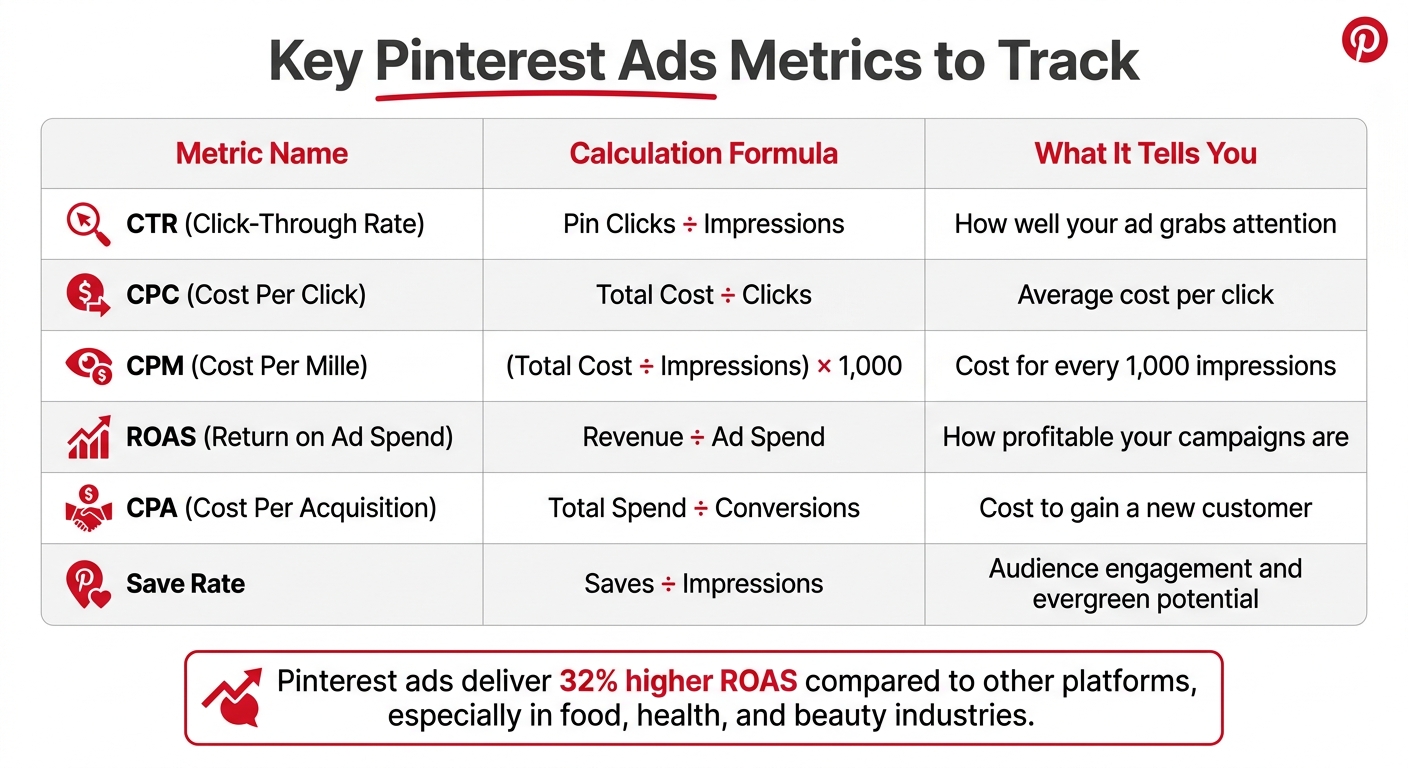
Pinterest Ads Key Metrics Comparison: CTR, CPC, CPM, ROAS, CPA, and Save Rate
To get the most out of your Pinterest ad campaigns, you need to focus on the metrics that matter. Once your Pinterest Tag is up and running, these numbers will help you fine-tune your targeting, avoid unnecessary spending, and maximize your returns.
Impressions measure how many times your ad is shown. To dive deeper into engagement, keep an eye on Pin Clicks (taps to see your Pin up close) and Outbound Clicks (clicks that take users off Pinterest). Outbound clicks, in particular, are key for driving traffic to your site and boosting conversions.
Click-Through Rate (CTR) is another must-watch metric. It’s calculated by dividing total Pin clicks by total impressions. If your CTR is low, it’s time to experiment with new ad formats, tweak your targeting, improve your call-to-action, or use PPC bid management tools. Also, don’t overlook the Save Rate - the percentage of impressions that lead to users saving your Pin. Interestingly, more than 60% of saves on Pinterest come from Pins that are over a year old, showing the power of evergreen content.
When it comes to conversions, two metrics stand out: ROAS (Return on Ad Spend) and CPA (Cost Per Acquisition). ROAS is calculated by dividing revenue by ad spend, while CPA is the total spend divided by the number of conversions. Pinterest ads are known to deliver a 32% higher ROAS compared to other platforms, particularly in industries like food, health, and beauty.
You can also customize your Ads Manager dashboard to match your campaign goals. Utilizing top PPC tools can further streamline this performance tracking across platforms. Use the "Edit columns" feature to focus on the metrics that matter most to you. You can even create custom columns using manual calculations (like +, -, *, /) to track unique KPIs. For conversion tracking, Pinterest suggests using a 30-day attribution window for both clicks and views (30/30).
| Metric | Calculation | What It Tells You |
|---|---|---|
| CTR | Pin Clicks ÷ Impressions | How well your ad grabs attention |
| CPC | Total Cost ÷ Clicks | Average cost per click |
| CPM | (Total Cost ÷ Impressions) × 1,000 | Cost for every 1,000 impressions |
| ROAS | Revenue ÷ Ad Spend | How profitable your campaigns are |
| CPA | Total Spend ÷ Conversions | Cost to gain a new customer |
| Save Rate | Saves ÷ Impressions | Audience engagement and evergreen potential |
Analyzing Campaign Performance with Pinterest Analytics
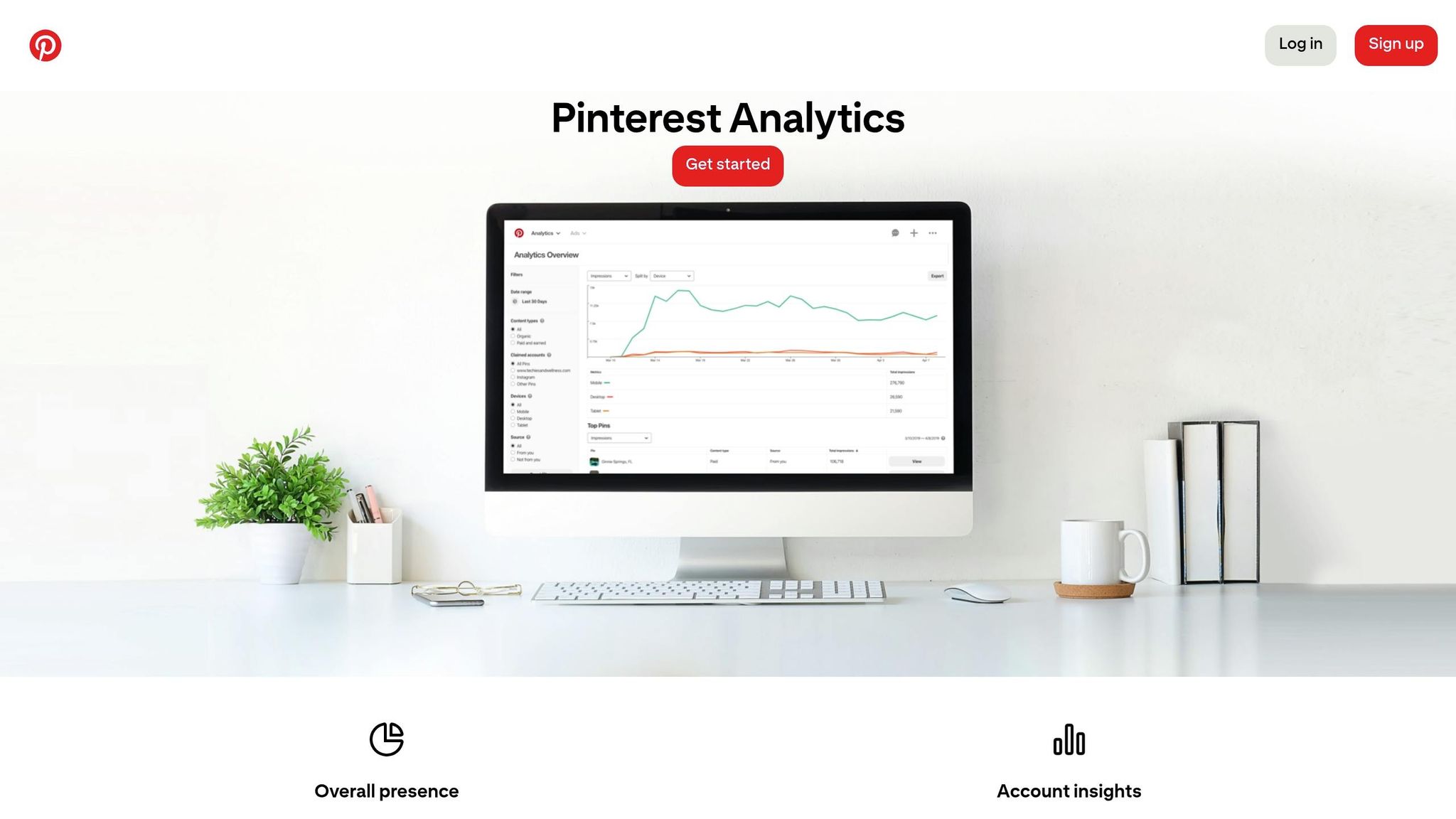
Reviewing your campaign data is key to spotting what’s working and what isn’t. Pinterest provides several tools to help you evaluate performance, fine-tune your spending, and maximize your campaign's potential, though some brands prefer partnering with top PPC agencies for expert management.
Customizing the Reporting Dashboard
Head to the "Ad reporting" section under "Manage campaigns" to access a summary of your campaign’s performance. While the default view offers a solid starting point, customizing it can give you insights tailored to your goals. Use the "Edit columns" option to add or remove metrics - like Cost per Result - or even create custom columns with formulas (e.g., +, -, *, /) to calculate metrics unique to your campaign. To focus only on active campaigns, toggle "Hide undelivered ads". Also, double-check that your local time zone is set correctly so your reports match your campaign schedule.
For up-to-date data, activate the "Use real-time estimates" toggle to see metrics from the last 48 hours. However, keep in mind that real-time analytics don’t cover audience metrics or filtered content types.
Once your dashboard is set, focus on analyzing your creative assets to see which ones are driving results.
Identifying High-Performing and Underperforming Creatives
The "Top Pins" section is a quick way to find out which assets are connecting with your audience. You can sort Pins by metrics like impressions, engagements, Pin clicks, outbound clicks, or saves. Look for patterns among your top-performing creatives - are videos doing better than images? Are text overlays or simple product shots more effective? Use these insights to shape your future creative strategies.
Key metrics like ROAS (Return on Ad Spend) and CPA (Cost per Acquisition) are essential for making scaling decisions. For instance, if an ad has a strong ROAS and low CPA, it might be worth increasing its budget. On the other hand, if an ad isn’t hitting the mark, pause it and redirect the budget to better-performing creatives. You can also break down performance by audience attributes like age, gender, and device type to see if specific segments are underperforming.
If an ad has high impressions but a low CTR (Click-Through Rate), consider tweaking your keywords, ad format, or CTAs. But if your CTR looks good and conversions are falling short, take a closer look at your landing page copy and visuals to ensure they match the ad’s message.
Segmenting Data for Deeper Insights
To dig even deeper, use segmentation to refine your targeting and improve outcomes. Click the "More filters" icon in the Analytics Overview or Ad Reporting dashboard to unlock advanced filtering options. For example, you can compare organic Pins to "Paid and Earned" content or evaluate different ad formats - like video, carousel, or collections - to find out which ones are driving the best results.
Segmenting by device (mobile, desktop, tablet) can also highlight traffic trends. If most clicks come from mobile users but conversions are low, your landing page might need better mobile optimization. You can also use the "Split by" dropdown in the performance graph to compare organic versus paid activity or see whether conversions came from clicks or impressions.
In Conversion Insights, segment by "Conversion Content" to see if users interacted with organic Pins, ads (Paid unassisted), or a mix of both (Paid assisted) before converting. This breakdown helps you understand how your organic and paid efforts complement each other in the sales funnel. Plus, Pinterest lets you view custom date ranges for up to 1.5 years, making it easier to spot seasonal trends and long-term shifts in performance.
Running A/B Tests for Creative Optimization
A/B testing is a powerful way to refine your campaign's creative elements and improve results. By comparing specific variables - like product images, headlines, or calls-to-action - you can identify what resonates most with your audience. The trick? Test only one variable at a time to isolate what drives the change.
Start by using insights from your "Top Pins" report and top PPC marketing tools to establish a performance baseline. Look at your best-performing content and note recurring design features, such as color choices, text overlays, or image layouts. For instance, if your Pinterest Analytics reveals high impressions but a low click-through rate, you might want to test tweaks to your headline or make your CTA more compelling. On the other hand, if engagement looks strong but conversions are falling short, try experimenting with different CTAs or adjusting your landing page messaging.
When setting up tests in Ads Manager, create two versions of an ad that differ by just one variable. Use clear naming conventions (e.g., "US-Brand-Category-TestA") and add UTM parameters to track performance beyond Pinterest, such as bounce rates or session lengths in Google Analytics.
Let your test run until the results are statistically significant. Focus on metrics that align with your campaign goals - like impressions and saves for awareness, outbound clicks and CTR for traffic, or conversion rates for sales. Pay close attention to save rates, as high saves often indicate strong content resonance and potential for organic reach.
Once you've identified the winning variant, analyze what made it successful and apply those insights to future campaigns. Then, develop a new hypothesis and start testing again. As Maddie Sheng from HubSpot puts it:
"The goal of A/B testing - which is also referred to as split testing - is to run simultaneous experiments between two marketing variables to determine which results in a better conversion rate."
Advanced Optimization Strategies Using Pinterest Analytics
Once you've nailed the basics of tracking and testing, it’s time to take things up a notch. Pinterest Analytics offers tools that can help you fine-tune your campaigns by reallocating budgets and sharpening your audience targeting. Let’s dive into some advanced strategies that can make a big difference.
Budget Allocation and Optimization
Use your campaign performance data to adjust spending and maximize ROI. Start by sorting your Pins by conversion value in the Analytics dashboard. This helps you pinpoint which ads are bringing in actual revenue - not just clicks or impressions. For example, if a campaign has a high click-through rate but isn’t converting, it’s a signal to redirect that budget to campaigns with lower CPCs but better conversion rates.
Look at conversion data over different time periods - 1-day, 7-day, and 30-day windows - to guide your decisions. Some campaigns might not drive instant sales but play a role in building brand awareness. These "assisted conversions" are worth investing in, as they can help nurture potential customers over time.
Geographic data can also uncover unexpected opportunities. For instance, if you notice that users in a specific region, like Texas, are converting at twice the rate of your national average, it might be time to create a dedicated campaign for that area. Tailoring your messaging or offers to high-performing locations can boost results.
Make it a habit to review performance weekly. A quick 30-minute check can help you spot trends and make timely adjustments. Pause underperforming Pins and focus your spend on evergreen content that consistently delivers.
Expanding Target Audiences with Analytics Insights
Your audience data holds the key to finding new customers. The Audience Insights tab in Pinterest Analytics allows you to compare the demographics of your total audience with those who actively engage with your content. If there’s a disconnect - say, your ads target women aged 25-34, but most engagement comes from women aged 35-44 - you can tweak your targeting to better align with these insights.
Explore "Interest Categories" to discover related interests among your audience. For example, if you’re a home decor brand and notice your audience has a strong interest in DIY projects, you can expand your targeting to include that niche. This kind of interest mapping can reveal exciting cross-promotion opportunities.
Pinterest’s Actalike audience feature is another powerful tool. It allows you to scale your campaigns by finding new users who share traits with your best-performing audience segments. For instance, if a particular group of users frequently converts or engages with your content, you can create an Actalike audience to reach similar users while staying relevant.
Don’t forget to retarget users who’ve already engaged with your content. Create campaigns designed to guide them further along the funnel, turning casual browsers into loyal customers.
Lastly, consider enabling Pinterest’s Expanded Targeting feature. This tool uses automated signals to analyze your ad images and descriptions, helping you reach people interested in related topics beyond your manual keyword selection. It’s a simple way to scale your campaigns without spending hours on research.
Building a Continuous Optimization Workflow
Once you've established and analyzed your key metrics, it's essential to adopt a continuous review process to keep your campaigns performing well. Regularly using Pinterest Analytics is a great way to ensure your efforts remain effective. Setting up a recurring monthly review is a simple yet powerful habit. Content marketer Alisa Meredith suggests:
"Set a recurring monthly calendar reminder and take just 30-60 minutes to review all your available Pinterest analytics so you can adjust your Pinning strategy for more traffic, leads, and sales on your site".
This review process builds upon your initial analytics setup and testing strategies, keeping your campaigns aligned with your goals.
Tailor your review schedule to match your business objectives. For example:
- Focus on impressions, audience size, and saves to boost brand awareness.
- Track outbound clicks and click-through rates (CTR) to drive traffic.
- Prioritize metrics like conversion value and cost per acquisition (CPA) for sales.
Leverage Pinterest's tools like Conversion Insights for tracking revenue and Pin Stats for creative engagement. Combine these insights with Google Analytics to get a complete picture of your visitors' journey.
Use your findings to identify top-performing creatives and expand on what makes them successful. Regularly scale up winning strategies by analyzing the Top Pins report to uncover trends in high-converting content . If specific boards consistently drive strong engagement, focus on pinning ad-linked content there. Chrissie Baker from The Busy Baker emphasizes:
"Monitoring your Board Insights regularly can help direct your Tailwind scheduling toward boards that perform well for both your Pinterest profile and your blog, maximizing the growth of your Pinterest profile and the traffic to your blog from Pinterest".
These insights should also feed into your A/B testing efforts, reinforcing the step-by-step approach to refining your campaigns.
For underperforming campaigns, start by auditing key elements like landing page relevance, clear calls-to-action (CTAs), and optimized keywords. If engagement is low, experiment with different ad formats or target more specific audience segments. Additionally, keep an eye on device-specific performance. For instance, if conversions are higher among iPhone users, consider adjusting your targeting to focus on that group .
Conclusion
Pinterest Analytics transforms ad performance into a clear, data-focused strategy that directly boosts your ROI. By keeping an eye on key metrics - like impressions, saves, conversion value, and cost per acquisition - you’ll uncover the information needed to make smarter decisions about where to allocate your ad budget with paid media optimization tools. This approach ensures your campaigns stay effective and continue to evolve.
The secret to success is constant monitoring and fine-tuning. To grow your presence on Pinterest and increase revenue, focus on what resonates with your audience and aligns with your business goals. This involves regularly analyzing your best-performing creatives, identifying the demographics most engaged with your content, and adjusting your targeting to reach the audiences most likely to convert.
With tools like Conversion Insights, you can measure how your Pins impact overall revenue, giving you a detailed view of your return on investment. This ongoing process of optimization turns raw data into actionable steps, allowing you to refine your campaigns further. Each insight helps you build on past successes while steering clear of what doesn’t work. Whether your goal is brand awareness, driving traffic, or increasing sales, Pinterest Analytics equips you to make smarter advertising choices that deliver better results over time. Start leveraging these insights now to see measurable improvements in your ROI.
FAQs
Which Pinterest metrics matter most for my goal?
When determining key Pinterest metrics, it all comes down to your specific goals:
- If your priority is brand awareness, pay attention to impressions, total audience, engaged audience, and saves.
- To drive traffic, focus on outbound clicks, saves, and engaged audience.
- For conversions, keep an eye on total audience, engaged audience, conversions, and outbound clicks.
The secret to optimizing ad performance is selecting the metrics that align with your business objectives.
How do I know my Pinterest Tag is working?
To make sure your Pinterest Tag is functioning correctly, try using the Pinterest Tag Helper Chrome extension. This tool lets you check if the tag is properly installed and transmitting data. Simply visit your website and look for event data, such as purchases or other actions.
Additionally, you can test the tag through Pinterest Ads Manager. Clear the logs and confirm that data is being sent as expected. If you still encounter problems, double-check the tag’s setup to ensure it aligns with Pinterest’s guidelines.
What should I A/B test first in Pinterest ads?
Start by experimenting with A/B testing for creative elements like images and headlines. This approach lets you identify what grabs your audience's attention the most. Trying out different visuals and messaging can lead to better engagement and higher click-through rates - two critical factors for running successful Pinterest ads.