If I had to boil it down to one line: Looker Studio is the lower-cost pick for small, Google-first PPC reporting, while Swydo is the better fit for repeat report delivery across many client accounts.
Here’s the short version:
- Choose Looker Studio if you want tight control over dashboard layout, use mostly Google data, and can handle connector upkeep yourself.
- Choose Swydo if you need built-in report scheduling, white-label delivery, account-health checks, and one reporting process across many PPC clients.
- Watch the hidden cost: Looker Studio is free for native Google sources, but non-Google connectors can add $20 to $350 per connector per month. Even Supermetrics starts at $37/month, with $177/month needed for daily refreshes.
- Watch the scale issue: once you move past a small client list, template edits, broken fields, expired tokens, and connector issues can add more work than expected.
- The tradeoff is simple: Looker Studio gives you more dashboard control. Swydo gives you more built-in reporting automation.
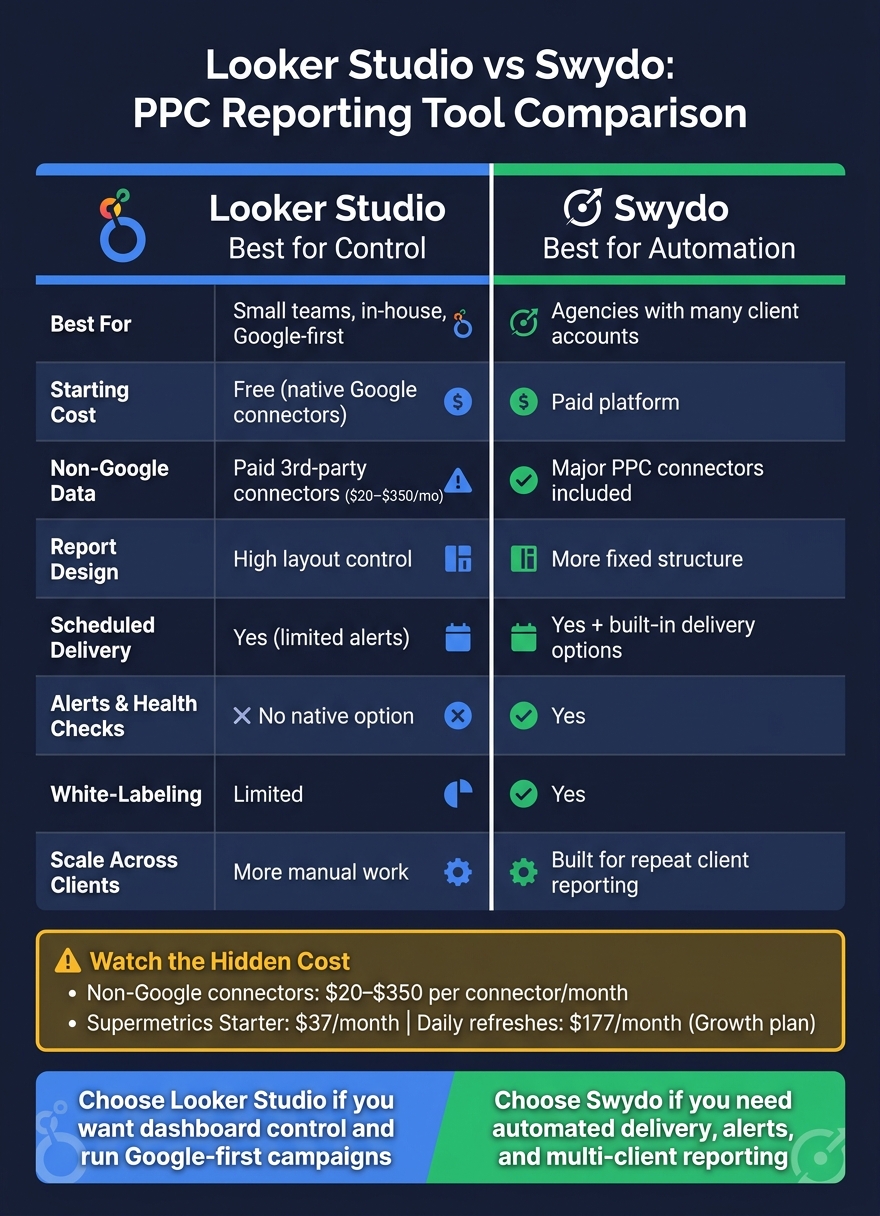
Looker Studio vs Swydo: PPC Reporting Tool Comparison
Quick Comparison
| Criteria | Looker Studio | Swydo |
|---|---|---|
| Best for | Small teams, in-house PPC, Google-first reporting | Agencies and teams with many client accounts |
| Starting cost | Free for native Google connectors | Paid platform |
| Non-Google data | Usually needs third-party connectors like Supermetrics | Major PPC connectors included in platform setup |
| Report design | More control over layout and fields | More fixed report structure |
| Scheduled delivery | Yes | Yes, with more built-in delivery options |
| Alerts and health checks | No native option | Yes |
| White-labeling | Limited | Yes |
| Scale across clients | More manual work | Built for repeat client reporting |
My take: if you care most about control, go with Looker Studio. If you care most about automation, go with Swydo.
That’s the core decision this article helps you make.
sbb-itb-89b8f36
Looker Studio for PPC Reporting: Strengths and Tradeoffs
Looker Studio is a solid fit for PPC reporting when a team wants low-cost dashboards, native Google connectors, and tight control over report layout. The native Google connectors are free and quick to set up. This makes it a popular choice among the top PPC advertising tools for basic data visualization. And the drag-and-drop editor makes it simple to build interactive dashboards with calculated fields and filters.
The catch shows up once you move beyond Google.
Setup Time, Templates, and Connector Costs
For non-Google platforms, setup tends to slow down and costs start to climb. Meta, LinkedIn, and TikTok need third-party partner connectors, which run $20 to $350 per connector per month. Supermetrics starts at $37/month on the Starter tier, but if you want daily refreshes, you need the $177/month Growth plan.
There’s also the upkeep. Tokens expire. Schemas change. Refreshes can fail without much warning. Someone on the team has to keep an eye on all of it. As Chris Irwin, Co-Founder & CEO, Oviond, put it:
"Looker Studio works best for agencies that are willing to assemble their own reporting stack and own the process around it."
Templates add another point of friction. Looker Studio gives you a lot of control over how reports look, which is great. But if you’re trying to standardize branded reports across a long list of client accounts, the work is still manual. There’s no built-in way to push template updates across accounts at scale.
Scheduled Delivery and Data Control
Looker Studio does support scheduled email delivery, which is fine for teams with a small group of stakeholders. But it does not include native monitoring for CPC drift, budget pacing, or connection health. If a connector breaks or campaign performance starts slipping, you won’t get an alert unless you build that layer yourself through BigQuery or Zapier.
Data control is one of Looker Studio’s stronger points, especially for teams that need custom metrics and Google-native modeling. Reusable calculated fields and BigQuery integration let you shape reporting logic around your needs. That said, Looker Studio can only blend up to five sources, and the join logic is limited. If your setup gets more complex, you’ll usually need to move data into a warehouse first and then connect that to Looker Studio.
| Feature | Strength | Tradeoff |
|---|---|---|
| Connectors | Free native Google connectors | Third-party connectors cost $20-$350/month |
| Scheduled Delivery | Email delivery is supported | No native alerts for performance shifts or budget pacing |
| Data Control | Strong calculated fields and BigQuery integration | Blending capped at five sources with limited join logic |
| Team Fit | Well-suited to Google-centric or in-house teams | Scaling a larger client roster increases maintenance overhead |
Swydo addresses these gaps with built-in delivery, alerts, and client workflows.
Swydo for PPC Reporting: Strengths and Tradeoffs
Swydo fixes two common agency problems: getting reports out on time and keeping an eye on account health between send dates. The catch is that you give up some layout freedom in return. It’s built for teams that care more about repeatable PPC reporting, automated delivery, and managing lots of client accounts than building highly custom dashboards. If your team runs the same type of report across many accounts, that setup can be a good fit.
Setup Time, Templates, and Multi-Client Standardization
A lot of the time savings in Swydo come from templates and account grouping. You can build one report template, then reuse it across clients by swapping in each account’s data. That’s a clean way to handle weekly or monthly PPC reports for Google Ads, Microsoft Ads, and Meta.
Swydo also supports blended reporting. You can combine as many as five ad platforms into one widget and show blended metrics like cost per conversion. That matters when every client needs the same reporting structure and you don’t want to rebuild it over and over.
Its AI-powered executive summary also writes report commentary from the data. For teams on a monthly reporting cycle, that can cut down the time spent writing summaries by hand.
Scheduled Delivery, Alerts, and White-Label Options
Swydo automates report delivery with branded email, custom domains, and white-label reports. Data Health Checks warn you about expired tokens before a report fails to send. Monitoring Boards and Goal Pacing help teams track live KPIs and targets between reporting cycles. Looker Studio, by comparison, doesn’t include native alerting or anomaly detection.
The tradeoff comes down to data flexibility. Swydo is made for standardized PPC reporting, so it gives you less room for raw data manipulation and deep customization than a BI-style tool. That matters more once your reporting needs move past polished client output and into custom analysis.
| Feature | Swydo Strengths | Swydo Tradeoffs |
|---|---|---|
| Setup Time | Fast onboarding with templates and account grouping | Less customization for complex, non-standard data models |
| Template Depth | Repeatable layouts for weekly and monthly PPC reporting | Can feel rigid for teams needing pixel-level layout control |
| Connectors | Native integrations for major PPC and analytics platforms | May have gaps for niche or one-off data sources |
| Scheduled Delivery | Fully automated recurring report delivery | Less useful for clients who need deep drill-downs |
| White-Labeling | Custom domains and branded reports | Can become a constraint at higher client counts |
| Data Flexibility | Supports blended reporting and AI summaries | Limited raw data modeling compared with BI-style tools |
| Agency Fit | Built for multi-client agency workflows | Less efficient for teams that need deep customization or flat costs as account counts rise |
Looker Studio vs Swydo: Direct Comparison
Setup, Templates, and Pricing
The comparison shifts from feature lists to workload: which tool costs less to run as reporting grows?
Looker Studio looks cheaper at first. But that edge shrinks fast once you bring in channels outside Google, because third-party connectors often come with added fees. Swydo costs more at the start, but it includes major integrations in the base setup.
In plain terms, Looker Studio gets more expensive once you add non-Google data sources. Swydo, on the other hand, is built for standardized reporting across many clients, which makes it a better match for agency-style reporting at scale.
That price difference shows up most in automation and day-to-day upkeep.
| Criteria | Looker Studio | Swydo |
|---|---|---|
| Connector Model | Free for Google; paid third-party connectors | Bundled multi-platform integrations |
| Scheduled Delivery | Scheduled email delivery; no native alerts | Automated recurring delivery plus alerts |
| Team Fit | Google-centric or in-house teams | Multi-client agency workflows |
Automation, Governance, and Connector Limits
Looker Studio supports scheduled delivery, but it does not include native health checks. So if a connector breaks, that issue can sit there unnoticed until someone spots it.
Swydo adds daily health checks, live monitoring, and goal pacing. This helps ensure you are tracking the right PPC performance metrics accurately. That matters when you're managing a lot of accounts, because it cuts down on manual QA and lowers the odds of bad reports slipping through.
Which Tool Fits Your Team Size
Team size is the fastest way to make this decision.
For solo marketers and small in-house teams running Google-only campaigns, Looker Studio usually gives you more for less. The main connectors are free, and setup is straightforward.
Once you get past five clients, things can change. Connector costs, field issues, and report maintenance start to pile up. That's where Swydo tends to make more sense.
Swydo is a better fit for growing agencies and mid-market teams that need portfolio-wide monitoring and standardized delivery across many accounts. It is also the safer pick when native alerts and connection-health checks matter more than deep custom modeling.
Conclusion: When to Use Looker Studio and When to Use Swydo
One practical question remains: which tool fits your reporting workflow? Looker Studio works best for teams that want control. Swydo works best for teams that want automation.
Key Takeaways for Agencies and performance-focused teams
Use Looker Studio for small, Google-centric teams that can handle upkeep themselves. Use Swydo when recurring delivery and monitoring matter more than dashboard flexibility.
As client count grows, Looker Studio can become harder to manage. Connector upkeep, broken fields, and template maintenance start to add more work than many teams want to carry. Swydo is built to close those gaps with standardized templates, automated delivery, native alerts, and portfolio-wide monitoring in the base setup. For those needing even deeper cross-platform management, audit and optimize paid media using specialized tools.
Choose Looker Studio for flexible, Google-first reporting. Choose Swydo for standardized, multi-client automation. For most teams, the better pick is the one that cuts reporting work without hiding performance gaps.
FAQs
When does Looker Studio stop being the cheaper option?
Looker Studio stops being the cheaper option when the time and effort to run your reporting stack cost more than a dedicated platform.
The tool itself is free. But the hidden costs can pile up fast - paid third-party connectors, broken fields that need fixing, manual template oversight, and white-label report delivery all take time and money.
For one or two clients, Looker Studio can work just fine. But once an agency is handling more than five clients, that extra work can make Swydo the lower-cost option.
Is Swydo worth it for a small PPC team?
Often, yes - especially for small PPC teams handling more than five clients.
Looker Studio is free, and for one or two accounts, that may be enough. But once your client list grows, the manual work tends to pile up.
Starting at about $49/month, Swydo comes with template-based reporting, monitoring tools, white-label features, and scheduled reports right out of the box. That can cut down on admin work and technical troubleshooting.
Can Looker Studio handle multi-platform PPC reporting well?
Yes - but next to agency-specific tools, it usually takes more hands-on work.
It tends to work best with Google Ads and GA4. Once you bring in non-Google platforms like Meta, LinkedIn, and TikTok, you’ll usually need third-party connectors.
That can push up monthly costs. And Looker Studio doesn’t include a native monitoring layer, so there’s more to watch manually. As client counts grow and your platform mix gets broader, connection upkeep and schema changes can eat into the upside of its low starting cost.