Performance Max campaigns are a powerful way to run ads across all Google platforms - Search, YouTube, Display, Shopping, Gmail, Maps, and Discover - using a single campaign. Powered by AI, it automates bidding with AI-driven tools, ad placements, and creative testing to help advertisers achieve their goals. Here’s the key takeaway:
- What It Does: Combines all Google ad channels into one campaign, managed by AI.
- What You Provide: Creative assets (headlines, images, videos), audience signals, and conversion goals.
- Why It’s Useful: Simplifies ad management and can reduce Cost Per Acquisition (CPA) by 18% on average.
Key Steps to Get Started:
- Set Up Google Ads and Merchant Center: Link accounts and prepare conversion tracking via tools like Google Tag Manager or GA4.
- Prepare Creative Assets: Include headlines, descriptions, images, and videos in required formats.
- Use Audience Signals: Upload customer data or create custom segments to guide Google’s AI.
- Launch and Monitor: Start with a budget 2–3x your target CPA and avoid major changes during the learning phase (6–8 weeks).
Performance Max campaigns are ideal for scaling ad performance while complementing existing Search campaigns. By following best practices like precise tracking, strong asset preparation, and strategic audience targeting, you can maximize results efficiently. For businesses looking to scale without the overhead, partnering with top PPC agencies can streamline the transition to automated campaign types.
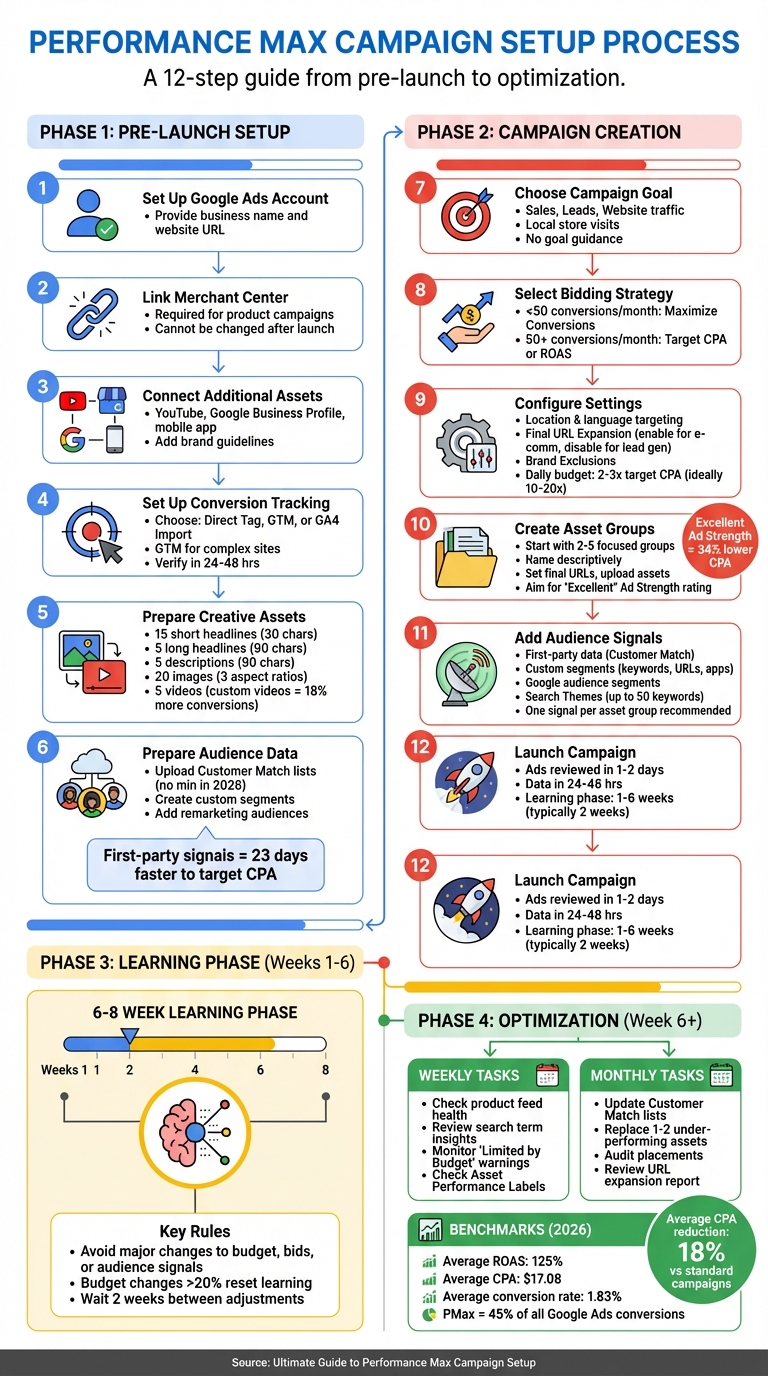
Performance Max Campaign Setup: 12-Step Implementation Guide
Performance Max Setup Tutorial + New Strategies 2025
sbb-itb-89b8f36
Pre-Launch Setup Requirements
These steps are essential for laying the groundwork for your Performance Max campaigns. A well-prepared account ensures Google's AI has everything it needs to perform effectively.
Setting Up Google Ads and Merchant Center
First, set up a Google Ads account if you don’t already have one. During the signup process, you’ll need to provide your business name and website URL. Google uses this information to autofill content and offer initial recommendations.
For product-based campaigns, linking a Google Merchant Center account is mandatory. Make sure the Merchant Center is fully set up before connecting it to your Google Ads account.
Important: Once linked, the Merchant Center account cannot be changed after the campaign launches.
Additionally, connect other relevant assets like your YouTube channel, Google Business Profile, or mobile app to expand your campaign's reach. Don’t forget to add your business name and logo in the brand guidelines section of Google Ads. This ensures your branding appears consistently across placements. If you skip this step, Google may pull assets from your top-performing asset group instead.
Once your account and assets are linked, the next step is to set up precise conversion tracking.
Setting Up Conversion Tracking
Accurate conversion tracking is non-negotiable for optimizing Performance Max campaigns. As Mijo Jurisic, Founder of MJ Marketing, puts it:
"Without clean tracking, PMax is worthless!"
You have three main options for implementing tracking: the direct Google Ads Tag (gtag.js), Google Tag Manager (GTM), or importing conversions from Google Analytics 4 (GA4). Google Tag Manager is often the best choice because it simplifies managing multiple conversion actions without constant code changes.
Here’s the key: Performance Max focuses on "Primary" conversion actions for optimization. Actions marked as "Secondary" are tracked for observation only and don’t affect bidding. If you’re tracking revenue, assign monetary values to conversions. This allows you to use value-based bidding strategies like Target ROAS.
Here’s a quick breakdown of the tracking methods:
| Tracking Method | Best For | Key Requirement |
|---|---|---|
| Direct Tag (gtag.js) | Small sites with few actions | Access to website <head> code |
| Google Tag Manager | Complex sites/Multiple tags | GTM container installed on all pages |
| GA4 Import | Users already using GA4 | Linked Google Ads and GA4 accounts |
| Offline Import | Lead gen/CRM-based sales | GCLID (Google Click ID) tracking |
Once tracking is set up, verify it using Google Tag Assistant or GTM Preview Mode. Ensure the "Conversions" summary shows data within 24–48 hours. For lead generation campaigns, consider using offline conversion tracking or lead scoring to prevent the algorithm from focusing on low-quality form submissions.
Preparing Creative Assets and Audience Data
Performance Max campaigns rely on asset groups - collections of headlines, descriptions, images, and videos that Google’s AI uses to create ads across various channels. The more high-quality assets you provide, the better the AI can test different combinations.
Here’s what you’ll need:
- Up to 15 short headlines (30 characters each)
- 5 long headlines (90 characters each)
- 5 descriptions (90 characters each)
- 20 images
- 5 videos
For images, include three aspect ratios: Landscape (1,200×628 pixels), Square (1,200×1,200 pixels), and Portrait (960×1,200 pixels). Video assets are especially important - ecommerce stores that include videos often see 25% to 40% better performance compared to using only images. If you don’t upload a video, Google will create one automatically from your images and text, but these tend to perform poorly.
On the audience side, first-party data is your strongest tool. Upload Customer Match lists (email addresses or phone numbers) to help the AI find similar high-value customers more quickly. Starting in 2026, Customer Match lists no longer require a 1,000-user minimum to be used in Performance Max campaigns. You can also layer remarketing audiences and custom segments based on competitor searches to target high-intent users.
Finally, set a realistic daily budget. Google recommends starting with 2–3 times your target CPA during the learning phase, though some experts suggest 10–20 times for better results. A common starting point for new advertisers is around $15 per day. Keep in mind that daily spend can fluctuate up to twice the average but won’t exceed a monthly cap of 30.4 times your daily budget.
With your creative assets and audience data prepared, you’re ready to move on to the campaign setup process.
Campaign Creation Steps
Once your pre-launch checklist is complete, building your campaign involves three main steps: setting your campaign goals and basic settings, creating asset groups, and adding audience signals.
Choosing Campaign Goals and Basic Settings
Start by selecting "New Campaign" in your Google Ads dashboard and choosing "Performance Max" as the campaign type. You'll then pick one of five objectives: Sales, Leads, Website traffic, Local store visits and promotions, or Create a campaign without a goal's guidance.
Your chosen objective will guide Google's recommended bidding strategy. For lead generation where all leads are equally valuable, go with Maximize Conversions. If your business deals with conversions of varying values (like a $50 purchase versus a $500 one), opt for Maximize Conversion Value. Assign monetary values to each type of conversion - e.g., $100 for a phone call and $50 for a form submission - so Google's AI can focus on delivering the highest return on ad spend.
Next, configure your location and language targeting. Use the "Advanced search" option to add multiple locations at once or set up radius targeting around specific addresses. If your business operates across various markets, consider separate campaigns if geographic conversion rates differ by more than 30% or if product profit margins vary widely.
Two key settings to address are Final URL Expansion and Brand Exclusions. URL expansion lets Google's AI send users to the most relevant landing page on your site, which can boost results for e-commerce. However, for lead generation, you might want to disable it to avoid directing traffic to pages like blog posts that don't convert. Brand exclusions allow you to block your ads from appearing in searches for specific brands, including common misspellings.
Set your daily budget to at least three times your target cost-per-acquisition, though 10 to 20 times is ideal. For campaigns generating fewer than 50 conversions monthly, start with "Maximize Conversions" without constraints. Once you hit 50+ conversions per month, you can fine-tune CPA or ROAS targets by adjusting them no more than 15% to 20% at a time, waiting two weeks between changes.
Important: Avoid making big changes to budgets or bidding targets during the first one or two conversion cycles. The learning phase generally lasts one to two weeks but can extend up to six weeks. By early 2026, Performance Max is expected to account for 45% of all Google Ads conversions, with campaigns typically achieving an 18% lower cost-per-acquisition compared to standard campaigns.
With these settings in place, you can move on to creating asset groups.
Creating Asset Groups
Asset groups are collections of headlines, descriptions, images, and videos organized around a specific theme or product category. While a single Performance Max campaign can include up to 100 asset groups, most advertisers begin with two to five focused groups.
- Name the group descriptively, like "Winter Jackets" or "Premium Services."
- Set the final URL to the most relevant landing page for that group. If URL expansion is enabled, Google might send users to a more suitable page on your site.
- Add text assets: You can include up to 15 short headlines (30 characters), 5 long headlines (90 characters), 1 required short description (60 characters), and up to 4 long descriptions (90 characters). Google's AI can also generate suggestions based on your site URL to save time.
"Having more relevant and unique content can help you get the right ad in front of your customers and improve your ad's performance."
- Upload visuals: Add up to 15 images and 5 logos, meeting the required aspect ratios mentioned earlier. Include at least one custom video longer than 10 seconds, as Google's auto-generated videos often underperform. Campaigns with at least one custom video asset tend to achieve 18% more incremental conversions at similar costs.
Use the Ad Strength indicator to assess the quality of your asset combinations. Higher ratings, such as "Excellent", often lead to better results. Keep your themes consistent - create separate asset groups for distinct product categories instead of combining unrelated themes.
Once your asset groups are ready, focus on refining your targeting with audience signals.
Adding Audience Signals
Audience signals are suggestions you provide to Google's AI to help it quickly identify your ideal customers. Unlike traditional targeting, these signals are not strict boundaries; Google's AI may show ads to users outside these signals if they are likely to convert. Essentially, audience signals act as starting points for machine learning rather than hard limits.
The most effective signals come from first-party data, such as Customer Match lists (emails or phone numbers), website visitors, and app users. Start with this data, then expand to custom segments based on search activity (keywords your target audience uses), URLs (like competitor websites), or apps they interact with.
You can also include Google audience segments such as Affinity (interests), In-market (purchase intent), or Life Events, along with demographic details like age, gender, household income, and parental status. A newer tool called Search Themes lets you add up to 50 keywords per asset group to signal user intent.
Best practice: Assign one specific audience signal per asset group. This helps track which segments perform best, as Google doesn't provide detailed data when multiple signals are used within a single group. To set this up, go to the "Audiences" section under an asset group, select "Create an Audience", and layer in your data.
For audience lists to be effective, they must include at least 1,000 active and eligible users. Remarketing lists should have over 100 active users in the last 30 days, with at least one new user added in the past two days to maintain effectiveness. Avoid making major changes to audience signals during the first two to four weeks of the learning phase, as this can reset the algorithm's progress.
With your campaign goals, asset groups, and audience signals in place, you're ready to launch your Performance Max campaign. Initial data usually starts appearing within 24 to 48 hours, and new ads typically require one to two days for policy review.
Performance Monitoring and Optimization
Once your campaign is up and running, the real work begins: monitoring and fine-tuning to maintain strong results. After launching a Performance Max campaign, the next four to six weeks are critical. This is the learning phase where Google's AI collects data to figure out what works best. During this time, it’s important to avoid making constant adjustments - big changes like altering budgets, bidding targets, or audience signals can reset the learning process.
Selecting Your Bidding Strategy
If your campaign is new or generates fewer than 50 conversions per month, start with Maximize Conversions. This approach helps the algorithm gather enough data to work effectively. Once your campaign achieves 30 to 50 conversions per month consistently, you can transition to Target CPA for lead generation or Target ROAS for e-commerce.
Using first-party audience signals can also speed things up - campaigns relying on these signals can hit their target CPA 23 days faster compared to those that only use interest-based signals. When adjusting your targets, stick to small increments of 15–20% and allow at least two weeks before making additional changes.
Tracking Performance Metrics
Pay attention to bottom-funnel metrics like total conversions, conversion value, ROAS, and CPA. For context, as of early 2026, the average Performance Max campaign delivers a ROAS of 125%, a CPA of $17.08, and a conversion rate of 1.83% for purchase events.
Use the Asset Performance Labels feature to evaluate your creative assets weekly. Within your asset groups, Google categorizes each headline, image, and video as Low, Good, Best, Learning, or Pending. Campaigns with an "Excellent" Asset Strength rating see a 34% lower CPA compared to those rated "Good".
It’s also smart to review placement reports monthly to see where your ads are appearing across YouTube, Display, and Search. Exclude low-quality websites, apps, or YouTube channels that might waste your budget without contributing to conversions. For lead generation campaigns, focus on tracking qualified leads or offline conversions instead of just raw form fills to avoid optimizing for spam submissions.
Adjusting Campaigns Based on Data
Once the six-week learning phase is over and your campaign stabilizes, you can start making data-driven adjustments. Review your campaign structure every two weeks. Weekly tasks should include checking the health of your product feed, analyzing search term insights to identify new negative keywords, and looking out for "Limited by Budget" warnings. Monthly, update your first-party customer match lists to keep audience signals fresh, and replace one or two underperforming creative assets with new ones.
"PMax amplifies inputs; messy feeds and loose conversions cap performance." - brightbid-admin, BrightBid
Be cautious with budget cuts - reducing your budget by more than 20% in one go will reset the learning phase.
If you’ve enabled URL expansion, check the corresponding report to ensure traffic isn’t being directed to irrelevant pages like blog posts, careers pages, or terms and conditions. Use exclusion lists to focus traffic on high-converting product or service pages. For campaigns using Search Themes, add up to 25 keyword themes per asset group to help the algorithm target higher-intent queries.
Summary and Next Steps
Performance Max campaigns rely on AI to deliver ads across all Google platforms - Search, Shopping, Display, YouTube, Gmail, Discover, and Maps. By using precise conversion tracking, strong creative assets, and audience signals, these campaigns aim to boost efficiency and drive better results. With Performance Max now accounting for 45% of all Google Ads conversions, it’s clear that this tool has become a cornerstone of modern PPC strategies. Understanding its fundamentals is key to improving campaign performance and conversion rates.
Main Points to Remember
- Set an appropriate budget: During the learning phase (which lasts one to six weeks), start with a daily budget at least three times your target CPA.
- Avoid drastic changes: Limit budget or bid adjustments to under 20% at a time, as larger changes can reset the algorithm's learning process.
- Optimize creative assets: Review performance labels every four to six weeks. Replace "Low" rated assets gradually - one or two at a time - to maintain campaign stability.
- Safeguard branded traffic: Use account-level negative keywords or the Brand Exclusions feature to protect your branded search traffic.
Finding More PPC Tools and Services
Managing Performance Max campaigns effectively often requires additional tools for tasks like creative development, bid management, and placement analysis. The Top PPC Marketing Directory (https://ppcmarketinghub.com) is a great resource for finding PPC tools, expert agencies, and services. Whether you’re focused on keyword research, A/B testing, retargeting, or tracking performance, this directory helps you compare solutions tailored to your needs.
Ongoing Campaign Improvement Tips
To keep improving your campaigns, regular monitoring and adjustments are essential:
- Check Diagnostics weekly: For the first eight weeks, review the Diagnostics card to identify and address issues like "Limited by budget" or missing asset coverage.
- Audit placements monthly: Remove low-performing websites, apps, or YouTube channels to refine your targeting.
- Experiment with new creative ideas: Introduce fresh concepts every four to six weeks to keep your ads engaging.
Since nearly 89% of audited Google Ads accounts show wasted spend due to poor targeting or unoptimized automation, consistent monitoring and small, strategic changes can make a big difference in results.
FAQs
How can I tell if my conversion tracking is “clean” enough for Performance Max?
"Clean" conversion tracking means your data is accurate, reliable, and provides enough information for Google’s machine learning to work effectively. To achieve this, aim for at least 15-30 conversions per month and ensure you're using proper audience signals.
For optimal results, allow a learning period of 4-6 weeks with around 50 conversions per month. This gives Google’s AI the data it needs to fine-tune and optimize your campaign for better performance.
When should I disable Final URL Expansion, and how can I avoid traffic going to the wrong pages?
If you want complete control over the landing pages your ads lead to, it's important to disable Final URL Expansion in your Performance Max campaigns. This ensures that your traffic doesn’t get redirected to irrelevant pages.
To turn this off, navigate to your campaign settings and uncheck the Final URL Expansion option. By doing so, you prevent Google from dynamically replacing your URLs, keeping all traffic directed to the specific pages you’ve chosen to align with your campaign goals.
What should I do if Performance Max isn’t improving after the learning phase?
If your Performance Max campaign isn't delivering better results after the learning phase, it's time to take a closer look at your setup. Start by ensuring your asset groups are filled with high-quality, engaging assets. Also, remember that audience signals are meant to guide the campaign - not limit it - so use them wisely.
Keep an eye on negative keywords at the account level to prevent your campaign from accidentally competing with branded terms. If you're still running into issues, consider tweaking your asset combinations, refining audience signals, or adjusting your bidding strategies based on the performance data you've gathered. Fine-tuning these elements post-learning phase can help improve your campaign outcomes.