If your Google Ads price asset shows the wrong price, the click gets weaker before the landing page even loads. In 2026, the best setup is simple: use 3 to 8 clear items, keep every listed price matched to the landing page, choose the right asset type, and review item-level results every month.
I’d boil the whole article down to this: price assets help filter clicks before people visit your site. That can mean fewer low-intent visits and stronger lead quality. But that only works when the setup is tight. The article points to a few core checks: Search-only use, USD formatting like $1,499.00, same-domain final URLs, exact page-price matches, and monthly audits. It also notes that 63% of audited accounts had landing page drift, while accounts checked monthly performed 23% better than those reviewed quarterly.
Here’s the short version:
- Use price assets only where they fit: Google Search campaigns
- Build at least 3 items: up to 8 total
- Match the page exactly: same offer, same price, same domain
- Use clear labels: pick the right asset type and make rows easy to scan
- Order items with intent in mind: top offer first, mostly on mobile
- Judge performance by lead quality: look at conversion rate and cost per conversion, not clicks alone
- Audit every month: use automation platforms to check prices, URLs, asset status, and expired offers
- Track changes in a log: headers, price edits, test dates, and outcomes
My takeaway: this is less about getting more clicks and more about getting the right clicks. If I were setting up price assets today, I’d treat them like a live pricing feed inside the ad: short, exact, and checked often.
That’s the frame for the rest of the article.
Google Ads Price Assets
sbb-itb-89b8f36
Pre-setup checklist: Confirm eligibility, targeting, and landing page readiness
Before you build price assets in Google Ads, do a few basic checks first. That small bit of prep can help you avoid disapprovals and wasted spend. Once these pieces are set, you can add price items with a lot less friction, or work with top PPC agencies to manage the setup for you.
Verify campaign eligibility and U.S. account settings
Price assets only run with Search campaigns. You can apply them at the account, campaign, or ad group level, and the most specific level takes priority.
If you're working in a U.S. account, check that the language setting is English (United States). Prices should also use U.S. dollar formatting, like $1,499.00.
Prepare 3 to 8 valid price items
Use 3 to 8 items. Each one needs:
- A header
- A price or an approved qualifier such as From, Up to, or Average
- A final URL
Add a short description only if it helps make the offer clearer. Also, each item's final URL needs to use the same domain as the ad's landing page.
You don't need to stuff all 8 slots just because they're there. It's better to show a smaller set of clearly different offers than to pad the asset with weak or repetitive items.
Check landing pages for price accuracy and conversion clarity
Each linked page must show the exact price listed in the extension. That's a big one.
Price assets help pre-qualify clicks, which means people often arrive already aware of the price point. So the landing page should meet that expectation. If someone clicks after seeing a price on the SERP, the page should confirm what they saw, not send them hunting for it or show a different number.
On mobile, price assets appear as horizontally swipeable cards. That makes the click path feel fast, so your landing page should keep up. It should load fast and line up with the ad's header, description, and call to action.
With eligibility and landing pages ready, build items that match search intent.
Build the extension: Structure items clearly and match them to search intent
Price assets show based on query intent and device, so it helps to build each row around searches that are most likely to convert. The goal is simple: match every row to a clear search theme so people can spot the option that fits them and click with less hesitation.
Choose the right price asset type and use exact headers
Google offers six predefined price asset types: Services, Service Categories, Products, Product Categories, Brands, and Events. Pick the one that lines up with your business, because each header needs to match that type exactly.
| Type | Best Use Case | Example Header |
|---|---|---|
| Services | Hourly or flat-rate work | Deep House Cleaning |
| Service Categories | Groups of related services | Residential Plumbing |
| Products | Individual items | Ergonomic Office Chair |
| Product Categories | Groups of related goods | Running Shoes |
| Brands | Specific manufacturers | Nike |
| Events | Time-bound occurrences | Summer Music Fest |
Once you’ve matched the type to the offer, make each row easy to scan. Keep the wording distinct from one row to the next so people don’t have to stop and decode what changed.
Write short descriptions and format prices in USD
Descriptions are optional, but they help when the header doesn’t say enough on its own. Use that space for one sharp detail: what’s included, what sets it apart, or which tier it belongs to. Google may truncate or omit descriptions depending on the device and layout, so put the key detail first.
Use USD throughout, such as $75.00/hr or $1,200.00/mo. If pricing changes by scope or package, use From, Up to, or Average. And for each item, send people to the page that matches it most closely.
Order items by priority, profitability, or buying intent
Put the offer most likely to convert at the top, especially on mobile. Clear tiers like Basic, Standard, and Premium can also help users sort themselves faster.
A few simple rules matter here:
- Don’t use rows that look almost the same; users won’t know which one to pick.
- If you offer a free consultation, free estimate, or free trial, a $0.00 item is allowed.
- The landing page should match the offer exactly.
Once the rows are live, check which mix of price, order, and intent gets the best clicks by testing your ad extensions.
Optimization checklist: Align pricing strategy, targeting, and testing
Keep pricing and ad messaging consistent
Once your assets are live, check that the live experience still matches the keyword, the price, and the page. After launch, review each item for match rate. The header, price, description, and landing page should all stay in sync with the query and the offer.
Price assets also help qualify traffic. People who are outside your price range are less likely to click, which can lower click volume but improve conversion quality.
Don’t judge price assets by clicks alone. Focus on conversion rate and cost per conversion, or use smart recommendations to automate these optimizations.
If you need tighter relevance for a certain service line or keyword theme, use ad group-level assets. More granular assets override campaign- or account-level assets.
Item order matters too. Review the order based on live performance, then line it up with your conversion goal. Move top-converting offers higher, and push down items that get clicks but don’t turn into conversions.
Set device, schedule, and location rules based on real demand
After message fit is in place, look at where each item performs best. Compare CPA by device and shift bids toward the device that converts best.
Use ad scheduling so your assets run when they make sense for the offer, like business hours, seasonal promos, or temporary pricing. For U.S. lead gen, use presence-only targeting to reach people who are physically in the location.
Review CPA by location each month. Split strong regions into separate campaigns only when the performance gap is big enough to justify tighter control.
Track results and test headers, descriptions, prices, and item order
Look at performance at the individual asset level, not just the campaign level, perhaps by using paid media optimization platforms to audit results. Check CTR, interaction rate, conversion rate, and cost per conversion to see which items are driving conversions.
When testing, change one variable at a time. That could mean:
- swapping a header
- adjusting a price point or a qualifier like "From", "Up to", or "Average"
- reordering items
- rewriting the description to add more useful detail
Use descriptions only for details the header doesn’t already cover.
Then scale the versions that improve conversion rate or cost per conversion. Use those winners as the baseline for your monthly audit.
Maintenance and conclusion: Audit regularly and document your workflow
Google Ads Price Assets: Monthly vs. Quarterly Audit Performance & Common Pitfalls
Run monthly accuracy audits
Once you've set up and optimized price assets, the next job is simple: keep them accurate.
Prices change. Deals expire. Landing pages shift over time. And when that happens, price assets can fall out of sync fast. That's why a monthly audit matters.
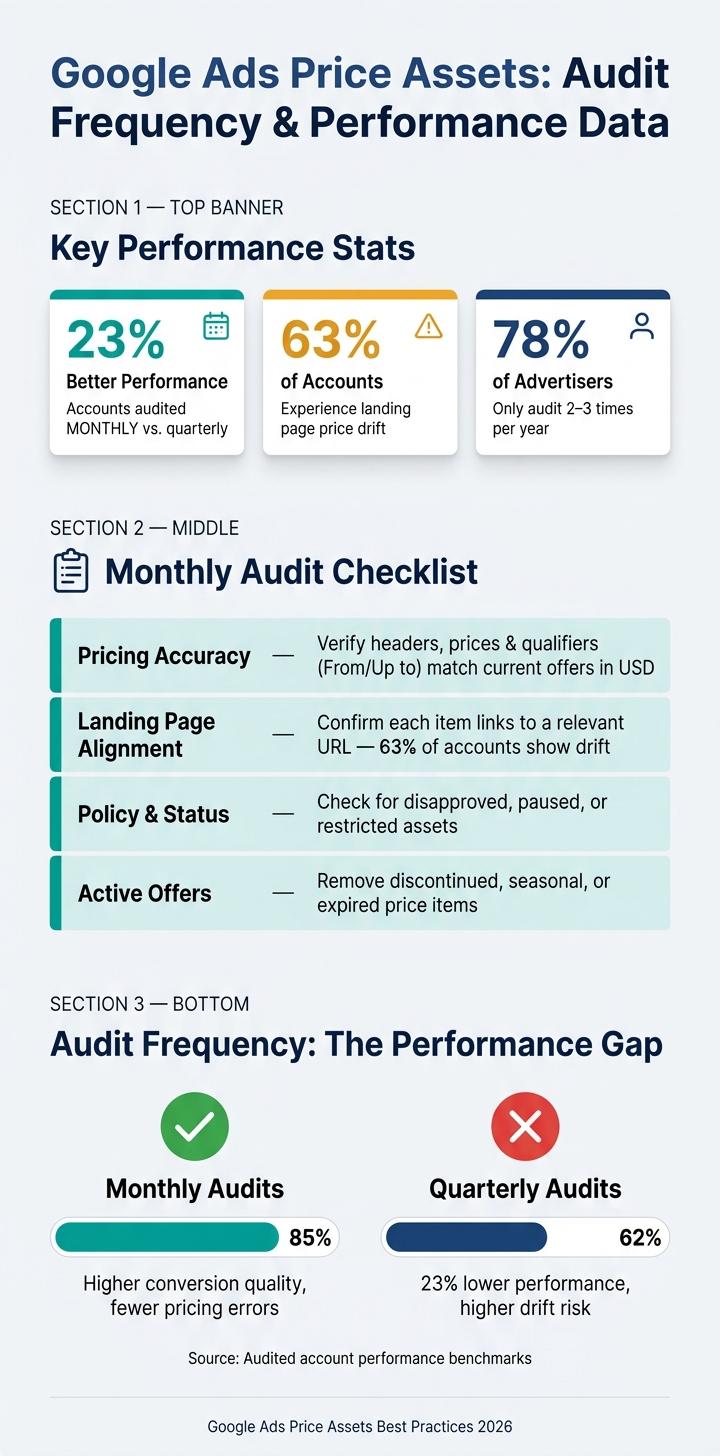
Accounts audited monthly perform 23% better than those audited quarterly, and 78% of advertisers still conduct full audits only 2 to 3 times per year.
A quick monthly review should cover four areas:
| Checkpoint | What to Verify |
|---|---|
| Pricing accuracy | Headers, prices, and qualifiers such as "From" or "Up to" still match current offerings and are formatted in USD |
| Landing page alignment | Each item links to a specific, relevant final URL; landing pages drift from ad promises in 63% of audited accounts |
| Policy and status | No disapproved, paused, or restricted assets are running |
| Active offers | Remove discontinued products, services, or seasonal offers |
It also helps to use scheduling for temporary promotions. Set end dates for seasonal or limited-time offers so expired prices stop serving on their own.
Document processes and use PPC bid management tools when scaling
As campaigns get bigger, small pricing changes can slip through the cracks. A clear change log helps you stay on top of it and cuts down on pricing drift across accounts.
Track each header, price point, test date, and outcome in that log.
Key takeaways for better price extension performance
Price assets do their job best when the whole setup stays aligned with search intent. In practice, that means:
- Confirm the setup is valid. Make sure the account is set to USD and each price asset includes at least three valid items before launch.
- Use 3 to 8 well-structured items. Three is the minimum, and up to eight gives Google more options for serving.
- Keep prices accurate and matched to landing pages. This is a common audit problem, affecting 63% of accounts.
- Apply assets at the right level. Ad group-level assets override campaign- and account-level ones, so use them when tighter relevance is needed.
- Optimize continuously. Review asset-level data monthly and refresh copy before it gets stale .
- Keep prices current, pages aligned, and changes documented.
FAQs
When should I use price assets?
Use price assets when you want to show structured pricing details that make your offers clearer, help with comparison-focused searches, and stay stable and useful for people who are deciding what to buy.
Why do my price assets get disapproved?
Price assets can get disapproved for a few common reasons.
They may run into issues if they use promotional or sales-like wording, show pricing that’s inaccurate or changes too often, or don’t meet the rules for the header, description, or URL.
One detail matters a lot: the URL must lead to the same domain as the ad.
How often should I audit price assets?
Start with a baseline audit of your price assets. Then review performance monthly.
Look at CTR, interaction rate, and contribution to conversions. Pause weaker assets, and keep testing new variations on a regular basis.