Refining lookalike audiences manually is time-consuming and often ineffective. Automated tools and top PPC agencies like Meta's Advantage+ and Google's Demand Gen can solve this by using AI to continuously update and optimize your audience targeting based on real-time data. Here's the key takeaway:
- Manual Refinement Issues: Static seed lists become outdated quickly, leading to inefficiencies and higher costs.
- Benefits of Automation: AI-driven systems dynamically adjust targeting, improving ROAS (113% vs. 76% for manual methods) and lowering CPA by up to 26%.
- How to Get Started:
- Use high-quality seed data (e.g., top customers, recent converters).
- Leverage Meta's automatic updates (every 3 days) or Google's AI-driven refreshes (every 1–2 days).
- Test audience sizes (e.g., 1%, 3%, 5%) and scale high-performing segments.
- Automate exclusions and monitor metrics like CPA, ROAS, and CTR.
What Are Lookalike Audiences and Why Manual Refinement Falls Short
What Are Lookalike Audiences?
Lookalike audiences are groups of people who share similarities with your most valuable customers, website visitors, or users who have already converted. Platforms like Meta and Google use machine learning to analyze details like demographics, interests, and behaviors from your source audience to find a broader group that’s likely to engage with your brand.
One key factor in lookalike audiences is the similarity percentage. A 1% lookalike audience is the closest match to your original audience, offering precision, while a 10% lookalike audience sacrifices some similarity for greater reach. For example, if you’re targeting users in the United States, a 1% lookalike includes the top 1% of Facebook users who are most similar to your high-value customers.
These audiences aren’t static. Meta refreshes its lookalike audiences every three days if they’re actively used in an ad group. Google Ads takes it a step further, updating its lookalike audiences automatically every one to two days. However, both platforms have minimum requirements for creating these audiences. Google needs at least 100 active matched users (though 1,000 to 5,000 is recommended for better results). Similarly, Meta requires at least 100 unique users from a single country in the seed audience. Despite these updates, relying on manual methods to refine these audiences often leads to inefficiencies.
Problems with Manual Refinement
Manually refining lookalike audiences comes with several challenges, primarily because it relies on outdated and static data. Many marketers manually upload CSV files with customer information, but this method has a major flaw: the data quickly becomes obsolete. As the team at Simon Data points out:
"By doing this manually, the customer data is immediately out of date and you need to continuously upload CSVs to update the customer list with new data".
This constant need for updates makes manual uploads impractical and time-consuming.
Another issue is inconsistent testing and poor segmentation. Many marketers stick to one audience size without exploring broader options or combine all customers into a single pool. This approach dilutes the effectiveness of campaigns and can result in overlapping audiences, which drives up costs unnecessarily. On top of that, manual segmentation often misses the mark, leading to inefficiencies and wasted budget.
The process is also resource-intensive. Effective manual refinement requires ongoing data segmentation, performance tracking (like CTR and CPA), and creative adjustments. Mistakes such as broken tracking pixels or errors in CRM data can go unnoticed, feeding unreliable data into the algorithm. As Ankit Lohar from GrackerAI warns:
"If your source data ain't up to snuff, your audience ain't gonna be either. This is because the algorithm relies on this data to find patterns".
The impact of these limitations is measurable. For example, testing in 2026 showed that 1% lookalike audiences delivered a 26% lower CPA compared to standard interest targeting - but only when the seed data was well-maintained. Without proper updates, the algorithm relies on stale data, and performance suffers. These challenges highlight the need for automated PPC tools that can refine lookalike audiences dynamically and in real time.
sbb-itb-89b8f36
How to Automate Lookalike Audience Refinement
Prepare High-Quality Seed Data
The quality of your seed data is crucial for accurate lookalike targeting. Focus on high-value customer segments - such as those with high lifetime value, frequent purchases, or an average order value over $150. Avoid using general website visitors or one-time bargain shoppers, as these can skew your results.
To maintain accuracy, regularly clean your seed list. This means removing duplicates, bots, refund seekers, and incomplete records. Colin Campbell, Head of Content at Pixis, highlights the importance of this:
"If your data contains errors or inaccuracies, it leads to flawed lookalike results. Regularly clean your lists to remove duplicates or incorrect information".
For the best results, use data from the past 30–180 days. Segment your lists based on customer behavior or product categories - for instance, "30-Day Purchasers" and "High-Intent Lead Form Fillers" rather than one combined list. Including extra details like location, purchase value, and the date of the last purchase can help create a more detailed customer profile. Keep in mind that Meta requires at least 100 users in your seed list, but using 200 or more can improve the accuracy of your models. On the other hand, Google Demand Gen needs a minimum of 1,000 active matched users, with 1,000–5,000 being the preferred range for better precision.
Once your seed data is clean and segmented, you’re ready to set up automated audience creation using Google Ads automation tools on major platforms.
Set Up Automated Lookalike Creation in Meta Ads
Meta simplifies lookalike audience creation by automatically refreshing these audiences every three days when linked to an active ad set. Start by selecting a well-refined seed list, such as your top lifetime-value customers or recent converters. For the best results, begin with a 1% lookalike audience, which typically delivers around 70% better cost per acquisition compared to a 10% lookalike.
To ensure your budget targets new prospects, exclude your original seed audience and recent converters from your lookalike campaigns. Experiment with different audience sizes, such as 1%, 3%, or 5%, to find the right balance between precision and reach.
For example, in 2025, Fashion Forward - a clothing retailer - used a lookalike audience based on their past 180-day purchasers. This strategy reduced their cost per purchase by 43%, increased ROAS by 28%, and boosted click-through rates by 2.1×. Similarly, CloudSolutions, a SaaS provider, created a lookalike audience from its highest-value customers (based on subscription length and monthly recurring revenue). The result? A 37% lower cost per lead and a 52% higher lead-to-demo conversion rate.
While Meta focuses on regular audience updates, Google Demand Gen takes a more dynamic, AI-driven approach.
Use AI-Driven Refinement in Google Demand Gen
Google Demand Gen leverages AI to refine lookalike targeting, using your seed list as a guide to identify high-converting users, even if they don’t fit traditional similarity criteria. Anu Adegbola, Paid Media Editor at Search Engine Land, explains:
"This effectively reframes Lookalikes from a fence to a compass".
To start, upload a customer match list with at least 1,000 active matched users. Google automatically refreshes these segments every 24–48 hours based on the latest customer data. You can choose from three reach levels - Narrow (2.5%), Balanced (5%), or Broad (10%) - to define your audience size. Google’s AI uses these settings as a starting point but can expand beyond them to optimize for cost per acquisition.
For the best performance, create lookalike segments 2–3 days before launch to allow the AI enough time for modeling. When combined with Optimized Targeting, Google’s AI layers multiple signals to improve conversions and reduce costs. Check the "signal" tag in your Audience Reporting table to ensure the segment is in suggestion mode.
This automated system adapts continuously to customer behavior, removing the need for manual adjustments. For instance, CarWorld - a regional auto dealer - used CRM data and offline conversions to create a high-value purchaser lookalike in Google Ads. The result? A 31% increase in qualified showroom visits and a 41% reduction in cost per vehicle sold.
How To Setup Facebook Ads Targeting In 2026 (Step by Step)
Set Up Automation Rules for Audience Testing and Optimization
After creating automated audience segments, the next step is to fine-tune and test these groups with automated rules. This strategy ensures your campaigns benefit from consistent, data-driven refinements without requiring constant manual adjustments.
Configure Testing Rules for Audience Segments
Once your audience refinement is set up, it's time to test different segments to find the best performers. For Google Demand Gen, experiment with Narrow (2.5%), Balanced (5%), and Broad (10%) lookalike segments individually. In Meta campaigns, begin with a 1% lookalike audience, then gradually expand to 2–3% or even 5% tiers as your frequency metrics increase or your CPA levels off.
To get accurate results, disable "Optimized Targeting" in Google Ads. Keep in mind that Google Demand Gen defaults to "suggestion mode" as of February 2026, which allows the algorithm to expand beyond your defined segments. If you want stricter controls, manually opt out and set lookalikes as a "Targeting Constraint".
For more precise testing, divide your high-value seed data into specific lookalike groups, such as "Top LTV Customers" or "Repeat Buyers." Google Ads expert Jyll Saskin Gales recommends starting small:
"When in doubt, I usually like to start with Narrow (2.5%) and see how we do".
To maintain effectiveness, set up alerts to notify you if a Google lookalike segment drops below 1,000 active matched users.
Scale High-Performing Audiences and Manage Exclusions
After identifying which audience segments perform best, focus on scaling them strategically. Increase budgets by 20–30% every 24–48 hours, but only after ad frequency and performance metrics stabilize. Begin scaling with your Narrow (1%) or smaller tiers, as these typically deliver 70% better CPA compared to broader 10% segments. Once stable, expand to Balanced (2–3%) tiers.
To avoid wasting ad spend, automate exclusions. Set rules to automatically exclude recent converters (last 30 days), current customers, and users who haven’t engaged with your campaigns. These exclusion lists should be updated regularly across platforms like Facebook, Google, Snapchat, and Pinterest using automation tools.
Real-world examples illustrate the benefits of automation. In 2024, Blue Yarn Media used Optmyzr's Rule Engine to streamline PPC strategies, cutting Customer Acquisition Costs by 36% and saving over 240 hours per client. Similarly, Eliminate Wasted Spend leveraged automated placement exclusions through Optmyzr, eliminating irrelevant ad placements and saving $6,000 in wasted spend.
Finally, monitor key metrics like CTR, CPC, and CVR with automated rules. For instance, set thresholds to pause ad sets if cost-per-conversion exceeds your target, ensuring profitability without constant oversight. Keep in mind that Meta refreshes lookalike audiences every three days, while Google updates them every 1–2 days.
Track Performance Metrics and Improve Over Time
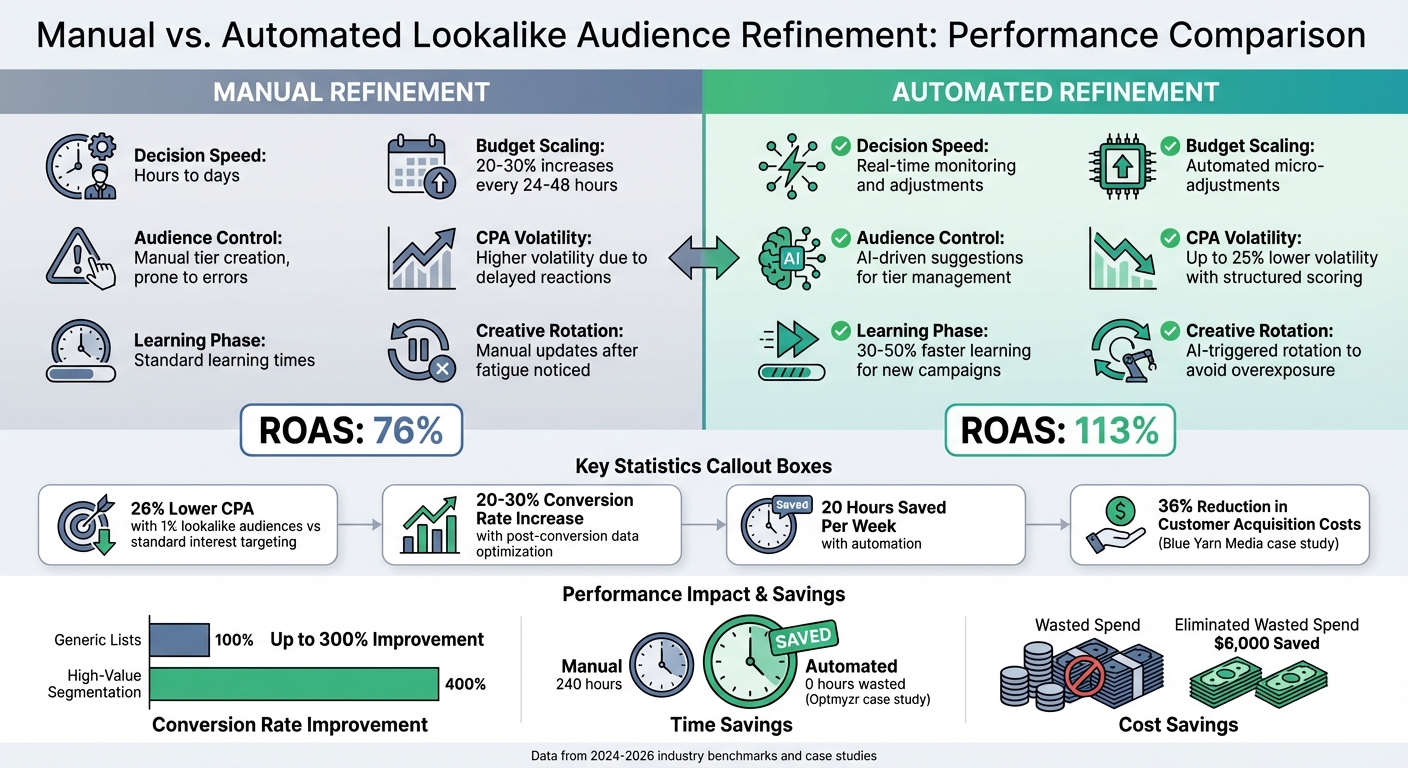
Manual vs Automated Lookalike Audience Refinement Performance Comparison
Once you've set up automation, it's crucial to keep a close eye on your metrics. Without consistent monitoring, you risk missing opportunities to scale successful segments or address underperforming ones.
Key Metrics to Monitor
Four core metrics - CPA (Cost Per Acquisition), ROAS (Return on Ad Spend), CVR (Conversion Rate), and CTR (Click-Through Rate) - are essential for gauging your campaign's profitability.
Here are some key benchmarks to watch:
- CPM (Cost Per Thousand Impressions): A rise of over 50% or a frequency exceeding 3 per week often signals audience fatigue.
- CTR: If it drops below 0.8%, it might be time to refresh your creative.
- CVR: For e-commerce campaigns, a conversion rate under 1% usually points to poor seed data quality.
Additionally, aim for around 50 optimization events per week to stabilize your ad sets and exit the learning phase. Using the Conversions API (CAPI) alongside the Meta Pixel can also reduce signal loss by 20–30%, improving the data fed into your lookalike models.
These metrics provide a solid foundation for comparing manual and automated campaign adjustments.
Manual vs. Automated Refinement Comparison
When it comes to refining campaigns, manual and automated approaches differ significantly in speed and consistency. Manual adjustments can take hours or even days, while AI-driven tools work in real time. For example, manual scaling typically involves increasing budgets by 20–30% every 24–48 hours to avoid resetting the learning phase. In contrast, automated systems make continuous micro-adjustments based on live performance data.
| Aspect | Manual Refinement | Automated Refinement |
|---|---|---|
| Decision Speed | Hours to days; relies on manual checks | Real-time monitoring and adjustments |
| Budget Scaling | 20–30% increases every 24–48 hours | Automated micro-adjustments |
| Audience Control | Manual tier creation and pausing; prone to errors | AI-driven suggestions for tier management |
| CPA Volatility | Higher volatility due to delayed reactions | Up to 25% lower volatility with structured scoring |
| Learning Phase | Standard learning times | 30–50% faster learning for new campaigns |
| Creative Rotation | Manual updates after fatigue is noticed | AI-triggered rotation to avoid overexposure |
Advertisers who optimize targeting using post-conversion data see conversion rates increase by 20–30% compared to those relying only on CTR. Additionally, advanced targeting systems can shorten the learning phase for new campaigns by 30–50%.
These distinctions highlight the importance of leveraging automation for continuous adjustments throughout your campaign lifecycle.
Best Practices for Ongoing Refinement
To maintain and improve campaign performance, follow a PPC campaign optimization checklist and consider these strategies:
-
Update Seed Data Regularly: Prevent audience drift by refreshing your seed data. As Ankit Lohar, Software Developer at GrackerAI, puts it:
"Lookalike audiences are not 'set it and forget it.' If your data is flawed, so is your audience".
- Segment by Value: Instead of generic lists, focus on high-value segments like repeat purchasers or high-LTV (Lifetime Value) customers. This can boost conversion rates by up to 300% compared to standard interest-based targeting.
- Automate Exclusions: Set rules to automatically exclude recent converters (within the last 30 days) and existing customers from prospecting campaigns. This ensures your budget targets fresh prospects, avoiding wasted spend.
- Use Tiered Segmentation: Test different similarity ranges - like 1%, 2–3%, and 4–5% - to identify which delivers the best results. Allocate your budget accordingly. For example, a 1% lookalike audience typically achieves a 70% better CPA than a 10% lookalike.
Conclusion
Streamlining lookalike audience refinement with automation can completely shift how you approach PPC campaigns. By taking over repetitive tasks, automation frees you to focus on the bigger picture. As AdStellar aptly puts it:
"Meta ads workflow automation changes this entire equation... It's the difference between being a campaign technician and being a growth architect".
The numbers back this up. Automated systems can save as much as 20 hours per week by optimizing bids and budgets in real-time, 24/7.
To get started, ensure you’re using high-quality seed data and let automation do the heavy lifting. Use predictive AI to spot winning strategies before your campaigns even launch, set up testing rules to scale successful elements, and keep an eye on critical metrics like CPA and ROAS. Don’t forget to update your seed audiences every quarter and segment them based on customer value instead of generic traits.
If you’re ready to dive into automation, check out the Top PPC Marketing Directory. This resource offers a curated list of tools for everything from bid management to audience targeting, creative production, and performance tracking. Whether you’re looking for a $40/month starter plan or an enterprise-level solution, you’ll find a range of options to suit your needs.
FAQs
What’s the best seed audience to start with?
When building a seed audience, the best starting point is your high-value customers or most engaged users. These could include your top spenders, recent buyers, or frequent website visitors. To get the most accurate and effective lookalike audiences, aim for a seed list with at least 500 to 1,000 qualified users. A well-curated seed audience ensures better results when expanding your reach.
How long should I wait before judging a new lookalike test?
When testing a new lookalike audience, it’s best to give it about 7 days before evaluating its performance. This time frame allows the audience to gather enough data and gives the algorithm the opportunity to fine-tune and optimize. By waiting a full week, you’ll get a more accurate understanding of performance trends and how well the audience is working.
When should I expand from a 1% lookalike to larger tiers?
When working with a seed audience that's large (ideally between 1,000 and 50,000 users), high-quality, and recent, consider expanding from a 1% lookalike audience to larger tiers, such as 5% or 10%. While larger percentages can significantly increase your reach, they may also reduce the similarity to your seed audience, which could impact conversion rates.
To strike the right balance between audience size and quality, it's essential to test different tiers. This approach helps you identify the sweet spot where you can scale your campaigns effectively without sacrificing too much on performance. Larger tiers are particularly useful when your goal is to reach broader audiences while still leveraging the characteristics of your seed audience.