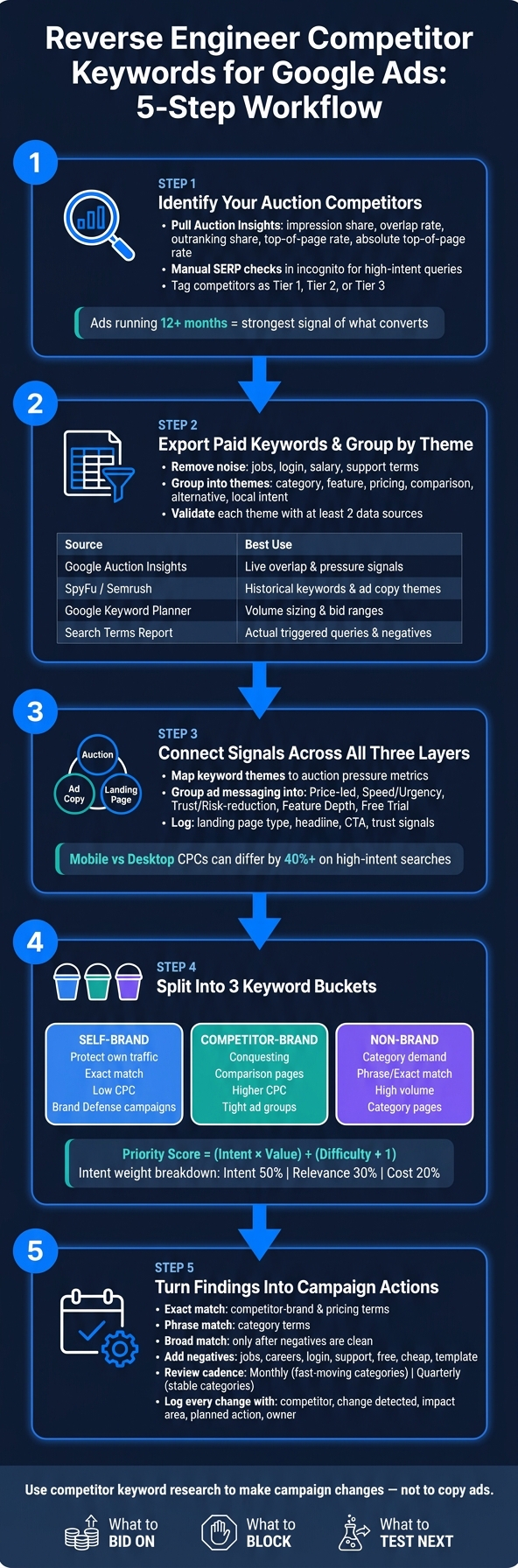
If I want better Google Ads decisions, I don’t start with more keywords - I start with competitor signals. The article’s core point is simple: I can use Auction Insights, SERP checks, PPC tools, ad copy, and landing pages to build a keyword map that tells me what to bid on, what to block, and what to test next.
Here’s the short version:
- I first confirm my actual Google Ads competitors - not just big brands in the market
- I keep the research scope tight - United States, one device view, and a 30-, 60-, or 90-day window
- I export paid keywords, remove clutter like jobs, login, and support terms, and group keywords by theme
- I check themes with at least 2 sources before I spend money on them
- I read auction pressure, ad messaging, and landing pages together, not as separate tasks
- I split keywords into self-brand, competitor-brand, and non-brand
- I score terms by buying intent, CPC, volume, and competitor repeat spend
- I turn the findings into campaign builds, negatives, landing-page tests, and a monthly or quarterly review log
A few points stand out. The article notes that mobile and desktop CPCs can differ by more than 40% on high-intent searches. It also points out that ads running for 12+ months are often the best clue for what a competitor keeps funding. And third-party spend estimates can get shaky for advertisers below $5,000 per month, so I’d treat those numbers as rough direction, not fact.
What I like here is the order of work. I’m not just spying on keywords. I’m building a clean system:
- competitor list
- keyword themes
- intent tags
- ad angles
- landing-page notes
- action list
That’s the part that matters. Without that, the work turns into a spreadsheet with no next step.
If I had to boil the whole piece down to one line, it would be this: use competitor keyword research to make campaign changes, not to copy ads.
Competitor Keyword Research Workflow for Google Ads
1. Find your real Google Ads competitors and collect the right data
With the U.S. scope locked in, the next job is to find the advertisers that actually affect your auctions. That matters because not every competitor is the same.
Business competitors fight for revenue. SERP competitors fight for attention. Auction competitors fight for ad inventory. For this workflow, auction competitors are the ones that change your bids, impression share, and placement. Once you know who they are, you can pull their active ads and paid keywords.
Use Auction Insights and manual SERP checks to confirm competitors
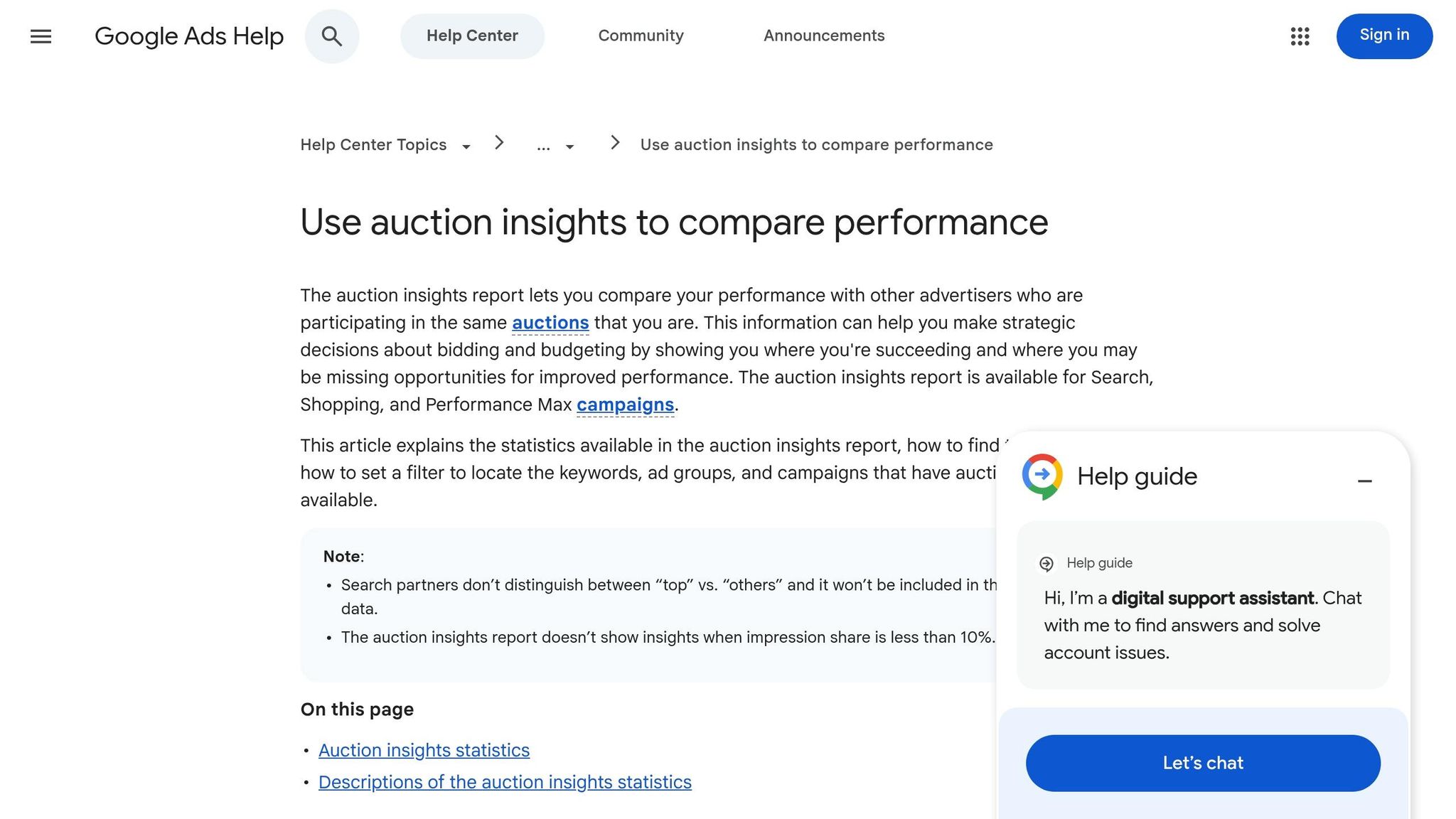
Start in Google Ads. Pull Auction Insights for your top campaigns and review five metrics:
- impression share
- overlap rate
- outranking share
- top of page rate
- absolute top of page rate
Focus on advertisers with steady overlap across more than one high-intent campaign. If the same domain keeps showing up in your highest-intent campaigns, that’s a strong signal it belongs at the top of your research list.
Then check the SERP by hand. Search your highest-intent commercial queries in incognito and write down which advertisers appear again and again. A one-time appearance is usually just noise. Repeated visibility across several queries is what marks a competitor worth tracking. If a big-name brand barely shows up in your most important auctions, move it down the list and put more attention on the specialists taking the traffic that converts.
Pull data from Google Ads, ad libraries, and PPC research tools
Once your competitor list is confirmed, collect proof from a few places.
Auction Insights gives you live overlap and pressure signals. The Google Ads Transparency Center shows the ads an advertiser is running right now, which helps you check messaging, offers, and positioning in market.
For historical coverage, use third-party tools like SpyFu, Semrush, and Ahrefs. SpyFu is especially useful for paid search research. Semrush and Ahrefs tend to work better when you also want broader international coverage or backlink context.
When you review those tools, pay close attention to ads that have stayed active for 12+ months. Longevity is one of the clearest signs of what converts. One caution here: third-party spend estimates are often shaky for advertisers spending less than $5,000 per month. Use those numbers as directional, not exact.
Create a master sheet for standardized analysis
Before you compare domains, export everything into one Google Sheet or Excel file. Set up the same columns from the start:
- keyword
- competitor domain
- competitor tier
- data source
- estimated CPC (USD)
- search volume
- match type (if available)
- landing URL
- device, geo, and date last seen tracking fields
Using the same column names across sources makes pivots much easier later.
Tag each competitor as Tier 1, Tier 2, or Tier 3 based on auction overlap and query intent. That simple tiering helps you decide which domains deserve a closer look in the next steps. This sheet becomes your source list for keyword extraction, and the Tier 1 group should be the first place you pull paid keywords from next.
sbb-itb-89b8f36
2. Extract competitor keyword sets and map them to themes
Export paid keywords from each competitor domain
With your competitor list in place, the next move is simple: pull each domain’s paid keywords and sort them by theme. Run a domain-level PPC report for every competitor in your PPC keyword research tools, then export the data.
Focus on commercial terms - queries that show evaluation, comparison, or buying intent. After export, remove brand, jobs, salary, and login terms. Those can clutter the list and pull attention away from keywords that can drive pipeline.
Put extra weight on recently active keywords. If a competitor has spent on a term again and again in the last few months, that tells you more than a keyword they tried once and dropped. One-off tests happen. Steady spend is the stronger clue.
Deduplicate keywords and group them by search theme
Start by normalizing case before you dedupe. Then remove near-duplicates that point to the same ad group and landing page.
Once the list is clean, group keywords into themes like:
- category
- feature
- pricing
- comparison
- alternative
- local intent
Each theme should line up with one ad group or one landing-page angle. That’s the point of the exercise. You’re not just building a big spreadsheet of keywords. You’re turning raw export data into something you can use for campaign structure, ad group planning, and page targeting.
Add a data-source table for validation
Use these sources to validate each keyword theme:
| Source | What It Shows | Best Use | Main Limitation |
|---|---|---|---|
| Google Auction Insights | Overlap rate, position above rate, and top-of-page rate | Identifying which competitors are hurting your performance in live auctions | Does not show the competitor's full keyword list or ad copy |
| Semrush / SpyFu | Historical paid keywords, ad copy themes, and estimated monthly spend | Bulk exporting competitor footprints and performing gap analysis | Data is estimated via scraping; can include low-confidence terms |
| Google Keyword Planner | Search volume, top-of-page bid ranges, and related terms | Sizing budget requirements and validating related terms | Not a direct spy tool; data is broad and directional |
| Search Terms Report | Actual queries that triggered your ads | Finding negative keywords and identifying exact customer language | Only shows queries your ads have already triggered |
Use at least two sources to check each theme before you put money behind it. That extra step can save you from chasing shaky terms and gives you a cleaner set of themes for the auction, ad copy, and landing-page review in the next step.
3. Read auction signals, ad copy, and landing pages together
Connect auction strength to keyword themes
Start by mapping each keyword theme to auction pressure. Pull your Auction Insights report, filter by campaign or ad group, and line those segments up with your keyword themes. If a competitor appears more often in pricing-focused groups than feature-focused groups, that usually means they’re putting more budget behind pricing terms. That’s a strategy call, not random noise.
A high impression share paired with a low top-of-page rate can point to an opening. In many cases, you can win more visibility on those themes by tightening ad relevance and improving landing page match instead of simply bidding more.
Document ad message patterns by intent
Review active competitor ads by hand in an incognito browser, then check what you found against SpyFu, Semrush, or PPC automation tools like Adalysis for ad history exports. The goal here is to spot patterns, not get distracted by one-off tests.
Use ads that have run for 12+ months as your baseline for testing.
As you review, group the messaging into simple buckets tied to intent, such as:
- Price-led hooks
- Speed or urgency claims
- Trust and risk-reduction language
- Feature depth
- Free trial offers
Then map each message theme back to the keyword group it supports.
Also keep an eye on Dynamic Keyword Insertion (DKI). Some competitors use it to reflect your query or even your brand name in the headline. An incognito SERP check can catch this when export tools miss it.
The message themes that run the longest are usually the best starting point for your own tests.
Review landing pages for offer type and funnel stage
When the query, ad, and page don’t line up, build a landing page just for that intent. Each keyword theme should connect to one ad angle and one page type.
For each keyword theme, log the landing page type, the headline, the CTA, and any trust signals such as testimonials, review counts, or guarantee badges. Strong alignment across query, ad, and page tends to lift conversion rates. In many cases, these proof points matter more than the ad itself.
| Keyword Theme | Competitor | Ad Angle | Landing Page Type | CTA |
|---|---|---|---|---|
| Pricing / Discount | Competitor A | "Lowest Price Guaranteed" | Pricing Page | Get a Quote |
| Comparison / Vs | Competitor B | "Why We Beat [Brand]" | Comparison Table | Start Free Trial |
| Feature / Depth | Competitor C | "Advanced AI Integration" | Product Feature Page | Book a Demo |
| Speed / Urgency | Competitor D | "Same-Day Implementation" | Lead Gen Form | Get Started |
Once you fill out this table for your competitors, the patterns usually show up fast. You’ll spot which angles get used again and again, and where a better page with tighter message match can beat a larger budget.
Use those patterns to label branded, non-brand, and high-intent terms in the next step.
4. Classify branded, non-brand, and high-buying-intent keywords
Tag branded and non-brand terms with simple rules
Once you've mapped ad angles and landing page types, sort your keyword list into clear buckets. If you skip this step, brand defense and conquesting spend get lumped together, and it gets much harder to see what's pulling its weight.
A branded keyword includes your company name, product names, or common misspellings. A non-brand keyword is a category or solution search that describes the problem or service without naming a provider.
Inside branded terms, break things down one more step:
- Tag your own brand as "Self"
- Tag competitor names as "Competitor"
That split matters. It shows the difference between budget used to protect your own searches and budget used to go after someone else's traffic.
Competitor-brand terms can also be tougher to run. Ad relevance is often weaker, and ad-copy rules can be tighter. That can push CPCs up.
Identify high-buying-intent modifiers and score priority
Use intent modifiers and expert-recommended PPC tools to rank each keyword theme before you set budget. These modifiers tell you where the searcher is in the buying process.
Terms like pricing, cost, quote, demo, trial, buy, book, sign up, compare, alternative, and vs usually signal that someone is close to making a choice. Terms like how to, what is, and guide usually point to research mode, which makes them a better fit for content or low-bid tests.
Repeated competitor spend is another signal worth tracking. If competitors keep showing up on a term, there's usually a reason. Pair that with search volume and CPC to rank what to tackle first.
A simple formula is enough: Priority = (Intent × Value) / (Difficulty + 1)
Here, Value combines monthly volume and CPC. You don't need a perfect score. You just need a ranked list your team can use to decide where to start.
Also, flag navigational competitor searches as negatives. Queries like "[Competitor] login" or "[Competitor] support" are not buyer searches. Exclude them from competitor campaigns.
Add a classification table for decision-making
The table below gives paid teams and operators one view of keyword type, intent, and next action. Start with your top 30 to 50 keywords, then build from there.
| Keyword | Branded/Non-Brand | Owner | Intent Type | Est. CPC ($) | Search Volume | Competitor Presence | Recommended Action |
|---|---|---|---|---|---|---|---|
| [Your Brand] pricing | Branded | Self | Transactional | Low | Moderate | Low | Brand Defense / Sitelink to Pricing |
| [Competitor] alternatives | Branded | Competitor | Commercial | High | Moderate | High | Conquesting / Comparison Landing Page |
| Best CRM for startups | Non-Brand | N/A | Commercial | High | High | High | Category Page / Listicle |
| [Competitor] vs [Self] | Branded | Both | Commercial | Moderate | Low | Moderate | Launch Comparison Page |
| [Competitor] login | Branded | Competitor | Navigational | Low | Moderate | Low | Exclude (Negative Keyword) |
Use this table to build new ad groups, negatives, and a refresh log.
5. Turn findings into campaign changes and monitoring rules
Build campaign and ad group changes from the keyword map
Once the keyword map is sorted, turn it into your campaign structure, or consult with top PPC agencies to refine your setup. Use the Section 4 classification table as the build sheet. Split terms into Branded Defense, Competitor Conquesting, and Non-Brand Category campaigns.
Match type matters here:
- Use Exact match for competitor-brand and pricing terms
- Use Phrase match for category terms
- Hold off on Broad until your negative lists are tight
Each ad group should point to the matching landing page. That sounds obvious, but it’s where a lot of accounts drift off course. If the keyword says one thing and the page says another, performance usually pays for it.
Add negatives and exclude low-fit themes
Competitor research helps you decide what to block, not just what to chase. Exports usually come with plenty of noise, so build a shared negative keyword list based on the low-fit terms competitor analysis surfaces.
Common exclusions include jobs, careers, salary, login, support, phone number, free, cheap, and template. Move irrelevant navigational terms into negatives as well.
This step can save a lot of wasted spend. A keyword may look related at first glance, but if the searcher wants customer support, a job opening, or a free download, that click probably won’t help your pipeline.
Set a refresh schedule and change log
Review monthly or quarterly for CPC, auction, and landing-page shifts. Then log each change so you can connect a competitor move to a clear account response.
| Review Date | Competitor | Change Detected | Impact Area | Planned Action | Owner |
|---|---|---|---|---|---|
| 2026-08-12 | Competitor A | New "Free Trial" offer in ad copy | CTR / Impression Share | Test "No Credit Card Required" headline | PPC Lead |
| 2026-08-12 | Competitor B | Bidding on [Your Brand] + "Alternative" | Brand Defense CPC | Launch dedicated comparison landing page | Content Mgr |
| 2026-08-12 | Competitor C | Dropped from Top-of-Page for core terms | Auction Strength | Increase bids on high-intent themes | PPC Lead |
| 2026-08-12 | Market Wide | CPC shift in USD (+15%) | Budget / CPA | Audit negatives to reduce wasted spend using specialized PPC advertising tools | Analyst |
When you check Auction Insights, pay close attention to Overlap Rate and Position Above Rate. Those two metrics can show when a competitor starts pushing harder. If either one moves fast, adjust bids, negatives, or landing pages right away.
Conclusion: Turn competitor keyword research into a Google Ads action plan
Turn the map into bids, negatives, and landing-page tests. This follows a thorough competitor budget analysis to ensure your spend is realistic. Use your keyword map to decide what to bid on, what to block, and what to test next.
Then split spend across three buckets: brand defense, competitor conquesting, and non-brand demand. That split shows where to bid, where to block, and where to build.
Run a dedicated brand campaign to protect your own traffic. For competitor-brand terms - especially comparison searches like "[Competitor] alternatives" or "[Product A] vs [Product B]" - use tightly controlled ad groups and dedicated comparison pages. Don't send that traffic to your homepage. Keep non-brand terms in phrase or exact match until your negatives are clean.
Before you put budget behind any theme, rank it by:
- Intent - 50%
- Relevance - 30%
- Cost - 20%
Review this work monthly in fast-moving categories and quarterly in stable ones. Log each change as you go. That rhythm keeps competitor research tied to live account updates.
FAQs
How do I find my real Google Ads competitors?
Identify three types: business rivals, SERP competitors, and auction competitors. For paid search, auction competitors matter most because they directly affect your costs and visibility.
Start with your Google Ads Auction Insights report. It shows which advertisers keep showing up in the same auctions as you.
Then search your high-intent keywords in incognito mode to see who appears on the page. After that, use tools like SEMrush, SpyFu, or the Google Ads Transparency Center to review ad copy and landing page patterns.
Which keyword themes should I test first?
Prioritize keyword themes based on commercial intent and how well they match a landing page. Test them in this order:
- Transactional, high-intent terms like “best,” “pricing,” “quote,” “vs,” and “alternative”
- Gap keywords your competitors bid on but you don’t
- Long-tail keywords built around more specific searches
Only launch a new theme when you have a dedicated landing page for it. And to keep traffic quality in check early on, start with phrase match and exact match.
When should I exclude competitor keywords?
Exclude competitor keywords when they pull in low-intent searches like jobs, logins, support, or careers. Do the same when you don’t have a matching landing page and a clear offer for that query.
Cut terms that keep bringing poor conversion quality or high costs with no clear payoff. If a competitor stays away from certain terms, that can also hint at weak conversion potential.