When running TikTok ads, choosing the right attribution windows is key to accurately tracking conversions and optimizing performance. Attribution windows define how long after someone interacts with your ad (clicks or views) a conversion is credited to that interaction. TikTok offers flexible options for click-through and view-through attribution, but their default settings (7-day click and 1-day view) may not suit every campaign.
Key Takeaways:
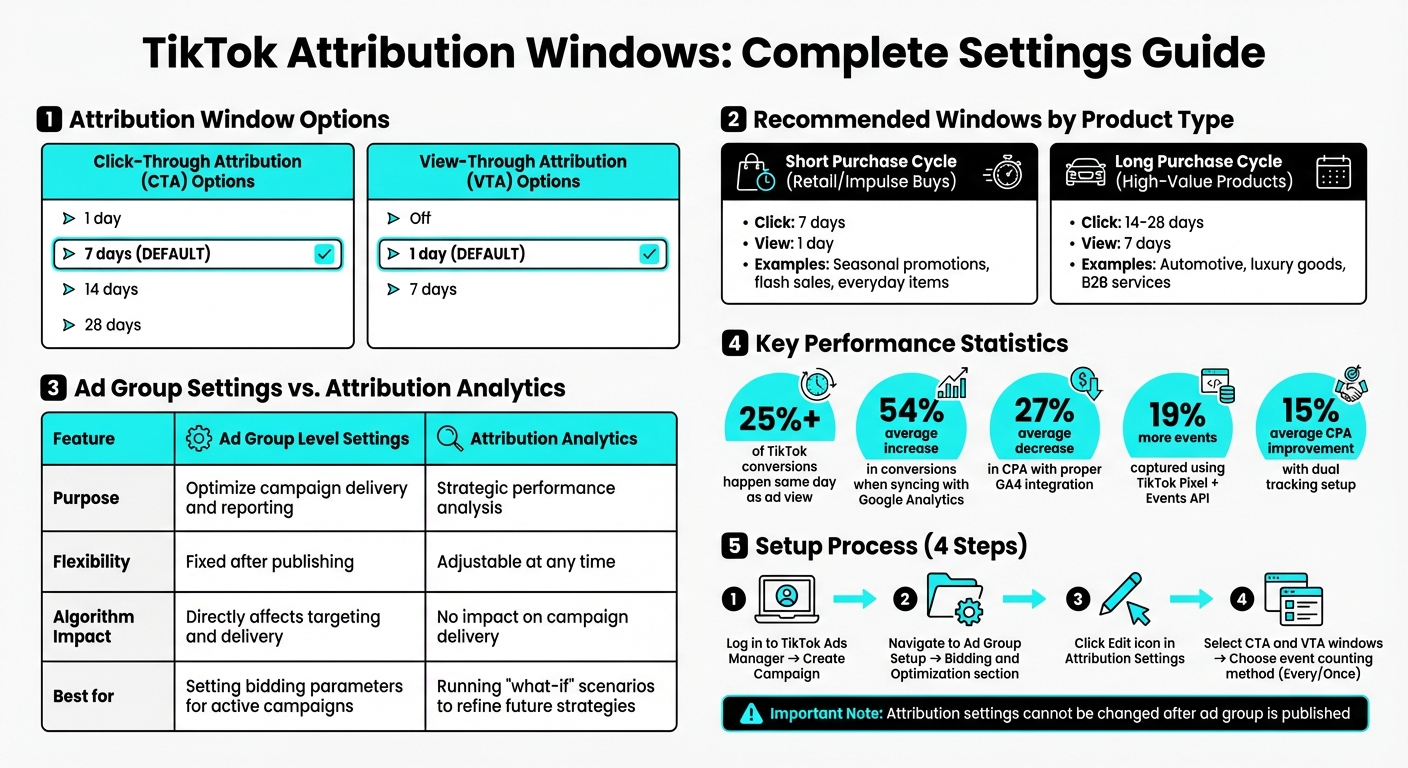
- Click Attribution Options: 1, 7, 14, or 28 days.
- View Attribution Options: Off, 1 day, or 7 days.
- Defaults: 7-day click and 1-day view.
- Customizing: Adjust settings during ad group creation in TikTok Ads Manager.
- Analytics Tool: Compare different attribution windows without affecting live campaigns.
For campaigns with short decision cycles (like impulse buys), shorter windows work well. Longer windows are better for high-value or research-heavy purchases. Consistency across TikTok and third-party tools like Google Analytics ensures accurate reporting and better results. Always align attribution settings with your sales cycle to capture the full impact of your ads.
TikTok Attribution Window Options and Settings Comparison Guide
TikTok's Default Attribution Settings
Default Click and View Attribution Windows
When you launch a new campaign on TikTok, the platform automatically applies a 7-day click-through attribution (CTA) and a 1-day view-through attribution (VTA) window. Here's how it works: if someone clicks on your ad, TikTok tracks any conversions that happen over the next seven days. On the other hand, if a user only views your ad without clicking, TikTok attributes any conversion within 24 hours to that view.
TikTok also provides an option called Engaged View-through Attribution (EVTA). This feature assigns credit to users who watch at least six seconds of your ad, even if they don’t click. Additionally, TikTok uses a last-click attribution model, meaning clicks take precedence over views. For example, if someone clicks on your ad on Monday, then views another ad on Wednesday, and finally converts, the credit goes to the Monday click. While these default settings are straightforward, they might not be the best fit for every campaign.
When Default Settings Don't Work
Default attribution settings are convenient, but they aren’t always ideal. They tend to favor quick, impulse-driven purchases, which can overlook the longer decision-making process involved in buying high-value items like cars, luxury goods, or B2B services. These types of purchases often require more time, research, and consideration.
TikTok is also a platform where users frequently discover products but don’t immediately act. For example, someone might see an ad, become interested, and then revisit the product days later through a search or direct website visit. In such cases, the default attribution windows might miss capturing those conversions.
As TikTok puts it:
"Shoppers take many paths to purchase after seeing an ad on TikTok and last-click attribution only shows part of the story".
Seasonal campaigns or efforts focused on brand awareness face similar issues. Imagine a customer notices your ad during their research phase, spends a couple of weeks comparing options, and then decides to buy. A 7-day attribution window simply wouldn’t account for that journey, potentially leaving valuable insights on the table.
How to Set Custom Attribution Windows on TikTok
Setting Custom Windows at the Ad Group Level
You can configure attribution windows during the ad group creation process in the Bidding and Optimization section. Start by logging in to TikTok Ads Manager and creating a campaign. When you reach the ad group setup stage, click the Edit icon in the Attribution Settings section.
From there, choose your preferred Click-Through Attribution (CTA) and View-Through Attribution (VTA) window options. Next, decide on the event counting method: select "Every" for purchases or "Once" for installs or non-purchase events. Keep in mind, once an ad group is published, its attribution settings are locked. To make changes, you’ll need to create a new ad group.
If you want to experiment with different configurations without disrupting active campaigns, TikTok provides an Analytics tool, which is explained below.
Adjusting Attribution Windows in Analytics
TikTok’s Attribution Analytics tool is a great way to explore alternative window settings without affecting live campaigns. You can find this tool under the Assets menu in TikTok Ads Manager. Once there, use the Performance Comparison tool to evaluate key events like Purchases or Add to Cart. This allows you to compare different attribution window combinations and see how they impact metrics such as CPA and conversion volume.
For example, you could test how a 28-day click window compares to a 7-day window in terms of performance. This kind of analysis helps you fine-tune your strategy without interfering with your current campaigns.
Ad Group vs. Analytics Adjustments
Ad group settings and Attribution Analytics serve different purposes, and understanding this distinction can help you optimize your campaigns more effectively.
| Feature | Ad Group Level Settings | Attribution Analytics |
|---|---|---|
| Primary Purpose | Optimizing campaign delivery and reporting | Strategic performance analysis |
| Flexibility | Fixed after publishing | Adjustable at any time |
| Algorithm Impact | Directly affects audience targeting and delivery | No impact on campaign delivery |
| Best Use Case | Setting bidding parameters for active campaigns | Running "what-if" scenarios to refine future strategies |
Ad group settings are ideal when you have a clear understanding of your customer’s conversion journey and want TikTok’s algorithm to optimize accordingly. On the other hand, Attribution Analytics is perfect for testing scenarios to see if your current settings might be underestimating TikTok’s influence.
For app campaigns, ensure that your TikTok attribution windows align with your Mobile Measurement Partner (MMP) settings. This will help you avoid any discrepancies in reporting.
Best Practices for Custom Attribution Windows
Choosing the Right Window Length
When setting up attribution windows, align them with your product's purchase cycle. For retail brands, seasonal promotions, flash sales, or everyday items, shorter windows like 7-day click/1-day view work well. These capture quick ad impacts without skewing results with unrelated conversions.
On the other hand, high-involvement products - like cars or other big-ticket items - require longer windows. Extending click windows beyond 7 days and view windows beyond 1 day allows you to account for the extended research and decision-making process. For example, automotive advertisers often need weeks to capture the full customer journey before a purchase.
To fine-tune your settings, use TikTok's Time to Conversion reports. These reports provide insights into how many days typically pass between an ad interaction and a conversion, helping you make informed decisions. Additionally, the Performance Comparison tool lets you see how different attribution window combinations impact metrics like CPA and total events, so you can test before committing to a new setup. Interestingly, over 25% of TikTok conversions happen on the same day as the ad view, highlighting the value of view-through attribution.
Once you've determined the right window lengths, make sure to keep these settings consistent across all platforms.
Syncing Windows with Third-Party Tools
After finalizing your attribution windows, ensure they are synced across all tracking systems. It's crucial to maintain identical settings between TikTok Ads Manager and tools like your Mobile Measurement Partner (MMP) or Google Analytics 4 (GA4) account. Discrepancies in settings can lead to mismatched reports, making it harder to track ROI accurately. TikTok strongly advises this consistency to avoid gaps in conversion reporting.
The benefits of proper syncing are clear. Advertisers who connected Google Analytics with TikTok Ads Manager reported an average 54% increase in conversions and a 27% decrease in CPA. Using both TikTok Pixel and Events API together can capture 19% more events while improving CPA by 15% on average. By linking your GA4 account to TikTok Ads Manager, you unlock Third-Party Optimization, which feeds TikTok's algorithm with valuable signals to enhance campaign performance. For app campaigns, configure your MMP to post back both attributed and unattributed data to give TikTok’s system the best chance to optimize effectively.
sbb-itb-89b8f36
TikTok Attribution Manager
Conclusion
Custom attribution windows give you control over how TikTok tracks conversions. You can set these at the ad group level under "Bidding and optimization." Options include click windows (1, 7, 14, or 28 days) and view windows (off, 1, or 7 days). Once published, these settings cannot be changed.
The attribution windows you choose have a direct impact on your campaign’s performance. Align them with your customer journey to ensure accurate conversion tracking. For example, retail brands and seasonal promotions often see success with 7-day click/1-day view windows. On the other hand, products with longer decision-making cycles, like automobiles, benefit from extended windows to account for more in-depth research. TikTok’s Performance Comparison tool can help you determine the best configuration for your campaigns.
To maximize results, make sure your attribution windows are consistent across TikTok Ads Manager and any third-party tools you’re using. Enabling View-Through Attribution can capture over 25% of same-day conversions, providing TikTok’s optimization algorithm with essential data. Additionally, by utilizing the TikTok Pixel and Events API, you can track 19% more events and lower your CPA by an average of 15%. When optimized effectively, these settings can lead to more efficient ad spending and a stronger return on investment.
FAQs
How can I set the right attribution window for my TikTok ad campaign?
Selecting the right attribution window for your TikTok ad campaign hinges on your objectives, the length of your customer’s decision-making process, and the type of data you need to fine-tune performance.
Start by identifying your campaign goal. If you're aiming for quick actions, like app installs or impulse buys, a 1-day click-through attribution (CTA) window usually works best. On the other hand, campaigns involving longer sales cycles - think high-value products or B2B services - might benefit from a 7- to 28-day CTA window to better capture delayed conversions.
For strategies where impressions are key, consider enabling view-through attribution (VTA) to track conversions that stem from ad views. While VTA is commonly set to 1 day, extending it to 7 days can provide a more comprehensive view of user behavior. Make sure your TikTok attribution settings align with any external measurement tools, such as mobile-measurement partners, to ensure consistent data across platforms.
Lastly, take advantage of TikTok’s analytics tools to test different attribution windows. Keep an eye on your conversion data and make adjustments as needed to get the most out of your campaign.
How do custom attribution windows affect TikTok ad campaign performance?
Custom attribution windows let you decide how long TikTok should track conversions after someone interacts with your ad. For click-through attribution (CTA), you can set the window anywhere from 1 to 28 days. For view-through attribution (VTA), the tracking period can go up to 7 days. Tailoring these windows to fit your product’s buying cycle is key. For example, a 1-day window works well for impulse buys, while a 7-day window makes more sense for products that require more thought before purchase.
Fine-tuning these settings helps TikTok gather more accurate conversion data, which improves its optimization algorithms. This often means lower cost-per-action (CPA) and better return on ad spend (ROAS). Enabling view-through attribution also gives you a fuller understanding of your campaign’s performance, helping TikTok optimize even further for stronger outcomes. Experimenting with different attribution windows can help you find the best fit for your business while minimizing reporting discrepancies.
How can I align TikTok tracking with third-party tools?
To make sure TikTok’s conversion data lines up with your third-party tracking tools, start by syncing attribution windows. Match the click-through and view-through settings (like 1-day or 7-day) in TikTok Ads Manager with those in your measurement partner’s platform. This helps reduce reporting inconsistencies.
Next, enable postbacks to track conversions that occur outside TikTok’s attribution window. Also, grant your measurement partner access to raw data for improved accuracy. When transitioning to TikTok’s Self-Attributing Network, keep the older integration active for at least 60 days to retain access to historical conversion data.
Once everything is set up, run a conversion test to confirm that timestamps and attribution align between both platforms. For more tools and resources to simplify campaign tracking, check out the Top PPC Marketing Directory.