Key Points:
- How it works: Uses the formula
y = 2^(-x/h)to calculate credit, wherexis days before conversion andhis the half-life. - Strengths: Highlights recent, impactful interactions while still considering earlier ones. Works well for campaigns with long sales cycles, such as in B2B.
- Limitations: Undervalues early-stage efforts like brand awareness and is no longer supported in Google Ads as of 2023, replaced by Data-Driven Attribution.
- Practical Use: Adjust the half-life for longer cycles (e.g., 30 or 45 days) to ensure early interactions aren’t overlooked. Use tools like GA4 or third-party platforms for advanced insights. You can also leverage top PPC bid management tools to automate optimizations based on these insights.
Time-decay attribution is a practical way to analyze PPC performance metrics, especially for campaigns with multiple touchpoints. However, it’s important to balance its recency focus with other models to get a full picture of your marketing efforts.
Google Ads/Analytics Attribution Models Explained - Beginner Level Tutorial
sbb-itb-89b8f36
How Time-Decay Attribution Works
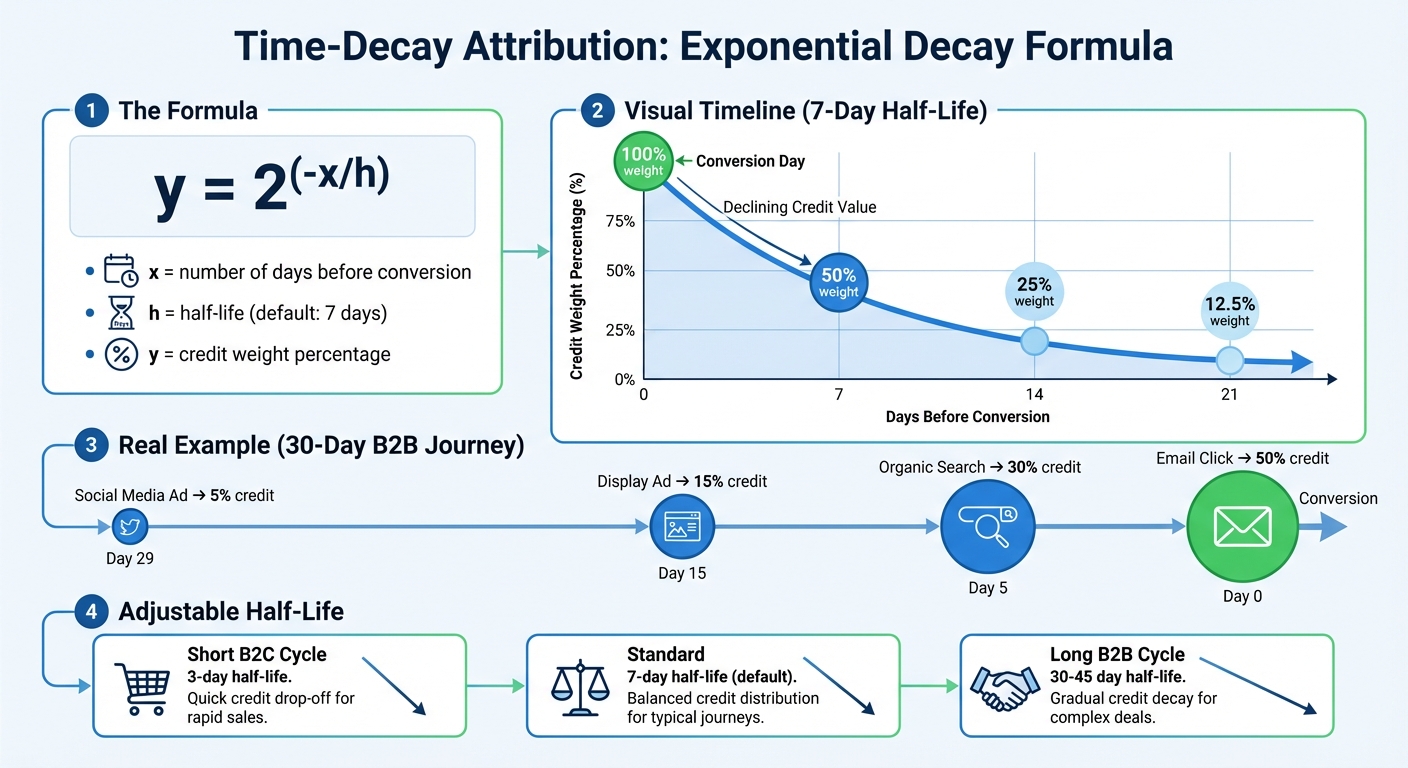
Time-Decay Attribution: How Credit Decreases Over Time with Exponential Decay Formula
Time-decay attribution assigns credit to all touchpoints in a customer's journey but gives more weight to interactions that occur closer to the final purchase. This concept, known as recency bias, operates on the idea that recent interactions have a stronger influence on the decision to convert. By focusing on timing, this model provides a nuanced way to allocate credit as part of your PPC campaign optimization.
The model uses a half-life parameter to measure how quickly the influence of a touchpoint fades over time. Most platforms set the default half-life at 7 days. Using top PPC tools can help you track these interactions across different channels more effectively. For instance, with a 7-day half-life, a touchpoint from 7 days ago would receive 50% of the credit.
The Exponential Decay Formula
The formula for time-decay attribution is:
y = 2^(–x/h)
Here:
- x represents the number of days before conversion.
- h is the half-life (e.g., 7 days).
Using this formula:
- A touchpoint on Day 0 has 100% weight.
- A touchpoint 7 days prior holds 50%.
- At 14 days, the weight drops to 25%, and at 21 days, it decreases to 12.5%.
This method is highly adaptable. For example, in B2B campaigns with longer sales cycles (e.g., 60 days), a 7-day half-life might undervalue early-stage interactions. Adjusting the half-life to 30 or 45 days - roughly 25–30% of the sales cycle - can provide a more balanced credit distribution.
Multi-Touch PPC Journey Examples
Take a 30-day B2B purchase journey with four key touchpoints:
- A social media ad 29 days before conversion.
- A display ad 15 days before conversion.
- An organic search interaction 5 days before conversion.
- An email click on the day of conversion.
With a 7-day half-life, the model might allocate credit as follows:
- 50% to the email click on Day 0.
- 30% to the organic search interaction on Day 5.
- 15% to the display ad on Day 15.
- 5% to the social media ad on Day 29.
This distribution reflects the stronger influence of interactions closer to the final purchase.
For shorter B2C cycles, such as a 10-day journey with a 3-day half-life, bottom-funnel actions like retargeting ads and search clicks would dominate the credit. In contrast, top-funnel actions, like display impressions, would provide more of a supportive role. This approach ensures that credit is allocated in line with the timing and impact of each interaction.
Pros and Cons of Time-Decay Attribution
Advantages
Time-decay attribution strikes a middle ground between overly simplistic single-touch models like last-click and more complex multi-touch alternatives. Unlike last-click attribution, which focuses solely on the final interaction, time-decay accounts for every touchpoint in the customer journey, offering a broader perspective on campaign performance.
By giving more weight to recent interactions, this model highlights the touchpoints that most directly influence conversions. This approach can help optimize return on investment (ROI) by identifying the channels that drive impactful late-stage interactions, enabling marketers to allocate budgets more effectively.
Another benefit is its customizable half-life parameter, which allows businesses to tailor the model to their specific sales cycle. For instance, in a B2B campaign with a 60-day sales cycle, the half-life can be adjusted to 30 or 45 days to ensure early awareness efforts aren't overlooked. This adaptability makes time-decay especially useful for optimizing campaigns like pay-per-click (PPC) advertising or retargeting, where recent interactions often play a crucial role. Additionally, for email nurture campaigns, this model provides clear insights into which strategies are driving results.
However, while time-decay attribution offers some clear benefits, it's not without its flaws.
Disadvantages
One of the most notable downsides is how it undervalues top-of-funnel activities. Early-stage interactions - such as brand awareness campaigns, SEO content, or initial social media engagement - receive minimal credit because they occur farther from the conversion event. As the MNTN Team explains:
Time-decay attribution can sometimes oversimplify the complex nature of consumer behaviors and decision-making.
This leads to recency bias, where the model assumes that the most recent touchpoints are the most impactful. For example, a detailed webinar from weeks prior might have significantly influenced a prospect's decision, but time-decay would predominantly credit a follow-up retargeting ad that drove the final conversion.
Another limitation is its declining relevance in modern tools. As of 2023-2024, Google Ads has phased out time-decay attribution in favor of Data-Driven Attribution, which offers a more nuanced view of touchpoint contributions. Additionally, the model doesn't account for external factors like seasonal trends, competitor activities, or organic brand growth - it focuses solely on the timing of tracked digital interactions.
Comparison Table
Here’s a quick comparison of time-decay attribution alongside other popular models:
| Attribution Model | Credit Distribution | Key Advantage | Key Limitation |
|---|---|---|---|
| Time-Decay | Weighted; recent touchpoints get more credit | Highlights the full journey and closing interactions | Downplays early awareness efforts |
| Last-Click | 100% to the final touchpoint | Simple and identifies the "closer" | Ignores earlier nurturing and discovery |
| Linear | Equal credit to all touchpoints | Values every interaction equally | Overlooks the varying impact of different touchpoints |
Setting Up Time-Decay Attribution in PPC Platforms
Configuring Time-Decay in Google Ads
As of November 2023, Google Ads no longer supports time-decay, first-click, linear, or position-based attribution models. Any conversion actions previously set to time-decay have been automatically transitioned to Data-Driven Attribution (DDA).
Currently, Google Ads offers only two attribution models: Data-Driven Attribution, which is now the default for most accounts, and Last Click. Data-Driven Attribution relies on AI to analyze historical account data and evaluate how each touchpoint contributes to conversions, rather than using a static, time-based formula.
To update the attribution model for an existing conversion action, log in to Google Ads, navigate to Goals, then go to Conversions > Summary. Select the relevant conversion action, click Edit settings, and choose the Attribution model option to view and select from the available models.
For Data-Driven Attribution to perform effectively, Google suggests meeting a minimum threshold of 200 conversions and 2,000 ad interactions within a 30-day period. If your account falls short of these numbers, Last Click remains a practical alternative until your data volume grows. Additionally, fine-tuning your conversion window is critical for precise performance measurement.
Adjusting Conversion Windows
Even though time-decay attribution has been phased out, managing your conversion window is still a key factor in tracking performance accurately. The conversion window determines the timeframe after an ad interaction during which a conversion is recorded. For Search and Display campaigns, this window can range from 1 to 90 days.
To modify the conversion window, go to the same settings menu, click Click-through conversion window, and select a duration - commonly 30, 60, or 90 days. Google recommends using at least a 7-day window to ensure enough data is captured.
Use the Time Lag report to help determine the best conversion window for your campaigns. For example, if 75% of your conversions happen between days 25 and 30, setting a 30-day window ensures you account for most of your conversions. B2B campaigns with longer sales cycles might benefit from a 60- or 90-day window, while e-commerce campaigns with shorter decision-making timelines often stick to 30 days.
When switching attribution models or adjusting conversion windows, it’s also important to update your bidding targets. Compare the percentage change in your "Cost / conv. (current model)" to the previous setup and adjust your Target CPA or Target ROAS by the same percentage to maintain balanced bidding.
Best Practices for Using Time-Decay Attribution in PPC Campaigns
Fine-tuning attribution in PPC campaigns involves a mix of testing, segmentation, and accurate tracking - key steps in improving performance and insights.
Testing Against Other Attribution Models
Since many platforms now lean toward newer attribution models, testing time-decay often means comparing it with Data-Driven Attribution or Last Click models. In Google Ads, navigate to Goals > Measurement > Attribution to run model comparison reports. These reports can reveal undervalued keywords and campaigns that play a role in nurturing leads.
To prepare for model changes, add the "Conversions (current model)" and "Cost/conv. (current model)" columns to your reporting tables before switching attribution models. This gives you a clear view of how performance metrics might shift. For those using third-party tools that still support time-decay, experiment with different half-life settings tailored to the type of campaign you're running.
The Path Metrics report is another valuable resource. It shows the average number of days and interactions leading to a conversion. For campaigns with shorter cycles - like 7–10 days - time-decay can work well. However, for longer cycles, such as those common in B2B where buyers might download multiple resources over weeks, you’ll need extended lookback windows to capture the full journey. These findings are essential for refining how you segment campaigns.
Segmenting Campaigns by Funnel Stage
Once you've tested attribution models, segmenting campaigns by funnel stage can improve how insights are applied. Time-decay tends to favor bottom-funnel channels while undervaluing top-funnel efforts like awareness campaigns. To balance this, divide campaigns into three groups:
- Awareness: Channels like display ads and social media
- Consideration: Tactics like webinars and email campaigns
- Conversion: Branded search and retargeting efforts
Use time-decay or Data-Driven Attribution to optimize Conversion and Consideration campaigns. For Awareness campaigns, consider using first-touch or linear attribution models to better evaluate their impact.
Check the Assisted Conversions report regularly. It highlights keywords that appear frequently in the customer journey but don’t receive credit under last-click models. These mid-funnel interactions often get partial credit with time-decay, providing opportunities to allocate budgets more effectively. For short-term promotions, such as flash sales lasting 1–2 days, time-decay is particularly useful for emphasizing recent interactions that drive quick actions.
Tracking Multi-Channel Impact
Accurate tracking is critical for effective segmentation. Use UTM parameters on all campaign URLs to clearly tag traffic sources, mediums, and campaigns. In GA4, enable the "Paid and organic channels" attribution setting to expand your view beyond Google Ads and include other traffic sources.
For a more detailed ROI analysis, integrate CRM data with your ad platforms to tie revenue directly to specific touchpoints. This approach goes beyond simple conversion counts and provides a clearer picture of campaign impact. Additionally, use GA4's User ID feature to track cross-device conversions accurately. Perform quarterly audits across all channels to catch and correct any inconsistencies in your tracking setup.
Tools for Time-Decay Attribution Analysis
The world of time-decay attribution tools shifted significantly in November 2023, when Google decided to phase out several rule-based models in both Google Ads and Google Analytics 4. While the standalone time-decay model is no longer an option, many platforms now incorporate time-related insights through advanced, data-driven methods. This shift has led to a new generation of tools for attribution analysis, as outlined below.
Google Analytics 4

Google Analytics 4 (GA4) has embraced data-driven attribution (DDA) to assess multiple factors, including the time elapsed from a key event, when distributing credit across touchpoints. With the Model Comparison Report, you can compare DDA with the Last Click model to uncover undervalued PPC keywords that simpler models might miss. The "Attribution Models" report, accessible via the Advertising section, lets you explore how different models would have influenced your historical performance. Additionally, the Conversion Paths Report provides a visual breakdown of credit allocation across ad interactions.
GA4 also offers flexible lookback windows - 30, 60, or 90 days - allowing you to determine how far back ad interactions can influence a conversion. Data-driven attribution can even reassign credit for conversions up to seven days after the initial event. While the standard version of GA4 is free, an enterprise-level option is available through GA4 360. These features make GA4 a powerful tool for optimizing PPC campaigns by highlighting the role of touchpoints throughout the customer journey. However, GA4 isn’t the only platform offering integrated attribution solutions.
Top PPC Marketing Directory
As platforms move away from rule-based time-decay models, the Top PPC Marketing Directory (https://ppcmarketinghub.com) has become a go-to resource for discovering attribution tools that link ad interactions to revenue. These tools integrate seamlessly with CRM systems like HubSpot and Salesforce, making them essential for marketers looking to refine their attribution strategies.
The directory highlights tools with advanced capabilities, such as identity stitching (connecting interactions across devices), server-side tracking, and automatic integration with various marketing platforms. The table below compares leading attribution platforms to help you identify the best fit for your needs.
Tool Comparison Table
| Platform | Models Supported | Key Integrations | Pricing |
|---|---|---|---|
| Google Analytics 4 | Data-driven, Last-click (Time-decay deprecated) | Google Ads, YouTube, BigQuery | Free / Enterprise |
| DiGGrowth | Time-decay, First, Last, Linear, Data-driven | HubSpot, Salesforce, GA4, Meta, LinkedIn | Mid |
| HubSpot | Time-decay, First, Last, Linear, U-shaped | Salesforce, Shopify, Google Ads, Facebook Ads | Mid |
| Dreamdata | Time-decay, Custom Multi-touch, Linear | HubSpot, Salesforce | Variable |
| Adobe Attribution | Algorithmic, Rule-based Multi-touch | Marketo, Magento, Salesforce | Enterprise |
When choosing a tool from the directory, make sure it supports your preferred attribution model and integrates smoothly with your existing tech stack. This helps avoid data silos and ensures a more streamlined workflow. Interestingly, businesses that transition from Last Click to data-driven attribution often experience a 6–8% boost in conversions without increasing their costs.
Conclusion
Time-decay attribution takes a recency-focused approach, assigning greater importance to recent touchpoints while still considering the entire customer journey in your PPC campaigns. This method bridges the gap between single-touch models - which often overlook the journey or downplay final interactions - and provides insight into mid-funnel efforts like email nurturing and webinars.
"Time-decay attribution actually reflects how people buy things in the real world. By giving recent interactions more weight, you actually see which marketing efforts pushed deals over the finish line." - The Statsig Team
This highlights the need to fine-tune your attribution settings to accurately measure the impact of each touchpoint.
The key to success is customizing your attribution model. For B2B campaigns with long sales cycles, consider extending the default half-life from 7 days to 30 or even 45 days. This adjustment ensures that top-funnel awareness efforts aren’t undervalued. Use tools like Google Ads or GA4’s model comparison features to identify keywords that assist conversions rather than just close them. Additionally, integrating your CRM can help connect touchpoints directly to revenue.
Although Google Analytics 4 discontinued rule-based time-decay attribution in November 2023, the model is still available in Google Ads and Search Ads 360. For marketers looking to implement these strategies, the Top PPC Marketing Directory (https://ppcmarketinghub.com) offers vetted tools designed to integrate seamlessly with CRM systems.
Whether you’re fine-tuning retargeting campaigns or navigating long sales cycles, time-decay attribution allows you to allocate your budget more effectively. Use these insights to refine your PPC strategy and explore advanced tools through the Top PPC Marketing Directory.
FAQs
How do I choose the right half-life for my sales cycle?
To determine the most suitable half-life for time-decay attribution, match the decay curve to your specific sales cycle. Focus on giving more weight to touchpoints that occur closer to the actual conversion. Adjust the model according to your customer journey and sales timeline to ensure it accurately represents the nuances of your process. This approach helps you evaluate interactions more effectively.
What should I use now that Google Ads removed time-decay?
With time-decay attribution no longer available in Google Ads, you now have data-driven attribution as the primary option. This model uses Google's AI to evaluate how each interaction contributes to conversions and is now the default in both Google Ads and Google Analytics 4. If you'd rather not use data-driven attribution, you can opt for the last click model instead.
How can I keep top-funnel campaigns from being undervalued?
To make sure top-funnel campaigns get the recognition they deserve, consider using a time-decay attribution model. This model assigns more credit to touchpoints that occur closer to the actual conversion, while still acknowledging the role of earlier interactions. Adjusting the decay curve to align with your specific sales cycle can make this approach even more precise.
For a more comprehensive perspective, try pairing the time-decay model with others, such as first-touch or multi-touch attribution. This combination helps you better allocate budgets and highlights the value of those early top-funnel efforts in driving conversions.