Time-of-day bid adjustments, or dayparting, let you fine-tune ad bids based on specific times or days. This approach helps focus ad spend during peak hours and scale back during low-performing periods. For example, a nutrition company reduced its Cost Per Acquisition by 82% and boosted Return on Ad Spend from 122% to 790% using this strategy.
Here’s the process in a nutshell:
- Analyze performance data: Use Google Ads reports to identify high- and low-performing time slots based on metrics like conversions, CPA, and ROAS.
- Set a custom ad schedule: Configure up to six time periods per day in Google Ads and specify when ads should run.
- Apply bid adjustments: Increase or decrease bids by percentages (from –90% to +900%) for different time slots.
- Monitor and refine: Use tools like the Google Ads Bid Simulator to evaluate the impact of adjustments and make data-driven improvements.
This method ensures ads appear during optimal times, improving ROI and reducing wasted spend. However, note that manual adjustments don’t work with automated Smart Bidding strategies like Target CPA or Target ROAS.
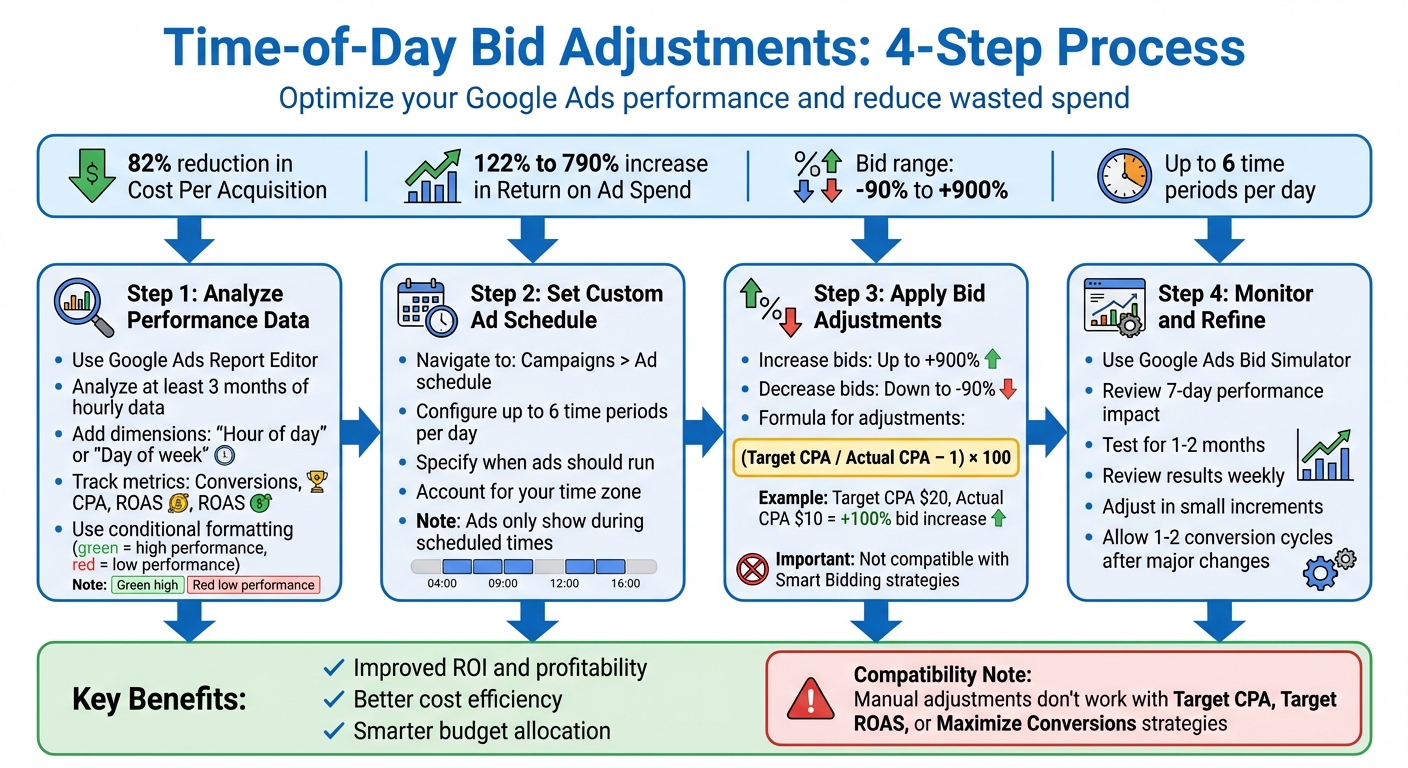
4-Step Process for Time-of-Day Bid Adjustments in Google Ads
Analyzing Performance Data for Time-of-Day Adjustments
How to Analyze Data in Google Ads Reports Editor

To get a clear picture of performance trends, analyze at least three months of hourly data. This helps avoid being misled by short-term anomalies. Start by navigating to Campaigns > Insights & reports > Report editor in your Google Ads account. The tool’s drag-and-drop interface lets you create custom reports. Add time-based dimensions like "Hour of day" or "Day of week" to rows, and pair them with metrics such as "Conversions", "CPA", or "ROAS" in the columns. Choose a chart type that best visualizes the data trends.
For faster insights, apply conditional formatting to table charts. For instance, you can highlight high-performing metrics with green and underperforming ones with red. Tree tables are another useful feature - they allow you to drill down from the account level to specific campaigns and ad groups. Keep in mind that ad schedules follow your account’s time zone, so adjust for customer time zones if necessary. Use these tools to pinpoint the best-performing time slots, which can guide your bid adjustments.
Finding High-Performing Time Slots
High-performing time slots are defined by strong conversion rates and ROAS, even if click volume isn’t particularly high. Look for hours or days that consistently deliver above-average conversions and acceptable CPA or ROAS levels. Matthew Gangnier, PPC Analyst at iProspect Canada, emphasizes this point:
Discovering the particular day and time that your target audience converts the most will enable you to increase your accounts' performance exponentially.
To dig deeper, segment your data by "Time" and then "Hour of day." Once you identify these high-performing periods, calculate the bid adjustment using this formula:
(Target CPA / Actual CPA – 1) × 100.
For example, if your target CPA is $20 and the actual CPA is $10, you’d apply a 100% bid increase. After optimizing for peak times, repeat the process for underperforming periods.
Finding Low-Performing Time Slots
Low-performing slots typically reveal high CPCs paired with low conversions. These are the hours where your ad spend isn’t yielding results, or where your CPA is far above your target. Gangnier advises:
Reducing your bids during low converting time frames will also help in creating a very cost efficient Adwords account.
Export your data to Excel and create a pivot table using "Hour of Day" as rows and "Day of the Week" as columns. Apply conditional formatting to quickly spot underperforming periods. For slots with consistently poor performance, consider reducing bids by up to -90%. This targeted approach ensures you’re not wasting budget on times that don’t deliver results.
Setting Up Time-of-Day Bid Adjustments in Google Ads
Creating a Custom Ad Schedule
To set up a custom ad schedule, start by identifying the times when your ads perform best or underperform. Once you've pinpointed these periods, configure your ad schedule in Google Ads. Here's how:
- Go to the Campaigns section in your Google Ads account.
- Expand the Audiences, keywords, and content dropdown.
- Select Ad schedule, click the pencil icon, and choose your campaign.
Next, define the specific days and times you want your ads to run. Google Ads allows up to six ad schedules per day for each campaign. Ads will only appear during the time slots you specify. As Google Ads Help explains:
When you create an ad schedule, your ads will only be eligible to show during the times you specify. Your ad won't show during the dates and times that aren't listed on your ad schedule.
If you're running ads overnight - for example, from 11:00 PM Monday to 7:00 AM Tuesday - you'll need to create two entries: one for Monday (11:00 PM to midnight) and another for Tuesday (midnight to 7:00 AM). Keep in mind that schedules follow your account's time zone, so adjust accordingly if you're targeting audiences in different regions.
Once your schedule is set, you can refine it further by applying percentage modifiers to the time slots.
Applying Percentage Modifiers to Time Slots
To adjust bids for specific time slots, locate the Bid adj. column in the Ad schedule table. Hover over a bid, click the pencil icon, or use bulk editing by selecting campaigns and clicking Edit > Change bid adjustments.
You can choose to Increase or Decrease bids by a percentage. Adjustments can range from –90% to +900%. For example:
- If the 9:00 AM to 11:00 AM time slot generates conversions at half your target CPA, you might apply a +100% bid increase.
- For time slots that underperform consistently, reduce bids by up to –90%.
It's worth noting that manual bid adjustments aren't compatible with Smart Bidding strategies like Target CPA, Target ROAS, or Maximize Conversions. They work with manual bidding and "Maximize clicks" strategies. As James Clemens, a Diamond Product Expert, explains:
Ad scheduling bid adjustments are not available for campaigns using an automated bid strategy.
If you're using multiple modifiers (e.g., for location and time-of-day), Google Ads multiplies them to calculate the final bid. However, the combined adjustments cannot exceed a 900% total increase.
Once you've made your adjustments, save and review your changes to ensure everything is set up correctly.
Saving and Reviewing Your Changes
After making your changes, click Save (or Apply for bulk edits) to finalize them. Your updates will immediately appear on the Ad schedule page. Verify that the adjustments are correct by checking the Bid adj. column.
To ensure your strategy is working as planned, review the reporting chart on the Ad schedule page. This chart provides performance metrics like clicks, impressions, CTR, and costs for each time slot. You can toggle between Day and Hour, Day, or Hour subtabs for a more detailed view.
Once a scheduled bid adjustment period ends, Google Ads will automatically revert to your normal campaign bids - unless other modifiers, such as device or location adjustments, are still active. Regularly reviewing and fine-tuning your Ad schedule helps maintain optimal performance.
Monitoring and Refining Time-of-Day Bid Adjustments
Using Google Ads Bid Simulator
The Bid Simulator in Google Ads is a handy tool for estimating how different bid levels might have impacted your campaign over the past 7 days. To access it, head to your Campaigns or Ad Groups page and look for the simulator icon (a small graph) in the Status, Budget, or Max. CPC columns. For time-of-day adjustments, choose the Bid scaling (%) option. This allows you to model and compare percentage changes - like increasing bids by 10% or decreasing them by 20% - against your current performance.
Before applying positive bid adjustments, review the projected costs to ensure your budget can handle the increase. Keep in mind that conversions can take up to 90 days to be reported, so if you've made recent changes to conversion tracking (within the last two weeks), the simulator's data might not fully reflect those updates. After simulating bid impacts, double-check that your adjustments don't conflict with other bid modifiers.
Avoiding Conflicts with Other Bid Modifiers
Once you've reviewed the simulated impacts, it's important to consider how other bid modifiers interact with your adjustments. Google Ads calculates final bids by multiplying all applicable adjustments. For example, if your base bid is $1.00, a +20% location adjustment, and a –50% time-of-day adjustment would result in a final bid of $0.60 ($1.00 × 1.20 × 0.50). Keep in mind that combined adjustments can't exceed a +900% increase, and the maximum decrease is capped at –90%.
If you're using Smart Bidding strategies like Target CPA or Target ROAS, manual bid adjustments are typically ignored. These strategies automatically optimize bids to meet your conversion goals. As Google Ads Help explains:
If you are using Smart Bidding strategies... you don't need to make manual bid adjustments since those strategies automatically set bids to optimize for the conversion goal.
It's a good idea to audit your bid interactions regularly to avoid unintentional and unprofitable cumulative effects.
Adjusting Based on Performance Data
After clarifying simulated impacts and potential modifier conflicts, start fine-tuning your bids using actual performance data. Begin by analyzing week-over-week trends, and then take a more comprehensive look after about a month or once you've gathered at least 50 conversions. Focus on metrics like revenue, cost, ROAS, conversion rate, and ROI. If your typical conversion cycle takes about 7 days, exclude the most recent week of data to avoid underestimating results.
Google Ads Help provides this advice:
Change your bids in small increments: Then look for changes to the clicks and conversions of your keywords before editing again. Internet traffic is always changing, so it's important to re-evaluate your bids regularly.
After 1–2 months, review your results to decide whether the time-of-day strategy is delivering the desired outcomes. Allow 1–2 full conversion cycles after making major changes to give the system enough time to adjust.
sbb-itb-89b8f36
Time of Day Adjustments: Google Ads Money-Saving Tactic
Conclusion and Key Takeaways
Fine-tuning your bids based on the time of day can make a significant difference in your PPC campaign performance. Here’s why it’s worth the effort.
Why Time-of-Day Bid Adjustments Matter
Adjusting bids by time of day brings three major advantages to your campaigns:
- Improved ROI and profitability: By focusing your budget on peak conversion hours, you can maximize returns.
- Better cost efficiency: Reducing bids during low-performing hours helps cut down on wasted ad spend.
- Smarter budget allocation: You can redistribute your daily budget more effectively without increasing your overall spend.
How to Get the Most Out of Bid Adjustments
Before making changes, analyze your performance data to uncover clear patterns. Google Ads allows bid adjustments ranging from -90% to +900%, and you can schedule up to six different time periods per day.
If you’re layering bid adjustments (like combining time and location), remember their effects multiply, but the total increase can’t exceed +900%. Keep in mind, though, that Smart Bidding strategies like Target CPA or Target ROAS may override manual time-based adjustments.
To test your adjustments effectively:
- Run tests for 1–2 months while reviewing results weekly.
- Account for seasonal trends that could affect performance.
- Use a -100% adjustment to completely avoid showing ads during consistently poor-performing hours.
As PPC Hero puts it:
Time of day bid modifiers are a great place to start testing within a Google Ads account and they can improve overall account performance dramatically.
These tips align with the structured approach outlined in this guide, helping you make informed decisions for your campaigns.
FAQs
How can I find the best times to run my ads?
The first step to determining when to run your ads is understanding your audience's habits and conversion patterns. Tools like Google Ads or Google Analytics can help by breaking down performance data by day of the week or even specific hours. This gives you a clear picture of when your audience is most engaged and ready to take action.
Once you’ve identified these high-performance windows, focus your efforts there. Adjust your bids to prioritize these peak times, ensuring your ads get maximum visibility and deliver the best return on investment (ROI). Keep in mind, though, that audience behavior can shift over time. Regularly reviewing and tweaking your strategy will help keep your campaigns running efficiently and aligned with current trends.
What challenges should I watch out for when using time-of-day bid adjustments?
Time-of-day bid adjustments can be a great way to fine-tune your PPC campaigns, but they come with their own set of challenges. One big issue is making decisions based on incomplete or unreliable data. If you’re not working with enough data over a meaningful period, your bid changes might end up doing more harm than good.
Another common pitfall is overcomplicating things. Setting up too many detailed bid adjustments without keeping a close eye on them can make your campaigns harder to manage and increase the chances of mistakes. On top of that, if you’re not regularly reviewing and updating your bid strategies, you could end up wasting money - especially if customer behavior or market trends shift unexpectedly.
To steer clear of these problems, stick to thorough analysis, keep an eye on performance, and make optimization an ongoing process.
How do time-of-day bid adjustments work with Smart Bidding strategies?
Time-of-day bid adjustments can work alongside Smart Bidding strategies, but their effectiveness varies based on the strategy in play. For example, ad schedule bid adjustments are compatible with strategies like Maximize Clicks and can help steer Smart Bidding to focus on specific times of the day.
That said, Smart Bidding heavily depends on real-time signals to optimize performance. This means manual bid adjustments might only have a small impact. Use them thoughtfully to align with your campaign objectives and ensure they complement your broader bidding approach.