City-level targeting in Google Ads helps businesses focus their ad spend on specific locations, ensuring ads reach the right audience. By targeting users based on city, neighborhood, or postal code, you can avoid wasting ad dollars on irrelevant clicks. This strategy is ideal for local businesses, service providers, and e-commerce brands looking to improve ad performance and explore new markets.
Key Takeaways:
- Setup: Add cities manually or in bulk through "Advanced Search" in campaign settings.
- Control: Use "Presence" targeting to focus on users physically in your selected locations.
- Optimization: Adjust bids for high-performing cities and exclude underperforming ones.
- Methods: Choose between individual city targeting, radius targeting, or bulk uploads.
- Refinement: Layer demographic filters and use performance data to improve results.
Google Ads Geotargeting (Location Targeting) Explained
How to Set Up City-Level Targeting in Google Ads
How to Set Up City-Level Targeting in Google Ads: Step-by-Step Guide
Access Location Settings
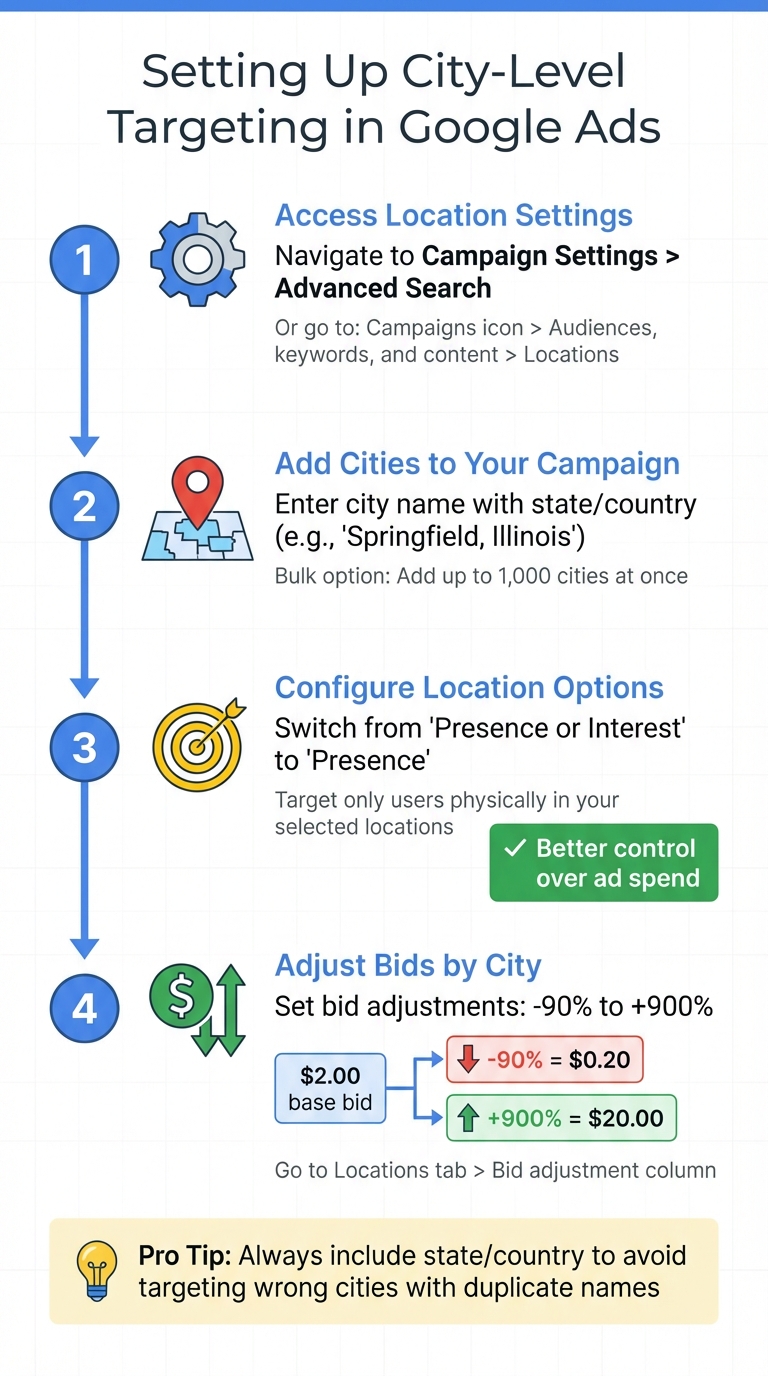
To start, find "Advanced Search" in the Campaign Settings of your new campaign. This is where you can manually enter city names or set up radius targeting. For active campaigns, head to Settings > Locations to make changes. Another route is through the Campaigns icon in the left-hand menu: select Audiences, keywords, and content, then choose Locations.
Once you're in the location settings, you can begin adding cities to tailor your campaign.
Add Cities to Your Campaign
In the Advanced Search section, type the city name into the search bar. Always include the state or country to avoid mix-ups - after all, "Springfield, Illinois" isn’t the same as "Springfield, Massachusetts". Google will highlight the city’s boundaries on a map. Click Add to include it in your campaign.
If you’re targeting a long list of cities, use the "Add locations in bulk" option. Paste up to 1,000 city names into the tool, with each city listed on a separate line. You can also use the "Nearby" button to find and add surrounding areas that might include your audience.
Before finalizing, check the "Location options" at the bottom of the targeting panel. By default, Google uses "Presence or Interest", which targets users physically in your selected cities as well as those searching about them. Angie Hoke from WebFX suggests switching to "Presence: People in or regularly in your targeted locations" for better control over your ad spend. This adjustment helps ensure your ads reach people more likely to engage with your business and avoids unintended locations.
Adjust Bids by City
Once your cities are added, you can fine-tune your bids for each one. Bid adjustments range from -90% to +900%. For example, a -90% adjustment drops a $2.00 bid to $0.20, while a +900% adjustment raises it to $20.00.
To set these adjustments, go to the Locations tab in your campaign’s side menu. You’ll find a "Bid adjustment" column next to each city. Here, you can increase bids for high-performing cities or lower them where returns are less promising. This level of control helps you allocate your budget effectively.
How to Edit City-Level Targeting in Active Campaigns
Once your campaign is live, you might need to tweak it to get the best results. Adjusting your city-level targeting is a key part of optimizing performance.
Review Your Current Location Settings
To check your current targeting, log into your Google Ads account and click the Campaigns icon. From the Audiences, keywords, and content menu, select Locations to see all the cities you're targeting. Another route is to go to Campaigns > Settings, pick the campaign you want to edit, and open the Locations panel.
For a more detailed breakdown, head to the Location report tab. Here, you'll find data on impressions, clicks, and spending by city. This information can help you pinpoint which areas might need adjustments. If you're using Smart campaigns, you can access the Location & ad schedule card on your campaign dashboard to view or update these settings.
Make Updates to Your City List
To add cities to an active campaign, click the blue pencil icon in the Locations menu. Enter the full city name along with the country (e.g., "Paris, France" instead of just "Paris") for precise targeting, then click Save. Double-check your selection by reviewing the map boundaries.
If you need to remove a city, simply uncheck it. For cities that aren't performing well but you still want some presence, consider lowering the bid adjustment. This allows you to reduce costs without completely dropping the location.
For bulk changes, go to Campaigns > Settings, select the campaigns you want to edit, click Edit, and choose Change locations. This method is especially useful when applying the same updates across multiple campaigns.
3 Methods for Targeting Cities
Once your campaign is set up, you can use one of these three methods to target cities effectively and ensure your budget reaches the right audience.
Google Ads offers three city-level targeting approaches to help you focus on the customers that matter most to your business.
Individual City Targeting
This method is perfect for businesses that serve specific cities or want to run promotions tailored to certain locations. It allows for precise control over where your ads appear. For instance, if you’re offering a special deal that’s only valid in Austin, Texas, and Portland, Oregon, you can target just those cities. To ensure accuracy, always use complete city names (e.g., "Austin, Texas" instead of just "Austin"). According to Google Ads Help:
"Location targeting helps you focus your advertising to help find the right customers for your business. This specific type of targeting could help increase your return on investment (ROI)".
Radius Targeting
Radius targeting allows you to reach customers within a set distance from a specific location. You can define a radius ranging from 1 to 500 miles. This method works well for businesses like restaurants, delivery services, or contractors that cater to customers within a particular area. For example, a plumbing company based in downtown Denver might set a 25-mile radius to include nearby suburbs. However, be cautious with very small radii, as they may limit ad visibility due to Google’s minimum privacy thresholds .
Bulk Uploading
If you’re managing a large campaign targeting multiple cities, bulk uploading is a huge time-saver. In the "Advanced Search" menu, simply check the "Add locations in bulk" box and paste a list of cities, one per line . For even larger campaigns, you can upload a CSV file through Google Ads Editor. This method reduces manual work and minimizes errors. To ensure accuracy, always include full location details (city, state, country). For added efficiency, group cities by the bid adjustments you plan to apply, making it easier to tweak bids across multiple areas.
| Method | Best Use Case | Key Advantage |
|---|---|---|
| Individual City | Specific cities or location-based promotions | Precise control over ad placement |
| Radius Targeting | Local businesses with defined service areas | Targets customers within a fixed distance |
| Bulk Upload | Large campaigns with many cities | Simplifies managing and adding multiple cities |
Up next, learn how to exclude locations and refine your targeting for even better results.
sbb-itb-89b8f36
Location Exclusions and Targeting Options
Google Ads gives you the tools to fine-tune your campaigns by excluding specific cities and deciding who sees your ads based on their physical location or search behavior. These options help reduce unnecessary spending and improve the results of your campaigns.
Exclude Cities from Your Campaigns
If there are cities you don’t serve or that consistently underperform, excluding them from your campaigns can make a big difference. To do this, go to your campaign settings, expand the Locations section, find the city you want to block, and click Exclude.
Managing campaigns across multiple regions? Bulk exclusions can save you a lot of effort. In the Locations section, use the Advanced Search feature, select "Add locations in bulk," and paste up to 1,000 locations (one per line). Then click Search and choose Exclude all. Keep in mind: if you both target and exclude a location, the exclusion takes priority. For instance, if you target California but exclude Los Angeles, your ads won’t show in Los Angeles.
To identify areas that aren’t delivering results, check your Matched locations report. If certain cities generate clicks but fail to convert, consider excluding them to reallocate your budget to higher-performing locations.
Once you’ve excluded underperforming cities, you can further refine your audience by adjusting your location targeting settings.
Configure Location Options
After setting up your city targeting, you can refine it even more by choosing between broader or stricter location targeting options. Google Ads provides two main settings: Presence or Interest (the default) and Presence. Knowing the difference between these is key to managing your ad spend effectively.
- Presence or Interest targets people who are either physically in your selected city or are searching for or engaging with content about that city. This option is ideal for businesses like hotels, tourism companies, or those shipping products across the country.
- Presence limits your ads to users who are physically in or frequently visit your targeted cities. This is a better choice for local service providers - like plumbers, dentists, or restaurants - who need to focus on customers who can actually visit their location.
To adjust these settings, go to your campaign’s Settings tab, expand Locations, click Location options, and select your preference under the Target dropdown.
| Targeting Option | Who Sees Your Ad? | Best For |
|---|---|---|
| Presence or Interest | People in the city or those searching for or engaging with content about it | Hotels, tourism businesses, nationwide product shipping |
| Presence | Only people physically in or frequently visiting the city | Local services (e.g., plumbers, dentists), physical stores |
How to Improve City-Level Targeting Performance
Once you've set up city-level targeting in your campaigns, the next step is fine-tuning performance using detailed data and audience demographics. This allows you to allocate your budget effectively and reach the right audience.
Use Performance Data to Refine Targeting
Analyzing performance data can reveal which cities are driving results and which ones are draining your budget. Metrics like clicks and impressions are only part of the story - what really matters is how these translate into conversions and Return on Ad Spend (ROAS). A city generating hundreds of clicks isn't valuable if those clicks don't lead to conversions.
To pinpoint where your ads are actually being clicked, head to Insights and reports, select When and where ads showed, and then click on Matched locations. This report shows the gap between your intended target area and where your budget is actually being spent. If you notice clicks coming from outside your service area, the default "Presence or Interest" setting might be to blame, leading to wasted spend.
Review data from at least 30 days to identify consistent trends. For cities that perform well, consider creating dedicated campaigns to better control bids and maximize returns. You can even set up automated rules to adjust bids based on performance thresholds, reducing the need for constant manual monitoring.
"Poor location targeting is one of the biggest silent budget killers in Google Ads." - Optmyzr
For your top-performing cities, take it a step further by creating location-specific landing pages. This can improve relevance and boost your conversion rates.
Next, refine your targeting by incorporating demographic data for even greater precision.
Layer City Targeting with Demographics
City targeting is a solid foundation, but adding demographic filters allows you to zero in on your ideal audience. By factoring in characteristics like age, gender, parental status, and household income, you can focus your budget on users who are most likely to convert.
For example, if you're marketing luxury services in Manhattan, you can narrow your audience to high-income households within specific ZIP codes instead of targeting the entire city. This approach provides more control over who sees your ads and how much you spend per click.
To make this strategy work, apply bid adjustments to specific demographic segments in your target cities. Increase bids for high-converting groups and lower them for those that perform poorly. Use reports like Matched locations and demographic breakdowns to identify segments that click but don’t convert, and exclude them from your campaigns.
For local businesses, switch to the Presence setting instead of Presence or Interest. This ensures your demographic filters apply only to people physically located in your target city, preventing your ads from being shown to users who are merely searching for information about the area but aren’t local.
Find Tools and Agencies on Top PPC Marketing Directory
Managing city-level targeting manually can be overwhelming, especially for campaigns covering multiple regions. To streamline your efforts, consider using advanced tools or partnering with experienced agencies. The Top PPC Marketing Directory (https://ppcmarketinghub.com) is a great resource for finding tools and services that specialize in campaign management, bid optimization, and performance tracking.
Tools like Optmyzr's Geo HeatMap make it easy to visualize performance by city, helping you identify areas where the "Presence or Interest" setting might be wasting your budget. Adalysis leverages API-driven data to compare performance between users physically in your target location and those merely interested in it, offering bid adjustment recommendations to meet your CPA or ROAS goals. Meanwhile, Adpulse provides a unified dashboard for managing location-based search terms and resolving issues with ads appearing in irrelevant areas.
If you prefer expert guidance, agencies like Coalition Technologies and Growth Minded Marketing can help. These agencies offer specialized audits to identify wasted ad spend in underperforming cities while implementing strategies to focus on high-value audiences using first-party data. For instance, Coalition Technologies provides a free Google Ads optimization consultation, while Growth Minded Marketing offers a complimentary "Growth Check" account analysis.
"If your goal is to target a local audience (whether regionally or nationally), switch to 'Presence' and avoid irrelevant clicks." - Stu Edwards, Founder, Growth Minded Marketing
Whether you choose automation tools or expert help, the Top PPC Marketing Directory connects you with solutions to refine your city-level targeting and make the most of your ad spend.
Conclusion
City-level targeting allows you to direct your Google Ads budget with precision, ensuring you focus on locations that truly matter while avoiding wasted spend in areas outside your service scope. By zeroing in on high-performing locations, you can make every dollar count and maximize your ad performance.
Once your campaigns are set up, consistent fine-tuning is key to better results. Start by setting your location options to "Presence" and use performance data to adjust bids strategically. Layering in demographic filters and crafting localized ad copy can further improve relevance and boost your Quality Score.
"When you take a step back to prioritize your top-performing locations you can reduce costs while maintaining conversions." - Susie Marino, Senior Content Marketing Specialist, WordStream
If you're managing campaigns across multiple regions, advanced tools and expert guidance can simplify the process. Resources like the Top PPC Marketing Directory offer valuable tools for optimizing campaigns, tracking performance, and conducting account audits with advanced strategies.
Start by testing your approach in key cities, then expand into new areas based on the results. With a well-structured plan and ongoing optimization, city-level targeting can become a cornerstone for driving local conversions and growing your business effectively.
FAQs
How can I improve my ad performance with city-level targeting in Google Ads?
City-level targeting in Google Ads lets you fine-tune your ad spend by focusing on specific locations. It’s a smart way to prioritize cities where your audience is most active, avoid wasting budget on underperforming areas, and tweak bids for individual cities based on how well they perform.
Start by analyzing your campaign data to spot cities with high conversions or strong customer interest. Once you’ve identified these locations, set up city-specific targeting in Google Ads. Use bid adjustments to distribute your budget more effectively, ensuring your ads appear in the areas most likely to deliver results. This method helps you get the most out of your ad spend by concentrating on the cities that matter most.
What are the advantages of using 'Presence' instead of 'Presence or Interest' in Google Ads location settings?
When you choose 'Presence', your ads will only appear to people who are physically located in your target city. This method ensures you're reaching a local audience, increasing the likelihood of meaningful engagement and minimizing wasted ad spend.
On the other hand, 'Presence or Interest' casts a wider net by targeting users who may not be in the area but have shown interest in it. While this might expand your reach, it can also water down the effectiveness of your campaign.
If your goal is to attract local customers or drive foot traffic to a specific location, sticking with 'Presence' is the smarter choice. It keeps your focus on the people who are actually there, making your efforts more precise and impactful.
How do demographic filters improve city-level targeting in Google Ads?
Demographic filters let you fine-tune city-level targeting by layering in factors like age, gender, parental status, or household income. For instance, instead of targeting everyone in Chicago, you could focus specifically on women aged 25–34 who are parents in the Lincoln Park neighborhood. This approach ensures your ads are shown to the right audience, cutting down on wasted impressions and improving key metrics like cost-per-acquisition (CPA).
These filters can be applied directly in your campaign or ad group settings, giving you the flexibility to test various combinations of city and demographic segments. By reviewing performance data - such as click-through rates (CTR) and return on ad spend (ROAS) - you can allocate your budget more effectively and avoid spending on underperforming groups.
For those looking to simplify this process, the Top PPC Marketing Directory offers a curated selection of platforms equipped with advanced demographic and geo-targeting tools, making it easier to optimize your campaigns and maximize results.