If weather changes buying intent in your market, I’d change bids by rule - not by guesswork. Google Ads has no built-in weather targeting, so I’d only use this setup when weather shifts CPA, lead volume, or revenue fast enough to matter.
Here’s the short version:
- I’d use weather-based bid changes for categories like HVAC, roofing, delivery, travel, and outdoor gear
- I’d only run it where I can track results by city or ZIP code
- I’d choose the setup based on speed:
- Google Ads automation platforms for simple forecast-based changes
- Scripts + weather API for hourly triggers
- External tools when weather is only one input among CRM, inventory, and budget data
- I’d put hard limits in place before launch:
- Max bid caps
- Budget caps
- Approval rules
- Daily checks in Change History
- I’d keep the rule only if it improves CPA, CAC, ROAS, payback, or revenue per click
A few numbers matter right away. Scripts can run as often as hourly. Single-account scripts can time out after 30 minutes, and MCC scripts can run up to 60 minutes in some cases. Budget pacing also matters - campaigns can spend up to 2x the daily budget on active days, so I’d set daily budget as monthly target ÷ 30.4.
The main point is simple: weather-based bidding is worth it only when weather has a clear link to demand and you can prove it with data.
From there, I’d keep the process tight - test the signal, pick the lightest setup, control spend, and measure against closed revenue instead of clicks alone.
Manage Your Google Ads Campaigns Based on Weather Conditions | Optmyzr
sbb-itb-89b8f36
Check campaign fit and gather required data
Start by looking at past Google Ads and business data. You want to see whether rain, temperature, or UV index lines up with changes in conversion rate or CPA. If that pattern is weak or messy, test it instead of guessing. Run a split test with one weather-triggered variant and one control group, then compare the results. Use keyword, ad, landing page, and conversion data to separate signal from noise. If the account shows a steady weather pattern, then move into setup - but only after the needed data is in place.
Fit criteria for weather-sensitive campaigns
Weather rules work best when demand changes fast by location and the account can measure that shift. The strongest fit is usually campaigns where demand is tied to place, timing, and outside conditions. That often includes HVAC, plumbing, roofing, and weather-sensitive retail products.
A simple way to judge fit is this: can you set a weather threshold that tends to improve CPA? For example, if temperature goes above a set threshold and CPA is 20% below target, increase bids by 15%. That is the kind of pattern you need. If spend is low or conversion volume is thin, automation usually doesn't have enough signal to work from.
Geo-targeting matters too. Weather rules tend to work best at the city or ZIP-code level. So before you automate, split campaigns by market.
A weather rule only helps when the account can connect that signal to the correct geography and conversion value.
Data inputs and account prerequisites
Before setup, make sure the account has the basics covered:
- Conversion tracking
- Revenue or lead value assigned in USD
- GA4 linked
- City- or ZIP-level geo-targeting
- A weather API
If you're working with an offline-close service business, add call tracking and offline conversion imports. That way, weather-driven leads connect back to revenue instead of stopping at the click or form fill.
What goes wrong when prerequisites are missing
Missing setup pieces don't just hurt performance. They can feed bad signals into bid automation and throw off ROI analysis.
| Prerequisite | Risk if Missing |
|---|---|
| Accurate Conversion Tracking | Wrong bid signals; no recovery via tuning |
| Revenue or Lead Value (USD) | Misleading ROI |
| City- or ZIP-Level Geo-Targeting | Wasted spend from poor geo matching |
| Call Tracking | Incomplete lead data in service verticals |
| CRM / Offline Conversion Import | ROI based on clicks, not closed revenue |
| Weather API | No real-time bid triggers |
Once these controls are in place, choose the setup method that fits your reporting stack and the pace you want from automation.
How to set up weather-based bidding in Google Ads
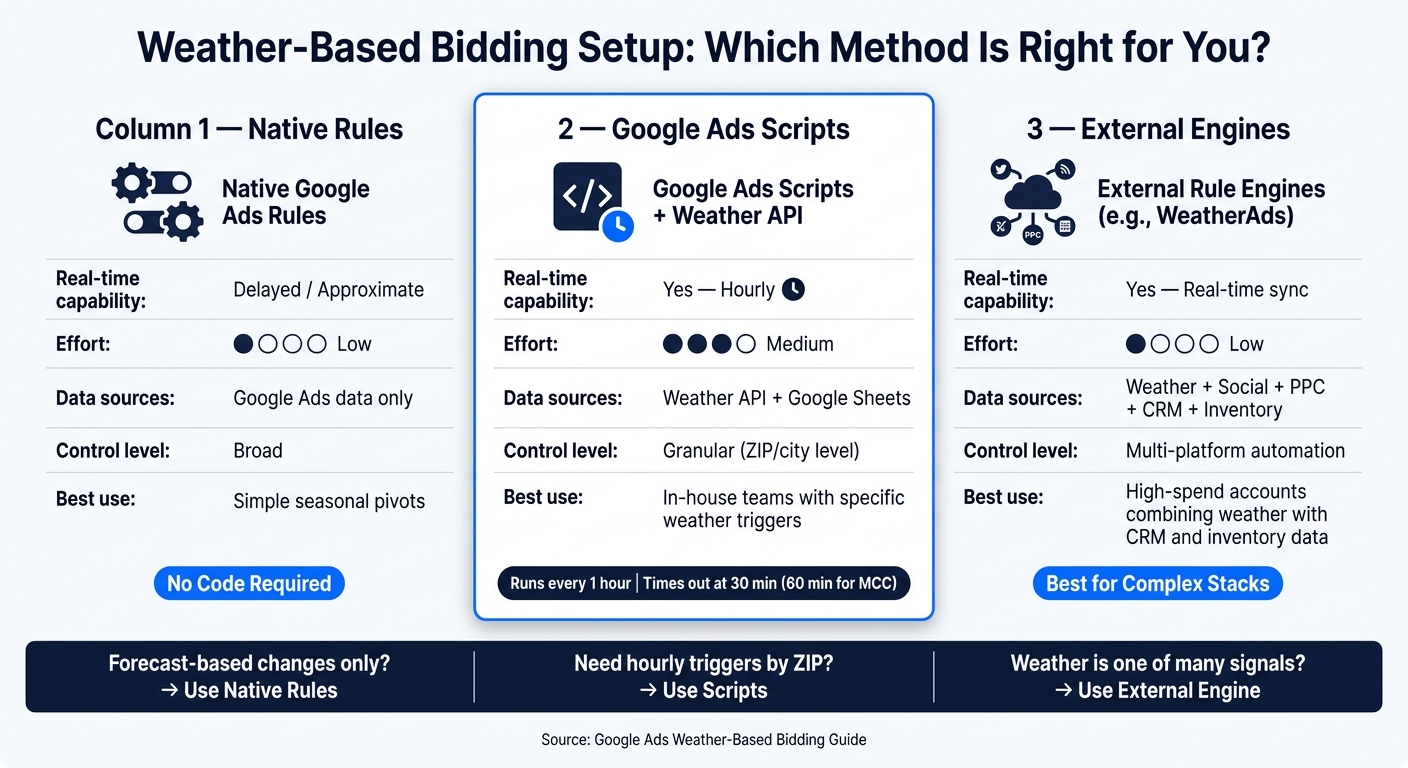
Weather-Based Bidding: Native Rules vs. Scripts vs. External Engines
Once tracking, geo targeting, and weather data are set, the next step is choosing the control layer that fits your account.
The goal is simple: use the lightest setup that still gives you the control you need. If weather-driven demand is fairly stable and easy to predict, a simple setup can do the job. If demand shifts fast by location, you'll want more automation.
Use native rules for simple timing and budget control
Start with Google Ads' built-in controls. Use ad scheduling, geo-segmented campaigns, and bid modifiers to move spend by city or ZIP code. If you already know a short weather event is coming, Seasonality Adjustments can help Smart Bidding react better during that period.
For example, if a heatwave or storm is in the forecast, you can signal that conversion rates are likely to climb for a set window. The big upside here is that you don't need code.
That said, native controls can feel a bit blunt. If you need tighter location-level automation, top PPC agencies often use scripts as the next step.
Use Google Ads Scripts with a weather API for real-time triggers
Google Ads Scripts work well when you want bid changes to happen only after a weather threshold is hit.
A common setup looks like this:
- Pull weather conditions from an API
- Store rules in a Google Sheet
- Adjust bids only when those rules are met
So, you might increase bids by 15% when the temperature goes above 85°F, or increase bids by 20% when rain probability passes 60%.
Before you let anything run live, test it in Preview mode first. That's the safest way to catch logic issues before they touch spend.
Scripts can run as often as once per hour. They're free to run inside Google Ads, and weather API access is often free at low usage levels.
A simple way to think about it: use native rules for forecast-based changes, scripts for hourly triggers, and external engines when weather is just one piece of the bidding puzzle.
Use external rule engines when multiple data sources drive bidding
If bidding depends on more than weather alone, an external platform can make more sense.
This is the better fit when weather needs to work alongside CRM data, inventory status, or cross-channel budget rules. Instead of rebuilding logic inside each campaign, you use one rule layer across Google Ads and other channels.
That matters even more when demand doesn't hinge on just one weather input. Some platforms support a broader set of signals, including temperature, rainfall, snowfall, wind speed, UV index, humidity, and cloud cover. For some categories, that's the difference between a rough guess and a usable trigger.
Here's how the three setup paths compare:
| Native Rules | Google Ads Scripts | External Engines (e.g., WeatherAds) | |
|---|---|---|---|
| Real-time capability | Delayed/approximate | Yes (hourly) | Yes (real-time sync) |
| Effort | Low | Medium | Low |
| Data sources | Google Ads data only | Weather API + Google Sheets | Weather, social, and PPC data |
| Control level | Broad | Granular (ZIP/city) | Multi-platform automation |
| Best use | Simple seasonal pivots | In-house teams with specific weather triggers | High-spend accounts combining weather with CRM and inventory data |
Limits, risk, and governance to address before launch
Before launch, put guardrails in place. That means script limits, budget caps, and approval rules. It doesn't matter whether you use native rules, scripts, or an external engine - the controls need to be there first.
Technical limits and data reliability
Google Ads Scripts have hard runtime limits. Standard single-account scripts time out after 30 minutes, and Manager Account (MCC) scripts can run up to 60 minutes with executeInParallel(). If you're managing many campaigns or several geographies, that limit can become a problem fast. Plan around it early instead of finding out mid-run.
Location accuracy is another risk that slips past teams. Weather APIs often pull conditions from the nearest major station. On paper, that sounds fine. In practice, it can miss what's happening in a given neighborhood, city pocket, or microclimate. Using granular geo-targeting helps, and so does checking API responses against local station data.
If you're running Target CPA or Target ROAS campaigns, don't use big script-driven bid modifier swings. For expected conversion changes, use Seasonality Adjustments instead.
Once your data checks out, move to spend controls.
Spend controls and approval rules
Budget risk is where things can get expensive in a hurry. Weather shifts can push spend up much faster than planned. With the March 2026 pacing update, weather-triggered campaigns now pace toward the full 30.4× monthly cap, which can push spend to as much as 2× the daily budget on active days. The clean setup is simple: set daily budget to monthly target ÷ 30.4.
Then add hard limits. For example:
- Never bid above $45
- Never bid below $0.50
- Require human approval before any rule can lift bids or spend past a set cap
After launch, check Change History and spend variance every day. If something goes sideways, you want to catch it early and roll it back fast .
The main launch risks are pretty plain: script timeouts, budget overruns tied to pacing rules, and location-data mismatch caused by broad API coverage.
Track results and refine weather rules over time
Build a before-and-after measurement plan
After launch, measure whether weather rules cut acquisition cost, not just increase spend. Start by logging daily metrics in a Google Sheet before launch. Then track native rules, scripts, and external PPC tools against the same outcome metrics: CPC, conversion rate, CPA, ROAS, CAC, and revenue per click.
Use the same control-group setup from the fit test so you can isolate weather lift. To separate weather lift from seasonality, use anomaly detection instead of fixed thresholds. Then break results out by condition - rainy vs. dry days, above 80°F vs. below 40°F, snowfall vs. clear. A simple triggered vs. non-triggered comparison blurs too much and can hide what is actually driving performance.
Connect weather triggers to pipeline and payback
Once you isolate lift, tie it to closed revenue. Use closed-won revenue to check whether weather triggers improve acquisition quality. That means joining Google Ads data with your CRM so you can track lead quality status, pipeline stage, closed-won revenue, CAC, and payback period. Tag each weather rule and campaign state so you can segment performance cleanly in both Google Ads and CRM reporting.
Calculate weather CAC as spend during trigger periods divided by closed-won customers from those periods. If CAC improves during the weather events that matter, keep testing. If it goes up, tighten the rule or cut it. Also review search terms every week to catch low-intent queries that weather rules can pull in.
Conclusion: Apply weather signals only where they lower acquisition costs
Keep weather rules only when they lower CAC and shorten payback. Weather-based bidding works when the setup is tight and the measurement is honest. In practice, that means confirming campaign fit first, picking the right path - native rules, scripts, or an external engine - putting spend guardrails in place before launch, and judging performance by CPA, CAC, and payback, not by script activity.
Compare pre- and post-launch CPC, CVR, CPA, ROAS, CAC, and revenue per click. If that pattern does not hold, go back to the fit criteria before adding more complexity.
FAQs
How do I know if weather bidding fits my campaigns?
Weather bidding makes sense when demand for your products or services jumps with heatwaves, storms, or other weather shifts.
Start with your past sales data. Look for clear patterns between performance and things like temperature, humidity, or precipitation. If your conversion rates move up or down with the weather, automated bid adjustments can help you spend budget more wisely and keep engagement on track.
Should I use rules, scripts, or an external tool?
It comes down to three things: your technical comfort, your budget, and how much scale you need.
Scripts are a strong native option if you want to automate weather-based bid adjustments with external data. If you'd rather skip the setup work, dedicated weather marketing platforms usually come with visual dashboards and prebuilt integrations.
For larger, multi-channel programs, tools listed in the Top PPC Marketing Directory can help. If you need custom CRM or pipeline integration, DevriX can support implementation.
Whatever route you take, test in preview mode before going live.
How can I measure whether weather-based bidding is profitable?
Track key metrics like ROAS, CPA, conversion rate, and click-through rate. Set a baseline before you change anything, then compare performance over the next one to two weeks using geographic reports or A/B testing against a control group.
The goal is simple: isolate the impact of weather-triggered rules. Did they cut wasted impressions? Did they bring in more revenue? Focus on patterns that hold up over time, not a few short swings that can throw you off.