Running YouTube ads? Here's what you need to know: YouTube offers five main ad formats - Skippable In-Stream Ads, Non-Skippable In-Stream Ads, Bumper Ads, In-Feed Video Ads, and Masthead Ads. Each format has its own rules for length, placement, and content. Ads that violate YouTube's policies will be flagged and won't run until fixed.
Key highlights:
- Skippable Ads: Flexible in length (up to 12 hours), but must grab attention in the first 5 seconds.
- Non-Skippable Ads: Limited to 15–20 seconds, ensuring full viewer engagement.
- Bumper Ads: 6-second non-skippable format for quick messaging.
- In-Feed Ads: Appear in search results and recommendations, encouraging voluntary engagement.
- Masthead Ads: Premium placement on YouTube’s homepage, with the strictest content rules.
Common compliance issues include:
- Misleading claims (e.g., "get rich overnight").
- Graphic, sensitive, or sexually suggestive content.
- Missing attribution for third-party media (movies, TV, games).
Pro Tip: Always review YouTube’s specific guidelines for your chosen ad format to avoid delays and wasted spend.
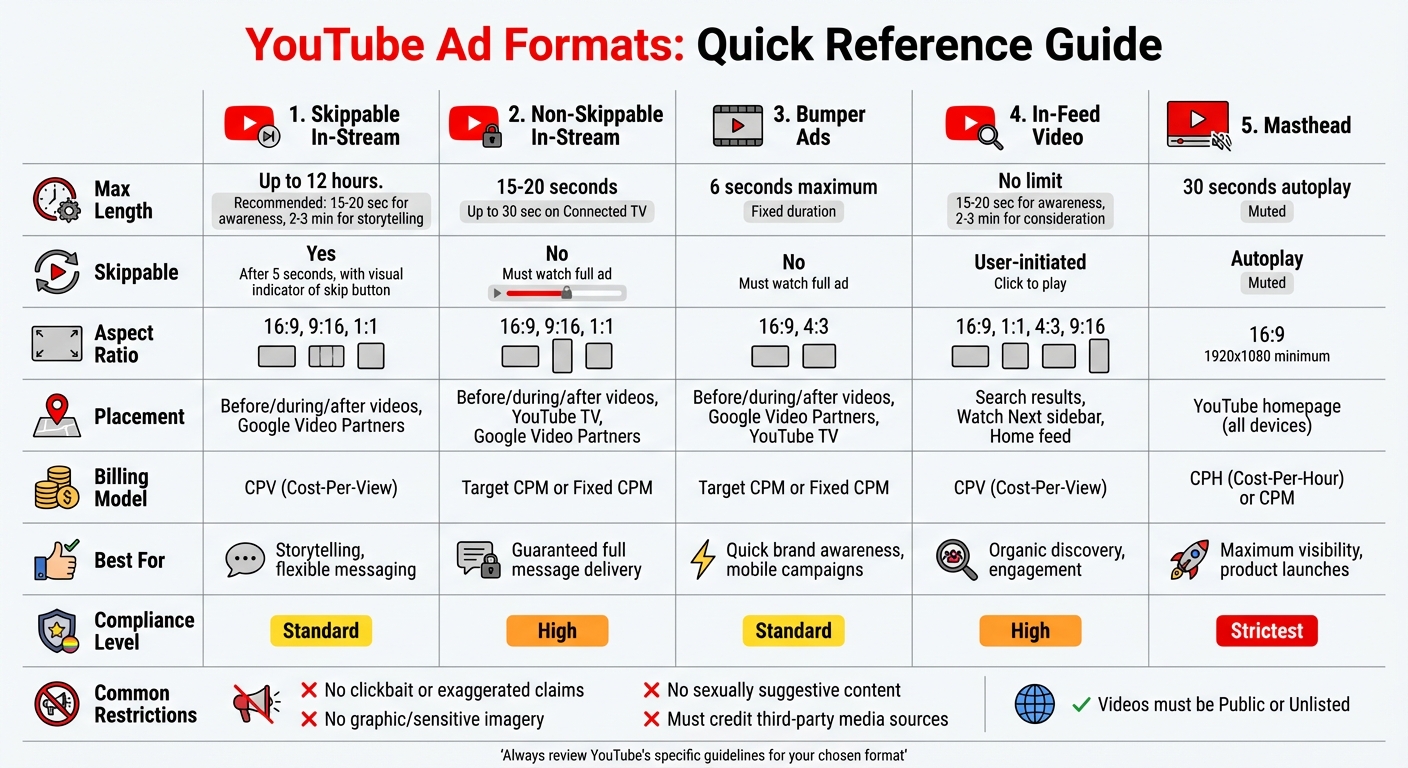
YouTube Ad Formats Comparison: Length, Specs, and Requirements
YouTube Advertising Ad Formats and Campaign Types 2023
sbb-itb-89b8f36
1. Skippable In-Stream Ads
Skippable in-stream ads are one of YouTube's most adaptable ad formats, appearing before, during, or after videos. They also show up on Google Video Partner sites and apps. Since viewers can skip these ads after just 5 seconds, it’s crucial to grab their attention right from the start.
Max Length
YouTube suggests keeping skippable ads under 3 minutes, but technically, they can be as long as 12 hours - provided the file size stays under 128 GB. For mid-roll placements, ads need to be at least 30 seconds long. If your goal is broad awareness, aim for 15–20 seconds. For more detailed storytelling, 2–3 minutes is ideal.
Aspect Ratio
YouTube supports several aspect ratios, including 16:9 (horizontal), 9:16 (vertical), and 1:1 (square). Since many users watch on mobile devices, vertical or square formats can boost engagement. Videos should have a minimum resolution of 720p (HD), but 1080p (Full HD) provides the sharpest quality.
File Specs
Accepted file types include .MP4, .MOV, .MPEG4, .AVI, .WMV, .FLV, WebM, and 3GPP. Frame rates between 24 and 60 FPS are supported. Companion banners must be 300×60 pixels and under 150 KB. Tracking pixels must be 1×1 image pixels and SSL compliant, with JavaScript strictly prohibited.
Content Restrictions
YouTube has strict guidelines for ad content. Ads cannot use clickbait, exaggerated claims like "get rich overnight", or misleading pricing information. They must avoid graphic or sensitive imagery, such as accidents, funerals, abuse, or gore. Similarly, sexually suggestive visuals, recreational drug promotion, and profanity are off-limits. If you include clips from movies, TV shows, or video games, you must clearly identify the source. Additionally, the videos used for ads must be set to Public or Unlisted on YouTube.
Placement Rules
Skippable ads appear on YouTube watch pages across devices like desktops, mobile phones, TVs, and game consoles. They also show up on Google Video Partner sites and apps. Advertisers pay on a cost-per-view (CPV) basis, meaning you’re charged only when a viewer watches 30 seconds of the ad (or the entire ad if it’s shorter) or interacts with it. For videos longer than 8 minutes, mid-roll ad breaks can be added manually or automatically. To improve performance, consider using top PPC tools to add call-to-action buttons, sitelink assets, or product feeds.
Skippable ads offer a level of flexibility that stands out when compared to more rigid formats, which will be covered in the next section on Non-Skippable In-Stream Ads.
2. Non-Skippable In-Stream Ads
Non-skippable ads ensure that viewers watch the entire ad before their chosen content begins. Unlike skippable ads, these formats don't offer the option to skip after 5 seconds, creating a different kind of viewer engagement. Both formats must comply with YouTube's strict advertising policies.
Max Length
Standard non-skippable ads run between 15 and 20 seconds, depending on regional guidelines. For Connected TV placements, the duration can go up to 30 seconds. Campaigns purchased through instant deals or reservations allow ads to stretch to 60 seconds. However, most advertisers stick to 7–15 seconds for better viewer retention. Ads under 7 seconds are automatically categorized as Bumper ads.
Aspect Ratio
Supported aspect ratios include 16:9 (horizontal), 9:16 (vertical), and 1:1 (square), with a recommended resolution of 1080p. For 30-second non-skippable ads on Connected TV, horizontal format is mandatory.
File Specs
YouTube recommends using .MPG (MPEG-2/4) files for the best performance but also accepts .MP4, .MOV, .WMV, .AVI, and .FLV formats. The maximum file size allowed is 256 GB. Technical file requirements include the option to use tracking pixels - up to 3 per event - for recording impressions, views, and skips. However, JavaScript is not permitted, and pixels cannot track midpoint or complete events.
Content Restrictions
Non-skippable ads come with stricter content guidelines. For example, ads cannot include exaggerated claims like "Make $5,000 in 5 minutes" or promote "secret" medical cures. Negative imagery, such as graphic accidents, funerals, or visible fluids, is prohibited. Content that is sexually suggestive, promotes recreational drugs or related accessories, uses profanity, or includes offensive gestures or slurs is also banned. Additionally, Google disallows non-family-safe ads in video formats. If clips from movies, TV shows, or video games are used, the source must be clearly identified, and gratuitous gore is not allowed.
Placement Rules
Non-skippable ads can appear before, during, or after videos on YouTube watch pages, YouTube TV, and Google Video Partner sites and apps. Mid-roll placements are available for videos over 8 minutes long, and for extended content (at least 5 minutes), YouTube may serve "ad pods" - two consecutive ads - to minimize interruptions. Advertisers are billed using Target CPM or Fixed CPM models. To use this format, campaigns should aim for "Awareness and consideration" goals, and the videos must be hosted on YouTube with either a Public or Unlisted setting. This delivery approach highlights the distinctiveness of non-skippable ads as we move on to explore other ad formats.
3. Bumper Ads
Bumper ads are ultra-short, non-skippable videos designed to deliver a message in just 6 seconds or less. Their brevity makes them perfect for mobile-first campaigns, where grabbing attention quickly is key. This ad format stands out as a quick and effective option within YouTube's advertising toolkit.
Max Length
Bumper ads stick to a strict 6-second limit. If a video runs longer, it automatically falls into the non-skippable in-stream ad category, which follows a different set of policies. This limitation pushes advertisers to craft a single, focused message.
Aspect Ratio
These ads can use either a 16:9 or 4:3 aspect ratio, with a minimum resolution of 640x360 pixels. For the best quality, 1920x1080 pixels is recommended, though encoding for VAST compliance often targets 720p. Many PPC agencies, however, opt for 1080p for sharper visuals. Plus, YouTube supports vertical video for eligible campaigns, ensuring a smoother experience for mobile viewers.
File Specs
When using third-party serving, videos should be in H.264 (MP4) format with MP3 or AAC audio. The maximum file size allowed is 1GB, with a frame rate of 30 FPS. If you’re including a companion banner, it must be 300x60 pixels in JPG, GIF, or PNG format, with a file size of no more than 150 KB. Third-party tracking pixels are limited to three per event, must be SSL-compliant, and cannot include JavaScript.
Content Restrictions
Bumper ads follow the same content rules as other YouTube formats. Advertisers must include a name or logo to clearly identify their brand, product, or service. YouTube's guidelines strictly prohibit content with excessive profanity, graphic violence, or overtly sexual themes. Tracking pixels may only be used for impression, view, and skip events, with no placement on midpoints or completions.
Placement Rules
Bumper ads can appear before, during, or after YouTube videos, as well as on Google Video Partner sites and YouTube TV. Advertisers purchase these ads using Target CPM or Fixed CPM bidding models, paying per 1,000 impressions. They are compatible with Video Reach Campaigns, Reservations, and App campaigns for installs. While bumper ad views count toward a video's public view count on YouTube, they don’t qualify as TrueView views in Google Ads, and they cannot be used to build remarketing lists.
4. In-Feed Video Ads
In-feed video ads are designed to promote discovery rather than interrupt the viewer's experience. These ads appear as thumbnail images with text in places like search results, the "Watch Next" sidebar, and the Home feed. Since the viewer has to click on the thumbnail to watch the video, this format encourages engagement in a more organic way, making it a great tool for brand discovery.
Max Length
There’s no strict limit on video length for in-feed ads, which allows flexibility depending on your campaign goals. For awareness campaigns, videos between 15–20 seconds are recommended, while consideration campaigns can benefit from longer videos, around 2–3 minutes. To access YouTube Analytics or build remarketing lists, the video must run for at least 12 seconds. However, keep in mind that videos under 10 seconds won’t count toward YouTube’s public view metrics.
Aspect Ratio
In-feed ads support a variety of aspect ratios, including 16:9 (horizontal), 1:1 (square), 4:3, and 9:16 (vertical). The recommended resolution is 1080p for the best quality, with specific dimensions depending on the format:
- Horizontal: 1920 x 1080 pixels
- Square: 1080 x 1080 pixels
- Vertical: 1080 x 1920 pixels
File Specs
YouTube supports multiple video file types such as .MP4, .MOV, .AVI, .WMV, .FLV, .MPG, 3GPP, and WebM, with a maximum file size of 256 GB. Headlines can be up to 100 characters, but on mobile devices, longer headlines (over 25 characters) may get cut off. Descriptions are limited to two lines of 35 characters each. You can choose from four auto-generated thumbnails or upload a custom thumbnail through YouTube Studio.
Content Restrictions
In-feed ads must follow Google Ads and YouTube’s creative quality rules. This means avoiding clickbait, misleading titles, or disturbing visuals. Prohibited content includes:
- Mentally distressing footage (e.g., funerals, accidents, riots)
- Graphic imagery (e.g., exposed internal organs, excessive blood)
- Close-ups of medical conditions (e.g., rashes or visible pus)
Additionally, the video must clearly feature a brand name or logo to identify the advertiser.
Placement Rules
These ads can appear in several spots: above YouTube search results, within the "Watch Next" sidebar, and on the Home feed. Billing operates on a cost-per-view (CPV) basis, meaning you only pay when someone clicks the thumbnail. In the YouTube app, videos may autoplay with captions and sound off, but these autoplay views don’t count as paid views unless the user clicks through to the watch page.
It’s worth noting that enabling content targeting might prevent in-feed ads from showing on the Home feed. Also, when users click on the channel name within the ad, they’ll be directed to the advertiser’s landing page or website, not the advertiser’s YouTube channel.
5. Masthead Ads
Masthead ads sit right at the top of YouTube’s homepage across all devices, giving them a prime position. Unlike other YouTube ad formats that rely on standard auction bidding, Masthead ads are only available through reservations. You’ll need to book them via a Google sales representative or through Display & Video 360. This format is perfect for advertisers looking to make a big splash, whether it’s for a product launch or a campaign focused on building brand awareness using top PPC advertising tools. Its exclusivity sets it apart from other YouTube ad options.
Max Length
On desktop, Masthead videos autoplay for up to 30 seconds, but they do so without sound. Once the autoplay ends, the video’s thumbnail remains visible at the top of the page. Since the video defaults to mute, it’s crucial to make your visuals engaging enough to grab attention without relying on sound. YouTube may also automatically add captions to muted videos, so ensure your message comes across clearly.
Aspect Ratio
The ideal aspect ratio for Masthead ads is 16:9, ensuring they display properly across all devices. For the best results, use a resolution of 1920 x 1080 pixels or higher. This resolution is also the minimum required for placements on Google TV. To make sure your key visuals aren’t obscured, use the Masthead Preview Tool before finalizing your ad.
File Specs
YouTube supports a variety of video file formats for Masthead ads, but .MPG (MPEG-2 or MPEG-4) is the top recommendation. Other accepted formats include .MP4, .MOV, .AVI, .WMV, .FLV, .WebM, and .HEVC (h265), with a maximum file size of 256 GB. Videos must be uploaded to YouTube as either Public or Unlisted. For text, headlines can have up to 40 characters (though 26 is optimal), descriptions are limited to 60 characters, and call-to-action buttons can include up to 15 characters. Since channel art and icons are directly pulled from your YouTube profile, make sure these elements are finalized at least 2–3 days before your campaign starts.
Content Restrictions
Masthead ads are governed by stricter content guidelines compared to other YouTube ad formats. Google Ads Policy enforces these tighter rules, and assets disapproved for Masthead placement might still run on other Google platforms. Prohibited categories include political content, gambling (with limited exceptions for sports betting and Daily Fantasy Sports in the U.S. and Canada), alcohol ads, and anything referencing prescription drugs. Additionally, creative content must avoid clickbait, exaggerated claims, negative imagery (e.g., funerals or accidents), and any focus on specific body parts or health conditions. Technical limitations also mean you can’t use 360-degree videos or app install campaigns.
Placement Rules
Masthead ads operate under unique delivery models. When using the Cost-Per-Hour (CPH) model, advertisers get 100% share-of-voice, meaning your ad will be the only one in that premium homepage position during the reserved time slot. Alternatively, the Cost-Per-Thousand Impressions (CPM) model guarantees a set number of impressions over the campaign’s duration. For example, Netflix India ran a CPM Masthead campaign in March 2023, which boosted brand awareness by 5% and achieved a 2.5X higher relative lift compared to the Entertainment vertical average. Unlike in-stream ads, Masthead ads don’t support topics targeting but do allow demographic and audience segment targeting. You’ll only pay for the impressions your ad delivers. These parameters make Masthead ads a powerful option for achieving high visibility in YouTube campaigns.
Pros and Cons
Each YouTube ad format brings its own set of benefits and challenges, particularly when it comes to compliance. Let’s break down what makes each format stand out - and where they might require extra attention.
Skippable In-Stream Ads offer a budget-friendly way to engage viewers, especially for longer storytelling. However, if the first 7–15 seconds include profanity or violence, you risk losing monetization.
Non-Skippable Ads guarantee that your entire message is seen, but they demand consistently high-quality content. If the ad is flagged as "mentally distressing" or "shocking", it could face compliance issues.
Bumper Ads, with their brief 6-second duration, naturally reduce the chances of policy violations. But packing a fully compliant brand message into such a short timeframe requires creativity and discipline.
In-Feed Video Ads excel at driving engagement since users actively choose to watch them. However, they come with strict rules against misleading tactics, such as clickbait, exaggerated health claims, or detailed body-related imagery.
Masthead Ads dominate YouTube’s homepage, delivering unparalleled visibility. But they’re also held to the highest compliance standards. As Google Ads Help explains:
"YouTube masthead ads... must comply with all Google Ads policies, the YouTube and Discover Feed ad requirements... and the Masthead format requirements... which may be more restrictive than the ad requirements for other platforms and surfaces".
This means even ads approved for other formats might not make the cut for Masthead placement.
Here’s a quick comparison of the compliance landscape for each format:
| Ad Format | Compliance Advantages | Compliance Challenges |
|---|---|---|
| Masthead Ads | Maximum visibility on the YouTube homepage. | Held to the strictest "Masthead format requirements"; assets face extra scrutiny. |
| In-Feed Video Ads | High engagement as they appear alongside organic content. | Prohibited from using clickbait, exaggerated health claims, or close-ups of body parts. |
| Skippable In-Stream | Great for longer storytelling; offers flexibility for professional media with proper attribution. | Monetization risks if the first 7–15 seconds contain profanity or violence. |
| Non-Skippable In-Stream | Guarantees full message delivery. | Requires consistently high creative quality to avoid being flagged as "shocking" or "distressing". |
| Bumper Ads | Short duration limits the opportunity for policy violations. | Must convey a compliant message quickly; still subject to strict content rules. |
For advertisers using clips from movies or video games, explicitly crediting the title or studio can qualify your content for modified compliance standards. These exceptions allow for more leniency with violence or negative imagery, which can be a game-changer for passing reviews.
Conclusion
Choose ad formats that align with your audience's stage in the buying journey. For early awareness, Bumper and Masthead ads are ideal. As your audience moves toward consideration and conversions, shift to In-Feed and Skippable In-Stream ads. Each format plays a unique role, but all demand strict compliance with YouTube's creative quality standards.
The level of compliance varies by format. For instance, Masthead ads - which offer unparalleled visibility on YouTube's homepage - undergo the most stringent review process. These ads must meet Google Ads policies, YouTube-specific quality standards, and additional Masthead-specific requirements. This underscores the need to follow each format's policies carefully.
When using professional media, always credit your sources to meet modified review standards. Following these guidelines not only ensures compliance but also boosts your ad's credibility and effectiveness.
Avoid clickbait tactics. Instead, focus on presenting information factually and positively. For sensitive topics like health or news, use neutral imagery and avoid distressing visuals.
Before launching your campaign, double-check the requirements for your chosen ad format. Standards for general YouTube ads may not meet the stricter criteria for Masthead placements. If your ad gets disapproved, leverage the Policy Manager in your Google Ads account to appeal or correct violations. By aligning your creative approach with both your campaign goals and compliance rules, you can maximize the reach and impact of your ads using expert-recommended PPC strategies. For more details on specific formats, refer to the earlier sections.
FAQs
Why was my YouTube ad disapproved?
Your YouTube ad might have been disapproved due to either policy violations or technical glitches. Google's content guidelines prohibit things like inappropriate language, violent imagery, or sensitive subject matter. On the technical side, issues such as incorrect aspect ratios or unsupported file formats can also cause problems. To fix this, carefully review the disapproval notice to identify the specific issue, make the necessary adjustments, and resubmit your ad to align with Google's standards.
Which YouTube ad format has the strictest policy rules?
The Masthead ad format on YouTube comes with the most stringent set of policy rules. Advertisers using this format must adhere to detailed compliance standards and go through a rigorous review process, all in line with Google's advertising policies.
How do I use movie or game clips in ads without policy issues?
To include movie or game clips in YouTube ads without running into policy issues, follow Google's advertising guidelines carefully. Make sure you have the proper licenses from the copyright holders, or ensure your content qualifies under fair use. This typically applies if your content adds something new, like educational insights or entertainment value. Always give credit to the original source, avoid implying ownership, and double-check that your use aligns with fair use rules or licensing terms to steer clear of copyright violations.