AI tracks PPC competitors by pulling visible ad signals from Google, Meta, LinkedIn, TikTok, and Microsoft, then lining them up in one view. I’d boil it down to this: watch what is public, separate facts from guesses, and only act when your own account data backs it up.
Here’s the short version:
- I can see public ad copy, ad format, landing pages, placements, and first-seen/last-seen dates
- I should treat spend, CPC, and audience data as estimated, not exact
- I get the cleanest signal from Google Ads Auction Insights
- Ads that run for 30+ days often point to a message the competitor wants to keep
- Cross-platform tracking helps me spot budget shifts, new offers, and message changes before they show up everywhere
- I should turn those signals into small bid management, budget, and ad copy tests - not account-wide changes
If I’m running U.S. paid acquisition, the main job is simple: build one view across search and paid social, check confidence, then act on patterns - not noise.
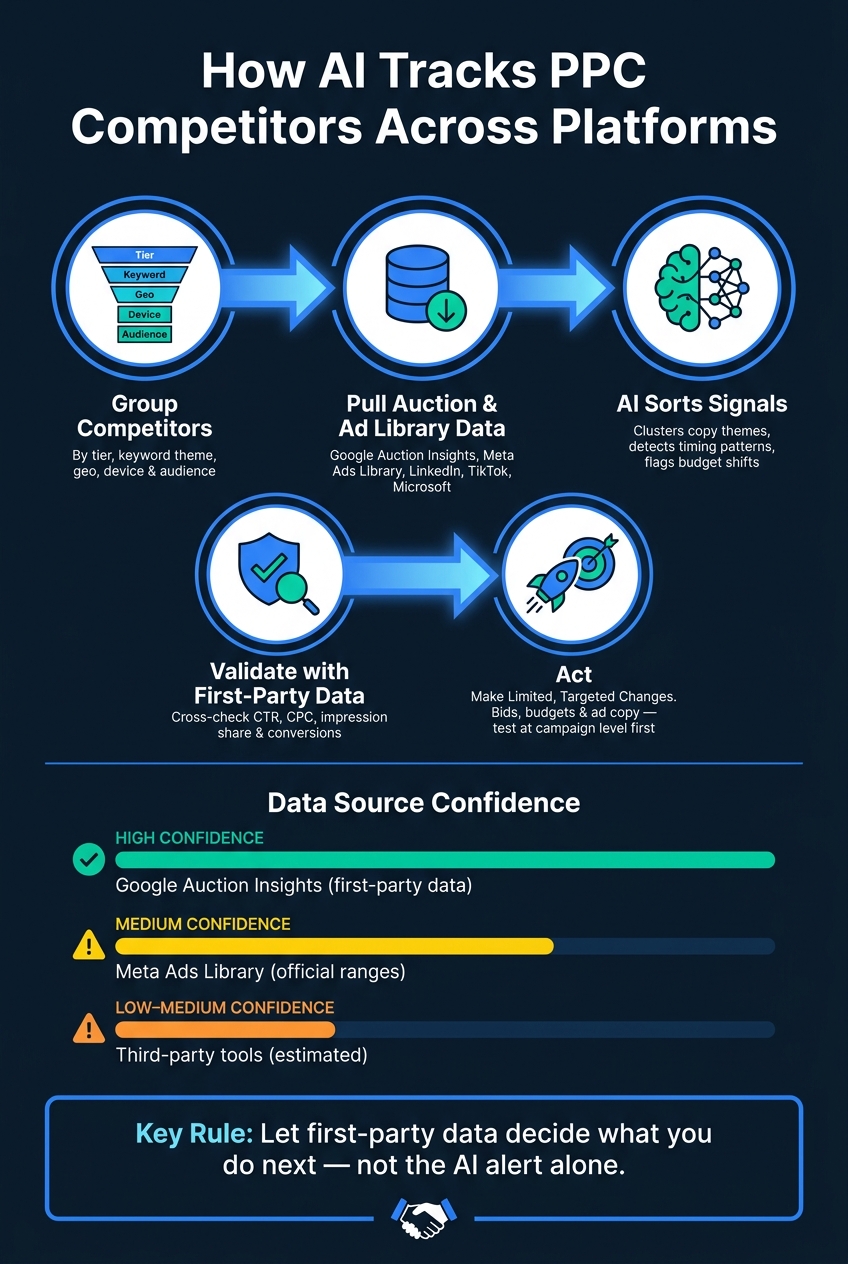
What matters most is not the tool. It’s the process:
- Group competitors by tier, keyword theme, geo, device, and audience
- Pull data from auction reports and ad libraries
- Use AI to sort copy themes, timing, and launch patterns
- Validate those findings against my own CTR, CPC, impression share, and conversion data
- Make limited changes where pressure is highest or where rivals look weak
A quick way to think about the data:
| Source | What I trust most |
|---|---|
| Google Auction Insights | Impression share, overlap rate, position data |
| Meta Ads Library | Live ads, copy, ad dates |
| LinkedIn Ad Library | Active company ads |
| TikTok Creative Center | Ad format and trend patterns |
| Top PPC tools | History, alerts, rough estimates |
Bottom line: I should use AI to spot competitor moves across channels, but I should let first-party data decide what I do next.
How AI Tracks PPC Competitors: 5-Step Process
How to Set Up Competitor Tracking Across Search and Paid Social
Group Competitors by Tier, Keyword Theme, Audience, and Location
Start by sorting competitors into the right buckets for each channel. Business competitors are the companies your sales team sees in live deals. SERP competitors are publishers, directories, and affiliates that win search attention even though they do not sell a competing product. Auction competitors are the advertisers showing up in the same auctions as you. They push up your CPC and eat into impression share.
From there, assign tiers. Tier 1 rivals are the competitors you run into most often on high-intent commercial terms. Tier 2 includes brands that overlap on nearby queries or are moving into your category. Tier 3 includes content-heavy SERP players that shape buyer views before paid demand shows up.
It also helps to group competitors by keyword theme instead of dumping them into one long list. Common themes include:
- Core commercial terms
- Brand-conquest queries
- Problem-aware searches
- Location-led terms
Location matters more than most teams think. Break out Auction Insights at the state or city level so you can spot brands that own one market but barely show up in another. Do the same by audience and device. Mobile and desktop auctions often bring out different rivals and different CPCs. That split tells you which data sources deserve the most attention.
Connect Auction and Ad Transparency Data Sources
Begin with live auction data. Then add transparency libraries to track ad creative and launch timing.
Google Ads Auction Insights is the main source for live competitive overlap. It shows impression share, overlap rate, position above rate, and outranking share based on data from your own account.
After that, layer in transparency sources. The Google Ads Transparency Center shows active ads across Search, YouTube, and Display. It also includes Payer Name disclosures, which helps you confirm who is paying for the campaign. The Meta Ads Library covers active ads on Facebook, Instagram, Messenger, and Threads, with creative, copy, and spend ranges visible for social and political advertisers. For B2B teams, the LinkedIn Ad Library lets you monitor active Sponsored Content and Message Ads from specific company pages. TikTok Creative Center shows trending ads and top-performing industry creatives, but it does not give you a per-advertiser view. Microsoft Ads Auction Insights adds Bing search coverage.
| Source | What It Shows |
|---|---|
| Google Ads Auction Insights | Live impression share, overlap rate, outranking share |
| Google Ads Transparency Center | Active Search/YouTube/Display ads, payer name |
| Meta Ads Library | Active FB/IG creatives, copy, spend ranges |
| LinkedIn Ad Library | Active Sponsored Content and Message Ads by company page |
| TikTok Creative Center | Trending industry ads, top creative formats |
| Microsoft Ads Auction Insights | Search competition on the Bing network |
Choose a Tracking Tool or Agency with the Right Coverage
Use native sources for official data first. Then bring in third-party tools for history and alerts.
Pick a tool or agency that covers both search and social over time, not just in the moment. You want search and social history, creative capture, alerts, exports, and confidence labels. When you evaluate a tool, check for cross-platform creative capture, at least 12 months of historical trend views, configurable alerts for new ads or copy changes, confidence indicators that separate observed data from estimated data, and clean export options. If you use a PPC agency, make sure paid social monitoring is part of the scope, not search alone.
sbb-itb-89b8f36
How AI Converts Competitor Data into Usable Signals
Input Data: Keywords, Auction Metrics, Creatives, Placements, and Landing Pages
Once your tracking sources are connected, AI tools pull raw data from across a competitor's paid footprint. In search, that usually means Auction Insights, your own query data, and SERP snapshots. On social, it includes ad copy, creative metadata, start dates, and payer disclosures from Meta, LinkedIn, and TikTok.
Landing pages matter too. AI systems crawl competitor destination URLs to check message match, page speed, mobile fit, proof, and offer clarity as part of a PPC campaign optimization audit. If a competitor has strong ad visibility but a weak post-click experience, that's a post-click gap you can use against them.
To make this usable, platforms run the raw inputs through a standardization layer. That layer maps fields from different sources into one shared format. A solid database tracks each ad by source, headline, body copy, CTA, and first-seen and last-seen dates. It can also apply tags like has_price, has_urgency, and question_headline automatically, which makes patterns searchable across large ad sets. Once the data is standardized, models can cluster it, score it, and flag changes.
Modeling Steps: Clustering, Time-Series Detection, and Copy Analysis
With the inputs normalized, AI can sort competitors by intent and catch shifts far faster than a manual review. The first step is clustering - grouping keywords and ads by intent instead of just category labels. That helps show whether a competitor is leaning into commercial terms, brand terms, or informational queries, and where budget and messaging may be moving across channels.
At the same time, time-series detection tracks when each ad first appeared and how long it stayed active. A long-running ad usually points to a stable winner. Ads that disappear fast often point to weak tests.
NLP-based copy analysis then scans ad text for changes in value props, emotional triggers, and audience signals. This is where AI earns its keep. It can spot that a rival moved from price-led language to implementation support without someone having to read every ad by hand.
Those signals feed the dashboards teams use to react fast.
Dashboard Outputs: Share Shifts, Creative Trends, and Alerts
The outputs that matter most to a working PPC team usually fall into three buckets. Share-shift views show impression share, overlap rate, and outranking share over time, so you can see when a competitor started pushing on your core terms. Creative leaderboards surface long-running ad copy, which helps you reverse-engineer what may be working. Alerts fire when a new ad appears or when bidding pressure spikes, often through Slack or email so your team can move fast.
Cross-platform snapshots add another layer. They show coordinated launches across Google, Meta, and LinkedIn at the same time.
| Dashboard Output | What It Signals | Action It Supports |
|---|---|---|
| Impression share shift | Competitor entering or exiting your core terms | Bid adjustment or match type tightening |
| Creative leaderboard | Most repeated copy worth studying | Messaging gap analysis and copy refresh |
| New ad alert | Campaign launch or offer change | Rapid creative or promotional response |
| Cross-platform snapshot | Coordinated launch across channels | Budget reallocation toward contested channels |
| Inactive ad log | Failed messaging test | Angles to deprioritize in your own testing |
Check Confidence Levels, Data Gaps, and Policy Limits Before Acting
How to Read Confidence Levels and Estimation Limits
The next step is simple: separate useful signal from model noise.
The dashboards from the previous section may look precise, but a lot of those numbers are modeled from proxy signals. That means spend, CPC, and eCPM should be treated as directional estimates, not board-level facts. The stronger signal is persistence. If you see the same competitor showing up with the same message over time, that usually points to real commitment behind the strategy.
For benchmarking, Google Auction Insights is still the highest-confidence source. Its impression share, overlap rate, and position above rate come from your own account data, which makes it far more dependable than outside estimates.
| Metric Source | Reliability | Best Use Case |
|---|---|---|
| Google Auction Insights | High (first-party) | Validating direct auction pressure and overlap |
| Meta Ad Library | Medium (official ranges) | Reviewing active creative and broad spend ranges |
| Third-party spy tools | Low-Medium (estimated) | Historical trends, keyword overlap, idea generation |
| AI qualitative analysis | Variable | Identifying shifts in messaging and value props |
Validate AI Findings with Internal Performance Data and Manual Review
Before you change a bid or move budget, check whether your own data backs up what the AI flagged.
If a tool says pressure increased on your core keyword cluster, go into Auction Insights and see whether overlap rate or position above rate also climbed on those same terms. If impression share fell during that same period, you probably have a signal worth acting on. If your internal numbers stayed flat, the alert may just be noise.
A good filter here is the ICE framework - Impact, Confidence, and Ease. Only move on signals that score high across all three. For example, a reported competitor spend spike that doesn't show up in your own CPC or CTR data should score low on confidence, no matter how dramatic the alert looks.
Also, clean up conversion tracking and CRM syncs before you automate anything from competitor signals. Bad inputs lead to bad moves. If the signal still holds up after that check, then it's ready for channel-level action.
Stay Within Platform Policies and Privacy Rules
Stick to approved sources only. Google's Transparency Center and Meta's library both come with access and automation limits, which is why many teams still do manual checks.
One hard line: never click competitor ads to watch what happens or try to drain budget. Google treats that as click fraud, and it can lead to account penalties. If you need to view live SERPs by location or device, use the Google Ads Ad Preview & Diagnosis Tool so you don't affect your own data.
Automation makes this even more important. If your team uses AI to trigger bid or budget changes from competitor signals, your data vendors need to follow U.S. privacy rules and each platform's transparency requirements. Only validated signals should feed into bids, budgets, or copy changes.
How to Turn Competitor Signals into Bid, Budget, and Copy Changes
Adjust Bids Based on Impression Share Loss and Overlap Pressure
Once you've validated the pattern, turn the strongest competitor signals into actual account changes using expert-recommended PPC tools and strategies.
Start with bids. Only raise them in the priority cluster where competitor overlap is going up and your impression share is going down. Before you touch anything, break Auction Insights into Brand vs. Non-Brand, device, and geo views. That extra cut matters. A bid issue in one pocket of the account can look a lot bigger than it is.
Don’t push changes across the whole account at once. Test at the campaign or ad group level, then wait at least two to four weeks - or until you hit 30 conversions - before judging the result or rolling it out more broadly.
And here’s the part people miss: bidding more is not always the best answer. If a rival is buying broad category terms with generic ad copy, the smarter move is often to go narrower. Split high-intent terms into tighter ad groups, match the message more closely, and send traffic to landing pages built for that exact intent instead of trying to win a bidding war.
Shift Budget Toward Weaker Competitor Zones and Stronger Channels
Use the same logic with budget. Move spend to places where competitor pressure is lighter and return is better.
That can mean pushing more budget into mobile, specific metro areas, or query segments where rivals barely show up. On intent-rich keywords, CPC gaps between mobile and desktop can top 40%, so device-level budget tests are worth running.
If competitors crowd the expensive, purchase-intent terms, don’t force it. Shift some spend toward informational or problem-aware queries that support the same buying path at a lower cost. But don’t validate that move on platform CPL alone. Check CRM data and watch click-to-close movement before you lock in the new mix.
Update Ad Copy and Creative Based on Message Gaps
Ad copy changes should follow the same principle: find the gap, then fill it with a sharper message.
AI tagging tools can sort competitor ads by themes like urgency, social proof, price, and feature-led hooks, then make the gaps easier to spot. If rivals are pushing price, you may have more room by leading with reliability, security, or ROI.
Focus on ads that have been live for 30 to 60 days or longer. Those are the ones worth studying. Match the pattern, not the wording. If a message keeps showing up for weeks, it’s probably doing a job.
You can also use copy filters to screen traffic before the click. Phrases like "For Teams of 20+" or "Enterprise-Ready" help pre-qualify clicks and protect CAC when CPCs are moving up.
| Ad Copy Signal | Competitor Strategy | Counter-Move |
|---|---|---|
| Price-led hooks | Commoditized lane competition | Lead with quality, support, or long-term ROI |
| Heavy trust language | Reducing perceived risk | Use specific case studies and direct-from-provider messaging |
| Feature-led headlines | Comparison-heavy audience | Highlight USPs or "built-for" use cases |
| Urgency/offer language | Short-window conversion push | Focus on lasting results or steady transformation |
PPC Competitor Analysis Tools - Surfside PPC Podcast Episode 26
FAQs
How accurate are AI-based PPC competitor insights?
Accuracy comes down to the data source.
First-party data - like your own Google Ads Auction Insights - is the most reliable way to measure live competitive overlap, impression share, and outranking share.
Third-party tools are better for directional estimates than exact numbers. Traffic estimates often vary by 15% to 25%, and spend figures are modeled approximations. They’re useful for spotting trends, creative patterns, and strategy shifts - not for precise budgeting.
Which data sources should I trust first?
Start with native platform data - especially the Google Ads Auction Insights report. It’s the most reliable source because it comes straight from the auctions you enter, with metrics like impression share, overlap rate, and outranking share.
Use that as your baseline. Then layer in third-party tools or platform libraries like the Meta Ad Library or Google Ads Transparency Center to get more context on creative and ad history.
How often should I act on competitor ad changes?
Act on reliable signals, not every small move a competitor makes.
Use Google Ads Auction Insights to spot changes that matter - like shifts in impression share or overlap rate. Then act right away if CPC climbs, or if CPA or conversion rates move past your profit thresholds.
A simple rule of thumb:
- Smaller accounts can watch for CPA jumps of 40% over 72 hours
- Larger accounts can use a 35% same-day threshold
Daily alerts or dashboards can help you catch new ad creative or offer changes without reacting to every little blip.