Most bid changes fail because people react to competitor noise instead of profit data, a common pitfall top PPC agencies help brands avoid. I’d use competitor signals only when they line up with shifts in CPC, CPA, conversion rate, or ROAS - and only after the segment has enough data.
Here’s the short version:
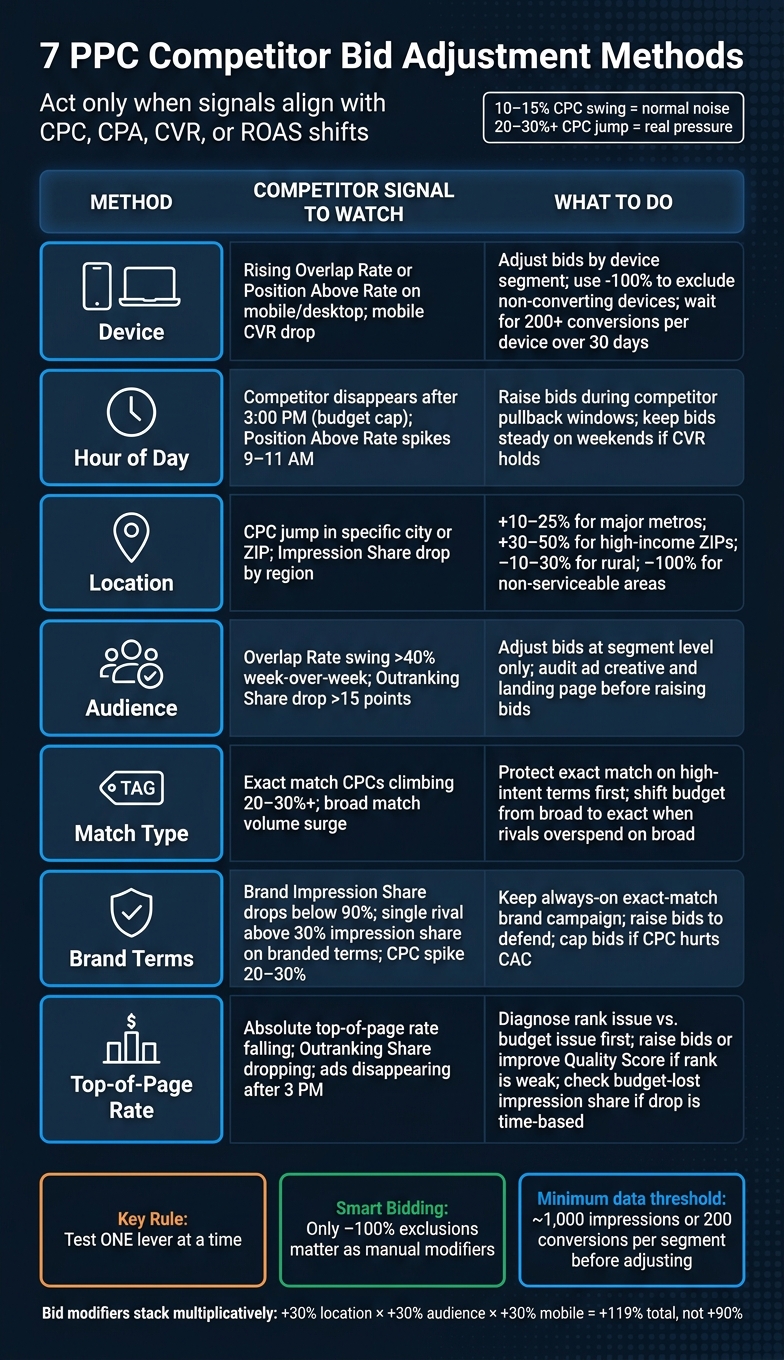
- I’d check Auction Insights first
- I’d review 7 bid levers: device, hour of day, location, audience, match type, brand terms, and top-of-page rate
- I’d ignore small swings like a 10%–15% CPC change
- I’d pay closer attention when CPC jumps hit 20%–30%+
- I’d wait for enough volume, such as ~1,000 impressions or stronger conversion data, before changing bids
- If I use Smart Bidding, I’d keep manual modifiers limited, with -100% exclusions as the main exception
- I’d test one lever at a time so I can see what changed , often using automation tools like Opteo to monitor these shifts
This article boils down to one rule: don’t bid more just because a competitor shows up more often. I’d change bids only when auction pressure is persistent, segment-specific, and tied to business results.
Quick Comparison
| Method | What I’d look for | What I’d do |
|---|---|---|
| Device | Mobile/desktop/tablet pressure | Change bids by device or exclude weak devices |
| Hour of day | Competitor pullback after certain hours | Shift bids into lower-pressure time blocks |
| Location | City, ZIP, or region pressure | Change geo bids or split campaigns by market |
| Audience | Pressure on remarketing or other segments | Adjust bids only for that audience |
| Match type | Exact vs. phrase vs. broad CPC pressure | Protect high-intent traffic first |
| Brand terms | Rivals showing on my brand | Hold brand visibility within CAC limits |
| Top-of-page rate | Loss of top visibility | Check rank vs. budget before changing bids |
If I were applying this in a U.S. account today, I’d start with the segments that affect cost and lead quality fastest: device, time of day, and brand terms.
7 PPC Competitor Bid Adjustment Methods: Signals & Actions
Foundations of Competitor Bid Analysis
Start with Auction Insights to spot where rival pressure is shifting. Then turn those shifts into bid changes for the segments you can actually control. That's the key part. A signal matters only if it points to a segment where you can change bids.
A drop in Outranking Share over 2–4 weeks often points to tougher rival bidding or a better Quality Score on their side. And if Position Above Rate jumps by 10 points or more over that same stretch, it's worth a close look. But don't react just because the numbers moved. Act only when that shift is hurting CPC, CPA, conversion rate, or ROAS.
"Position is not the goal - profitable conversions are. If you are winning fewer auctions but the auctions you win are still profitable, the change in competitive position is not a problem." - Adnan Agic, Google Ads Strategist
Also, don't make moves too early. Wait until the segment has around 1,000 impressions and your conversion tracking is clean.
Auction Insights can break performance out by device, time of day, and location. Those are the same levers used in the seven bid-adjustment methods below. So instead of making one broad change, you can get more precise. A competitor might own desktop traffic but barely show up on mobile. Another rival may vanish after 3:00 PM, which can hint at a budget cap.
When Auction Insights doesn't give you enough detail, outside tools can help fill the gap. Use them for historical context or to review competitor ad copy that Auction Insights doesn't show. Then bring those takeaways back to the segments you can bid on: device, time, location, audience, match type, brand, and top-of-page bids.
Once the data is clean, use these signals to pick the right bid adjustment next.
sbb-itb-89b8f36
1. Device Bid Adjustments
Compare mobile, desktop, and tablet auctions as part of your PPC campaign optimization to see where competitors hit hardest. Start with the weakest device segment. That’s usually where competitor pressure shows up first and where bid signals are easiest to spot.
A rising Overlap Rate means a competitor is showing up in the same device auctions more often. A high Position Above Rate on mobile usually means they’re bidding harder or have a better Quality Score for mobile searches. And a high Top-of-Page Rate is a sign they’re paying more to stay above organic results.
When those signals show up at the same time as weaker mobile CPA or CVR, that’s your cue to look closer. But don’t base the bid move on auction signals alone. Use segment-level performance to decide how much to change. Specialized tools like Optmyzr can help automate these adjustments across large accounts.
Use this formula:
(CVR segment ÷ CVR mean − 1) × 100 = % adjustment
Also, wait until you have at least 200 conversions per device segment over 30 days before making a change. Below that mark, bid adjustments hurt performance in 35% to 47% of cases.
Sometimes the problem isn’t bidding at all. It’s tracking. If the device drop might be tied to measurement, fix that first. Mobile conversions are under-reported in 55% to 68% of audited accounts because of misconfigured GA4 cross-device tracking or broken consent strings. So if mobile CVR looks weak, don’t assume the device is underperforming. You may just be looking at bad data.
For review cadence, a monthly check of device-level Outranking Share and Impression Share is enough in normal periods. During peak times like Black Friday, switch to weekly. Miss a competitor jump and you can lose 15% to 20% of impression share.
If you’re using Smart Bidding, Google already factors in device context in real time. In most cases, the only bid adjustment worth making is −100% to block a device completely. Think of a SaaS product that just doesn’t work on mobile.
"The 2026 rule is simple: -100% to exclude a device, zone, or time slot - 0% everywhere else, unless an explicit Manual CPC case." - Andrew, Smart Bidding & Automation Lead, SteerAds
Then compare device pressure with time-of-day shifts.
2. Hour-of-Day Bid Adjustments
Competitors don’t bid the same way all day. A lot of them spend hard during business hours, then drop off once budgets get tight. That opens up timing gaps you can use. Instead of moving bids everywhere, shift them only when rival pressure starts to ease.
If ads disappear after 3:00 PM, that may mean a competitor is budget-capped. And that can create a lower-competition window. When a competitor stops showing after 3:00 PM, increase bids during that period to pick up lower-cost traffic.
If Position Above Rate goes up during your best-converting hours - say, from 9:00 AM to 11:00 AM local time - that tells you a competitor is bidding past you when conversions matter most. In that case, you have two smart options: improve Quality Score or increase bids for that time block only. There’s usually no good reason to bump bids across the whole day if the problem shows up in a narrow window.
Weekends can open up another angle. Many advertisers cut bids on Saturdays and Sundays because they expect lower conversion rates. But if your weekend traffic still converts well, keep bids steady while others back off.
To stay on top of this, review Auction Insights every week so you can spot budget shifts and daypart changes. Then run a monthly audit to catch new competitors and schedule changes. When you spot a meaningful shift, make your move within 24 to 48 hours. Just keep the changes small so you don’t overreact to one noisy day of data.
Next, map the same competitive pressure by location.
3. Location Bid Adjustments
Competitor pressure changes from one market to another. A rival may crowd auctions in Chicago and barely appear in Denver. When you filter Auction Insights by location, you can see where that pressure is building by looking at Impression Share and Outranking Share. A sudden CPC jump in a city or ZIP code can also point to new competitor activity in that market.
Use geo bid changes only when the segment has enough conversion volume to be statistically stable.
Consult a PPC marketing directory for specialized tools, but here are solid starting ranges:
| Location Type | Adjustment Range | Rationale |
|---|---|---|
| Major U.S. metros (NYC, LA, Chicago) | +10% to +25% | Higher intent and conversion density |
| High-income ZIP codes (e.g., 90210, 10021) | +30% to +50% | Premium sectors with strong competitor pressure |
| Rural or sparse areas | −10% to −30% | Lower purchasing power or higher logistics costs |
| Non-serviceable regions | −100% | Full exclusion; the manual adjustment that stays active under Smart Bidding |
Under Smart Bidding, geo modifiers usually matter only for −100% exclusions. If certain metros matter more, split them into separate campaigns with their own budget and Target CPA. That gives you tighter control where it counts.
During heavy competition periods like Black Friday, run an Auction Insights scan every week. If you miss those windows, you can lose 15% to 20% of impression share as competitors push more regional spend into the auction. When you spot a real move in one region, act within 24 to 48 hours - but check first that it isn't just a one-day blip.
Next, check whether competitor pressure changes by audience segment.
4. Audience Bid Adjustments
When rival pressure hits some audiences harder than others, adjust bids at the segment level using PPC automation platforms, not across the whole account. That keeps your response targeted instead of blunt.
Use Auction Insights at the campaign or ad group level anywhere audience targeting is active. Pay close attention to Overlap Rate and Outranking Share. If overlap is going up while outranking share is slipping, that usually points to tougher rival pressure inside that audience segment. Still, bid changes only help when quality and relevance stay strong. A higher bid can still lose if Quality Score is weak.
Use these triggers:
| Metric | Action Threshold | Response |
|---|---|---|
| Overlap Rate swing | >40% week-over-week | Trigger a review of that audience segment |
| Outranking Share drop | >15 points | Audit ad creative and landing page specificity before raising bids |
Set aside 20 minutes each week for a review using a 7-day window. That helps you avoid chasing daily swings. Then do a deeper monthly check using 30- to 60-day trends to see whether a competitor's move is sticking or just a short burst.
If pressure on that audience keeps showing up, test match type next.
5. Match Type Bid Adjustments
Exact match usually gets hit the hardest. Phrase match tends to land in the middle. Broad match brings the most volume, but intent is often weaker.
That gap matters when you adjust bids. A 10–15% CPC swing is normal market noise and usually not worth chasing. Step in when CPCs climb 20–30% or more, not when you're just seeing the usual 10–15% movement.
| Match Type | Competitor Activity | Strategic Response |
|---|---|---|
| Exact Match | Highest pressure, highest CPCs | Optimize Quality Score and landing page relevance before raising bids |
| Phrase Match | Moderate pressure, captures query variations | Monitor for new variations on core service terms |
| Broad Match | High volume, usually broader and less qualified | Shift budget toward higher-intent long-tail keywords when rivals overspend here |
Match type shows where auction pressure is coming from. Search-term review shows whether that pressure is starting to spread. Run a weekly scan of search terms to spot new competitor encroachment and major auction shifts. Then split match-type pressure from brand-term pressure.
6. Brand Term Bid Adjustments
After match type, look at whether competitors are going after your brand terms.
Brand terms often come with near-perfect Quality Score and low CPCs. But that edge can fade when competitors start pushing in. Set a bid ceiling based on your allowable CAC. In most accounts, branded traffic converts better than conquesting traffic, so it usually deserves tighter protection.
Use Auction Insights to spot overlapping domains. Then check Search Terms to see whether competitor names or close variants are triggering your brand ads. If one rival is above 30% impression share on your branded terms, that usually points to deliberate conquesting. If they're below 10%, broad match or close variants are often the cause.
Keep an always-on exact-match brand campaign in place. If rank pressure sticks around, increase bids. If CPC inflation starts to hurt CAC, put caps in place. The goal is simple: hold the traffic you’ve already earned without paying more than the math allows.
Use these thresholds to tell the difference between normal brand noise and actual competitive pressure.
| Signal | Threshold for Action | Recommended Response |
|---|---|---|
| Brand Impression Share | Drops below 90% | Raise bids or check whether competitor budget constraints are the limiting factor |
| CPC Spike | 20% to 30% increase | Evaluate bid caps or increase target ROAS/CPA |
| Competitor Impression Share | Single rival above 30% | Usually indicates deliberate conquesting; consider aggressive defensive bidding |
| Position-Above Rate | Consistent upward climb | Improve Quality Score or increase bids to reclaim the top slot |
Review this weekly during launches and holidays, monthly for performance trends, and quarterly for strategy.
Once brand terms are stable, use top-of-page rate to judge how aggressively you need to defend visibility.
7. Top-of-Page Rate Adjustments
When brand defense is stable, look at top-of-page rate to see whether competitors are pushing you out of the most visible spots. This metric shows how often a rival’s ads appear above the organic results. Absolute top-of-page rate goes one step further: it shows how often that rival takes the #1 ad position.
Don’t jump straight to higher bids. First, figure out why the rate dropped.
If top-of-page rate falls because your rank is weak, you may need to raise bids or improve Quality Score. But if your ads start dropping out after 3:00 PM, that points to a different issue. In that case, check impression share lost due to budget before changing bids.
Use the table below to tell rank issues from budget issues before you touch bid levels.
| Metric | What It Signals | Response |
|---|---|---|
| Top-of-page rate | Ads shown above organic results | Raise bids or improve Quality Score to strengthen Ad Rank |
| Absolute top-of-page rate | #1 auction position | Raise bids on high-intent terms if the segment can support it |
| Position above rate | Stronger competitor bid pressure or Quality Score | Refine ad copy and offer before increasing bids |
| Outranking share | Head-to-head auction wins | Review offer and landing page changes before bid changes |
A sudden jump in a competitor’s outranking share is often a clue. They may have changed the offer, tightened the landing page, or pushed harder on ad copy. Check that first before making an automatic bid increase.
How to Apply These 7 Adjustment Methods
Before you change bids, compare CPC, top-of-page rate, and impression share with conversion rate. Think of this matrix as a fast gut-check. It helps you decide what to adjust before you layer in U.S.-specific budget, seasonality, and geo rules.
| Adjustment Method | Controls | Competitor Signal to Review | Decision Rule |
|---|---|---|---|
| Device | Mobile, desktop, tablet bids | Device-level CPC and visibility | Split campaigns when device intent differs |
| Hour-of-Day | Bidding by time and day | Competitor pullback windows | Raise bids when competitor pullback lowers CPC |
| Location | Bidding by geography | Impression share by region | Raise in underserved areas; lower in oversaturated regions |
| Audience | Segment-specific bids | Overlap Rate and Outranking Share by segment | Raise for high-value remarketing lists; cap if competition is too expensive |
| Match Type | Exact vs. broad keyword precision | Broad match volume and CPC pressure | Lower broad bids; raise exact match on high-intent gaps |
| Brand Terms | Own brand and rival brand bids | Competitor impression share on branded terms | Raise to defend your brand; bid on rivals only when you have a clear differentiator; start competitor-targeted bids 20%–30% below core brand campaign levels |
| Top-of-Page Rate | Visibility at the top of the SERP | Absolute top-of-page rate and outranking share | Raise to outrank if CVR is strong; cap if CPC climbs past conversion value |
One thing trips people up here: bid adjustments stack multiplicatively, not additively. So a +30% location modifier, a +30% audience modifier, and a +30% mobile modifier don’t add up to +90%. They stack to more than 119% because the math is 1.3 × 1.3 × 1.3.
That matters in practice. A few small-looking modifiers can snowball fast.
If competitor pressure shifts by device or by hour, don’t just pile on modifiers and hope for the best. Split the campaigns instead. Use campaign splits as your starting point, then apply the U.S.-specific limits in the next section.
U.S.-Specific Tips for Competitive Bid Changes
When competitor pressure shifts by U.S. market and business hour, use rules that match how the U.S. day actually works. The four main U.S. time zones create real scheduling choices for national campaigns. That three-hour East–West gap matters. A morning bid change on the East Coast can go live well before search demand peaks on the West Coast.
In B2B, running ads 24/7 can hurt lead quality if no one is there to qualify leads. That’s why it helps to watch competitor activity using PPC competitive analysis tools between 9 AM and 11 AM local time, when many advertisers make campaign changes. Also pay close attention to demo windows on Tuesday through Thursday, especially from 10 AM to 12 PM and 2 PM to 4 PM. Use those local timing windows first, then decide whether to split budgets by geography.
For market structure, separate campaigns for premium metros like New York, Los Angeles, and Chicago from standard U.S. markets. Then set budgets and Target CPA by market tier. High-income ZIP codes such as 10021 (Manhattan, NY), 94027 (Atherton, CA), and 90210 (Beverly Hills, CA) fit premium tiers for luxury, real estate, and premium services. After those geo splits are in place, use local-query demand to pick up the rest of the high-intent traffic.
On the keyword side, watch for location-intent searches like "near me" to catch high-intent local traffic that competitors may miss. Report changes in USD CPC and ROAS, then compare those results with competitor impression share changes before moving budget.
Building a Repeatable Testing Framework From Competitor Signals
When competitor pressure starts showing up by device, hour, or location, pause before changing bids. First, verify that what you're seeing is a real pattern and not random auction noise. A simple test framework helps you do that.
Start with 60 days of Auction Insights for your priority campaigns. Build baseline ranges for device, hour, location, audience, match type, brand terms, and top-of-page rate. Then break that data into exact brand terms, brand variants, and generic keywords. Those auctions don't behave the same way, so they shouldn't be judged the same way either.
Those baseline ranges become your reference point for later bid changes. Use that same setup across device, hour, location, audience, match type, brand, and top-of-page signals so you're comparing like with like.
Once the baseline is in place, test one lever at a time. That's the key. If you're changing device bids because a competitor is much more visible on mobile than desktop, don't also change your hour-of-day multipliers in the same test window. One bid lever per test makes the outcome easier to read.
A steady review rhythm matters too:
- Check results weekly
- Do a deeper biweekly review every two weeks
You also need a filter for what counts as a real shift. Don't react to a single spike in one auction. Treat a change as meaningful only when the same signal shows up across multiple days. In practice, that means acting only when a competitor's position-above rate or impression share crosses a threshold that matters to you and stays there.
For example, if a rival's impression share jumps from 20% to 60% on a high-value keyword cluster and holds there, that warrants a bid response.
Automation can help here, but it shouldn't make the final call. Use automated rules or Google Ads API scripts to pull Auction Insights metrics like overlap rate and position-above rate each day, then flag cases where they move past your preset thresholds. Let the system spot the shift. Keep the bid decision manual until that movement holds.
Tools and Resources for Competitive Bid Management
Once your testing setup is live, the right tools help you spot competitor moves faster and respond without second-guessing every bid change. They help confirm shifts across device, hour, location, audience, match type, brand, and top-of-page pressure. In plain English: they help you turn signals from the seven bid methods into faster, cleaner decisions.
Adalysis helps automate bid adjustments across device, location, and audience signals. It also tracks before-and-after results, so you can see if a change actually made a difference. It has a 4.7/5 rating from more than 200 reviews and includes a 30-day free trial.
For competitor intel, each platform does a slightly different job. Adthena looks at search results to analyze competitor ad copy, auction pressure, and keyword strategy. SpyFu is a better fit for historical paid keyword behavior and ad copy persistence. PPCmanager.ai helps separate budget-lost impression share from rank-lost impression share, then turns that into action items. If you want free options, the Google Ads Transparency Center and Meta Ad Library let you check active competitor creative.
It helps to group these tools by function. That way, each one answers a simple question: what changed, why did it change, and what should you do next?
| Tool Category | Key Examples | Primary Use Case |
|---|---|---|
| Bid Management | Adalysis, Google Ads | Automating bid adjustments and scheduling |
| Competitor Intelligence | Adthena, SpyFu, PPCmanager.ai | Tracking competitor spend, copy, and auction pressure |
| Keyword Research | Semrush, Ahrefs, SEMRocket | Identifying keyword overlap and modeling campaign ROI |
| Reporting/Analyzers | SEMRocket, ASK BOSCO® | Visualizing auction insights and high-level benchmarking |
You can also use the Top PPC Marketing Directory to compare PPC tools and agencies by function.
Conclusion
Competitor bid analysis isn't about copying every move your rivals make. It's about making the smallest bid change that can do the job using PPC management and optimization solutions when competitor pressure starts hitting visibility, cost, and conversion efficiency at the same time.
That means looking at the right signals before you act. Check device, time, location, audience, match type, brand, and top-of-page data. Those signals help you tell the difference between normal noise and a real shift in the auction.
Here's the plain-English rule of thumb:
- A 10–15% CPC increase is often just normal volatility
- A 20–30%+ jump usually points to actual competitor pressure
Move fast, but don't overreact. Test changes quickly, then adjust only when the signal keeps showing up.
FAQs
How do I know if a CPC increase is real competitor pressure or just auction noise?
Check Google Ads Auction Insights before you react to small CPC swings. A 10% to 15% jump in CPC is usually just normal auction noise, and in most cases, it doesn’t call for an aggressive move.
If CPCs climb 20% to 30% or more, compare that change against competitor data in Auction Insights. Watch for a matching jump in a competitor’s impression share, overlap rate, or position-above rate. If those numbers stay about the same, you’re probably looking at normal auction behavior - not a major market shift.
What should I adjust first if I’m already using Smart Bidding?
If you’re using Smart Bidding, skip manual bid adjustments for devices, locations, or audiences. The system already factors in real-time signals, and manual tweaks can get in the way of how it learns.
The main manual adjustment that still makes sense is a -100% modifier to completely exclude a device, area, or time slot. If you want to split performance by region or segment, set up separate campaigns with their own budgets and targets instead.
When should I split campaigns instead of stacking bid modifiers?
Split campaigns instead of piling on bid modifiers when you move from Manual CPC or Maximize Clicks to Smart Bidding like Target CPA or Target ROAS.
Here’s the simple reason: modern algorithms often ignore most bid adjustments outside of device settings. So if you want tighter control, separate campaigns usually work better.
With split campaigns, you can set different:
- budgets
- bidding targets
- creative assets
That makes it much easier to handle segments like regions or audience tiers without forcing everything into one campaign.