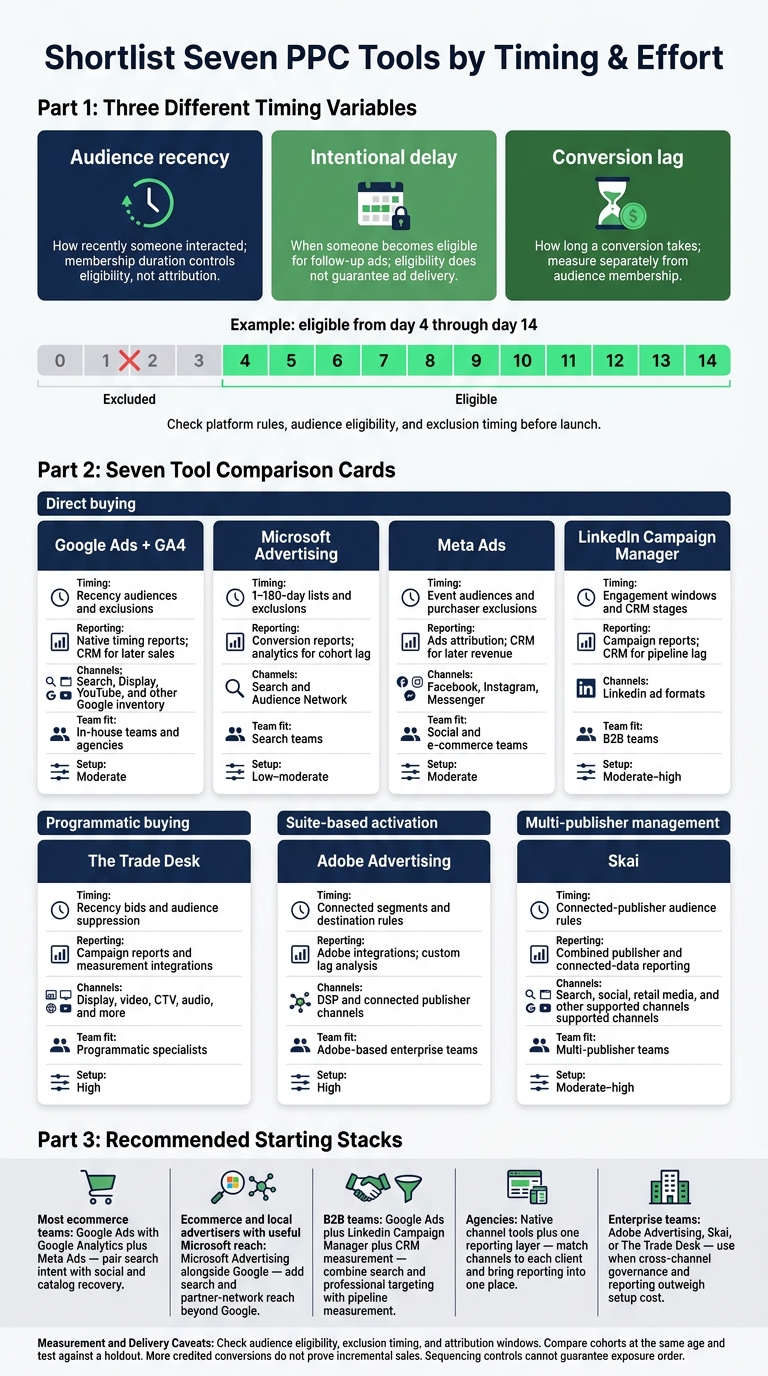
I’d start with Google Ads and GA4 for behavior-based retargeting, add Meta for cart recovery, and use LinkedIn for B2B follow-up. To delay ads until day 4, for example, target a 14-day audience and exclude the 3-day audience. Check each platform’s rules before launch.
I compare 7 PPC tools on timing controls, conversion-lag reporting, channel coverage, and setup work. The key distinction: audience duration is not a delivery delay, and neither tells you how long a sale takes.
Quick Comparison
| Tool | Timing controls | Reporting | Channels | Team fit and setup |
|---|---|---|---|---|
| Google Ads + GA4 | Recency audiences and exclusions | Native timing reports; CRM for later sales | Search, Display, YouTube, and other Google inventory | In-house teams and agencies; moderate setup |
| Microsoft Advertising | 1–180-day lists and exclusions | Conversion reports; analytics for cohort lag | Search and Audience Network | Search teams; low–moderate setup |
| Meta Ads | Event audiences and purchaser exclusions | Ads attribution; CRM for later revenue | Facebook, Instagram, Messenger | Social and e-commerce teams; moderate setup |
| LinkedIn Campaign Manager | Engagement windows and CRM stages | Campaign reports; CRM for pipeline lag | LinkedIn ad formats | B2B teams; moderate–high setup |
| The Trade Desk | Recency bids and audience suppression | Campaign reports and measurement integrations | Display, video, CTV, audio, and more | Programmatic specialists; high setup |
| Adobe Advertising | Connected segments and destination rules | Adobe integrations; custom lag analysis | DSP and connected publisher channels | Adobe-based enterprise teams; high setup |
| Skai | Connected-publisher audience rules | Combined publisher and connected-data reporting | Search, social, retail media, and other supported channels | Multi-publisher teams; moderate–high setup |
My rule before scaling: <u>check audience eligibility, exclusion timing, and attribution windows</u>. Then compare cohorts at the same age and test against a holdout. More credited conversions do not, by themselves, prove that retargeting drove more sales.
7 PPC Tools for Time-Delay Retargeting
1. Google Ads with Google Analytics
Audience timing and segmentation
Google Ads with GA4 provides the most direct native setup for recency-based retargeting. Link Google Ads to GA4 to build audiences based on user behavior.
Use non-overlapping recency windows such as 0–3, 4–14, and 15–30 days.
Exclude purchasers, and use Customer Match for CRM stages such as leads, open opportunities, customers, and recent buyers. Google eligibility rules and data policies apply. This structure makes delayed-response reports easier to read.
Conversion lag and revenue reporting
Use Google Analytics conversion-lag reporting and Google Ads conversion-time reports to track delayed conversions.
Review buckets like same day, 1–3 days, 4–7 days, 8–14 days, and 15–30 days.
For e-commerce, send transaction value, currency, order ID, and purchase status to Analytics. For lead generation, import qualified-lead and pipeline values rather than treating every form submission equally. Before comparing revenue, check attribution settings, deduplication, and the reporting time zone.
Channel coverage
Google channels can include Search, Display, YouTube, Discover, Gmail, and Shopping. Audience targeting, exclusions, and frequency controls vary by format. Check each channel’s setup and audiences during QA before launch.
Setup and team fit
Google Ads with GA4 works best when the team can handle measurement and keep audiences clean in-house. Before launch, verify the GA4 property, Google Ads customer ID, conversion actions, and reporting time zone.
Allow 24–48 hours for syncing and processing before comparing results. Before increasing spend, test audience eligibility, consent controls, conversion firing, and CRM updates. Consent choices and minimum eligibility thresholds can limit audience sizes.
Best fit: in-house teams and top PPC agencies that need native audience updates, recency control, and conversion-lag visibility. Tagging, CRM integration, and regular measurement still require budget.
sbb-itb-89b8f36
2. Microsoft Advertising
Audience timing and segmentation
Microsoft Advertising uses Universal Event Tracking (UET) to measure conversions and build remarketing audiences. Membership lasts 1-180 days, with a 30-day default.
Split UET audiences into 7-, 30-, and 90-day groups, then adjust bids, copy, and offers based on how recently users interacted. Combined audiences use AND, OR, and NOT logic. Campaign- or ad-group-level exclusions let you keep purchasers and other converted users out of later-stage retargeting. Use “target and bid” for audience-only targeting.
Conversion lag and revenue reporting
Set UET conversion goals for purchases, and pass revenue and order IDs where supported. For lead generation, import downstream CRM outcomes when available. This lets you compare leads with qualified opportunities or closed revenue, rather than form fills alone.
Compare CPA, ROAS, and conversion rate across audience-age groups, then check platform results against analytics and CRM records. Membership duration controls eligibility, not attribution. Set the conversion window separately, and review lag reports alongside CRM data.
Channel coverage
Microsoft supports audience targeting across Search and Audience Network. Eligibility varies by campaign type and placement, so check campaign settings instead of assuming every format supports the same audiences.
Setup and team fit
Best fit: search-focused in-house teams and agencies managing multiple client accounts.
Users can enter remarketing lists within minutes, but Microsoft’s documented remarketing delivery threshold is 1,000 users. Confirm current requirements before launch. If traffic is limited, start with longer membership windows.
Agencies can use manager-account controls for permissions, billing, consent, and conversion imports. Audit campaign- and ad-group-level exclusions together, since combined rules can block delivery.
Meta Ads is the next comparison for social-first retargeting and creative sequencing.
3. Meta Ads
Audience timing and segmentation
Build Meta Ads Custom Audiences from site events, customer lists, and Facebook/Instagram engagement. Segment by intent and recency: use short windows for cart and checkout abandoners, and longer windows for broad visitors or engaged users. Where event volume supports it, create segments for ViewContent, AddToCart, InitiateCheckout, Purchase, and lead events. Exclude recent purchasers from cart-recovery and acquisition campaigns.
Use separate windows, such as 1–3 days, 4–14 days, and 15–30 days, to mirror stage-based sequencing.
These audiences control eligibility, not message order. Meta works best when each recency window has a different offer or ad.
Connect a catalog to retarget people with products they viewed or added to their cart, excluding recent purchasers. Use recovery ads for short-window abandoners and follow-up offers for mid-window prospects. Keep product IDs, prices, availability, URLs, and images current. Put purchasers in separate cross-selling audiences rather than continuing to show them cart-recovery ads.
Conversion lag and revenue reporting
Use the Meta Pixel with Conversions API. Match event IDs for deduplication, and include purchase value and currency for revenue tracking. Compare 1-day view, 1-day click, and 7-day click attribution settings in Ads Manager.
Revenue that arrives after 14 or 30 days may fall outside the selected attribution window. CAPI helps preserve measurement, but it does not remove consent, attribution, or CRM-data limits.
Channel coverage
Use Facebook and Instagram Feed, Stories, Reels, and Messenger for remarketing, based on ad format fit and campaign objective.
Setup and team fit
Best fit: social teams and agencies that can maintain ad content, tracking, and catalog feeds. Update ads by stage, and start with a limited number of ad sets so small audiences aren't split too thin. Agencies should standardize audience naming, exclusions, and event checks.
Keep Meta-attributed revenue separate from CRM-validated revenue. Report spend, frequency, and outcomes by stage and attribution setting.
LinkedIn Campaign Manager follows for B2B retargeting, where smaller audiences and lead-stage timing matter more than cart recovery.
4. LinkedIn Campaign Manager
Audience timing and segmentation
LinkedIn Campaign Manager builds Matched Audiences from website visitors, contact and company lists, and engagement with video, documents, and Lead Gen Forms. Engagement audiences support 30- to 365-day lookbacks. Match those windows to buying stages: shorter for form starts and higher-intent engagement, longer for awareness content.
Separate Lead Gen Form openers from submitters. Exclude submitters from campaigns designed to drive form completion, and use CRM lists to exclude customers and active opportunities. Before launch, check audience status, match rate, and size. Uploading a list doesn't mean it's ready to use.
Audience timing matters, but what converts later matters more.
Conversion lag and revenue reporting
Connect Lead Gen Forms to Salesforce, Dynamics 365, or HubSpot. Track qualified leads, opportunities, pipeline, and closed revenue, not just submissions. Keep UTMs consistent so you can link acquisition to CRM outcomes, and import later-stage conversions where supported.
Pipeline may appear weeks or months later. Compare LinkedIn-reported outcomes with CRM records and account for that delay in your reporting.
For cross-channel retargeting beyond LinkedIn, the next platforms offer more open-web reach and programmatic controls.
Channel coverage
LinkedIn offers Sponsored Content, video, document ads, and Lead Gen Forms. Its strength is professional, company-level targeting, not open-web reach. Use it to reach relevant roles and buying committees, not as a replacement for broad programmatic advertising. It's a fit for B2B timing and pipeline follow-up rather than broad consumer retargeting.
Setup and team fit
Best fit: in-house B2B demand-gen teams with clean CRM data, or PPC agencies running account-based campaigns. For these teams, timing follows CRM stage rather than onsite behavior alone.
Keep stage definitions and CRM reporting consistent. Avoid stacking too many company, seniority, and engagement filters. Small audience pools limit delivery and testing.
Before increasing spend, extend lookback windows or combine compatible engagement sources. Judge performance by qualified pipeline and payback, not cheap leads.
5. The Trade Desk
The Trade Desk extends time-delay sequencing beyond single-network platforms for open-web retargeting.
Audience timing and segmentation
The Trade Desk lets you reduce bids across open-web inventory as audience recency fades. Set short, medium, and long recency windows, then lower bids as intent drops. Keep high-intent visitors, such as people who viewed product or pricing pages, separate from general visitors. Use audience blocking to exclude converters. First-party data and cross-device identity can also suppress converters on other devices.
Conversion lag and revenue reporting
Measure time to conversion and report click-through and view-through results separately. Check conversion value against CRM or order data. Use lift tests when possible: attribution alone does not prove incremental impact.
Channel coverage
The Trade Desk buys display, online video, CTV, audio, native, and digital out-of-home inventory. This lets you sequence follow-up ads after earlier CTV or video exposure. UID2 and other identity integrations support activation and frequency management. But check consent, match rates, and coverage before promising person-level continuity across channels.
Setup and team fit
Best fit: agencies with programmatic buying expertise or in-house teams with dedicated media, data, and analytics resources. Budget for tracking, audience onboarding, channel-specific ad assets, suppression, and regular supply optimization. The Trade Desk serves teams that need programmatic buying, not one of the multi-platform search and social management suites like Optmyzr.
Adobe Advertising is the closer fit for teams that need similar open-web retargeting with deeper enterprise workflow control.
6. Adobe Advertising
Adobe suits enterprise teams that want retargeting linked to Adobe analytics and commerce data, with more workflow control than simpler native tools.
Audience timing and segmentation
Adobe works best when audience timing rules draw on connected analytics and commerce data, rather than ad-platform pixels alone.
Use Adobe Advertising page-based pixel audiences for basic retargeting. For recency windows and exclusions, use segments from Adobe Analytics, Audience Manager, or Experience Platform. Check refresh and suppression timing so converted users are excluded without delay.
Conversion lag and revenue reporting
Adobe Advertising has no native conversion-lag dashboard. Build a lag view to compare median days to conversion across cohorts.
When paired with Adobe Analytics, it can report downstream events, revenue, cart views, and custom metrics. It can also separate last-touch view-through conversions from click-through conversions. To optimize for downstream revenue rather than early form fills, use CRM, commerce, subscription, or offline revenue data.
Channel coverage
DSP and Search, Social, & Commerce workflows cover display, video, audio, CTV, search, social, and commerce. Audiences do not sync automatically across all workflows. Before sequencing ads, confirm audience destinations, identity matching, and frequency settings for each publisher.
Setup and team fit
Best fit: enterprise in-house teams and agencies already using Adobe’s data stack. Before scaling, validate event mapping, audience population, suppression delays, attribution windows, and conversion deduplication. Agencies should also standardize client permissions and reporting templates.
Use the comparison table to weigh Adobe against simpler native platforms and lighter-weight programmatic tools, or browse our directory of top PPC tools for more options.
7. Skai
Adobe ties retargeting to its own stack. Skai works above multiple publishers as a shared control layer, similar to other top PPC tools.
Skai centralizes retargeting across hundreds of publishers for teams managing delayed follow-up across channels. It brings audience management and reporting into one place without replacing publisher targeting controls, helping teams keep timing and reporting consistent.
Audience timing and segmentation
Audience Manager syncs customer lists and builds cross-publisher audiences from campaign clicks, connected site visits, product actions, and lead events. After syncing, check recency windows, purchaser suppression, membership, exclusions, and each publisher’s lookback rules.
Conversion lag and revenue reporting
Once audiences are built, reporting shows whether delayed clicks and conversions are generating revenue.
Skai combines spend, conversions, revenue, CPA, and ROAS reporting by publisher and audience age. Use connected conversion timestamps to group conversions into 1 day, 2-7 days, 8-30 days, and more than 30 days. Incrementality measurement helps separate credited conversions from incremental revenue.
Channel coverage
Skai covers paid search, paid social, retail media, display, apps, and CTV across major publishers. Each publisher’s controls determine available audience types, lookback windows, exclusions, placements, and frequency controls. Check these before planning a cross-channel sequence.
Setup and team fit
Best fit: mid-market and enterprise in-house teams and agencies managing multiple publishers. Skai supports centralized governance rather than a lightweight single-platform interface. Agencies can use APIs and scheduled reports to build repeatable workflows.
Start with 1 or 2 publishers, verify audience sync, and test audience, exclusion, and reporting workflows before adding more publishers.
Compare Timing, Reporting, Channels, and Setup
The platform breakdown above explains how each tool works. These tables compare timing controls, lag reporting, channel reach, and setup work side by side.
Start with each platform’s timing controls and the reporting it can provide.
| Platform | Timing approach | Lag-reporting source | Buying model | Setup complexity |
|---|---|---|---|---|
| Google Ads with Google Analytics | Native membership rules; event cohorts | Ads and Analytics; CRM for downstream lag | Direct buying | Moderate |
| Microsoft Advertising | Native remarketing rules | Conversion reports; analytics for cohorts | Direct buying | Low–moderate |
| Meta Ads | Custom Audiences; event rules; exclusions | Ads reporting; CRM for cohort lag | Direct buying | Moderate |
| LinkedIn Campaign Manager | Website and Matched Audiences | Campaign reports; CRM for pipeline lag | Direct buying | Moderate–high |
| The Trade Desk | First-party, partner, and identity rules | Campaign reports; measurement integrations | Programmatic buying | High |
| Adobe Advertising | Destination-based audience rules | Connected engines; Adobe integrations | Suite-based activation | High |
| Skai | Connected-publisher rules | Publisher data; connected reporting | Multi-publisher management | Moderate–high |
Audience Recency Windows and Exclusions
Combine event timestamps and exclusions to create recency cohorts that don’t overlap.
| Platform | Duration limits | Delayed-window approach | Segmentation | Suppression and recency controls | Recency-based delivery |
|---|---|---|---|---|---|
| 30-day default; up to 540 days | Timestamp rules; exclusions | Event cohorts | Converter and shorter-window exclusions; membership resets | Campaign targeting; audience eligibility | |
| Microsoft | 1–180 days; 30-day default | Separate lists; exclusions | Event and duration rules | Campaign-specific exclusions | Targeting or bid controls |
| Meta | Source-dependent; verify retention | Custom Audiences; event exclusions | Event, value, product, recency | Purchaser, lead, and contact suppression | Campaign-specific controls |
| Source-dependent; verify retention | Matched Audiences; CRM/event segments | Account, role, lifecycle, engagement | Contact and account exclusions | Match and audience eligibility | |
| The Trade Desk | Identity- and partner-dependent | First-party, partner, or DMP audiences | Recency, event, identity, inventory | Suppression; household/device controls | Recency bids; frequency and inventory controls |
| Adobe | Platform- and destination-dependent | Adobe segments; destination rules | Analytics or customer-data segments | Integrated suppression; destination validation | Destination-specific controls |
| Skai | Connected-publisher limits | Publisher-specific audiences and workflows | Destination-dependent segments | Publisher exclusions; centralized governance | Publisher-supported controls |
Conversion Lag, Revenue, and Pipeline
Track conversion lag separately from ad-response lag. Then compare cohorts at the same age.
| Platform | Lag visibility | Attribution scope | Revenue or pipeline connection | Reporting caveats |
|---|---|---|---|---|
| Google Ads with Google Analytics | Native timing reports; integrated cohort analysis | Google channels; linked Analytics; selected windows | Offline imports; CRM or warehouse | Time zones; models; consent; deduplication |
| Microsoft Advertising | Native conversion reports; analytics for cohort lag | Configured click and impression attribution | Offline conversions; CRM | Window and identity differences |
| Meta Ads | Native attribution views; CRM/warehouse for cohort lag | Click-through; view-through; modeled results | CRM; offline-event integrations | Privacy; modeling; audience overlap |
| LinkedIn Campaign Manager | Native campaign reports; CRM for opportunity lag | LinkedIn interactions; configured windows | CRM; offline conversions | Small audiences; match rates; long sales cycles |
| The Trade Desk | Campaign- and integration-dependent | Programmatic clicks and impressions | CRM, conversion, clean-room, or warehouse integrations | Household/device identity; view-through; supply paths |
| Adobe Advertising | Connected-engine reports; integrations for detailed lag | Publisher- and model-dependent | Adobe Analytics; Experience Platform; CRM or warehouse | Cross-engine overlap; definitions; latency |
| Skai | Aggregated publisher data; connected lag analysis | Publisher integrations; measurement configuration | CRM, analytics, or warehouse | Publisher overlap; modeling; window differences |
Next, compare each tool’s support for staged retargeting across channels.
Channel Coverage and Ad Sequencing
Exclusions, creative rotation, and frequency caps can approximate sequencing. They cannot guarantee exposure order.
| Platform | Supported inventory | Buying model | Sequencing approach | Cross-channel limitations |
|---|---|---|---|---|
| Google Ads with Google Analytics | Search; YouTube; Display | Direct buying | Audience exclusions; campaign structure; creative variants | Identity; eligibility; campaign settings |
| Microsoft Advertising | Search; Audience Network | Direct buying | Exclusions; recency-based bids and creative | Microsoft inventory only |
| Meta Ads | Facebook; Instagram; Messenger; eligible placements | Direct buying | Event audiences; exclusions; creative variants | Platform and identity constraints |
| LinkedIn Campaign Manager | LinkedIn feed and eligible formats | Direct buying | Lifecycle, account, and engagement segments | No direct Google, Meta, or broad open-web buying |
| The Trade Desk | Programmatic display; video; CTV; audio | Programmatic buying | Audience stages; frequency; inventory; creative rotation | Identity; consent; publisher and supply availability |
| Adobe Advertising | Deployment-supported publisher channels | Suite-based activation | Destination-specific campaigns and exclusions | Integration and account dependencies |
| Skai | Supported publisher integrations | Multi-publisher management | Coordinated audiences and campaign structures | Publisher controls; no guaranteed cross-channel order |
The last table compares setup work and team fit for in-house teams and agencies.
Setup and Team Fit
| Platform | Setup dependencies | Workload | Agency governance | Best fit |
|---|---|---|---|---|
| Measurement; consent; linked Analytics; audiences; optional CRM imports | Moderate; higher for custom cohorts | Manager accounts; client permissions; reporting standards | In-house Google teams; multi-account agencies | |
| Microsoft | UET; consent; lists; conversion goals; optional offline data | Low–moderate; higher for CRM analysis | Manager accounts; client separation; import controls | Search-focused in-house teams and agencies |
| Meta | Pixel/CAPI; consent; audiences; exclusions; optional CRM events | Moderate | Client permissions; data access; event standards | Paid-social teams and agencies |
| Website/Matched Audiences; CRM or offline imports | Moderate–high | Account permissions; CRM access; stage definitions | B2B teams and agencies with CRM ownership | |
| The Trade Desk | Identity; data partners; measurement integrations | High | Advertiser separation; audience and measurement controls | Programmatic specialists |
| Adobe | Connected engines; Adobe and data integrations | High | Destination governance; permissions; reporting templates | Enterprise teams and agencies using Adobe |
| Skai | Publisher connections; audience and reporting integrations | Moderate–high | Client permissions; centralized workflows | Multi-publisher in-house teams and agencies |
Platform Strengths and Limitations
Timing, reporting, and channel coverage shape the shortlist. Audience requirements, activation delays, and setup demands determine whether a platform can run the planned campaigns.
Delayed retargeting has 2 activation blockers: audience eligibility and sync lag. LinkedIn website-retargeting audiences need at least 300 members. Google linked audiences can take up to 2 days to activate.
| Platform | Advantage | Drawback | Use case | Best for |
|---|---|---|---|---|
| Google Ads with Google Analytics | Behavioral audiences and conversion-path measurement | Consent, tagging, and campaign eligibility | Cart and consideration windows based on conversion lag | In-house Google teams and measurement-focused agencies |
| Microsoft Advertising | Additional reach and supported professional attributes | Limited inventory and feature availability | Search-led retargeting beyond Google | Lean in-house teams and search agencies |
| Meta Ads | Catalog-based ad content | Event quality, modeled attribution, and repeated exposure | Short-delay cart recovery and medium-delay reminders | E-commerce teams and paid-social agencies |
| LinkedIn Campaign Manager | Professional and account context | Higher costs | Longer-delay nurture for content and pricing/demo visitors | B2B teams and specialized agencies |
| The Trade Desk | Broad programmatic inventory | Data costs, commercial requirements, and specialist setup | Delayed display, video, audio, and CTV activation | Programmatic agencies and enterprise teams |
| Adobe Advertising | Adobe audience and measurement integration | Licensing and implementation effort | Enterprise retargeting through Adobe data workflows | Adobe-centric enterprises and large agencies |
| Skai | Centralized automation and governance | Platform cost and onboarding | Delayed segments across accounts or publishers | Multi-client agencies and advanced in-house teams |
Google can report conversions up to 90 days after a click, so recent CPA may not reflect final results. For Meta and LinkedIn, reconcile attributed leads with CRM outcomes.
Microsoft’s LinkedIn-derived company, industry, and job-function targeting can add B2B relevance where supported. It does not replace LinkedIn’s professional setting. Meta’s catalog advantage depends on accurate product data and deduplicated events.
The Trade Desk adds programmatic reach, Adobe connects retargeting to Adobe data, and Skai centralizes multi-account control. Check pricing and integrations before buying, and assess each platform against your channel mix and team capacity.
Conclusion: Choose by Channel, Buying Cycle, and Team
Choose tools based on 3 timing variables: audience recency, intentional delay, and conversion lag. Match the stack to your channels, buying cycle, and team to find the shortest path to delayed-conversion coverage.
| Team or use case | Recommended starting stack | Why it fits |
|---|---|---|
| Most ecommerce teams | Google Ads with Google Analytics plus Meta Ads | Pair search intent with social and catalog recovery. |
| Ecommerce and local advertisers with useful Microsoft reach | Microsoft Advertising alongside Google | Add search and partner-network reach beyond Google. |
| B2B teams | Google Ads plus LinkedIn Campaign Manager plus CRM measurement | Combine search and professional targeting with pipeline measurement. |
| Agencies | Native channel tools plus one reporting layer | Match channels to each client and bring reporting into one place. |
| Enterprise teams | Adobe Advertising, Skai, or The Trade Desk | Use when cross-channel governance and reporting outweigh setup cost. |
Before scaling spend, test delayed messaging with randomized cohorts and a holdout. Once cohorts mature, measure incremental CAC, pipeline, and payback.
FAQs
How do I choose the right retargeting delay?
Match your retargeting window to your sales cycle and user behavior. For fast-moving consumer goods, 30 days is often enough. High-ticket items or subscription renewals typically need 90 days or longer.
Check your platform’s Time Lag report to see when most conversions happen, then set your window around that timing. Segment users by behavior: product views often call for a 3-7-day window, while cart abandoners respond best after a 1-3-day delay.
What if my retargeting audience is too small?
Audit your tag management and event governance to keep data consistent. Use identity stitching to improve match rates across platforms. If platform audiences remain fragmented, consider a Customer Data Platform (CDP) or advanced analytics tools to bring cross-channel signals together.
Build lookalike audiences from your best-performing segments to reach more people. Measure results against revenue, customer acquisition cost (CAC), and payback - not just clicks.
How can I measure incremental retargeting sales?
Measure revenue, not just conversions. Connect CRM data to ad platforms to tie revenue to specific touchpoints. Use time-decay or data-driven attribution to see how retargeting supports the customer journey.
Predictive analytics can identify likely buyers and has been shown to improve campaign incrementality by 40–60%. Closed-loop attribution tools track the full journey, from the first click to the final sale.