Bid adjustments in PPC campaigns can make or break your advertising success. By tweaking your bids based on competitor activity, you can optimize costs, improve ad placement, and maximize ROI. Here's what you need to know:
- Bid adjustments allow you to increase or decrease your base bids by percentages (-100% to +900%) based on factors like device, location, or time.
- Competitor behavior impacts your costs and ad positions - their budget increases or strategy shifts can raise CPCs and lower your ad rank.
- Key metrics to monitor: Impression share, CPC, and ad position. Tools like Google Auction Insights and top PPC tools (e.g., Semrush, SpyFu) help analyze competitor activity.
- Adjust bids strategically: Increase bids for high-value keywords or branded terms, lower them during low-competition periods, and use AI-powered bidding for real-time optimization.
Pro Tip: Don’t just outbid competitors - focus on improving Quality Scores with better ad relevance and landing pages to reduce costs without sacrificing performance.
Let’s break down how to track competitors, adjust bids effectively, and avoid common pitfalls.
How Competitor Activity Affects PPC Bidding
How Competitor Bidding Activity Impacts Your PPC Campaign Metrics
Competitor activity in PPC refers to the actions and strategies of advertisers vying for the same keywords and audiences in real-time auctions. Since PPC platforms operate like auctions, every competitor bidding on the same keyword directly influences your costs and ad placements. If more competitors enter the auction or current ones increase their bids, your cost-per-click (CPC) can rise, and your ad position may drop. This dynamic environment means advertisers must constantly adapt to stay competitive.
This isn't a "set-it-and-forget-it" scenario. Platforms like Google Ads are always evolving, with new competitors, budget changes, and automated bidding strategies shaking things up. A strategy that worked last quarter might fail if a competitor increases their spend or improves their ad quality. Advertisers must remain flexible, as rising CPCs often force tough budget decisions.
"In a crowded auction, even small changes can impact results. A competitor increases bids, launches a new promo, or improves their landing page, and suddenly your cost per lead climbs." - THAT Agency
Keeping tabs on competitor bids, budgets, and ad quality is crucial. Regular monitoring helps you adjust your strategy, protect your most profitable keywords, and seize opportunities others might miss. Without this insight, you risk either overpaying for low-quality traffic or losing valuable ad placements.
Factors That Drive Competitor Activity
Several factors influence how competitors adjust their bidding strategies. Understanding these can help you anticipate shifts and prepare accordingly. Here’s a closer look at some of the most common drivers:
- Seasonal Trends: Events like Black Friday or the holiday season often lead to predictable spikes in competition. If you're unprepared, you might burn through your budget too quickly or lose visibility to better-positioned competitors.
- New Market Entrants: A new, well-funded competitor can disrupt your campaigns overnight. These newcomers often bid aggressively to establish themselves, causing CPC spikes across your keywords. You might spot them in your Auction Insights report with high overlap rates and better ad positions.
- Competitor Budget Changes: A sudden increase in a rival's overlap rate could mean they've boosted their ad spend or shifted focus. This leaves you with a choice: either raise your bids to maintain your position or explore less competitive keywords.
- Brand Bidding: Some competitors bid on your brand name to divert traffic from customers actively searching for you. Since branded searches often convert at higher rates, defending your position here is usually worth the extra cost.
These factors directly influence your campaign metrics, making it essential to stay alert and adjust your approach as the competitive landscape evolves.
Impact of Competitor Bids on Your Campaign Metrics
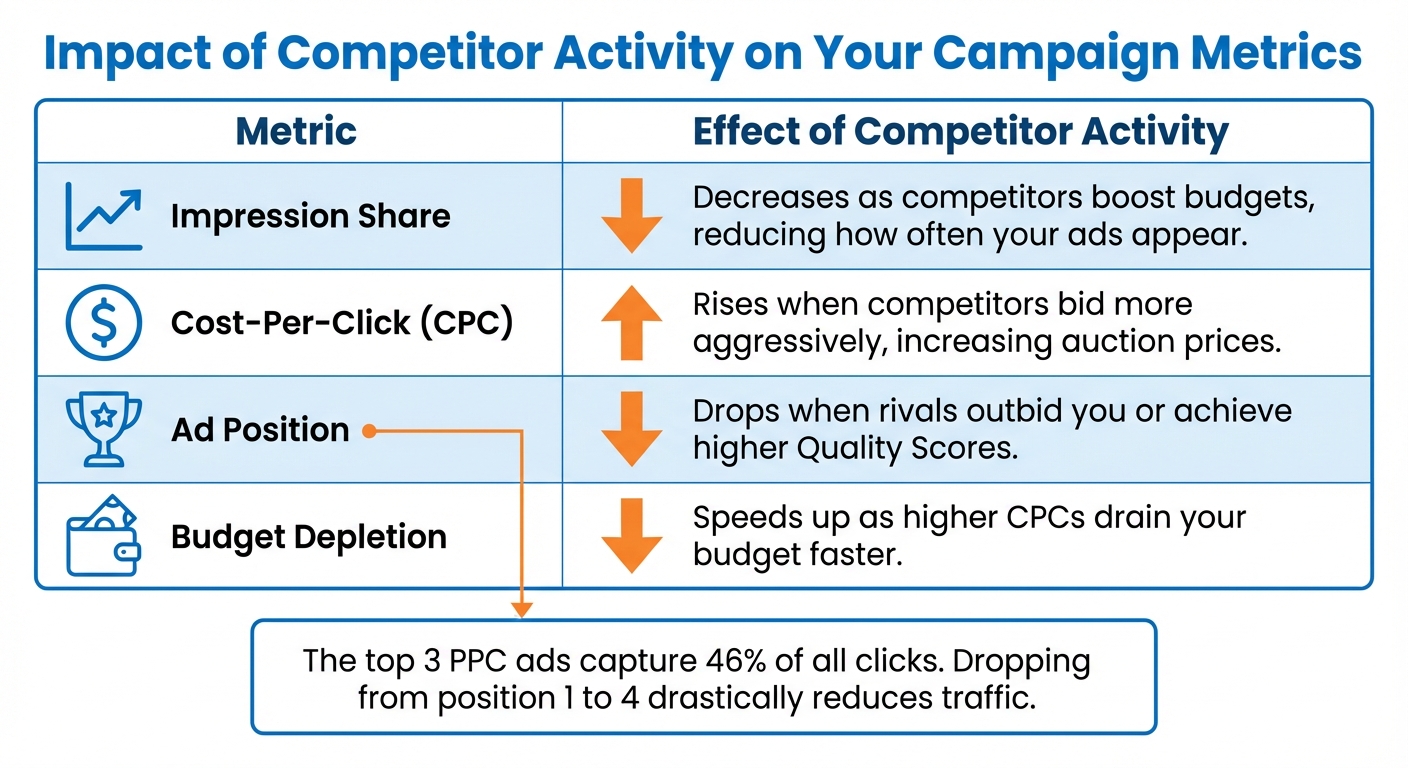
Competitor bidding has a direct effect on three critical metrics: cost-per-click, impression share, and ad position. When competitors bid more aggressively or achieve higher Quality Scores, they increase their "Position Above Rate", pushing your ads lower in search results. This is significant because the top three PPC ads on a search results page capture 46% of all clicks. Dropping from the top spot to fourth position can drastically reduce your traffic.
Here’s how competitor activity impacts your metrics:
| Metric | Effect of Competitor Activity |
|---|---|
| Impression Share | Decreases as competitors boost budgets, reducing how often your ads appear. |
| Cost-Per-Click (CPC) | Rises when competitors bid more aggressively, increasing auction prices. |
| Ad Position | Drops when rivals outbid you or achieve higher Quality Scores. |
| Budget Depletion | Speeds up as higher CPCs drain your budget faster. |
CPC inflation is especially noticeable for high-intent keywords. When multiple advertisers target the same terms, the cost of maintaining visibility rises, forcing tough choices: spend more to keep traffic steady or accept lower positions and reduced clicks. Either way, your budget feels the strain, and campaign performance becomes harder to predict.
While businesses typically earn $2 for every $1 spent on Google Ads, rising competition can erode these returns if you don’t monitor and adjust your strategy. By regularly analyzing your metrics, you can catch issues early and make informed decisions to protect your ROI.
sbb-itb-89b8f36
Tools for Tracking Competitor Bidding
Adjusting bids effectively requires a clear understanding of what your competitors are doing - whether it’s the keywords they’re targeting or their overall aggressiveness in bidding. Some tools are built into ad platforms, while others provide a broader look at the market, extending beyond your active campaigns.
The main difference between internal tools and third-party solutions lies in their scope. Internal tools, like Auction Insights, focus on precise performance data tied to your campaigns. They provide metrics such as impression share, overlap rate, and position above rate. Meanwhile, third-party tools like Semrush and SpyFu offer a wider lens, revealing new keywords, competitor spend estimates, and historical ad performance. Together, these insights help you decide when and where to optimize your PPC campaigns for better ROI.
Google Auction Insights for Competitor Monitoring
Auction Insights, a free tool within Google Ads, lets you compare your performance against other advertisers in the same auctions. You can drill down to the account, campaign, ad group, or keyword level. However, the tool only activates when your impression share surpasses 10% for the selected timeframe. This ensures the data focuses on competitors with meaningful activity.
Here’s what Auction Insights tracks:
- Impression share: The percentage of eligible auctions your ads win.
- Overlap rate: How often a competitor's ad appears alongside yours. An overlap rate above 55% often indicates similar targeting strategies.
- Position above rate: The frequency with which a competitor’s ad ranks higher than yours when both are shown.
- Outranking share: How often your ad appears above a specific competitor.
- Absolute top of page rate: The percentage of times an ad secures the top spot above organic results.
These metrics can help you detect shifts in competitor strategies. For instance, if a competitor’s overlap rate jumps from 40% to 70%, it may signal they’ve increased their budget or expanded their keyword targeting. Monitoring your brand campaigns can also reveal if competitors are bidding on your branded terms, which might require more aggressive bidding.
"Your ads don't exist in isolation. Their reach and potential performance is all impacted directly by what your competition is doing around you." - Austin LeClear, Grow My Ads
One downside of Auction Insights is that it only reports data starting the day after your ads run, which may not suit those needing faster updates. For quicker insights or deeper historical analysis, third-party tools are a good supplement. Microsoft Advertising offers a similar tool, but with the added benefit of a time-series graph for tracking changes over time - a feature not available in Google Ads.
While Auction Insights provides real-time data, third-party tools offer a longer-term perspective and additional insights.
Third-Party Competitor Analysis Tools
Third-party tools complement internal options by uncovering untapped keywords, analyzing competitor ad copy, estimating monthly spend, and offering extensive historical data.
- Semrush Advertising Research: This tool showcases every keyword a competitor bids on, along with their ad copy, monthly spend estimates, and historical ad positions over the past year. Its "Keyword Gap" feature identifies keywords you might be missing.
- SpyFu: With access to over 13.1 billion keywords and 18+ years of data, SpyFu specializes in PPC research. It lets you review every keyword a competitor has purchased, analyze past ad tests, and estimate their ad spend. Starting at $33 per month, SpyFu updates its data as often as every 15 seconds for near real-time insights.
"SpyFu is OnPoint! Ad spend visibility, PPC forecasting, and deep competitor intel – all at a price that just works." - Anthony J., Digital Marketing Specialist, SMB
These tools also highlight patterns in competitor ad copy, which can reveal their most effective messaging. Semrush’s "Pages" tab, for example, identifies a competitor’s top-performing PPC landing pages, offering inspiration for improving your own. For Shopping campaigns, these tools reveal which products competitors prioritize and how they price them - details not available through Auction Insights alone.
Another helpful (and free) resource is the Google Ads Transparency Center, where you can search any advertiser and view all their active ads across Google’s network, including geographic targeting. While it doesn’t provide bid estimates or historical data, it’s great for quickly checking competitor messaging and offers.
| Tool | What It Shows | Best For |
|---|---|---|
| Google Auction Insights | Impression share, overlap rate, position above rate | Understanding competitive pressure on active campaigns |
| Semrush Advertising Research | Competitor keywords, ad copy, spend estimates, landing pages | Discovering new keyword opportunities and ad strategies |
| SpyFu | Complete keyword history, ad tests, 18+ years of data | Long-term strategy analysis and identifying proven tactics |
| Google Ads Transparency Center | All active ads from any advertiser, geographic targeting | Quick research on competitor ad copy |
How to Adjust Bids Based on Competitor Activity
Using tools like Auction Insights and SpyFu to monitor competitor behavior is just the first step. The real challenge lies in adjusting your bids strategically to stay competitive without overspending. This means knowing when to ramp up, when to scale back, and when to let automation handle the bidding. Specialized platforms like Adalysis can streamline this process by identifying optimization opportunities automatically.
Your strategy should align with your goals. For instance, branded terms often require a different approach than generic keywords, and products with higher profit margins might justify more aggressive bidding. Timing is also key - competitor activity fluctuates throughout the day and week, creating opportunities to either dominate or conserve your budget. Use these insights to decide when to increase, reduce, or automate bids.
Protecting Your Position with Higher Bids
If competitors are consistently outranking you, consider raising bids or improving quality scores. While increasing bids is a quicker solution, it’s not always sustainable, so it’s important to evaluate when the extra cost is justified.
Branded keywords often warrant higher bids. When competitors target your brand name, defending that traffic becomes essential. Using Target Impression Share can automate bids to secure a specific percentage of top-of-page placements. For example, setting a 90% absolute top impression share ensures your ad appears above organic results nearly every time someone searches your brand name.
For high-value segments, manual bid adjustments can be effective. You can increase bids by up to 900% for specific dimensions like device type, location, or time of day.
"The advertisers who win long-term are not the ones with the biggest budgets, but the ones who monitor competitors consistently and adapt faster than the auction." - PPC agencies
Remember, bid adjustments multiply together to form your final bid. This allows you to fine-tune your strategy without overspending across the board.
Reducing Bids During Low-Competition Periods
During quieter times - like weekends, late nights, or off-peak seasons - you can lower bids to save budget while still maintaining strong visibility. Ad scheduling adjustments can help you take advantage of these periods.
For instance, if Auction Insights reveals that competitors dominate top positions at 8 PM on Thursdays but are less active at 8 AM on Mondays, you can raise bids during the high-competition window and reduce them during the low-competition one. Cutting bids during slower times can significantly reduce costs without sacrificing performance, as fewer advertisers are competing for the same impressions.
Another tactic is reallocating your budget. When competition spikes for expensive broad keywords, consider focusing on high-intent long-tail keywords or high-margin product categories. These areas often face less competition and deliver better conversion rates, making them a smarter investment.
With the average cost per click increasing by 12.88% year-over-year as of 2025-2026, finding these low-competition opportunities is becoming increasingly important for maintaining efficiency.
Automated Bid Adjustments Using AI
Manual adjustments can’t keep up with the fast-paced nature of real-time auctions. AI-powered Smart Bidding strategies, like Target CPA, Target ROAS, and Maximize Conversions, adjust bids dynamically based on hundreds of factors. These include competitor activity, device type, location intent, and even how your product price compares to others in the same auction.
"Smart Bidding refers to bid strategies that use Google AI to optimize for conversions or conversion value in each and every auction - a feature known as 'auction-time bidding'." - Google Ads Help
Automated bidding doesn’t just save time - it delivers results. Advertisers can reduce ad spend by up to 24% while increasing click-through rates by 28%. Additionally, AI-driven strategies can boost conversions by 25% and cut costs by 15%. These improvements come from the system’s ability to analyze patterns and adjust bids in real time, something no human could match.
However, AI requires a learning phase. Expect a 30-60 day period for the system to optimize and stabilize performance. During this time, avoid making frequent manual changes, as they can disrupt the learning process. Also, when using Smart Bidding, refrain from applying manual bid adjustments (except for -100% device exclusions), as the AI relies on its own data-driven optimizations.
| Smart Bidding Strategy | Business Goal | Best Use Case |
|---|---|---|
| Target CPA | Increase leads/sales | Maintain a specific cost per acquisition |
| Target ROAS | Increase profit | Achieve a specific return on ad spend |
| Maximize Conversions | Increase volume | Get the most conversions within a fixed budget |
| Target Impression Share | Brand visibility | Maintain top-of-page position against competitors |
Pairing broad match keywords with Smart Bidding can also accelerate learning and uncover high-performing opportunities. This approach allows the algorithm to explore new search queries while staying aligned with your performance goals, giving you greater reach without compromising efficiency.
Mistakes to Avoid When Adjusting Bids for Competitors
Chasing ad position over profit often backfires. When a competitor outranks you, it’s tempting to immediately raise your bids. But here’s the catch - being highly visible doesn’t always mean you’re driving better results. Prioritizing cost-per-click (CPC) or ad position over metrics like cost-per-acquisition (CPA) or return on ad spend (ROAS) can lead to wasted money on keywords that don’t pay off. Instead, take a closer look at your competitor’s landing pages. If their post-click experience is subpar, focus on improving your ad relevance and Quality Score instead of simply increasing your bids.
Reacting too quickly disrupts the platform's learning phase. Google Ads needs about 7–14 days to fully adjust during its learning phase. If you tweak bids or settings too frequently, you risk resetting this process, which can throw off your campaign’s performance. A smarter approach? Optimize your campaigns on a weekly or bi-weekly schedule to give the algorithm time to stabilize. As Karly Scott, Manager of Strategy at Logical Position, puts it:
"Constant tweaking of bids, keywords, or targeting during the learning phase disrupts the algorithm's ability to 'understand' your campaign"
.
Misreading competitor data can lead to unnecessary changes. Not all bidders are actual competitors - some might be affiliates or indirect players in your market. A sudden spike in your competitor overlap rate might just signal a short-term promotion, not a permanent shift. Plus, third-party tools that estimate competitor spend and traffic often rely on incomplete data, so their numbers might not be entirely accurate. Before making any big moves, study trends in Auction Insights over several weeks to confirm patterns.
Ignoring Quality Score while trying to outbid competitors is a costly mistake. Throwing money at higher bids won’t fix issues like irrelevant ads or poorly optimized landing pages. A low Quality Score drives up costs and reduces efficiency. Often, refining your ad copy and improving landing page performance can deliver better results for less. With the average cost per click rising by 12.88% year-over-year, focusing on Quality Score is more important than ever.
Going head-to-head with competitors who have bigger budgets drains resources. Instead of trying to match their spending, shift your focus to long-tail keywords and high-margin product categories. These areas often have less competition and higher conversion rates. You can also use the "Outranking Share" metric in Auction Insights to identify specific times when competitors outbid you. This allows for more precise bid adjustments without wasting resources. These strategies help you allocate budget wisely and prepare for more advanced bid management techniques in the next section.
Using Top PPC Marketing Directory for Bid Management Resources
finding the best PPC bid management tools doesn’t have to feel like searching for a needle in a haystack. The Top PPC Marketing Directory simplifies the process by organizing resources into clearly defined categories. Whether you’re looking for AI-driven platforms, tools for multi-platform budget tracking, or solutions to uncover keyword gaps, this directory allows you to filter options based on your specific needs. It’s designed to save you time and help you align tool capabilities with strategies like competitor-driven bid adjustments.
For instance, if AI-powered analysis is a priority, platforms like PPC.io are highlighted for their automated competitor audits and unique features like "Landing Page Warfare", which taps into advanced AI models such as Claude, GPT-4, and Gemini. On the other hand, if budget management tops your list, tools like Optmyzr stand out. They offer features like automated pacing alerts delivered through Email, Slack, or Teams, and even the ability to pause campaigns automatically when monthly spend limits are reached. By categorizing tools based on their core strengths, the directory ensures you can quickly find solutions that match your campaign objectives without wasting resources on tools that don’t fit.
The directory also tailors its listings by budget, business size, and platform focus. This means you can explore everything from affordable research tools like SpyFu to high-end enterprise platforms such as Adthena, which starts at $1,000+. This level of organization ensures you make informed decisions, whether you’re managing a small business or a large-scale operation.
Directory Listing Options for Bid Management Tools
To further streamline your search, the directory offers three listing tiers:
- Free Listings: Provide basic details about the tools.
- Featured Listings: Offer enhanced visibility with more detailed profiles.
- Premium Listings: Maximize exposure and include promotional opportunities.
These tiers not only provide insights into the tools but also hint at the credibility of their providers. Premium Listings often represent well-established platforms with robust features, while Featured Listings may spotlight newer tools offering competitive pricing. By considering these tiers alongside factors like pricing, features, and user reviews, you can build a solid shortlist of tools to test. This approach ensures you’ll find the right resources to fine-tune your bid adjustments and track campaign performance effectively.
Tracking the Results of Your Bid Adjustments
Once you've adjusted your bids based on competitor activity, the next step is to evaluate their impact by tracking key metrics. Start by reviewing Google Ads Auction Insights, which provides a snapshot of how your ads perform against competitors in the same auctions. Pay attention to metrics like overlap rate, position above rate, and top of page rate. For instance, if a competitor's overlap rate suddenly spikes, it could mean they're increasing their spending, signaling that your bids may need to work harder to maintain visibility.
In addition to auction metrics, focus on conversion volume and Return on Ad Spend (ROAS) to assess profitability. Compare your actual ROAS to your targets to ensure you're meeting your goals. Take the example of a Connecticut car dealership in November 2024: using WhatConverts, they tested different bidding strategies. "Variant A" generated $135,000 in value from just two leads, while "Variant C" produced four leads but only $16,600 in value. This analysis helped them identify the strategy that delivered the best return on investment. This highlights why tracking conversion value is just as critical as monitoring auction metrics.
"For active search campaigns, Auction Insights in Google Ads is key to knowing how your campaigns are faring vs. your competition." - Stuart Pereira, Campaign Manager, WSI Comandix
Other indicators like CTR (Click-Through Rate), Quality Score, and CPC (Cost Per Click) are essential for monitoring the overall health of your campaigns. To gauge how well your adjustments are expanding your reach, evaluate traffic diversity by analyzing unique search categories with impressions, clicks, and conversions. This can help determine whether you're capturing a broader range of search queries. Give your campaigns at least six weeks to stabilize before making further changes. Also, ensure your landing pages are optimized to handle increased traffic by using tools like GTmetrix or Google PageSpeed Insights - a slow-loading page can undermine even the most effective bidding strategy.
Lastly, calculate your overall ROI to confirm that your bid adjustments are driving meaningful revenue growth. Use the formula: (Net Benefit - Cost) ÷ Cost × 100. Here, "Net Benefit" refers to the extra revenue generated by your adjustments, while "Cost" includes any increased ad spend and related expenses. Compare the performance of adjusted campaigns to unadjusted ones to isolate the impact of your bid changes and establish a clear pre-adjustment baseline.
Conclusion
Adjusting bids based on competitor activity is a dynamic process that separates successful campaigns from wasted ad spend. Auction conditions are always changing as competitors tweak budgets, test new creatives, and refine their bidding strategies. The best advertisers understand that competitor analysis isn't a one-time task - it's an ongoing effort.
The secret isn't about spending more; it's about making smarter moves than your competitors. Start by using Google Ads Auction Insights for real-time data on auction dynamics. Then, enhance your strategy with tools like SpyFu (starting at $39/month) or SEMRush (starting at $119.95/month) to identify keyword gaps and analyze historical bidding trends. And here's a critical point: winning auctions doesn't always mean bidding higher. Improving your campaign quality can often deliver better results at a lower cost.
"You don't win PPC by guessing; you win by understanding your competitors better than they understand themselves." - Expert PPC Services
Capitalize on your competitors’ blind spots, such as untapped long-tail keywords, neglected demographics, or low-competition timeframes. Tailor your bids by device type - mobile users often act quickly, while desktop users tend to engage in more thorough research. Also, don’t overlook your landing pages. Use tools like Google PageSpeed Insights to ensure your site isn’t creating unnecessary friction. Even the best bidding strategy can fail if your landing pages don’t perform.
FAQs
How do I know a competitor change is real and not a temporary spike?
To get a clear picture of your competitors' strategies, it's essential to monitor their activity over a period of time rather than focusing on just one data point. Keep an eye on their bid adjustments and ad performance for several days or even weeks. This approach helps you spot consistent patterns, such as changes in bids, ad placement, or visibility, which might indicate a deliberate strategy shift. On the other hand, short-term fluctuations are often just temporary blips. By regularly analyzing historical trends, you can better determine whether a change is intentional or simply an outlier.
When should I raise bids versus focus on Quality Score improvements?
When you want your ads to stand out more or compete effectively in high-traffic or high-conversion areas, increasing your bids can make a big difference. Higher bids can help secure better ad placements and boost click-through rates.
However, if your bids are already competitive but your performance is lagging, it’s worth focusing on improving your Quality Score. Issues with relevance or your landing page might be holding you back. A better Quality Score can reduce your cost per click and improve your ad placement - without needing to raise your bids.
How can I use Smart Bidding without losing control of competitor-driven bid changes?
To make the most out of Smart Bidding, it’s important to stay engaged. Keep a close eye on how your campaigns are performing and step in if automated adjustments - like those triggered by competitor actions - don’t match your goals. When needed, you can take control by applying manual overrides or tweaking your strategies temporarily. This hands-on approach helps you maintain efficiency and keep your campaigns aligned with your objectives, all while benefiting from Smart Bidding's automation.