If your exclusion lists are not syncing on a schedule, you are likely paying to show ads to people who already converted. I’d set this up with 5 steps: clean the source data, pick the right exclusion segments, map rules and sync timing, apply lists at the right campaign layer, and test for over-blocking before scaling.
Here’s the short version:
- Use synced exclusions, not one-time uploads - customer and lead status changes every day
- Pick clear source segments - customers, applicants, support traffic, and low-value non-converters
- Standardize data before upload - UTF-8 CSV, SHA-256 hashing for email and phone, U.S. date format, and clean field mapping
- Match sync speed to risk - hourly for fraud or brand-safety cases, daily for normal updates, weekly for review-heavy rules
- Apply exclusions narrowly - keep customers out of net-new acquisition, but leave room for upsell or cross-sell
- Measure impact with a holdout - a 70% / 30% split over 14 to 28 days gives a cleaner read on CAC, ROAS, conversion rate, and excluded-spend share
- Expect delays - audience changes can take 24 to 48 hours to show up in delivery data
- Keep a rollback path - approval queues, audit logs, reason codes, and a manual pause switch help limit damage
What matters most is not the script or tool. It is the rule quality. A bad rule that runs every hour can waste more budget than a manual process that runs once a week.
I’d treat this setup as a control system for paid media - one source of truth, dated list versions, clear rule thresholds, and regular audits. For most teams, that is enough to cut wasted impressions without hurting reach.
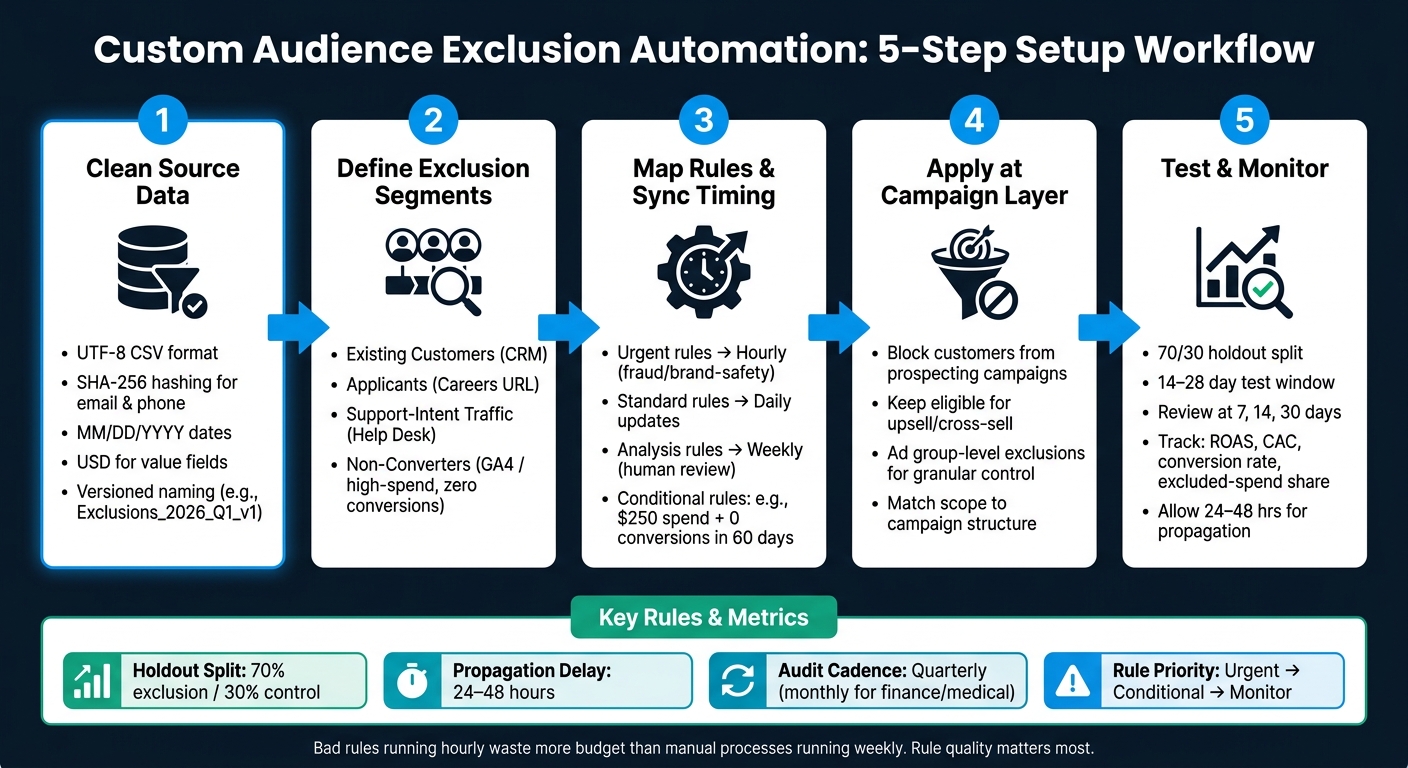
Custom Audience Exclusion Automation: 5-Step Setup Workflow
The Meta Ads Exclusion Trick Most Agency Owners Miss
Prepare source lists and data before building any automation
Before you set up automation rules, get the source data cleaned up first. Messy inputs lead to sync errors, duplicate records, and exclusions that stop refreshing when they should. Give each exclusion segment a clear owner, and standardize the data before anything gets uploaded.
Choose the source segments that should feed your exclusion lists
Not every contact in your database belongs on an exclusion list. Start with the groups where wasted ad spend is most likely, then build one list for each segment.
Define each exclusion segment by business intent, then tie it to one source system.
| Source System | Exclusion Segment | Decision Rule |
|---|---|---|
| CRM / Ecommerce | Existing Customers | Exclude if the business is focused on one-time purchases; keep the segment active if upselling or cross-selling makes sense. |
| Form Tools / Careers URL | Applicants | Exclude anyone who visited /careers or submitted an employment form. |
| Support Portal / Help Desk | Support-Intent Traffic | Exclude users browsing /support or help docs, since their intent is usually assistance rather than purchase. |
| GA4 / Server-Side Data | Non-Converters | Exclude high-spend users with zero conversions over the chosen lookback window. |
After you define those segments, roll them into one versioned master list, such as Exclusions_2026_Q1_v1.
Format customer data correctly for U.S. ad platforms
For U.S. uploads, standardize email, phone, and ZIP code fields, use MM/DD/YYYY dates, and keep any value-based segmentation in USD. Save files as UTF-8 CSV files, and hash email and phone fields with SHA-256 before uploading to platforms like Google Ads or Meta. Clean formatting helps improve match rates in Google Ads and Meta.
Use one source of truth and a dated, versioned naming pattern. That makes stale lists easier to spot and helps keep syncs aligned over time.
Once the source lists are clean and versioned, map each segment to a rule and sync schedule.
Build the automation rules and sync workflow
With your source lists in place, the next step is to turn them into rules that can refresh on their own.
Define rule logic, triggers, and membership rules
Start by translating each rule into three parts: the trigger, the condition, and the action. In plain English, that means what starts the check, what makes a record qualify, and what the workflow should do next.
For performance-based automation, a weekly SQL job in BigQuery can join ad performance data with GA4 or server-side event data to flag new exclusion candidates. The key is to use tiered rule logic so you don't block too much, too soon.
- Urgent rules block at once for fraud or brand-safety risks.
- Conditional rules fire only after a set threshold, such as spend above $250 with zero conversions in 60 days.
- Monitor rules don't block anything. They just flag records for human review.
Add human approval to conditional rules to cut down on false positives. That's often the difference between a system that helps and one that quietly causes damage.
Choose a sync method: native tools, scripts, or middleware
The right sync method depends on how your accounts are set up, what technical help you have, and how fast exclusions need to go live. Here's a practical breakdown:
| Sync Method | Best For | Setup Complexity | Maintenance Cost |
|---|---|---|---|
| Built-in platform tools | Single accounts | Low | Limited to platform-specific controls |
| Scripts (API/Python) | Teams with custom workflows | Medium | Requires developer oversight and API versioning |
| Middleware (SA360/DSP) | Enterprise, multi-platform, programmatic | High | High cost; requires centralized governance |
| Spreadsheet/SQL Jobs | Mid-market, human-in-the-loop review | Medium | Requires manual approval step to avoid over-blocking |
Scripts and API-based syncs fit best when your logic gets more complex or needs to span multiple accounts. Google Ads Scripts (JavaScript) can automate changes, pull reports, and send alerts without third-party software, and custom Node/Python scripts can push updates from a master list to the Google Ads API. Run scripts in preview mode first, and keep a manual override switch so you can pause automation if performance shifts without warning.
Middleware such as SA360, DV360, or DSP APIs makes the most sense for enterprise teams that need shared inventory controls across programmatic buys and multiple manager accounts. No matter which sync method you use, keep the master list in one system of record. Then match the refresh cadence to the rule type: hourly for urgent fraud or brand-safety blocks, daily for standard updates, and weekly for analysis-heavy checks.
Once the sync runs, apply each list at the campaign or ad group level.
sbb-itb-89b8f36
Apply exclusion audiences at the campaign and ad group level
Once your sync workflow is set up, apply each list where it limits the least amount of good traffic. The goal is simple: use the narrowest scope that still fits the campaign goal.
Apply exclusions in campaigns and ad groups
Use this rule: block existing customers from prospecting campaigns but keep them eligible for upsell and cross-sell campaigns; exclude job applicants and support seekers from prospecting campaigns.
Ad group exclusions make sense when only one part of a campaign should block a segment. For example, you might exclude customers from a prospecting ad group while still letting them see an upsell ad group. That keeps targeting tight without shutting out people who should still be in play.
Create audiences from Careers pages, Support or Help documentation pages, or customer login pages as inputs to the exclusion audience sync. If you want better match rates, sync email match lists and use Google Analytics events to track actions like clicks on third-party job application links.
Match exclusion scope to your campaign structure
Match exclusion scope to campaign structure so you block the right users without suppressing eligible traffic.
After you apply exclusions, check match rates and watch delivery impact before you use them across a large spend base. A list can look fine on paper and still cut into reach more than expected.
Test the setup, monitor audience health, and fix errors
Check list growth, delivery impact, and exclusion behavior
Once exclusions are live, make sure they block the right traffic without shrinking qualified reach too much. A simple way to do that is with a holdout test: send 70% through the exclusion setup and keep 30% as a control for 14-28 days. That gives you a cleaner read on lift in ROAS and CAC.
Compare results at 7, 14, and 30 days. Watch ROAS, CAC, conversion rate, and excluded-spend share to check whether the traffic left in the campaign is better quality. If conversions fall hard, that can point to over-blocking. In plain terms, you may be filtering out high-intent inventory along with weak placements.
Give exclusion changes 24-48 hours to fully propagate before you review delivery reports. If you audit too soon, the data can send you in the wrong direction.
Fix upload failures, rule conflicts, and overlap issues
If performance looks off, the problem usually comes from a small set of failure modes:
| Error Type | Likely Root Cause | Impact | Corrective Action |
|---|---|---|---|
| Over-blocking | Aggressive spend/conversion thresholds | Reduced reach; higher CPAs; hurt machine-learning signals | Loosen thresholds and run a holdout. |
| Stale Syncs | Script/API failure or expired tokens | Wasted spend on new bad actors | Rotate tokens and add alerts. |
| Logic Conflicts | Conflicting include/exclude rules | Exclusions fail to apply consistently | Audit rule hierarchy and dry-run updates. |
| Hashing Mismatch | Incorrect data formatting for U.S. platforms | Low match rates; sync failures | Validate headers and hashing format. |
Put changes through a review queue before they go live. Also keep a manual override so you can pause updates for 24 hours. A changelog matters here too. Use reason codes like "no-conversions" or "low-viewability" so you can roll back fast if performance dips without warning.
Conclusion: A minimum viable process for reliable exclusions
After testing, the workflow comes down to five repeatable steps: prepare clean source lists, define rules with care, sync on a set schedule, apply exclusions at the right campaign layer, and monitor diagnostics on a regular basis.
Run exclusion audits at least quarterly. If the account spends a lot or sits in higher-risk fields like finance and medical, move to a monthly cadence. Keep a changelog for every update so the team can reverse a block fast if performance dips unexpectedly.
FAQs
Which exclusion lists should I automate first?
Start with past converters and existing customers. Those are your top exclusions because they stop wasted ad spend.
Then set up automated exclusions for people who don’t engage and for groups that don’t fit your sales goals, like job applicants or support seekers. That keeps your suppression data up to date and helps you avoid targeting people who already converted or were never a fit in the first place.
How often should audience exclusions sync?
It depends on the platform and the campaign setup, but frequent updates help keep targeting accurate and cut wasted ad spend.
- Meta/Facebook: every 6 hours
- Google Ads RLSA: daily, with a full refresh every 30 days
- LinkedIn: daily
- Broad blacklist or suppression syncs: hourly or daily, based on urgency
How can I tell if exclusions are hurting reach?
Monitor results against your baseline. Compare the excluded segment’s CTR with the account average. If it’s 20% or more lower, think about pausing the exclusion.
Keep an eye on conversion rate and ROAS too. If conversion rate drops 15% below your campaign goal, take another look at the exclusion. Regular audience-size testing can help you balance precision with reach.