If your PPC setup only tracks form fills, you're missing the part that affects revenue. I’d sum this up in one line: map ad-click data and CRM data to the conversion fields your ad platforms use, so bidding can learn from qualified leads, sales, and revenue - not just thank-you pages.
Here’s the short version:
- I’d standardize event names first, such as
lead_form_submit,qualified_lead, andpurchase - I’d keep parameter keys consistent across platforms, such as
gclid,conversion_name,conversion_time,value,currency, and hashed user data - I’d use the actual event date and time - like a close date or stage-change timestamp - not the upload time
- I’d pull dynamic values from the CRM or checkout when revenue changes by deal or order
- I’d send only the status changes that count, so platforms don’t learn from junk leads or duplicate events
In plain English, the article is about turning PPC conversion tracking from a basic submission counter into a system tied to pipeline stages and closed revenue. That means naming events the same way across GA4, Google Ads, Meta, LinkedIn, Microsoft Advertising, and the CRM - then mapping each field to the right destination.
A few points matter most:
- Default tracking stops too early. A thank-you page can tell me someone converted on-site, but not whether that lead became an MQL, SQL, or closed-won deal.
- Bad signals hurt bidding. If Smart Bidding learns from low-intent form fills, it will chase more of them.
- Field mismatches break imports. Even a small error in
conversion_name, timestamp format, or click ID storage can cause failed uploads or bad attribution. - The CRM should drive offline conversion data. That’s where lead stage, revenue, and close dates live.
- Testing has to stay narrow at first. I’d start with 1 lead event, 1 sale event, and 1 form event before expanding.
The piece also explains which fields usually matter most:
gclidfor ad-click matchingconversion_namefor the exact conversion actionconversion_timefor attributionvalueandcurrencyfor revenue reporting- hashed email or phone for match support
lead_stagefor pipeline tracking
One useful takeaway is that not every event should be treated the same. A sale event usually needs value, currency, and transaction_id. A lead event usually depends on CRM stage changes and stored click IDs. A form event usually starts in the browser or data layer.
If I were setting this up, I’d keep the model simple:
- Name events once
- Define the parameters once
- Store click IDs in the CRM
- Trigger uploads only on the exact stage change that counts
- Check platform totals against CRM and automation logs often
That’s the core point of the article: clean mapping gives you cleaner attribution, cleaner reporting, and better bidding inputs.
Google Ads Conversion Tracking (with Values) Step by Step
sbb-itb-89b8f36
Define Conversion Events and Standardize Naming
Once you’ve nailed down the core workflow, lock the event names first. Do that before you map parameters.
Choose the Core Events to Track for Leads, Sales, and Forms
Track events that tie to business results. That’s the main rule.
Start with a short list of primary conversions - the actions that point to revenue or strong buying intent. In most PPC accounts, that usually means purchase, lead_form_submit, booking, and sign_up. Mark only those primary events as conversions. Leave micro-conversions out of that bucket.
Then set up micro-conversions on their own. Events like add_to_cart, begin_checkout, file_download, newsletter_subscription, and video_start can show how people move toward a conversion. But they shouldn’t stand in for your main goals. If you mix them together, reporting gets noisy and optimization signals get muddled.
For non-purchase actions, use custom events and value parameters when they help with reporting and bidding, often managed through top PPC tools. That keeps ROAS reporting usable for lead-gen and form-based flows.
Name Events So They Match Business Reporting
Messy naming can throw off PPC reporting fast. If GA4 uses lead_form_submit, Google Ads shows "Lead", and your CRM logs "New Lead", you’re looking at the same action through three different labels. That makes reporting harder than it needs to be.
The fix is simple: use clear snake_case event names across the whole tracking stack, then document the mapping once. Names like qualified_lead and newsletter_subscription are easy to read in ad platforms, CRM reports, and internal dashboards.
| Event Category | Recommended Event Name | Google Ads / Meta / CRM |
|---|---|---|
| Initial Inquiry | lead_form_submit |
Lead / Lead / New Lead |
| Qualification | qualified_lead |
Qualified Lead / Custom Event / MQL |
| Final Sale | purchase |
Purchase / Purchase / Closed Won |
| Engagement | video_start |
Micro-conversion / Custom Event / - |
Use this table as the source schema before any event goes live. After the naming schema is set, map each event to the same parameter keys across platforms.
Align Event Names with U.S. Reporting Needs
For offline and CRM imports, use the same event names your reporting team sees in the ad platform. That keeps reports easier to read and cuts down on mapping mistakes.
When you import offline conversions from a CRM or spreadsheet, use the actual conversion date - not the upload date - to keep attribution accurate. Match event names to CRM stages and ad-platform labels so offline imports and reporting stay clear.
Design Parameters and Pass Values Correctly
Once your event names are set, the next step is simple: decide which parameters each lead, sale, or form event should send, and make sure each one matches the format the ad platform expects. This matters because these fields feed ROAS reporting, attribution, and lead-quality tracking. They also become the exact fields you'll map inside each ad platform.
Pick the Parameter Keys That Support PPC Decisions
Not every parameter serves the same purpose. Some help with attribution. Others feed reporting. A few are required for offline conversion imports or enhanced conversion setups. For most PPC teams using top PPC advertising tools, these are the core fields to get right:
| Parameter Key | Format / Source |
|---|---|
gclid |
Unique string from the landing page URL parameter; stored in the CRM |
conversion_name |
Must exactly match the conversion action defined in the PPC platform |
email |
SHA-256 hashed string |
conversion_time |
ISO 8601 or platform-specific date/time of the actual sale or stage change; supports accurate attribution |
value |
Numeric (for example, 1,000.50); pulled from the CRM deal value or cart total; supports ROAS reporting |
currency |
3-letter ISO code, such as USD |
lead_stage |
Exact text string matching CRM lifecycle stages, such as Marketing Qualified Lead or Won; supports qualified-lead and pipeline tracking |
A small mismatch here can cause a big headache later. If conversion_name doesn't match the platform setup exactly, the upload may fail. If conversion_time points to the wrong moment, attribution gets messy fast.
Pass Static and Dynamic Values in the Right Format
Use static values when every conversion is worth about the same amount. Use dynamic values when order size or deal amount changes from one record to the next. In those cases, pull value straight from the CRM opportunity amount or the cart total at checkout, then pair it with the right currency code.
For conversion_time, use the actual time the conversion happened - like the CRM close date or the timestamp for a stage change - not the date you upload the record. That one detail can make the difference between clean attribution and bad reporting.
Use CRM Fields as the Source of Truth
Your CRM or backend should be the source of truth here, not hard-coded scripts. Capture gclid in a hidden field, then store it in the CRM. If gclid isn't there, use hashed customer data instead. Add filters so only records with the right status and an available click ID are sent.
At that point, you should have clean values, clean formats, and a clean handoff into each platform's required fields.
Map Fields Across PPC Platforms and Event Types
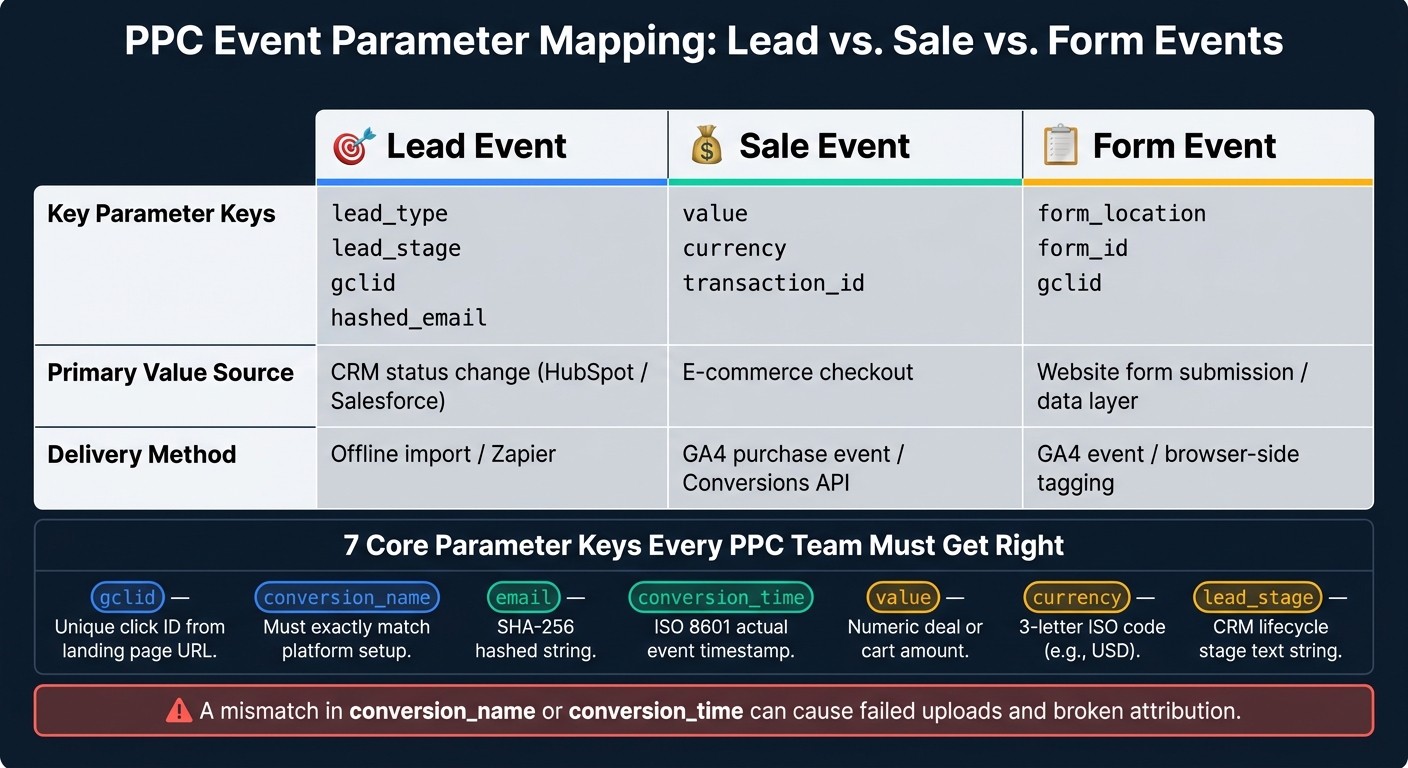
PPC Event Parameter Mapping: Lead vs. Sale vs. Form Events
Once your parameter values are clean, the next job is simple in theory and messy in practice: put each field in the right place for lead, sale, and form events. If the names are set but the mapping is off, data still breaks.
Map Custom Fields in Google Ads, GA4, Meta, LinkedIn, and Microsoft Advertising
GA4 runs on an event-based model, which means custom parameters like value, currency, and transaction_id are tied directly to a user interaction. Before you push anything live, check GA4 DebugView to make sure those parameters fire the way you expect. GA4 can then pass event data into Google Ads and support conversion reporting through linked accounts.
In Google Ads, make sure you capture gclid in a hidden field or as a URL parameter, then store it in your CRM. That step matters because the click ID is often the link between ad spend and offline revenue. On Shopify, this usually takes Enhanced Conversions or a custom script to keep the gclid attached to the order.
Set Up Lead, Sale, and Form Event Flows
Event type drives the setup. A lead event does not need the same fields as a sale event, and a form event usually depends on browser-side capture or the data layer. The cleanest approach is to use one mapping pattern for each event type so the same inputs land in the right platforms every time.
| Event Type | Key Parameter Keys | Primary Value Source | Delivery Method |
|---|---|---|---|
| Lead | lead_type, lead_stage, gclid, hashed_email |
CRM status change (HubSpot/Salesforce) | Offline import / Zapier |
| Sale | value, currency, transaction_id |
E-commerce checkout | GA4 purchase event / Conversions API |
| Form | form_location, form_id, gclid |
Website form submission / data layer | GA4 event / browser-side tagging |
Lead events depend on CRM status changes. Sale events come from checkout data. Form events usually come from browser-side tagging or the data layer.
Map CRM Fields for Qualified and Offline Conversions
When a lead moves to qualified or closed-won, the CRM becomes the source of truth. At that point, trigger the upload to the ad platform when the record changes to "Qualified" or "Won".
The main fields are straightforward:
- the identifier, such as
gclidor hashed user data - the conversion action name
- the event timestamp
- the value or revenue amount
One detail trips people up all the time: in Google Ads, the conversion action name has to match the platform's conversion name exactly. If it does not, uploads can fail without much warning. Also, use the event timestamp - not the upload timestamp.
For automated imports, send the conversion only after the original click ID has been stored. Then check the result in Google Ads by conversion time.
When to Use Custom Mapping and How to Keep It Reliable
Once your field map is set, the next job is keeping it clean and dependable.
Use Custom Mapping When Pipeline Quality Matters More Than Lead Volume
Custom mapping makes sense when you're optimizing for qualified leads, SQLs, or revenue - not just raw form submissions.
That's the big reason to use it: when revenue quality matters more than lead count.
If you lump every conversion into one bucket, bidding learns from noisy signals. That's a problem for your PPC performance metrics. A low-intent form fill is not the same as an MQL. An MQL is not the same as an SQL. And an SQL is not the same as a closed sale.
So split those events out. Keep MQL, SQL, and sale events separate so the platform learns from the signals that match actual pipeline quality. Once the business rule is clear, lock the schema before you automate anything.
Document the Schema, Test Every Event, and Limit Scope
The easiest way to break a mapping setup is simple: skip the documentation.
Keep a shared tracking sheet with the core details for every mapped event:
- event name
- parameter key
- source field
- destination field
- data type
- owner
Start small. Use one lead event, one sale event, and one form event first. After each one passes testing, then expand.
Scope matters here. If you try to map everything at once, small mistakes spread fast.
Filters matter just as much as the mapping itself. Fire automations only on the exact status change you want to count. If the trigger is too broad, you'll create duplicates. And once duplicates get into the system, reporting starts to drift.
Track only the single status change that marks a real conversion.
To catch mapping drift early, compare automation logs with the "All conv. (by conv. time)" column in Google Ads on a regular basis. If those numbers don't line up, something in the pipeline is firing at the wrong time - or firing more than once. Use the CRM event time, not the upload time.
Conclusion: A Minimum Mapping Model for Accurate PPC Reporting
A reliable setup does not mean mapping every field in your CRM. It means mapping the right fields, the same way, every time.
Standardize event names early. Attach only the parameters that help with bidding or reporting. Pass values in the right currency format with accurate timestamps. And keep the schema documented so anyone on the team can review it without guessing.
FAQs
How do I choose which PPC events to map first?
Start with the events that line up with your business goals and campaign targets. If you run an e-commerce business, focus on purchases, add-to-cart clicks, and checkout steps. If you’re after leads, pay attention to form submissions, newsletter signups, and contact requests.
Before launch, double-check your setup with tools like Google Tag Manager preview mode or Meta’s Test Events tool. That helps you confirm the data is coming through the way it should.
What happens if my conversion names or timestamps are wrong?
Wrong conversion timestamps can mess up reporting and lead to bad campaign calls. In server-side setups like the Facebook Conversions API, timestamp errors or delays can also hurt ad performance.
Here’s the issue: events older than seven days may be rejected, and delays of more than two hours can limit optimization.
To avoid that, keep time zones aligned, stick to one date format like MM/DD/YYYY, and use UTC when the platform asks for it.
Should I use CRM data or browser tracking for lead and sale events?
Yes. For lead and sale events, CRM data is a best practice because it ties ad clicks to final revenue. That means you can optimize for actual business results, not just form fills.
Capture and store the Google Click ID (GCLID), or use enhanced conversions with hashed first-party data. Keep your mapping format consistent for dates, phone numbers, and USD ($) amounts. Also use unique IDs so the same event doesn’t get counted twice.