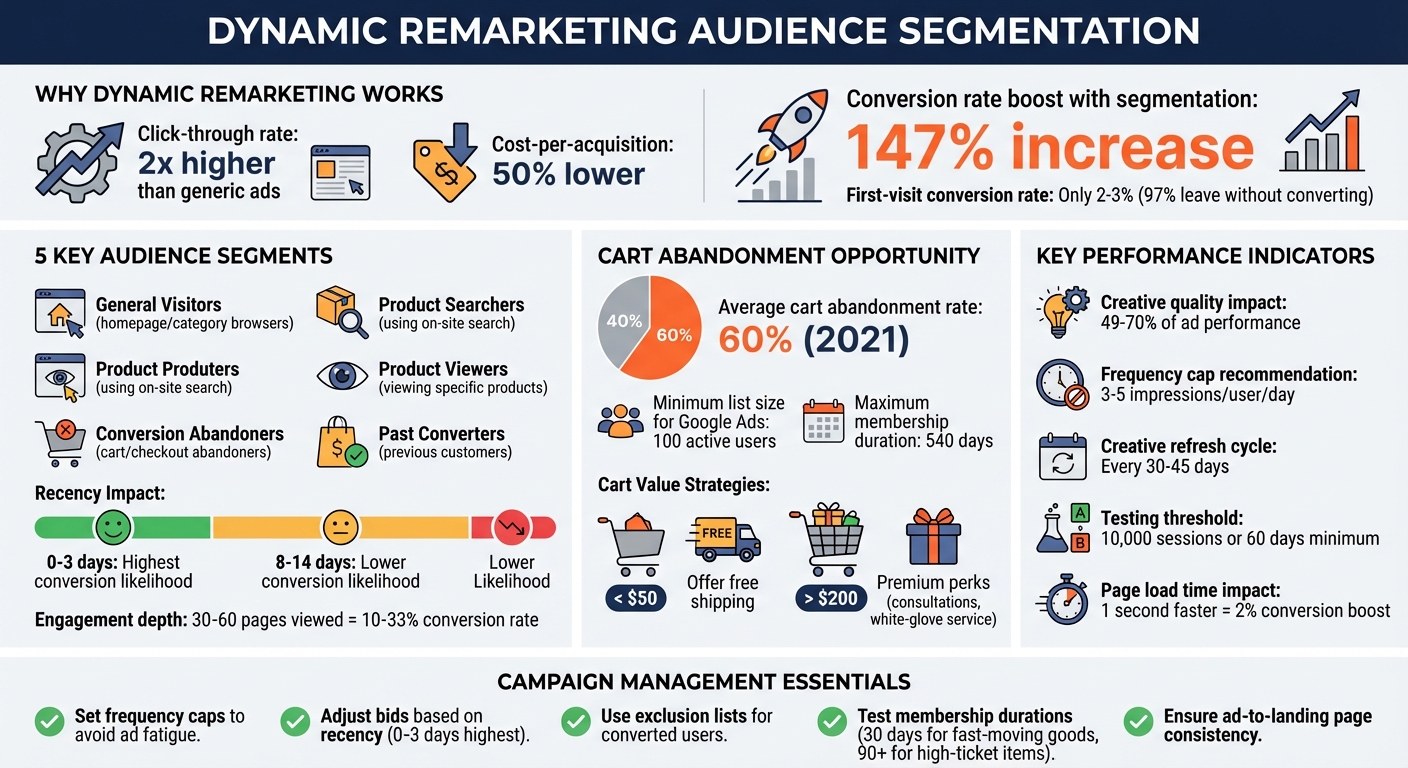
Dynamic remarketing helps turn lost website visitors into buyers by showing them personalized ads based on their previous interactions. It’s more effective than generic ads, with double the click-through rate and a 50% lower cost-per-acquisition. But the real power lies in audience segmentation, which tailors ads to user behavior and intent, boosting conversion rates by 147%.
Here’s how to segment your audience for better results:
- Behavior-Based Groups: Separate users by actions like homepage visits, product views, or cart abandonment.
- Intent-Focused Groups: Identify high-value users, such as those who added items to their cart but didn’t purchase.
- Recency Matters: Visitors from the last 3 days are more likely to convert than those from 2 weeks ago.
- CRM & Analytics Integration: Combine website behavior with customer data for precise targeting.
To make the most of dynamic remarketing:
- Use Google Ads with a product feed to display tailored ads.
- Test ad copy, visuals, and offers for each segment.
- Set frequency caps (3–5 impressions/day) to avoid ad fatigue.
- Focus on recency and exclude irrelevant audiences to optimize spending.
Dynamic ads work best with frequent testing, fresh creative updates, and clear alignment between ads and landing pages. By targeting users with the right message at the right time, you can recover lost sales and improve your campaign’s performance.
Dynamic Remarketing Audience Segmentation Performance Metrics and Best Practices
Stop Losing Sales With This Google Ads Trick! (Dynamic Remarketing) #googleads #remarketing
How to Segment Audiences for Dynamic Remarketing
To make dynamic remarketing work effectively, you need to segment your audience based on where they are in the sales funnel and how recently they visited your site. Successful campaigns focus on breaking audiences into smaller, more specific groups rather than treating all visitors the same.
Behavior-Based Segments
Start by grouping users based on their behavior. Here are five common categories:
- General Visitors: People who browse your homepage or category pages.
- Product Searchers: Users who use your on-site search feature.
- Product Viewers: Those who check out specific product pages.
- Conversion Abandoners: Shoppers who added items to their cart or began checkout but didn’t complete the purchase.
- Past Converters: Customers who have already made purchases.
Recency matters. Visitors from the last 0–3 days are far more likely to convert than those who visited 8–14 days ago. Adjust your bids accordingly.
To make these segments actionable, tag your website with custom parameters - like product IDs, prices, or vertical-specific data - that align with your Merchant Center feed. Use a Data Layer to push this information for more precise targeting.
Another way to refine segments is by engagement depth. For example, users who spend more than 5 minutes on your site or view over 10 pages usually show higher intent. Even deeper engagement, like browsing 30 to 60 pages, can lead to conversion rates between 10% and 33%. On the flip side, exclude users who bounce immediately (spending less than 10–15 seconds on your site) to improve your Quality Score and click-through rates.
Intent-Based Segments
Behavior tells part of the story, but understanding intent can take your segmentation to the next level. Target users who repeatedly visit pricing pages, product pages, or engage with lead magnets.
For instance, you can combine criteria to pinpoint high-value prospects. A good example is targeting users who "Added to Cart" but "Did Not Reach Thank-You Page." These cart abandoners often have clear purchase intent. Considering that the average cart abandonment rate across industries was about 60% in 2021, this group is particularly important.
You can also tailor your messaging based on cart value. For carts under $50, offering free shipping might encourage conversions. For carts over $200, premium perks like consultations or white-glove service could make a difference.
Keep in mind that Google Ads requires at least 100 active users on a remarketing list before you can serve ads. Plan your segments carefully and remember that the most recent visitors usually bring the best results. You can set membership durations for up to 540 days, but shorter time frames often perform better.
Using CRM and Analytics Data
To sharpen your segmentation even further, combine website behavior with CRM data. Google’s Customer Match lets you upload customer details like email addresses and phone numbers directly into Google Ads. This allows you to target known customers across platforms like Search, YouTube, and Gmail.
By linking your Google Analytics 4 (GA4) account to Google Ads, you can automatically share audience segments and e-commerce events. This integration enables you to create segments that blend identity data (from your CRM) with behavioral data (from your site).
Use exclusions wisely to avoid wasting your budget. For example, exclude past buyers from campaigns aimed at new prospects. Or, create combined criteria to target users who performed one action but not another - like those on your "Product Viewers" list who haven’t yet made a purchase.
You can also set up automated triggers for browse abandonment. Target users who spent meaningful time in a category but didn’t add anything to their cart. By combining these behavioral signals with CRM insights - like customer lifetime value - you can prioritize your highest-value segments with the best bids and most compelling offers.
How to Create and Deploy Dynamic Ads
Dynamic ads are a game-changer when it comes to personalized advertising. They automatically display tailored product details to users based on what they’ve browsed on your site. By pulling data directly from your product feed, these ads ensure users see exactly what caught their eye.
Setting Up Dynamic Ad Campaigns
To get started, tag your website using Google Tag Manager. These tags track visitors and link them to the specific product IDs they’ve viewed. Without this tracking setup, Google won’t know which products to show to which users.
Next, upload your product feed. Retailers can do this through Google Merchant Center, while others can use the "Business data" section in Google Ads. Your feed should include essential details like unique product IDs, prices, and images.
When creating your campaign in Google Ads - whether it’s a Display, App, or Performance Max campaign - go to "Additional settings" and enable the option for "Use dynamic ads feed for personalized ads". This prompts Google to pull content directly from your feed instead of relying on static ad creatives.
For more control, set your campaign to "Manual" mode. This lets you target specific audience segments you’ve already built. While the "Automated" option uses Google’s machine learning to expand your reach, manual targeting is ideal for tailoring messages to precise behaviors. For instance, you can show cart abandoners a different ad than someone who simply browsed products.
Use Responsive Display Ads to streamline creative optimization. Upload multiple headlines, images, and logos, and Google will test combinations to find the best-performing setups for each placement. These ads also adapt their size and format to fit the placement, while pulling personalized product details directly from your feed.
To refine targeting, exclude users who’ve already completed a purchase. For example, you can target those who reached your checkout page but exclude visitors to the thank-you page. Then, adjust your ad copy to align with each segment’s intent.
Personalizing Ad Content
Once your dynamic campaigns are live, the next step is crafting ad copy that resonates with your audience. Creative quality is the single biggest factor in campaign success, accounting for 49% to 70% of performance - more than targeting or bidding strategies.
"The majority of an ad's performance comes from creative quality, not targeting or bids." - Samuel Edwards, Chief Marketing Officer, PPC.co
Tailor your messaging to each segment’s behavior. For cart abandoners, try a line like “Still interested in [Product Name]?” instead of a generic call-to-action. If someone viewed a product but didn’t add it to their cart, showcase customer reviews or highlight a limited-time offer to nudge them toward a decision. For past purchasers, focus on cross-sell or upsell opportunities rather than showing them the same product they’ve already bought.
Sequential retargeting is another effective strategy. Guide users through the buying journey with tailored messages at each stage. Start with educational content for initial browsers, move to testimonials for those showing more interest, and finish with urgency-driven offers like “Only 3 left in stock” or “Sale ends in 2 hours” for cart abandoners. This approach aligns with how customers naturally progress through the decision-making process.
To avoid overwhelming your audience, set frequency caps to limit ad exposure to 3–5 impressions per user per day. Also, adjust membership duration based on your sales cycle. For fast-moving goods, 30 days might be enough, while high-ticket items or subscription renewals may require a 90-day window or longer.
Since only 2–3% of users typically convert on their first visit, these personalized touches can be the key to turning interest into a sale.
sbb-itb-89b8f36
How to Optimize Segmented Campaigns
When running dynamic ads, the work doesn’t stop once they go live. To get the best results, you need to constantly test, measure, and fine-tune your approach. The goal is to figure out what clicks with each audience segment and focus on those winning strategies.
A/B Testing for Audience Segments
A/B testing is your go-to tool for identifying which elements - like headlines, images, or calls-to-action - drive the best results. The key? Test one variable at a time. If you change too many things at once, you’ll never know what caused the improvement or decline in performance.
Always include a control campaign to serve as your baseline. For instance, you might test “Free Shipping” against “10% Discount” for users who abandoned their carts. Or compare a static image ad with a carousel format for people who browsed specific products. These experiments can reveal what works best for audiences based on their behavior and intent.
Another approach is to tailor your creative based on how recently someone visited your site. For users who visited in the last three days, stick with a standard brand ad. But for those who haven’t returned in 15–30 days, try offering a discount. Membership duration can also be tested - does a 30-day or 90-day cookie window align better with your sales cycle?
For reliable results, aim for 10,000 sessions before making conclusions. If that’s not feasible due to budget, run your tests for at least 60 days. Remember, the quality of your ad’s creative content contributes to 49%–70% of its performance - far more than targeting or bidding strategies.
"The algorithms do the heavy lifting now... your agency's edge comes from improving elements outside of the algorithm, like your ads and landing pages." - Samuel Edwards, Chief Marketing Officer, PPC.co
Once your tests are complete, dive into the data to see which strategies hit the mark.
Tracking Key Metrics
Metrics are your compass - they validate whether your strategies are working. Each audience segment should have its own benchmarks that align with where users are in their buying journey.
- Click-through rate (CTR): A high CTR means your ad resonates with the audience’s behavior. A low CTR? It might be time to rethink your messaging.
- Conversion rate: This shows whether your landing page delivers on the ad’s promise. If people click but don’t convert, the issue is likely with the landing page, not the ad.
- Return on ad spend (ROAS): This profitability metric tells you how much revenue you’re generating for every dollar spent. Pair this with cost per acquisition (CPA) to gauge spending efficiency. High-value segments, like cart abandoners, can justify higher CPAs because they’re more likely to convert.
- Frequency rate: Overexposure can lead to ad fatigue. If users see your ad too often, CTR drops, and frustration rises. Nearly 40% of U.S. consumers report annoyance with online ads.
- Bounce rate and Quality Score: A high bounce rate suggests your landing page doesn’t align with the ad. Quality Score, on the other hand, affects your ad’s cost-per-click and placement - so improving relevance and user experience directly impacts your bottom line.
| Metric | What It Tells You |
|---|---|
| CTR | High CTR signals the ad resonates with the segment’s behavior. |
| CPA | Compare against the segment’s customer lifetime value (CLV) for accurate ROI. |
| Frequency | High frequency with dropping CTR indicates ad fatigue. |
| Time Lag | Measures the time from first visit to conversion. |
Armed with these insights, you can make informed adjustments to your creative, targeting, and bidding strategies.
Adjusting Strategies Based on Results
Data is only useful if you act on it. Once you know what’s working (and what isn’t), tweak your approach to improve results.
Bid adjustments are a quick way to shift performance. For high-intent segments like checkout abandoners, increase your bids to ensure your ads remain visible. For broader audiences, like homepage browsers, lower your bids since they’re still early in their journey. You can also prioritize recency - allocate more budget to users who visited recently (0–3 days ago) as they’re more likely to convert than those who visited weeks ago.
If your CTR is declining, it’s time to refresh your creative. Update your ad visuals and copy every 30–45 days to avoid “banner blindness” and keep your message engaging. If ad fatigue is setting in, reduce your frequency cap or pause the campaign briefly to let the audience reset.
Use exclusion lists to refine your targeting. For example, exclude users who’ve already converted from seeing the same “buy now” ad. Instead, move them into upsell or cross-sell campaigns. Similarly, if certain placements are generating accidental clicks or low-quality traffic, exclude those to save your budget for better-performing spots.
Experiment with membership durations to suit your product or service. Shorter durations (like 30 days) work well for fast-moving goods, while longer windows (90 days or more) are better for high-ticket items or subscription renewals. And if your impression share hits 100%, lower your bids or tighten caps to avoid oversaturating your audience.
"Optimization is never 'set and forget'. It's iterative. It's ongoing." - Easy Ecommerce Marketing
Lastly, your landing page must align perfectly with your ad. If you’re promoting a special offer, that exact deal needs to be front and center on the landing page. Any mismatch leads to high bounce rates and wasted ad spend. Even shaving off just one second from your page load time can boost conversions by about 2%.
Best Practices for Dynamic Remarketing
When it comes to dynamic remarketing, keeping your campaigns engaging and relevant is the secret to turning segmented audiences into conversions. To achieve this, you'll need to focus on fine-tuning your approach and actively managing your campaigns.
Frequency Capping and Ad Fatigue
Showing your ads too often can backfire. When users repeatedly see the same ad, they may start ignoring it - or worse, develop a negative impression of your brand. This can lead to lower click-through rates (CTR) and weakened engagement.
Frequency capping is a simple but effective solution. It limits how many times a single user sees your ad within a specific timeframe. The sweet spot often falls between 3–5 impressions per user per day, particularly for high-intent audiences like cart abandoners. For broader audiences, fewer impressions - around 1–2 per day - tend to work better. Ultimately, the right cap depends on your audience and sales cycle.
If you notice your CTR dropping as impressions rise, it’s a sign of ad fatigue. To combat this, refresh your ad visuals and messaging regularly - roughly every 30–45 days. On platforms like Facebook, where smaller audiences are common, fatigue can set in even faster. Avoid targeting groups of fewer than 100 people for extended periods to prevent overexposure.
Another strategy is recency-based bidding. Focus higher bids and ad frequency on users who visited your site in the last 0–3 days, as they're more likely to convert. For users who haven’t visited in 15–30 days, consider reducing both bids and frequency. You can also experiment with running ads in cycles - for example, showing ads for 30 days, pausing for 30 days, and then resuming - to re-engage users without overwhelming them.
"Remarketing isn't about bombarding people. It's about reminding the right people, at the right time, why they were interested in the first place." - Mark Barry, Easy Ecommerce Marketing
Lastly, don’t waste your budget on users who’ve already converted. Use exclusion lists to automatically remove these individuals from your campaigns.
Maintaining Relevance and Consistency
Dynamic remarketing only works if your ads are relevant to the user’s experience on your site. If your ad doesn’t align with what they browsed or interacted with, it risks confusing or alienating them.
Leverage dynamic feeds to display the exact products or services a user viewed. For example, if someone checked out a pair of running shoes, your ad should feature those shoes - not a generic promotion.
Equally important is your landing page experience. If your ad promises a 25% discount, the landing page should clearly highlight that offer. A mismatch between the ad and landing page can drive users away quickly.
Consistency in branding is another must. Use the same logos, colors, and messaging across all your ads to ensure instant recognition. Responsive ad layouts, which adapt to various placements, help maintain a seamless look and feel.
Tailor your messaging to user behavior and timing. For visitors from the last 0–3 days, a simple reminder might be enough. For those who haven’t returned in 4–7 days, consider adding urgency or incentives, like a discount or a "Sale ends in 2 hours" message. Remember, only about 2–3% of users convert on their first visit, leaving a vast pool of potential remarketing opportunities.
By keeping your ads relevant and consistent, you’ll set the stage for better results.
Using Top PPC Marketing Directory for Remarketing Tools
To manage dynamic remarketing effectively, you need the right tools - and finding them can feel overwhelming. The Top PPC Marketing Directory is a curated resource designed to help businesses and marketers discover the best tools, agencies, and services for pay-per-click advertising. Whether you’re looking for campaign management solutions, audience segmentation tools, or A/B testing platforms, this directory provides a comprehensive overview to guide your efforts.
Platforms like Google Analytics 4 (GA4) can offer invaluable insights, such as session duration and page depth, which help you create highly targeted remarketing lists. Meanwhile, tools like Google Tag Manager (GTM) simplify the process of adding remarketing tags and integrating dynamic parameters, ensuring your ads stay relevant and personalized.
With these tools and strategies in place, your dynamic remarketing campaigns can achieve better performance and deliver results that matter.
Conclusion
Dynamic remarketing zeroes in on users who’ve already expressed interest, grouping them into specific segments based on their behavior, intent, and how recently they interacted with your site. This approach ensures your ads reach the right people, reducing wasted ad spend. Here's a stark reality: only about 2–3% of users convert during their first visit, meaning roughly 97% leave without taking action. By targeting these users strategically, you can significantly improve conversion rates.
For example, high-intent groups like cart abandoners should be prioritized with higher bids and personalized offers. On the other hand, visitors with minimal engagement may warrant lower bids - or even exclusion - to protect both your budget and your ad quality scores.
Timing plays a crucial role, too. Recency is often a strong indicator of future actions. Mike Rhodes, CEO of WebSavvy, emphasizes this point:
"One of the greatest predictors of future behavior is past behavior and, especially, the RECENCY of that past behavior".
To capitalize on this, adjust your bids and ad creative to focus on recent visitors, as they’re far more likely to convert.
Exclusions are another powerful tool for refining your campaigns. Removing recent buyers (unless upselling), high-bounce visitors, or users who’ve shown no interest can enhance your click-through rates and keep your campaigns efficient. Pair this with frequency capping to avoid overwhelming your audience, which helps maintain a positive brand image. Together, these tactics create a streamlined, effective remarketing strategy.
Success in dynamic remarketing hinges on consistent testing, refreshed creatives, and data-driven optimizations. By layering behavioral insights, aligning ads with the customer journey, and using the right tools, you can turn segmented audiences into tangible results that elevate your PPC campaigns. Explore the Top PPC Marketing Directory to find tools that can take your remarketing efforts to the next level.
FAQs
How can I use CRM data to improve my dynamic remarketing campaigns?
Tapping into your CRM data for dynamic remarketing can help you create ads that feel tailor-made for each customer. By leveraging details like purchase history, average order value, product preferences, and recent interactions, you can serve highly relevant ads that resonate with individual shoppers. For instance, imagine greeting a returning customer with an ad that says, "Welcome back! Enjoy 10% off your favorite $199 jacket."
Start by organizing your audience into meaningful segments. These could include groups like:
- Cart abandoners: Shoppers who left items behind without completing their purchase.
- Repeat buyers: Loyal customers who frequently return.
- Recent visitors: People who visited within the last 3 days.
- Lapsed customers: Those who haven’t engaged in 30–90 days.
Craft specific ads and bidding strategies for each group. For example, focusing on high-value customers who spent over $500 in the past six months can provide a better return on investment.
To streamline the process, use tools that integrate your CRM data with platforms like Google Ads or Meta. These tools can automate tasks like syncing data, updating audience lists, and personalizing ads. This keeps your campaigns timely and effective.
Don’t forget to regularly refresh your audience lists and experiment with different ad creatives. Staying aligned with U.S. shoppers’ expectations - like showing accurate pricing in USD - can make your ads even more engaging and impactful.
How can I set frequency caps to prevent ad fatigue in dynamic remarketing campaigns?
Frequency caps play a key role in preventing ad fatigue and keeping your dynamic remarketing campaigns effective. While the ideal approach can differ depending on your audience and industry, here are some practical tips to consider:
- Set reasonable daily limits: Keep ad impressions per user at a manageable level. A good starting point is around 3 to 5 impressions per user per day to avoid overwhelming your audience.
- Segment your audience: Tailor frequency caps based on user behavior. For example, show ads more often to recent visitors while scaling back for those who haven’t engaged with your site in a while.
- Switch up your creatives: Keep things interesting by rotating ad designs after a certain number of views. This helps maintain engagement and prevents your ads from feeling repetitive.
These strategies can help strike the right balance between staying visible and avoiding oversaturation. Keep an eye on your campaign metrics and tweak your approach as needed to get the best results.
How can I optimize dynamic ads for different audience segments to increase conversions?
To get the most out of dynamic ads for different audience segments, start by breaking down your audience into specific groups based on their behavior. For example, you can create remarketing lists that focus on actions like browsing a product, adding items to a cart, or spending time on certain pages. Take it a step further by segmenting these users by their intent - are they just gathering information, ready to buy, or somewhere in between? You can also group them by their lifecycle stage, such as first-time visitors, cart abandoners, or loyal repeat customers. Combining this behavioral data with demographic insights or look-alike audiences can make your targeting even sharper.
Once your audience is segmented, customize your ads to suit each group’s needs and interests. Dynamic remarketing makes this easy by showing users the exact items they viewed, along with details like price or stock availability. For high-intent users, sweeten the deal with offers like a limited-time discount (e.g., "15% off when you order by January 10, 2026") or free shipping. On the other hand, users with broader interests might respond better to ads highlighting best-sellers or similar products. Adjust your messaging based on where the user is in their journey - for instance, encourage cart abandoners with "Complete your purchase" or grab new visitors' attention with "Check out our latest arrivals." Keep testing different ad variations, track metrics like click-through rates (CTR) and return on ad spend (ROAS), and tweak your strategy to keep improving results.
If you’re looking for more tools and expert guidance to refine your dynamic ad campaigns, check out the Top PPC Marketing Directory for curated solutions.