If Google Ads only sees form fills, it will chase more form fills - even when those leads are poor. I’d set lead value tracking so Google can bid toward lead quality and sales value, not just volume.
Here’s the short version:
- I assign a dollar value to each lead stage
- I keep primary conversions tied to the stage closest to revenue
- I pass values with Google tag, GTM, or CRM imports
- I send back offline outcomes like SQLs or closed-won deals
- I switch to value-based bidding only after I have enough clean data
A simple starting formula is:
Average deal size × close rate = lead value
So if the average deal is $5,000 and 10% of leads close, I’d start with $500 per lead.
A few numbers matter here:
- 30 to 50 conversions/month per campaign is a common level for Smart Bidding
- 15+ conversions with values in 30 days is a common starting point for Target ROAS
- Offline imports often take 24 to 48 hours to show in reports
- I’d wait at least 24 hours after the ad click before uploading offline conversions
This setup works best when lead quality varies, sales take time, or revenue shows up in a CRM instead of on the website. The goal is simple: connect the click to revenue so budget goes to the campaigns bringing in the best pipeline, not just the most leads.
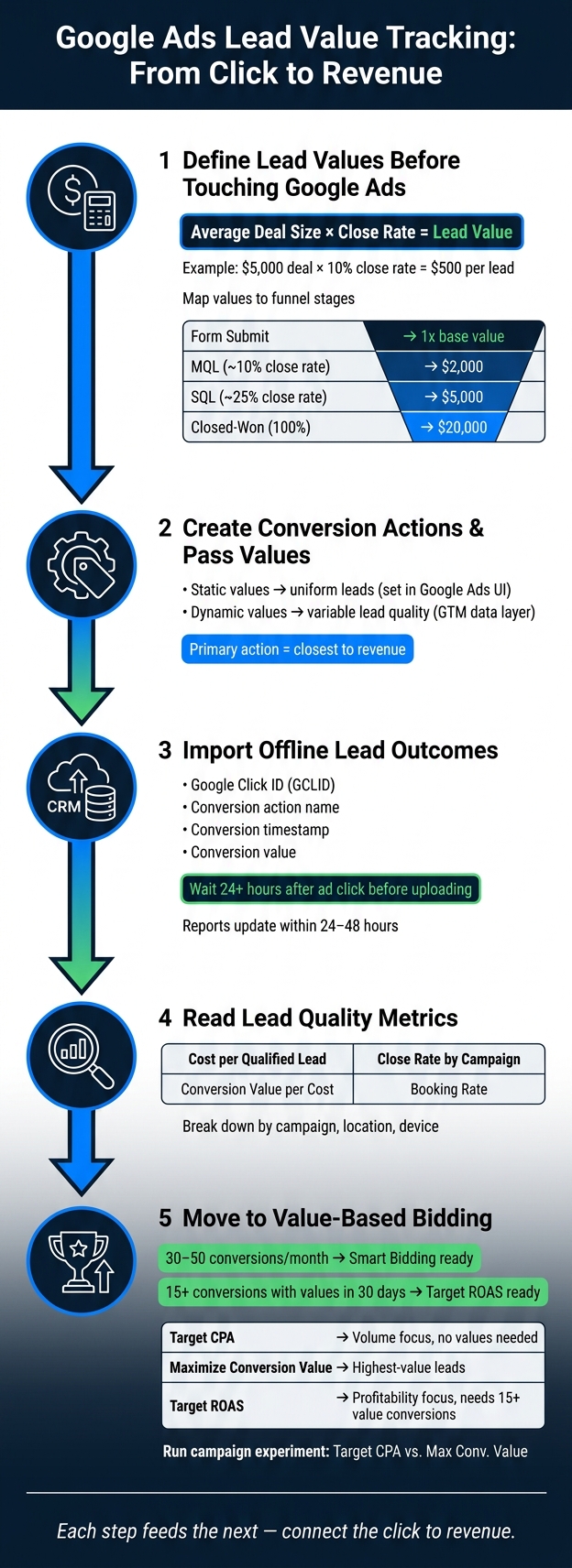
Google Ads Lead Value Tracking: From Click to Revenue
How To Track Leads In Google Ads (Step-By-Step)
sbb-itb-89b8f36
Define Lead Values Before Touching Google Ads
Set lead values before you build conversion actions. If you skip this step, you'll probably end up reworking your setup later.
Start simple. Use a basic value model now, then swap in CRM-based numbers once your tracking is in better shape.
Choose Between Proxy Values and Revenue-Based Values
There are two common ways to handle lead values.
Proxy values assign a score to early-stage leads based on past close rates. Revenue-based values pull in closed-won revenue from your CRM.
| Proxy Values | Revenue-Based Values | |
|---|---|---|
| Data Needed | Estimated conversion rates per funnel stage | Actual CRM closed-won revenue data |
| Accuracy | Moderate (predictive) | High (actual revenue) |
| Setup Complexity | Low to medium | High (requires CRM integration) |
| Best Fit | Long sales cycles; high lead volume | Short sales cycles; clean CRM attribution |
| Feedback Speed | Fast | Slow (delayed until deal closes) |
For most B2B advertisers, proxy values are the practical place to start. They are easier to set up, and they give Google Ads a usable signal much sooner.
Estimate a Starting Value from Deal Size and Close Rate
Use this formula:
Average Deal Value × Lead-to-Customer Close Rate = Expected Lead Value
If your average contract value is $5,000 and 10% of leads turn into customers, your starting lead value is $500.
That gives Google Ads a clear value target before CRM data is connected.
Map Values to Key Funnel Stages
Not every lead has the same worth. A form fill is not the same as an SQL, and Google Ads works better when you reflect that difference in your setup.
When you assign a separate value to each funnel stage, you give bidding more detail to work with, often by using top PPC tools for bid management. You also make it easier to track lead quality as people move through the funnel.
A simple starting model, based on a $20,000 average deal size, looks like this:
| Funnel Stage | Historical Close Rate | Assigned Value |
|---|---|---|
| Form Submit | - | 1x base value |
| Marketing Qualified Lead (MQL) | ~10% | $2,000 |
| Sales Qualified Lead (SQL) | ~25% | $5,000 |
| Closed-Won | 100% | $20,000 |
The key is to tie each value to business impact, not guesswork. If 25% of SQLs become customers and the average deal is $20,000, then an SQL is worth $5,000 to the business - and your Google Ads conversion values should match that. These are the values you'll assign to conversion actions in Google Ads.
Set up conversion actions and pass lead values into Google Ads
Create the conversion action in Google Ads, then assign a fixed or dynamic value to it. You can set that value inside the conversion action or pass it through your tag setup.
Create the right lead conversion action
Go to Goals > Conversions > Summary > + Create conversion action, or browse top PPC marketing tools to help manage your setup. When Google Ads asks you to group conversions, pick the category that best matches the business result you care about. Common lead-gen options include Qualified lead and Converted lead.
The value setting tells Google which leads matter more. If every lead is worth about the same, use one fixed value in Google Ads. If lead quality changes based on form type, product line, or deal size, pass a dynamic value instead. That gives Smart Bidding a clearer signal, so it can optimize toward better leads, not just more form submissions.
After that, pass the value through the Google tag or GTM so each conversion logs the right amount.
Pass static or dynamic values with the Google tag or GTM
Use static values when leads are uniform. Use dynamic values when lead quality changes in a meaningful way by form type, product line, or deal size. In GTM, you can pull the value from the data layer or from form fields and send it with the conversion. For B2B advertisers with multiple service tiers or variable deal sizes, this is usually the better setup.
| Lead Form Type | Recommended Value Setup | Implementation Method |
|---|---|---|
| Single service / fixed price | Static value | Set in Google Ads UI at conversion action level |
| Multi-service / variable quote | Dynamic value | GTM variables pulling from data layer or form fields |
| High-value B2B (long sales cycle) | Offline / CRM value | Import from Salesforce or HubSpot via GCLID |
Enhanced Conversions supports both web and lead conversions in one setup and improves cross-device attribution with hashed first-party data.
Use primary and secondary conversions correctly
Only primary conversion actions affect bidding. In Google Ads, primary conversion actions show up in "Conversions" and guide Smart Bidding. They tell the system what to optimize for. Secondary conversion actions appear in "All Conversions" only.
A simple rule works well here: make the conversion action closest to revenue your primary one. If you track both an initial form fill and a qualified lead, the qualified lead should be primary. Keep the form fill as secondary. That way, you can still watch top-of-funnel volume without pushing the system to go after low-intent submissions.
| Feature | Primary Conversion Action | Secondary Conversion Action |
|---|---|---|
| Bidding impact | Directly guides Smart Bidding (tCPA, tROAS) | No impact on automated bidding |
| Reporting column | Appears in "Conversions" | Appears in "All Conversions" only |
| Lead-gen use case | Qualified leads | Initial form fills, newsletter signups |
| Optimization goal | Find users likely to generate revenue | Observe full funnel and micro-conversions |
Smart Bidding needs enough volume to work well - usually 30-50 conversions per month for each campaign. If volume is low, move the primary action one step higher in the funnel. That keeps bidding focused while still letting you track lower-funnel actions and micro-conversions.
Import CRM and Offline Lead Values into Google Ads
Form fills alone don't tell you which leads turn into revenue. After you assign lead values in Google Ads, send qualified outcomes back from your CRM. When a lead closes later, send that result back to Google Ads too.
This is where offline conversion imports matter. They connect sales events that happen later to the original ad click, so Google Ads gets a value signal instead of just a form count. To do that, you need to store the original click ID or a hashed contact field.
Capture the Identifiers and Fields Required for Upload
Every import needs a matching click ID or hashed contact field. When someone clicks your ad, Google appends a unique ?gclid= parameter to the landing page URL. Your site needs to pull that value into a hidden field, then map that field to a CRM property such as "Google Click ID." If recent leads don't store the click ID, your uploads won't match.
If GCLID isn't available, use Enhanced Conversions for Leads with hashed email or phone.
Every upload file needs these core fields:
| Field | Required? | Notes |
|---|---|---|
| Google Click ID (GCLID) | Required (standard) | From the ad click URL |
| Hashed email or phone | Required (EC4L) | Used when GCLID is unavailable |
| Conversion action name | Required | Must match the Google Ads conversion action name exactly |
| Conversion time | Required | Timestamp of the conversion event, with time zone |
| Conversion value | Optional | Monetary value tied to the lead or deal |
| Conversion currency | Optional | 3-letter ISO code, such as USD |
Miss one of these, or format it wrong, and the upload can fall apart fast.
Pick an Import Method That Fits Your Team's Resources
Choose the method that fits your lead volume and CRM setup. The goal is simple: pick the import path that best preserves the lead value you defined earlier.
| Method | Setup Time | Ongoing Effort | Data Freshness | Best Fit |
|---|---|---|---|---|
| Manual CSV upload | Low | High | Low (weekly/monthly) | Small businesses with low lead volume |
| Scheduled file (Sheets/SFTP) | Medium | Low | Medium (daily) | Mid-sized teams using spreadsheets or legacy CRMs |
| API / connectors (Zapier) | Medium | Very low | Near real time | Companies using HubSpot or Salesforce wanting automation |
| Enhanced Conversions for Leads | Medium | Low | Near real time | Businesses prioritizing data durability and cross-device tracking |
For most mid-market teams, API or connector-based imports give the best tradeoff between automation and upkeep. Manual uploads can work, but they get messy once lead volume starts to climb. Whatever method you use, the import only works if the identifiers and timestamps are clean.
Follow Timing and Data Quality Rules
Timing matters more than most teams expect. Wait at least 24 hours after the original click before uploading a conversion - Google needs time to process the click data, and sending it too early can cause the upload to fail.
Use the actual conversion date - the date the lead status changed, not today's date and not the original form submission date. Format timestamps as MM/DD/YYYY HH:MM:SS with a time zone offset to avoid rejections.
Duplicate uploads are another common problem. If a lead triggers both an automated Zapier workflow and a manual CSV export, that same conversion can be counted twice and inflate ROI metrics. Set filters in your automation so conversions fire only when a specific CRM status is reached. Also make sure the conversion action name matches Google Ads exactly.
Uploaded conversions appear in Google Ads reports within 24 to 48 hours. Once those offline values start coming in, you can use them to judge lead quality and adjust bids.
Use Lead Value Data to Judge Quality, Set Bids, and Allocate Spend
Once imported CRM data and offline conversion values start flowing into Google Ads, use them to move budget toward better leads, not just more leads. The first step is simple: compare campaigns by qualified value, not raw lead count.
Read the Metrics That Matter for Lead Quality
Look at the same conversion actions you gave values to - not basic form fills. Pay close attention to All conversions by conversion time, which shows when conversions actually happened, plus Conversion value per cost and Cost per qualified lead or booked meeting so you can see which campaigns are driving business value.
Then break the data down by conversion action, campaign, and location to see where higher-value outcomes are coming from. Pair that with call recordings, CRM notes, and sales feedback to confirm that the conversions you're training Google Ads on match your definition of a qualified opportunity. If one region, device, or audience keeps producing better leads, conversion value rules can help Google Ads bid more aggressively in those cases.
| Layer | Metrics | Purpose |
|---|---|---|
| Traffic Quality | CTR, CPC, Search Terms | Checks whether ads attract relevant searchers |
| Conversion Efficiency | Conv. Rate, Cost per Lead | Shows how well traffic turns into inquiries |
| Lead Quality | Cost per Qualified Lead, Booking Rate | Shows whether inquiries are worth sales follow-up |
| Business Impact | Close Rate, ROAS, Revenue | Shows whether campaigns produce profitable customers |
Use that ranking to decide where value-based bidding should go first.
Move to Value-Based Bidding When Data Is Stable
Once lead quality is stable, start shifting spend toward value-based bidding. Don't switch too early. Wait until your value data is steady before changing bid strategies. Google recommends at least 15 conversions with assigned values in the past 30 days before using Target ROAS. After your first imports, give the system 2-4 weeks to calibrate before making major bidding changes.
When you're ready to test, use a campaign experiment. Keep one campaign on Target CPA as the control, then test Maximize Conversion Value or Target ROAS against it using the primary qualified-lead action. That gives you a clean way to compare lead quality and efficiency without putting the whole account at risk.
| Bid Strategy | Required Data | Optimization Focus | Strength | Drawback |
|---|---|---|---|---|
| Target CPA | Conversion count; no values needed | Lead volume at a set cost | Predictable lead costs | Ignores the actual revenue value of each lead |
| Maximize Conversion Value | Consistent lead values | Total value within budget | Gets the highest-value leads for the spend | CPA can fluctuate |
| Target ROAS | 15+ conversions with values in 30 days | Efficiency / return on spend | Optimizes for profitability, not just volume | Needs enough value data to optimize |
If Closed Won volume is too low, combine multiple value-based stages into one bidding action. You can still assign different values to each stage. The point is to give the algorithm enough signal to work with.
Conclusion: Build a Feedback Loop from Click to Qualified Revenue
This works when values, imports, and bidding stay tied together. Set realistic lead values before touching Google Ads, create conversion actions that carry those values, import CRM outcomes on a steady basis, and use that data to guide bidding and budget choices. Each step feeds the next.
That loop is what turns Google Ads from lead generation into revenue generation.
FAQs
How do I choose between proxy values and CRM revenue values?
Choose proxy values when you don’t yet have solid financial data or when you’re still early in lead generation. They work as placeholders - for example, an estimated average client value tied to a phone consultation - and help Google put more weight on higher-quality leads instead of basic form fills.
Switch to CRM revenue values once you can sync closed-deal amounts back to your campaigns. That lets you optimize for actual ROAS, not rough estimates, and move spend toward the keywords and campaigns that drive verified sales.
What if my Google Ads account doesn’t have enough value data yet?
If your account doesn’t have enough conversion value data yet, the system may need more time to calibrate. In most cases, Smart Bidding needs 30 to 50 conversions per month per campaign to work well.
Give it 2 to 4 weeks before you make big changes or decide it isn’t working. During that time, check that your tracking is accurate. If the data is off, the system can optimize for the wrong actions.
How can I avoid errors when importing offline lead values?
Capture and store the Google Click ID (GCLID) for every lead. If you don’t, imports can fail because Google needs a valid identifier to match the conversion.
A simple way to do this is to use hidden form fields that pull the GCLID from the URL and store it with the lead record.
Then set your automations to sync data only when a lead reaches closed-won. That keeps early-stage records from being pushed before the deal is done.
It also helps to validate the setup weekly. Check match rates, look for failed imports, and make sure your conversion action names stay consistent across systems.