Running Pinterest ads on a small budget can deliver strong results. Pinterest works differently than social media platforms - it’s a visual search engine where users actively look for products and ideas. This means your ads reach people who are already searching for solutions, making it a cost-effective platform for advertisers with limited budgets.
Here’s why Pinterest is a great fit for small advertisers:
- Lower competition: Pinterest has fewer advertisers (1.5 million monthly) compared to platforms like Facebook (7 million), which means lower costs per click (CPC) and impression.
- Affordable bidding: Minimum CPC bids start at just $0.10, making it accessible for smaller budgets.
- High purchase intent: 93% of users plan purchases on Pinterest, and 50% buy after seeing a Promoted Pin.
- Flexible ad options: Pinterest offers manual (Custom Bidding) and automatic (Pinterest Performance+) bidding strategies to suit different experience levels and time commitments.
For beginners, automatic bidding (Pinterest Performance+) is ideal as it optimizes costs and results with minimal effort. Experienced advertisers may prefer manual bidding for more control over costs and targeting. Start with a small daily budget ($10–$20) and let campaigns run for at least 30 days to allow for optimization.
Key tips:
- Focus on a few high-margin products to maximize your budget.
- Use long-tail keywords and geographic targeting to reduce costs.
- Monitor performance weekly and adjust bids based on results.
With proper planning and testing, even modest budgets can drive measurable growth on Pinterest.
How To Crush Pinterest Ads with a Small Budget
How to Choose the Right Bidding Strategy
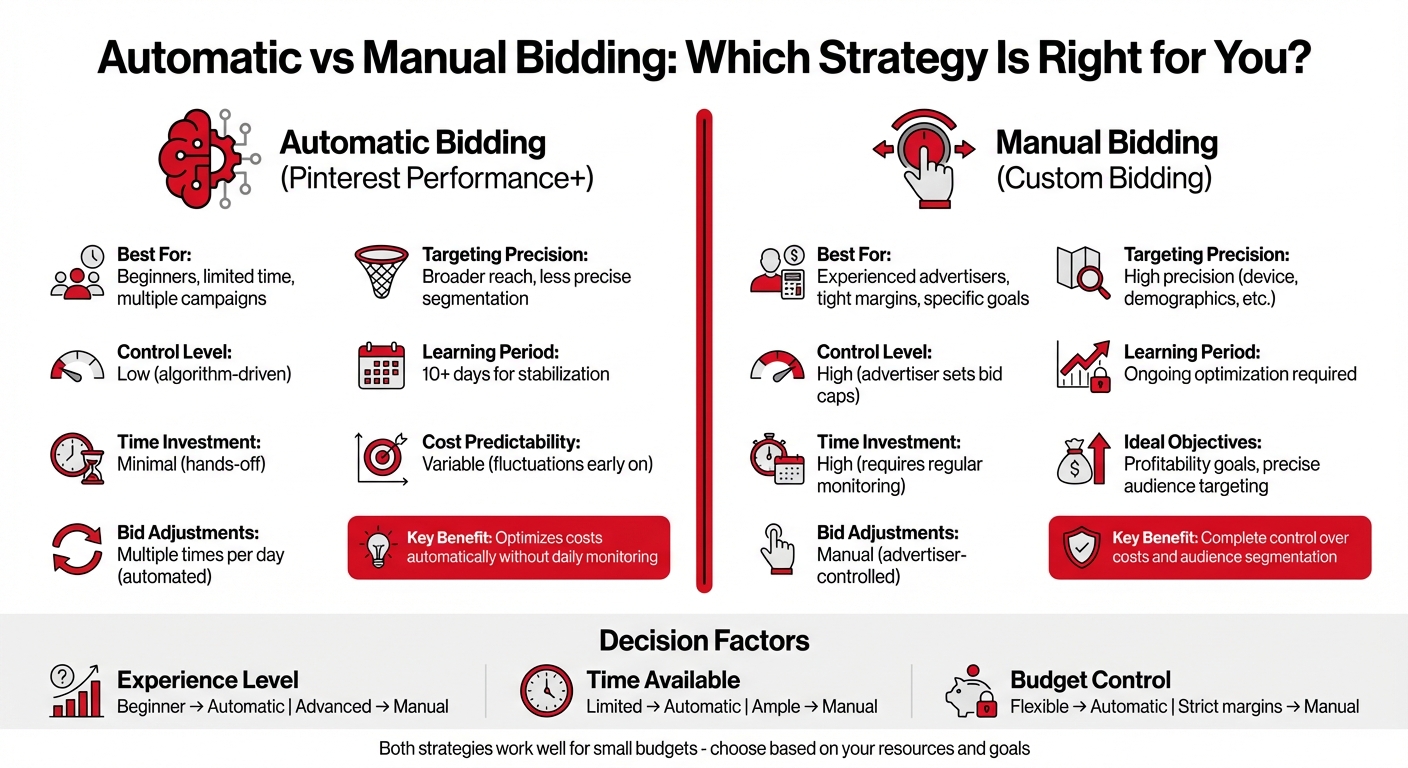
Pinterest Automatic vs Manual Bidding Strategies Comparison
Choosing the best bidding strategy comes down to three key factors: your experience, the time you can devote to campaign management, and your budget constraints. Both automatic and manual bidding can work well for smaller budgets, but the right choice depends on how these factors align with your goals.
Your campaign's objective - whether it’s driving clicks, building brand awareness, or boosting conversions - will also influence your decision. For example, automatic bidding works well for clicks, CPM is ideal for impressions, and CPA or ROAS is better suited for conversions.
Automatic Bidding for Beginners
Automatic bidding, also known as Pinterest Performance+, adjusts your bids multiple times a day to optimize results and costs. This hands-off option is a great choice for beginners or those juggling multiple campaigns with limited time.
The algorithm aims to spend your budget effectively, delivering the most clicks or conversions at the lowest possible cost per result. However, during the early days of your campaign, you might notice some fluctuations in costs. As Alexandra Solà from Adsmurai explains:
"The automatic bidding strategy can cause fluctuations in costs, especially at the beginning of a campaign, as Pinterest's algorithm looks for the best possible results".
To give the algorithm enough time to stabilize, it’s recommended to let your campaign run for at least 10 days before making significant adjustments.
One drawback of automatic bidding is the reduced control over audience targeting. The system often defaults to broader targeting to maximize reach, which may result in less precise audience segmentation compared to manual bidding. That said, for advertisers who lack the time or expertise to manage bids daily, automatic bidding usually delivers better outcomes than relying on guesswork.
For those who want more control over costs and targeting, manual bidding might be a better fit.
Manual Bidding for More Control
Manual bidding, also called Custom Bidding, allows you to set a bid cap - the maximum amount you’re willing to pay for each action. This approach keeps your costs predictable, making it especially useful if you’re working with tight margins or have specific profitability goals.
The trade-off is that manual bidding requires more time and effort. As Katie Sullivan Porter from Marin Software points out:
"Manual bidding... is a manual process which could be time consuming if you need to adjust your bid amounts over the course of the campaign".
Regular performance monitoring and bid adjustments are essential to make the most of this strategy. On the plus side, manual bidding offers greater targeting precision, allowing you to refine your audience by factors like device type or demographics. This flexibility can be invaluable for experienced advertisers looking to fine-tune their campaigns.
When using manual bidding, ensure your bid cap is high enough to generate sufficient data for testing while still protecting your margins.
How to Manage Small Campaign Budgets
Handling a small advertising budget on Pinterest requires careful planning and strategic choices. While the platform gives you plenty of flexibility in allocating funds, understanding the different budget types and testing strategies can help you avoid costly mistakes that might drain your budget too quickly. Let’s dive into how to structure your daily and lifetime budgets for better campaign performance.
Setting Daily and Lifetime Budgets
A daily budget sets the maximum amount you’re willing to spend each day, while a lifetime budget caps the total spend for the entire campaign. Lifetime budgets allow Pinterest to allocate more funds on days with higher potential, ensuring your campaign performs better overall.
For smaller advertisers, Performance+ daily budgeting is a great option. This approach allows Pinterest to spend up to 125% of your daily budget on high-performing days, but it balances out by keeping your weekly average (calculated from Sunday to Saturday) within your set daily limit.
Here’s a quick breakdown for small business budgets:
- Most businesses allocate between $200 and $1,500 per Pinterest ad campaign.
- If you’re new to Pinterest Ads, start with $10–$20 per day to test which pins resonate with your audience.
- Once you’ve identified high-performing pins, consider increasing your daily budget to around $50 for faster optimization insights.
It’s also crucial to plan for at least one month of runtime. Pinterest ads often take 2–3 weeks to stabilize and generate consistent conversions. Additionally, conversion delays can range from just a few hours to several weeks. Pausing campaigns too early could mean missing out on valuable optimization data.
Once you’ve set your budget, the next step is testing and fine-tuning your bidding strategy to maximize performance.
Testing and Adjusting Your Bids
Testing different bidding strategies is key to finding what works best for your budget. Whether you’re using automatic or manual bidding, adjusting your bids based on real performance data can help you get the most value for your money.
To make testing more efficient:
- Focus your budget on one or two high-margin, proven products instead of spreading funds across too many items. This targeted approach generates actionable data faster and helps you make better scaling decisions.
- Use geographic targeting to stretch your budget. Instead of targeting the entire U.S., limit campaigns to your best-performing regions or areas with lower shipping costs.
- Prioritize long-tail keywords - specific, multi-word search terms that tend to have less competition and lower cost-per-click compared to broader terms.
Pinterest’s average costs range from $0.10 to $1.50 per click and $2.00 to $5.00 per 1,000 impressions. These benchmarks are helpful when setting manual bid caps. If you decide to use Custom bidding, make sure your bid cap is high enough to win auctions but still leaves room for healthy profit margins.
sbb-itb-89b8f36
How to Optimize Campaigns for Better Returns
To get the most out of your budget, focus on audiences and placements that consistently deliver strong results.
Using Audience Segmentation to Lower Costs
Targeting a more specific audience can help cut costs by avoiding low-intent users. By narrowing down demographics, interests, and keywords, you can ensure your budget is spent on people who are actively considering purchases, not just browsing.
For example, instead of using a broad term like "beauty", try something more specific, such as "aesthetic workout gear." This approach connects you with shoppers who are ready to buy. Pinterest's interest and keyword targeting relies on first-party intent data, meaning you’ll reach users based on what they’re actively searching for and planning to purchase.
"Even the most compelling ads won't make an impact if they don't reach the right people." - Pinterest Business
Retargeting is another smart way to stretch a small budget. By focusing on people who have already visited your site or purchased from you before, you’re reaching an audience that’s familiar with your brand and more likely to convert. Additionally, lookalike audiences can help you find new users with similar characteristics to your best customers, expanding your reach without wasting spend.
Once you've refined your audience, tracking their behavior will guide your next steps.
Tracking Performance and Making Adjustments
Monitoring performance is essential for improving results. Tools like the Pinterest Tag or Conversions API allow you to track actions like checkouts, sign-ups, and add-to-cart events. With this data, you can identify which audience segments are driving sales and adjust your bids accordingly.
It’s best to let Pinterest’s algorithm run for about 10 days before making changes.
"Successful accounts need to be monitored and optimized regularly. Try to set aside a minimum of 30 minutes every week to check in on your campaigns." - Portent
Set aside just 30 minutes each week to review campaign performance. Pay close attention to metrics like click-through rate (CTR) and cost-per-click (CPC). If you notice high bounce rates on your landing pages, it could mean your ads aren’t aligning with user expectations, which wastes your budget. Using more precise keyword match types, such as phrase or exact match, can help you limit impressions to highly relevant searches and improve CTR.
Fine-tune your bids to focus on placements that deliver the best performance.
Adjusting Bids for Top-Performing Placements
Pinterest offers two key placement options: home feed and search. Once you determine which placement performs better, adjust your bids to prioritize it. Campaign-level budgets can automatically allocate funds to top-performing ad groups, reducing the need for constant manual adjustments. However, if you’re using Custom bidding, it’s crucial to review performance weekly. Remove underperforming keywords or segments to redirect your budget where it’s most effective.
For advertisers aiming to maximize revenue, Performance+ ROAS bidding can be a game-changer. This feature adjusts bids based on the predicted value of each checkout, not just the number of conversions.
Tools and Resources for Managing Pinterest Ads
Streamlining bid optimization and tracking performance is easier with the right tools at your disposal.
How Top PPC Marketing Directory Can Help

The Top PPC Marketing Directory is a go-to resource for small businesses looking for expert agencies and specialized tools tailored to PPC advertisers. This platform connects advertisers with resources for bid management, performance tracking, and campaign optimization.
Through the directory, you can access advanced tracking tools critical for ROAS (Return on Ad Spend) bidding. It also provides resources for audience segmentation and keyword research, helping you pinpoint long-tail keywords that come with lower costs per click (CPC) and higher user intent. Having access to these vetted tools can make a noticeable difference in your campaign's profitability.
While the directory offers an array of resources, Pinterest itself provides built-in tools that cater to advertisers working with smaller budgets.
Other Tools for Small Budget Advertisers
Pinterest's built-in tools are designed to simplify campaign management while keeping costs in check. Here's a breakdown of what they offer:
- Ads Manager: The central hub for creating campaigns and adjusting bids.
- Bulk Editor: A tool for making large-scale changes across multiple ad groups by uploading and downloading spreadsheets.
- Recommendations Page: Found in your Pinterest business account, this page offers automated suggestions to enhance campaign performance.
- Pinterest Tag and Conversions API: These tools pass checkout value data to Pinterest's algorithm, helping optimize bids for better results.
- Media Planner: A forecasting tool that estimates campaign performance before launch.
"Any PPC specialist knows advanced options boost results without extra spend." - Jack Brown, Paid Media Specialist, Hallam
For advertisers interested in automation, tools powered by machine learning can adjust bids in real time by analyzing historical performance and market conditions. These tools work hand-in-hand with Pinterest's bidding strategies, helping you allocate your budget more effectively. However, staying proactive with daily account reviews is key to keeping costs under control.
Conclusion
Running Pinterest ads on a small budget can deliver impressive results. The platform boasts 2.3 times higher efficiency per conversion, making it a smart choice for advertisers looking to stretch their dollars. With 97% of top searches being unbranded, the competition isn’t about having the deepest pockets - it’s about crafting creative ads and bidding intelligently.
To make the most of this opportunity, start with Pinterest Performance+, an automated bidding option. Allocate a daily budget of $10–$20 for your initial tests and aim to run campaigns for at least 30 days. This time frame allows for the learning period and conversion lag, which typically takes 2–3 weeks to stabilize. Once your campaign settles, you can expect steady CPCs between $0.10 and $1.50, along with CPMs ranging from $2.00 to $5.00.
Keep your targeting strategy simple by focusing on either keywords or demographics - but not both at once. Over-segmenting can stretch a limited budget too thin. Check on your campaigns daily, but avoid making drastic changes during the early days while the algorithm optimizes performance.
For additional support, tools like the Top PPC Marketing Directory offer bid management and tracking resources to help you get the most out of every dollar spent. Combine these with Pinterest’s Ads Manager, Bulk Editor, and Recommendations Page to refine your campaigns and improve your return on ad spend.
Ready to take the next step? Launch a test campaign with Performance+ bidding, attention-grabbing vertical images, and well-defined audience segments. Use conversion data to adjust your strategy, and scale what works best. With discipline and the right resources, even a modest budget can drive measurable growth on Pinterest. Every dollar counts - make yours work harder.
FAQs
How is Pinterest's bidding system unique compared to other platforms?
Pinterest’s bidding system offers a two-pronged approach that caters to different advertising needs. One option is Performance+, an automated feature that adjusts bids to align with your campaign goals - whether you're aiming for more impressions, clicks, or a lower CPA. This tool simplifies the process, making it easier to achieve your objectives without constant oversight.
If you prefer a hands-on approach, Pinterest also lets you set manual maximum bids for CPC or CPM. This added flexibility allows you to fine-tune your strategy to match your budget and specific goals, which can be especially helpful for advertisers working with smaller budgets.
What are the benefits of using automatic bidding for beginners on Pinterest?
Automatic bidding works well for beginners because it takes the guesswork out of managing campaigns. By automatically adjusting bids, Pinterest’s algorithms aim to deliver the best possible results for your budget. This approach not only saves time but also ensures your ad spend is optimized effectively.
This method is particularly helpful for those new to advertising or working with smaller budgets. It allows you to achieve strong performance without the need for constant manual tweaks, letting you concentrate on expanding your campaign while the system manages the finer details.
What are the best strategies for running Pinterest ads on a small budget?
To stretch a small budget on Pinterest, start by setting a clear campaign goal - whether it's awareness, consideration, or conversions. This clarity helps Pinterest's algorithm distribute your budget more effectively. A good starting point for daily spending is between $10 and $20, paired with custom bids to control your maximum cost-per-click (CPC). For smaller budgets, aim for a CPC range of $0.10 to $1.50.
Next, fine-tune your targeting. Narrow down your audience by focusing on specific interests, keywords, or demographics to connect with the right users. Choose visually engaging ad formats like Idea Pins or Carousel ads, which allow you to showcase multiple products and often generate better engagement without breaking the bank. Keep an eye on your performance metrics, such as click-through rate (CTR) and cost per conversion. Pause ads that aren't performing well and shift your budget toward the ones delivering strong results.
If you need extra help with tasks like bid adjustments, keyword research, or campaign optimization, check out the Top PPC Marketing Directory. It offers tools and resources designed to help you get the most out of your ad spend.