Pinterest search ads work best when I keep three things tight: keyword themes, Pin copy, and bid reviews. For brands scaling quickly, top PPC agencies can help manage these complex optimizations. With 619 million monthly active users and 80 billion monthly searches, Pinterest is a search channel first. That means I need to match keywords to what people want right now, not just push brand terms.
Here’s the short version:
- I build keyword lists around product terms, problems/goals, and style or material modifiers
- I split broad, phrase, and exact into separate ad groups so results are easier to read
- I make sure the Pin title, Pin description, image, and landing page all match the same search intent
- After 1–2 weeks, I review search terms, add negatives, and change bids based on CTR, CPC, conversions, and cost per result
A few points stand out from the article:
- Phrase match is the default pick for most campaigns
- Some advertisers use 25 keywords per ad group as a floor, with many lists reaching 50–200+ terms
- Terms like “DIY,” “free,” and “cheap” often belong in negative keyword lists for premium offers
- Bid or budget changes should be small, usually around 20% to 30% at a time
If I had to sum up the whole checklist in one line, it would be this: keep targeting clean, keep message match tight, and use search-term data to trim waste.
Master Pinterest Ads Targeting: Keywords, Interests & Actalikes Explained
sbb-itb-89b8f36
Pre-Launch Checklist: Build the Keyword Structure
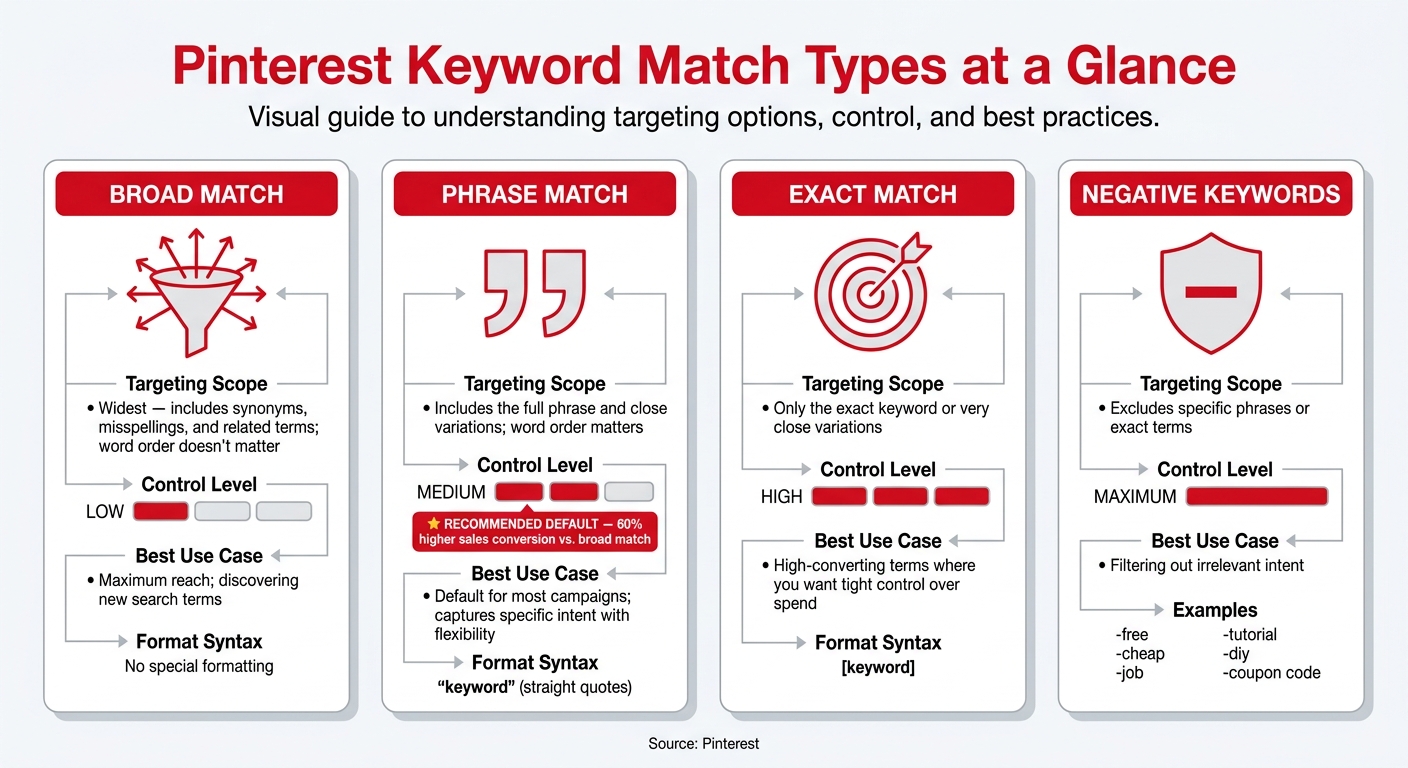
Pinterest Keyword Match Types: Targeting Scope & Best Use Cases
Research Keywords Based on Pinterest Search Intent
Pinterest users don’t search the same way Google users do. They’re often planning ahead, not just shopping on the spot. Someone searching for "modern kitchen ideas" is usually still shaping a decision. That person has intent, but it’s early intent. That’s the angle you want to target.
Start with a seed list built from three keyword buckets:
- Product category keywords like "living room furniture"
- Pain-point or goal-based phrases like "small bedroom storage solutions"
- Style, material, or room modifiers like "boho bedroom decor" or "oak dining table"
Use the Pinterest Trends tool to compare up to four terms side by side and review search volume trends over the past year. Then search those seed terms right in the Pinterest search bar. The autocomplete suggestions give you modifiers that people are actively adding to their searches.
A good target is at least 25 keywords per ad group. Many experienced advertisers build lists with 50–200+ terms.
Before you lock in the list, remove low-intent queries. If you sell premium products, add terms like "DIY", "free", and "cheap" as negative keywords from day one.
This keyword base affects everything that comes later. Your Pin copy check and search-term review both depend on how clean this list is. Once the seed list is ready, sort it by match type before you test.
Choose Match Types and Separate Them for Cleaner Testing
Pinterest supports broad, phrase, exact, and negative keyword targeting. For exclusions, you can also use negative phrase and negative exact.
| Match Type | Targeting Scope | Level of Control | Best Use Case |
|---|---|---|---|
| Broad Match | Widest - includes synonyms, misspellings, and related terms; word order doesn't matter | Low | Maximum reach; discovering new search terms |
| Phrase Match | Includes the full phrase and close variations; word order matters | Medium | Default for most campaigns; captures specific intent with flexibility |
| Exact Match | Only the exact keyword or very close variations | High | High-converting terms where you want tight control over spend |
| Negative Keywords | Excludes specific phrases or exact terms | Maximum | Filtering out irrelevant intent like "DIY", "free", or "cheap" |
Use phrase match as the default. Save broad match for discovery work. In side-by-side testing, phrase match keywords drove a 60% higher sales conversion rate than broad match.
If you’re adding keywords manually in Ads Manager, formatting matters more than most people think. Use straight quotes like "keyword" for phrase match and square brackets like [keyword] for exact match. Curly quotes can switch the keyword back to broad match.
Keep match types in separate ad groups. If broad, phrase, and exact all sit in the same group, it gets messy fast. You won’t know which intent layer is doing the work.
"The most common mistake: running all targeting types in one ad group. You can't optimize what you can't isolate." - Md Sharifuzzaman, Pinterest Ads Specialist
Once match types are split out, set each ad group around one theme.
Group Keywords into Tight Ad Group Themes
Each ad group should cover one clear theme: one product category, one style, or one use case. "Mid-century modern living room" and "boho bedroom decor" should sit in different ad groups, not the same one. When the theme is narrow, it becomes much easier to line up the Pin creative and landing page with what the user searched.
If an ad group can’t point cleanly to one landing page, split it. Every keyword in that group should reflect the same search intent, and that intent should connect straight to what the user sees after the click.
Tighter themes also make launch checks and post-launch reviews much easier to manage.
Launch Checklist: Review Pins Before Publishing
With your keyword themes and match types in place, give every Pin one last review before it goes live. At this stage, the goal is simple: make sure each Pin lines up with its keyword theme.
Check Pin Titles and Descriptions Against the Keyword Theme
Put the primary keyword, or a close variation, near the start of the title. Pin titles can be up to 100 characters, but on mobile, users usually see only the first 40 characters in the feed.
Pin descriptions can run up to 800 characters. Pinterest also uses them to judge relevance and decide where the Pin should appear, even if users don’t read the full text. So yes, the description still matters. Use the keyword theme in the description, and make sure every Pin has one.
Confirm Message Match from Keyword to Pin to Landing Page
Once the copy looks good, check the landing page. The keyword, the Pin, and the landing page should all point to the same intent.
Say the Pin targets "small bathroom storage ideas" and shows a specific shelving unit. The landing page should open on that product or on a tightly grouped collection page, not a broad category page. The page needs to meet the same search intent as the keyword. And if the Pin shows an offer, that same offer should appear on the landing page.
"A common mistake is sending Pinterest traffic to a generic page that does not match the Pin. Relevance between Pin, headline, and landing page improves conversion rate." - POMOROI
| Creative Element | What to Check |
|---|---|
| Pin Title | Primary keyword appears in the first 40 characters |
| Pin Description | Keywords and supporting context are included |
| Pin Visual | Image reflects the specific use case, not generic brand imagery |
| CTA Match | "Shop Now" leads to a relevant product or collection page, not a homepage |
| Offer Match | Any promotion shown in the Pin is visible on the landing page |
A mismatched landing page can hurt conversion. Once these checks are done, publish the Pin and move to search-term review.
Post-Launch Review Checklist: Search Terms and Bids
After launch, give the campaign 1 to 2 weeks and wait for enough conversion data before making big keyword or bid changes. This window is where launch data starts to tell you what’s working, what’s off, and where you need tighter control.
Review Search Terms and Decide What to Keep, Refine, or Exclude
Match-type separation makes this step much easier to read. Pull search terms from the Keywords tab in Pinterest Ads Manager. Those terms show you which match types are pulling their weight.
Focus on three signals:
- Terms that don’t match your product intent
- High-performing terms missing from your keyword list
- Terms that belong to a different theme
Use the original ad group theme as your filter. That makes it easier to decide whether a term belongs where it is, needs to become a new keyword, or should be excluded. Add strong new terms to the right ad group, and move misplaced terms into a tighter themed ad group.
For example, if you sell ready-made furniture and a query like "custom upholstered sofa" is driving clicks but zero sales, add it as a negative keyword.
| Search Term | Performance Signal | Recommended Action |
|---|---|---|
| "Custom upholstered sofa" | High clicks, $0.00 sales | Add as Negative Keyword |
| "Modern green couch" | High ROAS, low impressions | Increase Bid |
| "Living room decor" | High impressions, low CTR | Move to a tighter themed ad group |
| [Exact product name] | High conversion, high CPA | Split into an exact-match ad group |
Review Keyword-Level Bids Using Performance Data
Once search terms are cleaned up, move to bids. Review and adjust keyword bids using PPC tools for bid management in Ads Manager only after the campaign has enough data to mean something. Before changing anything, check four metrics: CPC, CTR, conversions, and cost per result.
Raise bids on keywords where CPA is below your target and ROAS is strong. But keep one guardrail in place: only do this when the keyword still matches the Pin and landing page intent. If a keyword has a high CPC, weak CTR, and no conversions across a meaningful spend window, lower the bid. If a keyword doesn’t have much data yet, leave it alone until the numbers settle down.
"If you see a keyword that is vastly outperforming everything else, remove everything else (put them into a new ad group) and up your daily budget!" - Alisa Meredith
Increase budgets or bids slowly, in the 20% to 30% range at a time, to avoid resetting the learning phase.
Conclusion: Keep the Checklist Simple and Repeatable
Use this checklist the same way every time: before launch, after launch, and during bid review. Stick with the same structure each time so testing stays clean and results stay easy to read.
Pinterest keyword targeting works best when research, copy, and bids follow the same setup every time. Most Pinterest demand starts with discovery, not brand recognition. That’s why keyword structure matters so much.
Run the checklist at launch and again after launch. Consistency is the strategy.
FAQs
How do I choose between phrase, broad, and exact match?
Choose based on the balance you want between reach and precision:
- Broad match: shows your ad to a larger set of searches, including related terms, synonyms, and misspellings.
- Phrase match: keeps your keyword phrase in the same order, but still allows close variations.
- Exact match: gives you the most control, showing your ad for the specific term or very close variations where word order matters.
What makes a good Pinterest ad group theme?
A good Pinterest ad group theme should stick to one clear targeting idea. That makes it much easier to see what's driving results.
In plain English: group similar keywords around a specific product category or a specific user intent.
Why does that matter? Because it keeps your setup clean. You avoid mixing goals or targeting types, cut down on algorithm conflict, and make it easier to test interests, keywords, and audiences on their own.
For the best read on performance, use at least 25 keywords per group.
When should I add negative keywords or change bids?
Add negative keywords when search terms don’t match what you sell. For premium products or services, that often means terms like free, cheap, or DIY. These keywords help block searches that may trigger your ads but don’t lead to meaningful engagement.
You should also adjust bids based on what the reporting shows. Once you have enough data, raise or lower bids to respond to high cost per click, low click-through rate, or poor conversion performance.