Retargeting ad personalization helps businesses re-engage website visitors by showing ads tailored to their behavior. Tools like AdRoll, Criteo, Meta Ads, Google Ads, and LinkedIn Ads are leading options. Each platform offers unique features to optimize audience targeting, ad customization, and cross-channel reach. Here's a quick breakdown:
- AdRoll: Great for SMBs, offering multichannel retargeting with dynamic ads and CRM integration.
- Criteo: Ideal for eCommerce, using AI to predict conversions with real-time updates.
- Meta Ads: Focused on B2C, leveraging Facebook and Instagram for dynamic social ads.
- Google Ads: Provides dynamic remarketing across Search, Display, and YouTube.
- LinkedIn Ads: Best for B2B, targeting professionals with precise audience filters.
Quick Comparison
| Tool | Best For | Key Features | Pricing Model |
|---|---|---|---|
| AdRoll | SMBs, multichannel campaigns | Dynamic ads, CRM integration, email retargeting | Performance-based, flexible budgets |
| Criteo | Retail & eCommerce | AI-driven product recommendations, real-time pricing updates | ROAS-focused, self-service available |
| Meta Ads | B2C social retargeting | Facebook Pixel, dynamic product ads, custom audience creation | Auction-based, no minimum spend |
| Google Ads | Cross-channel reach | Dynamic remarketing for retail, travel, and more; tailored industry solutions | Auction-based (CPC/CPM) |
| LinkedIn Ads | B2B targeting | Matched Audiences, job title and industry filters | Premium CPC, minimum spend required |
Each tool excels in different areas. Choose based on your audience, goals, and budget. For expert help, consider resources like the Top PPC Marketing Directory to find specialists who can refine your campaigns.
Retargeting with AI-powered dynamic ads - Business Guide
sbb-itb-89b8f36
Best Tools for Retargeting Ad Personalization
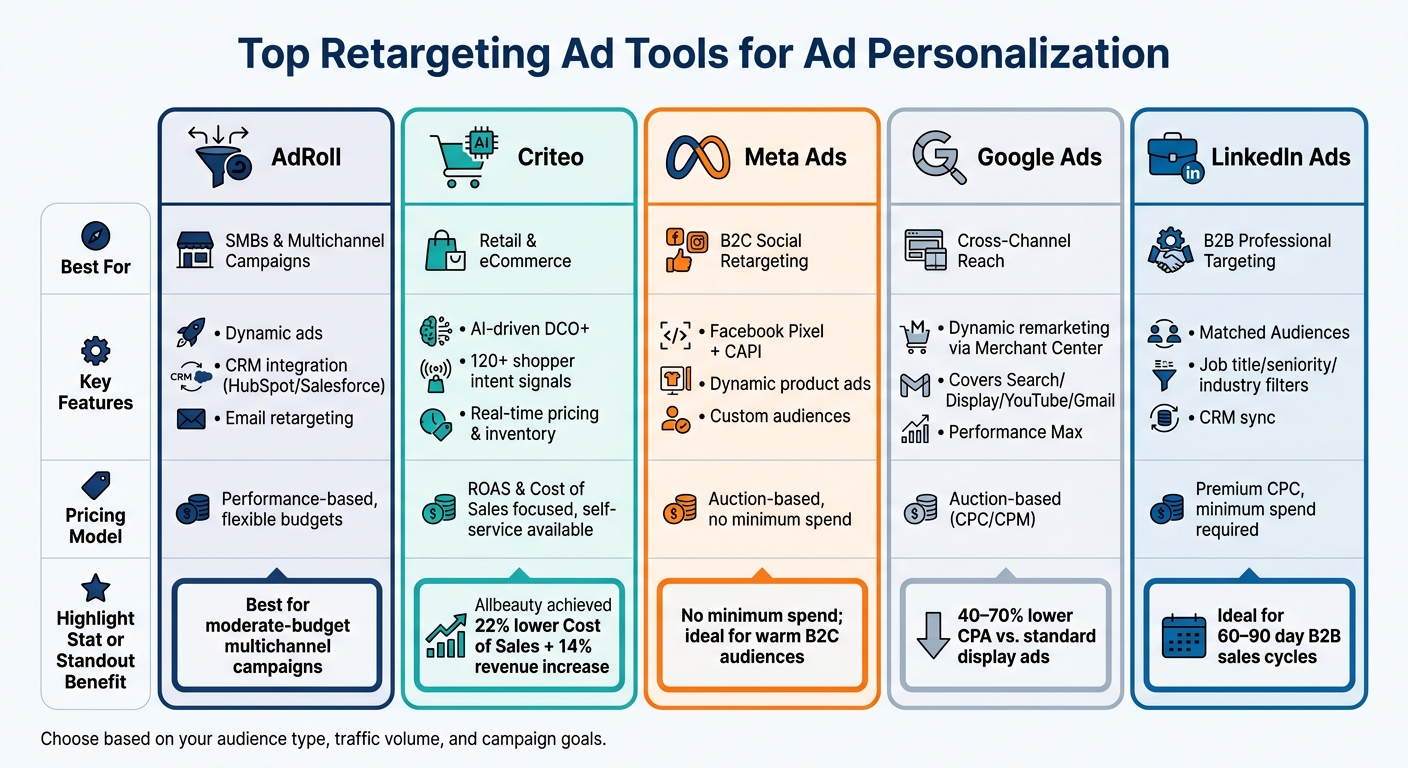
Top Retargeting Ad Tools Compared: Features, Pricing & Best Use Cases
When it comes to retargeting ad personalization, different tools excel in different areas. The right choice for your business depends on your audience, goals, and industry needs. Below, we’ve broken down some of the top tools, highlighting their standout features, pricing models, and ideal use cases.
AdRoll: Multichannel Dynamic Retargeting
AdRoll simplifies retargeting by allowing you to reach past visitors across display, social, and email channels - all from a single dashboard. It automatically generates dynamic ads from your product catalog, ensuring users see the exact items they’ve previously viewed. The platform also integrates seamlessly with CRM tools like HubSpot and Salesforce, letting you combine first-party customer data with behavioral insights. This approach enables highly targeted audience segmentation. AdRoll’s performance-based pricing makes it a good fit for businesses running multichannel campaigns on moderate budgets.
Criteo: Commerce-Focused Ad Personalization
Criteo is a go-to option for retail and eCommerce businesses. It uses Dynamic Creative Optimization+ (DCO+) to create ads with live pricing, inventory updates, and personalized product recommendations. Leveraging data from over 120 shopper intent signals, Criteo’s AI predicts which products are most likely to convert for returning visitors. For example, beauty retailer Allbeauty achieved a 22% reduction in Cost of Sales while increasing total sales by 7% and revenue by 14% using Criteo Retargeting. Another success story comes from a U.S. mattress retailer that doubled its omnichannel ROAS, outperforming competing platforms by 30–50%. Criteo’s pricing focuses on ROAS and Cost of Sales, with a self-service option (GO Campaigns) available for businesses of all sizes.
Meta Ads: Facebook and Instagram Retargeting
Meta Ads is a leader in B2C retargeting, particularly in the U.S. Using tools like the Facebook Pixel and Conversions API (CAPI), Meta Ads tracks user behavior and serves dynamic ads tailored to their interests. These ads automatically pull products from your catalog to match users’ actions, such as viewing a product page, adding items to a cart, or starting the checkout process. You can also create custom audiences based on website visits, video views, or customer lists. Meta Ads operates on an auction-based pricing model with no minimum spend, though costs vary depending on factors like audience size, ad placements, and seasonal demand.
Google Ads: Dynamic Remarketing Across Channels
Google Ads offers dynamic remarketing across multiple channels, including Display, YouTube, Gmail, and Search. Ads are personalized using data from your Merchant Center feed, and the platform provides tailored solutions for industries like retail, travel, real estate, education, and jobs. Each vertical has specific parameters, such as Product ID or Destination ID, for precise targeting. According to Kirk Williams, Owner of ZATO PPC Marketing:
"Dynamic remarketing earns its place when you have a large, diverse inventory and you want to show people the specific products they were actually looking at."
Google’s dynamic remarketing campaigns often achieve 40–70% lower cost per acquisition compared to standard display ads. With Performance Max (PMax) campaigns, Google has started to consolidate traditional remarketing into broader, cross-channel strategies.
LinkedIn Ads: B2B Retargeting

For B2B businesses, LinkedIn Ads stands out with its Matched Audiences feature. This tool allows you to retarget website visitors, upload contact lists, or sync CRM data to create highly specific audience segments. You can filter by job title, seniority, company size, or industry - making it perfect for targeting decision-makers. For example, a SaaS company could focus on CFOs or IT Directors who’ve visited its pricing page. While LinkedIn’s costs are on the higher side and often include minimum spending requirements, its precision makes it ideal for long B2B sales cycles (60–90 days). Pairing LinkedIn Ads with strong lead magnets - like whitepapers or webinars - can be an effective strategy to re-engage potential clients.
| Tool | Best For | Pricing Model |
|---|---|---|
| AdRoll | SMBs, multichannel retargeting | Flexible, performance-based pricing |
| Criteo | Retail & eCommerce, large catalogs | Performance-based (focused on ROAS & COS) |
| Meta Ads | B2C social retargeting | Auction-based with no minimum spend |
| Google Ads | Broad reach, cross-channel display | Auction-based (CPC/CPM) |
| LinkedIn Ads | B2B, professional audience targeting | Premium CPC with minimum spend requirements |
Top PPC Marketing Directory as a Resource for Retargeting Solutions
Overview of Top PPC Marketing Directory
Once you've selected your retargeting tools, the next step is finding the right experts or agencies to bring your campaigns to life. The Top PPC Marketing Directory is designed to help U.S. marketers and businesses do just that. This platform allows users to locate, compare, and evaluate PPC tools, retargeting specialists, and agencies in one convenient spot. Updated as of May 2026, the directory ensures you're working with the most up-to-date information in an industry that’s constantly evolving. Beyond being a resource hub, it also highlights standout features that can take retargeting personalization to the next level.
Features and Benefits for Retargeting Personalization
The directory is built to tackle common retargeting challenges like ad fatigue and ineffective segmentation. It offers filters for essential features such as AI-driven dynamic personalization, A/B testing capabilities, and real-time performance tracking. These tools are especially valuable for refining campaigns and keeping them fresh and engaging.
Considering that 97% of website visitors leave without converting, and retargeted users are 70% more likely to convert, the directory’s advanced segmentation filters are a game-changer. These filters help you identify providers who specialize in funnel-based segmentation, ensuring campaigns are tailored to where users are in their buying journey - whether they’re in the Awareness, Consideration, or Decision phase. This approach avoids the mistake of treating all past visitors the same, making your retargeting efforts far more effective.
The platform also emphasizes finding providers who understand the nuances of the U.S. market and adhere to key privacy regulations - an increasingly critical factor as data laws continue to evolve.
Pricing Tiers and Access Options
Browsing and comparing solutions on the directory is straightforward. Listings are organized by visibility tiers, making it easy for marketers to find options that match their needs and budgets. For tool developers and agencies, the platform offers three listing plans:
| Plan | Price | What You Get |
|---|---|---|
| Free Listing | Free | Includes a basic profile with name, description, and contact details |
| Featured Listing | Custom pricing | Offers better visibility, priority placement, and a detailed profile |
| Premium Listing | Custom pricing | Provides maximum exposure, all Featured benefits, plus extra promotional opportunities |
The Free Listing is a solid option for smaller agencies or new tools looking to gain exposure without any upfront costs. Meanwhile, the Featured and Premium tiers are ideal for established providers aiming to stand out in a crowded market. These higher tiers are particularly beneficial for retargeting specialists targeting mid-market and enterprise clients. By categorizing listings this way, the directory helps businesses not only choose the right tools but also connect with experts who can execute highly personalized retargeting strategies effectively.
Key Takeaways and Next Steps
Summary of Top Tools
Here’s a quick breakdown of the tools and their strengths for U.S. advertisers:
| Tool | Primary Strength | Best For |
|---|---|---|
| Google Ads | Dynamic remarketing across Search & Display | Scaling product ads via Google Merchant Center feeds |
| Criteo | Commerce AI with real-time DCO+ | Retailers aiming for high ROAS and predictive product recommendations |
| Meta Ads | Social retargeting with psychological triggers | Re-engaging warm audiences on Facebook and Instagram |
Each tool brings something different to the table, so the right choice depends on your specific goals. For example, a Shopify-based retailer may benefit more from Criteo or Google Ads, depending on their focus.
Use this overview as a guide to align your tool selection with your marketing objectives.
How to Choose the Right Tool
Choosing the best tool for your retargeting strategy starts with understanding your needs and resources.
- Traffic Volume Matters: Platforms powered by AI need sufficient data to perform well. If your site sees fewer than 10,000 monthly visitors, the results might not be impactful.
- Optimize Tracking Setup: Relying solely on pixel-based tracking can limit your audience, especially in industries with a high percentage of iOS users (like fitness or beauty). In such cases, pairing a standard pixel with a Conversions API (CAPI) can increase audience sizes by 25–45% within 30 days.
- Segment Audiences by Intent: Group users based on their behavior, such as 7-day checkout abandoners versus 60-day general site visitors. Adjust your bids and messaging for each group to avoid overspending and maintain relevance.
- Refresh Creative Regularly: For smaller audiences (under 50,000), updating ad creatives every 10–14 days can help sustain strong click-through rates.
If you’re still uncertain or need expert help, check out the Top PPC Marketing Directory. It’s a useful resource for finding specialists who can handle tasks like AI-driven personalization, A/B testing, or integrating first-party data - tailored to your budget and goals.
FAQs
Which retargeting tool fits my business type best?
The best retargeting tool varies based on your business model, traffic volume, and technical requirements. For e-commerce brands aiming to recover abandoned carts, Criteo or Auctera might be ideal choices. If you're a Shopify user, AdNabu can streamline Google Ads dynamic remarketing. For campaigns prioritizing privacy, Pathmonk provides a cookie-free, automated solution. Meanwhile, independent businesses looking for an all-in-one programmatic platform may appreciate the simplicity of ad:personam.
What setup is needed for dynamic retargeting ads?
To get dynamic retargeting ads up and running, you’ll need three main ingredients: a product feed, a tracking pixel, and creative templates.
- Product Feed: This is essentially a structured file (like XML or CSV) that contains all your product details - think IDs, titles, prices, and image links. It’s the backbone of your ads, ensuring the right products are shown to the right people.
- Tracking Pixel: Install this on your website to gather event data, such as which products visitors are viewing. The pixel connects these actions to specific product IDs from your feed.
- Creative Templates: These templates are what make your ads feel personal. They dynamically pull in data from your product feed to display tailored content to each user.
By combining these components, you can create ads that feel custom-made for your audience.
How can I reduce ad fatigue in retargeting?
To keep your audience engaged and avoid ad fatigue, prioritize variety in your ad content and careful frequency control. Aim to rotate your ads every 7–14 days, ensuring you have 3–5 different versions ready to go for automatic rotation. Additionally, set frequency caps, ideally limiting impressions to 5–7 per week, and keep an eye out for warning signs like declining click-through rates or increasing costs.
Another effective approach is leveraging sequential messaging. Instead of bombarding users with the same offer repeatedly, guide them through a narrative. This storytelling approach keeps their interest alive and helps sustain engagement over time.