If I want to scale PPC without going fully broad, I start with lookalikes built from buyers - not random traffic, a strategy often recommended by top PPC agencies. The short version is simple: use a tight seed, start at 1%, keep most spend on the best-performing audience, and only expand after results hold at your target CPA or ROAS.
Here’s the playbook in plain English:
- Start with the seed: I use closed-won customers, repeat buyers, or high-LTV purchasers
- Skip weak inputs: I don’t build from all site visitors unless volume is too low
- Begin narrow: I test 1% lookalikes first, then move to 2% to 5% only after proof
- Keep tests clean: same offer, same ads, same goal - change one variable at a time
- Control spend: I put about 60% to 80% of budget on proven segments and 20% to 40% on expansion
- Scale slowly: I increase budgets by 20% to 30% every 3 to 4 days
- Watch the right numbers: CPA, ROAS, and cost per qualified lead matter more than CTR
- Set stop rules: if CPA stays above target for 3 straight days, I pause and review
A few platform rules matter too. Meta lets me build true percentage-based lookalikes, Google Ads uses first-party data more as an audience signal, and LinkedIn models from contact lists through Predictive Audiences. The setup changes by platform, but the rule does not: bad seed in, bad scale out. To find the right software for these workflows, check out our PPC marketing directory.
One quick comparison helps:
| Platform | How I use lookalikes | Starting point |
|---|---|---|
| Meta | Percentage-based audience | 1% from buyer seed |
| Google Ads | First-party audience signal | Narrow signal with Target CPA or Target ROAS |
| Predictive Audiences | 300+ contacts from qualified leads or customers |
If you want more volume without losing control, this is the path I’d use: better seed, narrow start, slow budget moves, and hard guardrails on performance.
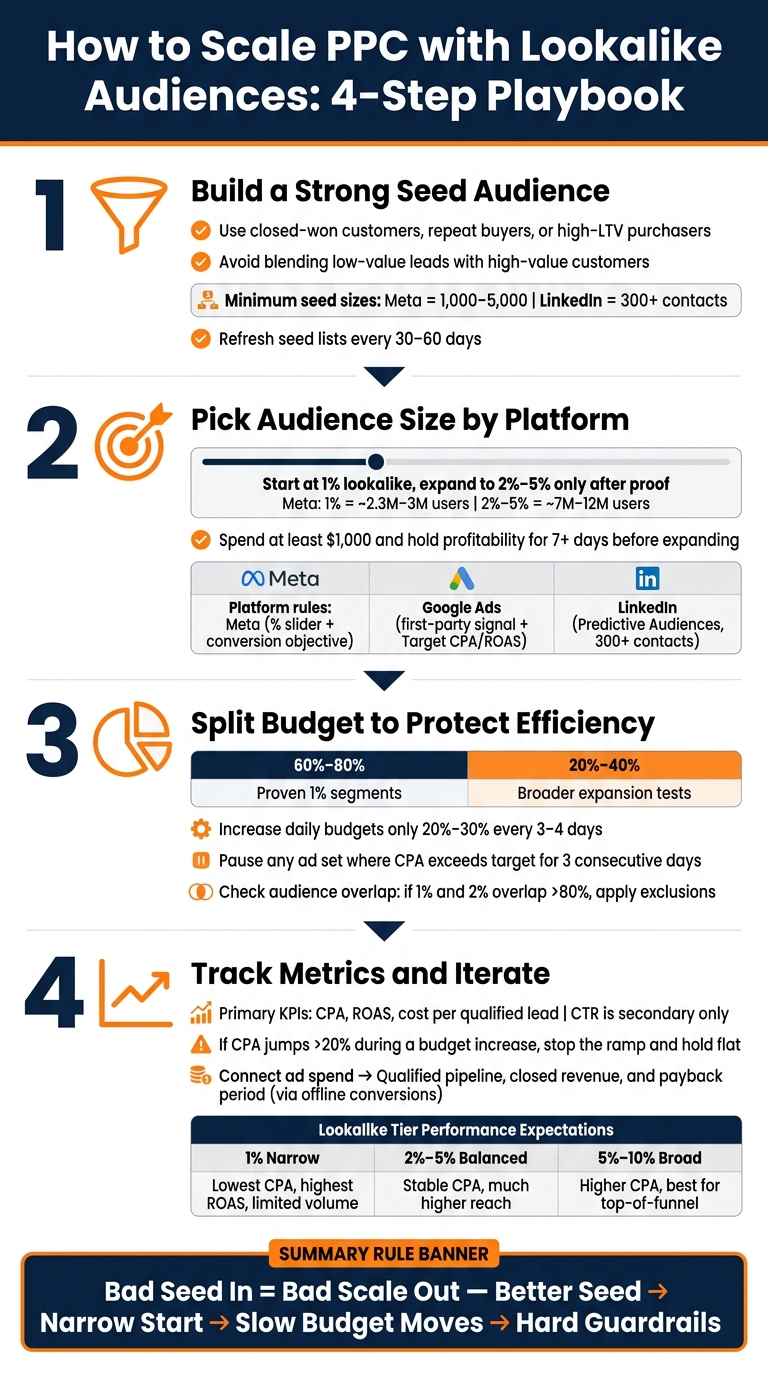
How to Scale PPC with Lookalike Audiences: 4-Step Playbook
How To SCALE Facebook Ads Lookalike Audiences
sbb-itb-89b8f36
Step 1: Build a Strong Source Audience Before You Scale
Seed quality shapes lookalike quality. If you use a broad list like all visitors, you water down the signal. A smaller, tighter list of actual buyers gives the algorithm something useful to model from. That makes seed choice your first scaling call.
Choose Seeds Based on Revenue Quality, Not Just Volume
Use closed-won CRM customers, high-LTV purchasers, or repeat buyers. These audiences give the platform cleaner revenue signals to work from.
For lead gen, use thank-you pages tied to demo requests, pricing inquiries, or trial signups instead of general traffic. If purchase volume is too low, use add-to-cart or trial-signup data until you have enough purchase data.
Don’t mix low-value leads with high-value customers in one list. That kind of blended seed sends mixed signals and can weaken the model.
Use Separate Seeds for Different Goals
If your budget can support it, build separate seed lists for each goal instead of lumping everything together. A high-LTV customer list makes sense for a ROAS-focused scaling campaign. A list of qualified opportunities from your CRM is a better fit for mid-funnel B2B growth.
It also helps to split by product line or service tier. Each seed points to a different type of buyer, and the platform models each one in its own way.
Check Minimum Audience Size Before Launch
Aim well above platform minimums before launch.
| Platform | Minimum Seed Size | Recommended Seed Size |
|---|---|---|
| Meta | 100 | 1,000 - 5,000 |
| 300 | No fixed minimum (Predictive model) | |
| Google Ads | No fixed minimum | Uses first-party lists as signals |
Refresh your source audiences every 30-60 days so the platform is working from current behavior, not stale patterns. That gives your next scaling moves a better starting point by following a PPC campaign optimization checklist. Once the seed is clean, set audience size and platform rules.
Step 2: Pick Audience Size and Set Up Each Platform Correctly
Once your seed is solid, the next decision is audience size. And this is where platform differences start to matter.
Start at 1% and Expand to 2%–5% Only After Proof
After you have a solid seed, audience size becomes the main lever for scaling. But audience size only works if it matches the seed quality. Start with 1%. Go broader only after the first test shows it can hold up.
On Meta, a 1% lookalike targets the top 1% of people in the United States who are most similar to your seed. That’s usually the tightest and most efficient range. Move into broader ranges only after the 1% audience has spent at least $1,000 and stayed profit-stable for at least 7 days. Here’s the rough tradeoff as you expand:
| Tier | Approx. U.S. Reach | Best Use Case |
|---|---|---|
| Narrow (1%) | 2.3M–3M+ users | Conversions and high-intent scaling |
| Balanced (2%–5%) | 7M–12M+ users | More scale with steadier performance |
Once you’ve picked the size, set each platform up the way it expects. This part matters more than people think.
Set Each Platform Up by Its Own Rules
Each platform treats lookalikes a little differently. Use the same setup everywhere, and you’ll burn spend for no good reason.
Meta: Use the 1%–10% percentage slider with a conversion objective. Set the target location to the United States. Exclude your seed and current customers so spend stays focused on net-new customer prospecting.
Google Ads: Google handles these audiences as signals inside Demand Gen, not hard targeting limits. Start with the Narrow tier, then manage expansion through Target CPA or Target ROAS bidding.
LinkedIn: Use Predictive Audiences with at least 300 contacts. LinkedIn uses that seed to model people who look like future converters.
Once the platform rules are in place, keep the first test clean. Don’t change five things at once and then guess what happened.
Keep the First Test Structure Simple
Test 1% vs. 3% using the same creative, the same offer, and the same optimization goal. That keeps audience size as the only real variable. If one audience wins, you’ll know why.
Also, don’t scale too early. Wait until each audience has at least 50 conversions before changing budget, so you have enough data to compare performance with some confidence.
Step 3: Split Budgets So Growth Does Not Hurt Efficiency
Once your audience size is set, budget pacing determines whether a test scales in a controlled way or starts burning cash. The basic move is simple: put most of your spend behind what already works, and keep a smaller slice for testing with top PPC tools.
Put Most Spend on Winners, Less on Tests
Send 60%–80% of total spend to proven 1% segments, and use the other 20%–40% for broader expansion tests. If the account is still small, stay closer to an 80/20 split until you have enough data to trust the next move. When a campaign is profitable, increase daily budgets slowly - only 20%–30% every 3–4 days.
Use Vertical First, Then Horizontal
These two methods do different jobs at different stages. Vertical scaling helps you hold efficiency inside a winning audience. Horizontal scaling comes later, when you need more reach.
| Scaling Method | Definition | Common Failure Points |
|---|---|---|
| Vertical | Increase daily budget on a winning ad set | Sudden large increases can reset the learning phase or spike CPA; audience fatigue over time |
| Horizontal | Add new lookalike tiers, seeds, or regions | Audience overlap and weaker lead quality without exclusions |
Start with vertical scaling. It's simpler, and it keeps your conversion data in one place. Shift to horizontal scaling when one ad set starts to level off - for example, when frequency goes above 3.0 or CPA starts rising while spend stays flat.
Set Guardrails Before Spend Spikes
Scaling only makes sense if early results stay steady enough to support more spend. Put loss limits in place before you expand. A simple rule works well here: pause any ad set where CPA stays above your target for more than 3 consecutive days.
You should also check audience overlap before launching more lookalike tiers. If your 1% and 2% ad sets overlap by more than 80%, they end up bidding against each other in the same auction. That pushes costs up for both. Use the platform's overlap tool before you launch anything new, then apply exclusions so each tier reaches a separate group of users.
Step 4: Track Early Metrics, Iterate, and Apply the Scaling Playbook
Read Early Efficiency Metrics Before Raising Budget
Once your budget splits are set, use early performance data to decide what to do next: hold, scale, or test a broader audience.
Start with CPA, ROAS, and cost per qualified lead. Those are the numbers that matter most early on. CTR can help, but it should stay a secondary signal. A high CTR looks nice on the surface, but it doesn't tell you much if lead quality slips or conversion costs drift up.
Hold off on budget increases until CPA, ROAS, and cost per qualified lead look steady. If CPA jumps by more than 20% during a budget increase, stop the ramp, keep spend flat, and let the campaign settle for several days.
Compare Audience Ranges Before Pushing More Spend
If the 1% lookalike is holding up, compare broader tiers against it before sending more dollars into the account.
Move into the 2%-5% range only after the 1% audience has spent at least $1,000 and stayed profitable for 7+ days. That's the point where the tradeoff starts to make sense. Until then, broader reach can just mean paying more for weaker traffic.
| Lookalike Tier | Primary Goal | Performance Expectation |
|---|---|---|
| 1% (Narrow) | High-intent conversions | Lowest CPA, highest ROAS, limited volume |
| 2%–5% (Balanced) | Scaling and volume | Stable CPA with much higher reach |
| 5%–10% (Broad) | Aggressive growth / awareness | Higher CPA, best for top-of-funnel reach |
Use PPC reporting tools to Tie Ad Spend to Pipeline and Payback
Platform reporting only shows the first layer. If you want to know whether lookalike scaling is paying off, connect ad spend to qualified pipeline, closed revenue, and payback period.
That means feeding CRM revenue and funnel stage data back into the ad platform as offline conversions. Then you can judge spend against payback, not just front-end conversion volume.
When the platform can optimize toward revenue instead of simple conversions, it can improve conversion odds and deal quality at the same time.
FAQs
What if I don’t have enough buyer data yet?
If you don’t have enough buyer data, start with a seed audience built from other engagement signals. Most platforms need at least 100 users to work with, but 1,000+ gives you a much better base.
Good starting points include:
- Website visitors
- Email subscribers
- High-intent actions, like add-to-cart
- People who spent five minutes on your site
You can also pull from more than one source over a longer time frame, then filter for relevance. That way, you’re not waiting around for perfect purchase data before you can get moving.
How do I know when to move beyond a 1% lookalike?
Move past a 1% lookalike only after it has shown steady profit for 7-14 days, which usually means you've spent about $1,000. If you expand too soon, it's easy to burn budget and watch conversion rates slip.
Once that 1% audience is stable, test 2% to 5% tiers in separate ad sets. That keeps spend easier to control and makes performance easier to read. If your cost per acquisition climbs above your target, pull back.
Should I use separate lookalikes for different products or goals?
Yes. Use separate lookalikes for different products and goals so your source audiences stay consistent and granular.
One broad audience can hurt performance because it blends different signals. Split source lists by product category or conversion action - like repeat buyers or high-LTV customers - so each ad set lines up better with audience intent and helps avoid cannibalizing campaign performance.