If you want better retargeting, the stack matters less than the signal quality. I’d keep it simple: use Google Ads + GA4 + GTM for most builds, add Meta or LinkedIn based on channel mix, and move to Segment, Tealium, or Adobe only when audience rules, identity, or reporting start to break.
Behavior-based targeting can convert at 6.8% vs. 2.8% for broad run-of-network ads. So the job is not to add more tools. The job is to build audiences from actions that sit close to purchase intent as part of a broader PPC campaign optimization strategy - like pricing-page views, repeat product visits, video watch depth, and form starts - then push those audiences into the channels you already use.
If I were shortlisting tools from this article, I’d group them like this:
- For native activation: Google Ads, Meta Ads Manager, LinkedIn Ads
- For cross-channel retargeting: AdRoll, Criteo, StackAdapt
- For tracking setup: Google Tag Manager, Tealium iQ, Adobe Tags
- For audience unification: Twilio Segment, Adobe Real-Time CDP
- For analysis and reporting: GA4, Adobe Analytics, Looker Studio, Power BI, Tableau
Quick Comparison
| Group | Best use | Good fit |
|---|---|---|
| Google Ads + GA4 | Search-led remarketing from site behavior | SMB, mid-market |
| Meta / LinkedIn | Social or B2B engagement audiences | D2C, B2B demand gen |
| AdRoll / Criteo / StackAdapt | Cross-channel remarketing and dynamic ads | Ecommerce, programmatic teams |
| GTM / Tealium / Adobe Tags | Event and pixel setup | All teams, based on stack size |
| Segment / Adobe RTCDP | Cross-platform audience rules and identity stitching | Mid-market, enterprise |
| GA4 / Adobe Analytics | Behavior analysis and audience logic | Most teams, enterprise for Adobe |
| Looker Studio / Power BI / Tableau | CAC, payback, and revenue reporting by audience | Teams that need channel-level rollups |
My takeaway: start with the tools that match your media mix, keep audience windows tight, and judge every segment against CAC, payback, and revenue - not clicks alone.
sbb-itb-89b8f36
Top ad platforms for native engagement audience targeting
The platforms below let you build and use engagement audiences inside the ad platform itself. A simple way to choose: start with the top PPC tools that match how you buy media most of the time - search, social, B2B, or catalog remarketing.
Google Ads with GA4 audiences
Google Ads is the most direct native option for turning on-site behavior into remarketing audiences. When you link GA4 to Google Ads, you can use audiences built from events like product views, cart activity, checkout starts, session-based engagement, and YouTube interactions for campaign targeting. In linked Google Ads accounts, audiences can take up to two days to become available after creation.
GA4 uses an event-based model, which makes it easy to segment by how far someone moved through the funnel. That can mean repeat visits, add-to-cart behavior, checkout starts, or other high-intent actions. Audience membership duration can be set up to 540 days, but shorter windows - like 7 to 30 days - usually line up better with active buying intent in most funnels.
Best for Search or Performance Max teams that want to layer post-click behavior onto query intent.
Meta Ads Manager and LinkedIn Ads
Meta builds engagement audiences from native social actions, including video views, Facebook Page interactions, Instagram account engagement, and lead form activity. It fits D2C and visual brands well, since interest often starts in the feed.
LinkedIn builds audiences from Insight Tag site visitors, video engagement, and Lead Gen Form opens or completions, with lookback windows from 30 to 365 days. B2B buying cycles tend to run longer, so someone who visited your pricing page 90 days ago may still be an active prospect.
Cross-channel retargeting tools: AdRoll, Criteo, and StackAdapt
Use a separate retargeting layer when you need dynamic product-level ads, more inventory reach, or cross-channel execution that one native platform can't handle on its own. Criteo uses its OneTag to capture browse, cart, and purchase events, then serves dynamic ads with live prices, availability, and personalized product recommendations. AdRoll uses a similar feed-based setup for dynamic display. StackAdapt pushes this into programmatic and native channels for broader cross-channel remarketing.
| Platform | Core engagement signals | Lookback / duration | Best fit |
|---|---|---|---|
| Google Ads + GA4 | Product views, cart/checkout events, session-based engagement, YouTube interactions | Up to 540 days; Google Ads data segments default to 30 days | Search-led advertisers, omnichannel teams |
| Meta Ads Manager | Video views, Page/Instagram engagement, lead form activity | Varies by audience type | D2C, visually driven brands |
| LinkedIn Ads | Insight Tag visitors, video engagement, Lead Gen Form opens/completions | 30 to 365 days | U.S. B2B demand gen, ABM |
| Criteo | Browse, cart, and purchase events tied to a product feed/catalog | Feed- and campaign-dependent | Ecommerce with a sizable catalog |
| AdRoll | Product-feed-driven dynamic ads | Varies by implementation | Mid-market ecommerce, cross-channel |
| StackAdapt | Cross-channel remarketing across programmatic and native inventory | Varies by implementation | Teams that need broader reach beyond one native ad network |
When native audiences get too thin or scattered, that's usually the point where tools that collect and unify signals start to make more sense.
Top tools for collecting and unifying engagement data
Engagement audiences start with clean data collection and solid identity stitching. If event names are inconsistent, parameters are missing, or triggers break, every audience built after that gets weaker. Clean inputs tend to produce better match rates in Google Ads, Meta, and LinkedIn. In most cases, it makes sense to start with tag managers. Then, when you need tighter identity handling and cross-channel consistency, move into CDPs and analytics.
Tag managers: Google Tag Manager, Tealium iQ, and Adobe Tags
Tag managers are the starting point for engagement tracking. They fire the pixels and event rules that record scroll depth, button clicks, video progress, and form actions across your site. From there, they pass those signals into analytics tools and ad platforms.
Google Tag Manager (GTM) is the standard pick for many PPC teams. It’s free, works natively with GA4 and Google Ads, and includes built-in support for scroll triggers, YouTube video events, form submissions, and click tracking. Better trigger control usually leads to cleaner retargeting lists. If your team lives mostly in Google’s ecosystem, GTM handles most engagement tracking without much cost or setup burden. Larger enterprise teams often move past GTM, shift to Tealium or Adobe Tags, or partner with top PPC agencies for complex setups.
Tealium iQ is built for teams that need tighter control. It uses a data-layer model, so engagement events like video_completed can be structured once and routed in real time to many destinations. Its strongest enterprise use case is consent orchestration. It checks each incoming event against purpose-based rules and can stop events that fail consent conditions before they’re processed or sent anywhere. That makes Tealium iQ a strong option for regulated industries or multi-brand setups where governance and CCPA compliance are non-negotiable. Adobe Tags makes the most sense for teams already using Adobe across the stack.
Adobe Experience Platform Tags (formerly Adobe Launch) fits best when Adobe Experience Cloud is already in place. It manages tagging across Adobe Analytics, Adobe Audience Manager, and Adobe Real-Time CDP, and it comes with enterprise-grade publishing workflows and built-in change control.
CDPs and event pipelines: Segment and enterprise audience platforms
Tag managers collect data. CDPs bring it together. Twilio Segment takes in events from websites, mobile apps, servers, and cloud tools, then merges anonymous and known activity into one profile. For example, a cookie-based session can later be tied to an email sign-up. Those profiles can then sync to ad platforms through audience destinations such as Google Ads Customer Match, Meta Custom Audiences, and LinkedIn Matched Audiences. It uses hashed identifiers to improve match rates while helping protect privacy.
For PPC teams, the day-to-day value is pretty simple: you can build cross-platform segments that native audience tools can’t recreate on their own. A segment like “visited pricing pages, attended a webinar, and has not closed” can be sent at the same time to Google Ads, Meta, and LinkedIn using the same membership rules. That matters when the same person needs to match across all three platforms.
Adobe Real-Time CDP goes a step further with streaming segmentation. As soon as a user’s behavior or attributes change, the profile is qualified into or out of an audience right away. That allows same-session activation instead of waiting for next-day batch updates. This is especially useful for mid-market and PE-backed teams that want paid media tied to pipeline and payback, not just clicks. Analytics tools then help decide which behaviors should be synced into those profiles.
Web analytics: GA4 and Adobe Analytics
GA4 is the default choice for most PPC teams. Use it to define high-intent behaviors before sending those audiences to ad platforms. One useful example is a group of users who reached 75% scroll depth on a key product page, visited at least twice in the last 14 days, and still haven’t converted. GA4 also shows the full multi-channel path - organic, direct, social, and email - so you get a broader view than Google Ads can give on its own.
Adobe Analytics is the enterprise exception. It’s the better fit when your team needs custom dimensions, engagement scoring, and more detailed funnel analysis across sites and regions. Its connection to Adobe Experience Platform lets you send refined segments into paid channels with unified identity and without extra client-side pixels. Most U.S. PPC teams can begin with GA4. Adobe Analytics makes more sense when reporting and segmentation start to push past what GA4 can handle. After those audiences are built, the next layer is reporting on which ones actually convert.
Reporting and tool comparison: matching tools to team needs
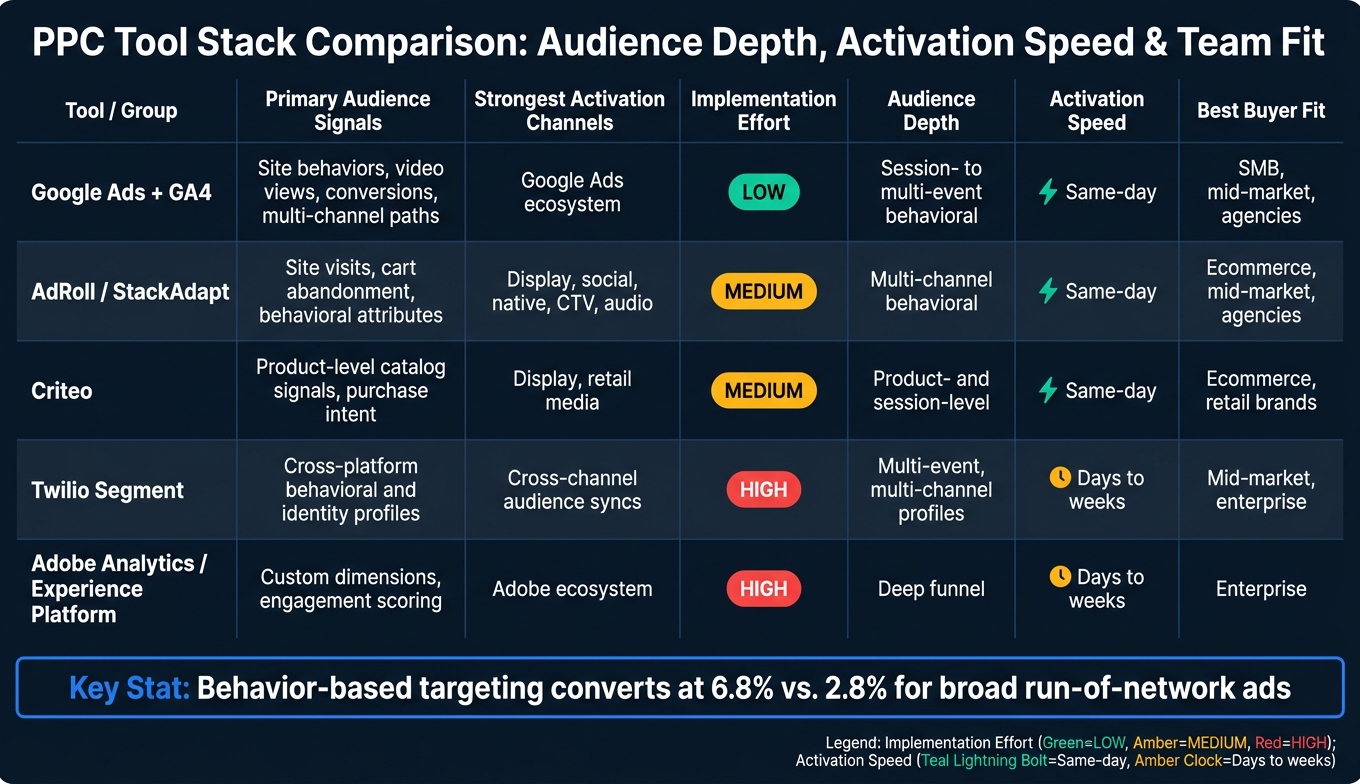
PPC Tool Stack Comparison: Audience Depth, Activation Speed & Team Fit
Once engagement audiences are live, the next job is simple: find out which segments are driving revenue. Native platform reports can show channel activity. But if you want to compare audience size, CAC, conversion rate, and payback across channels, you need a reporting layer.
Two things matter most here. First is audience depth - does the tool support multi-event, multi-channel profiles, or is it closer to basic session-level engagement? Second is activation speed - how fast can new data turn into live campaigns?
Use the table below to line up tool depth, activation speed, and team fit with your current stack.
Comparison table: tool category, best use case, and buyer fit
| Tool / Group | Primary Audience Signals | Strongest Activation Channels | Implementation Effort | Audience Depth | Activation speed | Best Buyer Fit |
|---|---|---|---|---|---|---|
| Google Ads + GA4 | Site behaviors, video views, conversions, multi-channel paths | Google Ads ecosystem | Low | Session- to multi-event behavioral | Same-day | SMB, mid-market, agencies |
| AdRoll / StackAdapt | Site visits, cart abandonment, behavioral attributes | Display, social, native, CTV, audio | Medium | Multi-channel behavioral | Same-day | Ecommerce, mid-market, agencies |
| Criteo | Product-level catalog signals, purchase intent | Display, retail media | Medium | Product- and session-level | Same-day | Ecommerce, retail brands |
| Twilio Segment | Cross-platform behavioral and identity profiles | Cross-channel audience syncs | High | Multi-event, multi-channel profiles | Days to weeks | Mid-market, enterprise |
| Adobe Analytics / Experience Platform | Custom dimensions, engagement scoring | Adobe ecosystem | High | Deep funnel | Days to weeks | Enterprise |
Reporting layers: Looker Studio, Tableau, and Power BI
If campaign activation is working but performance is still stuck in channel silos, add a reporting layer.
Native ad-platform reporting is fine for spend and audience size. It starts to fall short when you need side-by-side channel views for CAC, conversion rate, and payback. That’s where BI tools earn their keep.
Looker Studio is a good starting point for many PPC teams, especially if you already live in the Google stack. It’s free, connects natively to GA4, Google Ads, BigQuery, and Google Sheets, and makes it easy to build dashboards for engagement audience size, spend, CTR, and CPA.
Power BI and Tableau make more sense once reporting gets messier. Both can join PPC data with CRM, finance, and product usage data so you can calculate CAC payback period and LTV by audience segment. For PE-backed teams and operators focused on efficiency, those are the numbers that matter most. If your team is still reconciling CAC or payback in spreadsheets by hand, it’s time to move to BI.
| Tool | Reporting Flexibility | Connector Depth | Cost (per user/month) | Best Team Fit |
|---|---|---|---|---|
| Looker Studio | Quick visual dashboards, drag-and-drop | Native: GA4, Google Ads, BigQuery, Google Sheets; third-party via connectors | Free; Pro about $9 per user/month | Small to mid-size teams, agencies |
| Power BI | Advanced data modeling, DAX measures, governance | Broad: databases, CRMs, cloud warehouses | Pro $9.99 per user/month; Premium about $20 per user/month | Mid-market and enterprise on Microsoft stack |
| Tableau | Polished visualizations, exploratory analysis | Broad: databases, cloud warehouses, ETL tools | Creator about $70-$75 per user/month | Data-savvy enterprises, analyst-led teams |
Using a directory to speed up vendor shortlisting
If the table exposes a gap, a directory can cut down shortlist time.
Use Top PPC Marketing Directory when the table shows a gap and you need a faster shortlist for tools tied to pipeline and CAC payback.
Conclusion: build your stack around audience quality, not tool count
After you compare activation, collection, and reporting tools, one test matters most: does the stack improve audience quality? More tools usually don't do that. Cleaner signals do.
When you use first-party behavioral data through a clean, consolidated stack, you can see 5–8x higher ROAS and cut acquisition costs by 15–20% without adding spend. That's the payoff from audience quality - not from piling on more software.
The right stack comes down to what your team can govern and measure, not how many platforms sit in the mix. In many cases, a small, well-run stack beats a bigger one that's loosely managed.
Buyer fit matters more than feature lists. A lean Google Ads + GA4 + Looker Studio setup may be the right call for a smaller team. A PE-backed company chasing hard CAC targets may need a more advanced setup - but only if the team can run it day to day. The wrong tool at the wrong stage adds overhead, creates data issues, and makes your audiences weaker instead of better.
Engagement audiences matter only when you can measure them against revenue. Every audience should connect to CAC, payback, or revenue. If a segment can't connect to CAC, payback, or revenue, cut it or rebuild it. Stack audits, clear event governance, and audience-level reporting keep attention on business outcomes instead of software.
Build around the signals that matter, keep the stack tight, and measure everything against dollar revenue.
FAQs
Which PPC tool stack should I start with?
Start with Google Analytics to track site activity and see how people behave on your website. Once you spot a clear behavior-based segment, add campaign and bid tools like Google Ads or Marin Software.
Focus on tools that connect cleanly with your CRM. You can use Zapier or Make to sync lifecycle data between systems. If you want to compare options and find more tools, the Top PPC Marketing Directory can help.
When do I need a CDP instead of GA4 and GTM?
You need a CDP when GA4 and GTM aren't enough to build unified, persistent customer profiles across multiple data sources.
GA4 and GTM are strong for tracking website behavior and digital journeys. A CDP makes more sense when you need cross-channel audience segmentation, merged CRM and behavioral data, or predictive modeling.
Which engagement signals are best for retargeting?
Focus on high-intent actions that show clear buying interest - things like cart abandonment, visits to pricing or product pages, and longer time on site.
You can also use behavior signals like on-site searches, downloads, and repeat visits to group users by funnel stage. For more advanced targeting, use CRM data to flag high-value customers or target accounts, exclude past converters, and update segments in real time.