Most DDA problems start after setup, not during setup. I’d sum it up like this: if your team lacks volume, clean CRM data, steady tagging, and shared rules for budget moves using top PPC tools, data-driven attribution will stay a report - not a decision tool.
Here’s the short version:
- I need enough data before I trust DDA - GA4 usually needs 600 conversions and 15,000 events in 28 days
- I can’t rely on DDA alone because it misses dark social, word of mouth, podcasts, referrals, and offline touches
- I need GA4, self-reported data, and CRM to do different jobs instead of forcing them into one number
- I should lock Original Lead Source, clean up UTMs, and check pipeline and revenue before moving spend
- I should treat credit shifts as a signal, not proof of cause
- I should confirm budget changes with 2 or more data sources
- If I can’t match GA4 and CRM trends, I should pause budget changes first and fix the data issue
The article’s 9 blockers are simple: low volume, missing channel data, weak CRM links, low trust in the model, conversion lag, reporting drift, team misalignment, budget risk after model changes, and weak incrementality testing.
If I use DDA as one input - not the final answer - I make better budget calls and avoid bad cuts.
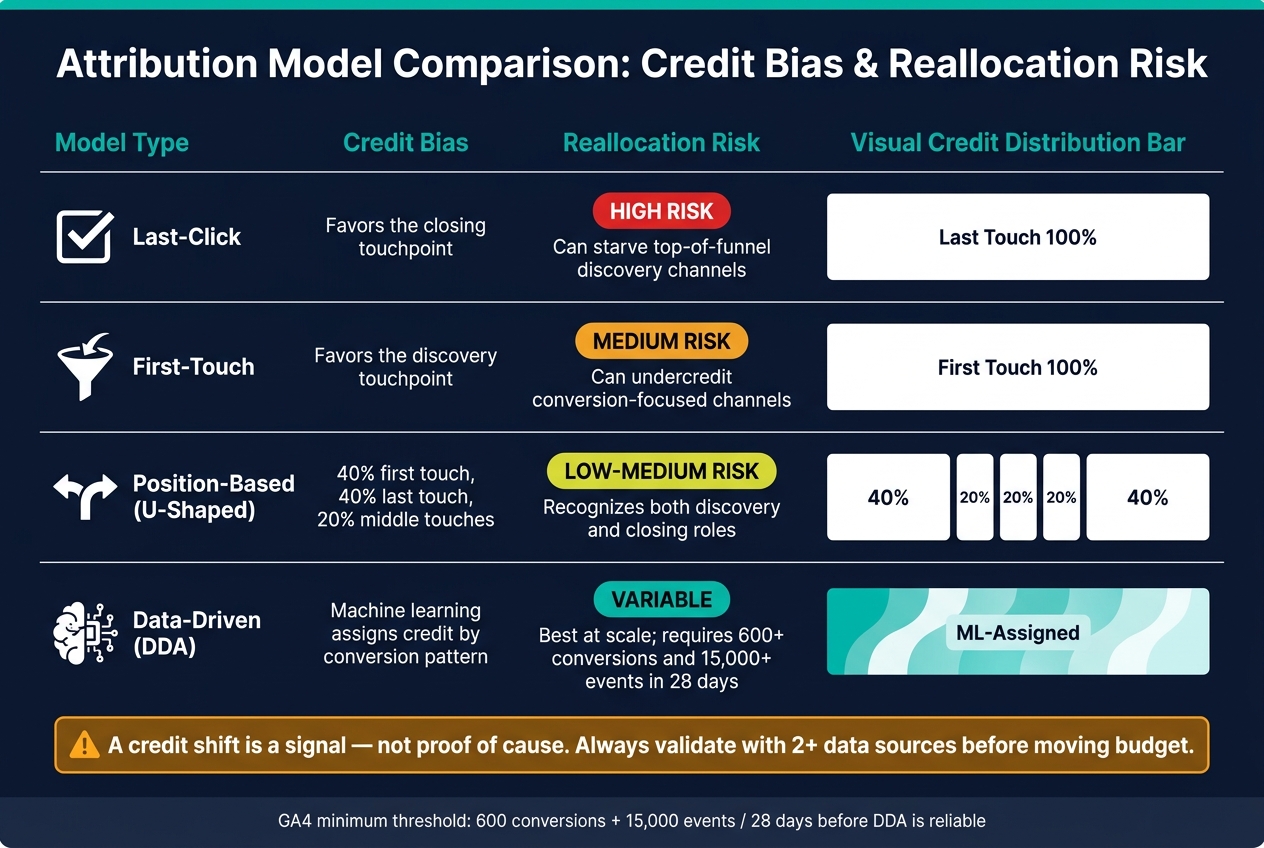
Attribution Model Comparison: Credit Bias & Reallocation Risk
Digital Marketing Attribution in 2026: Challenges and Solutions
sbb-itb-89b8f36
Why Adoption Is Harder Than Setup
Setup is technical. Adoption is organizational. And that’s where most teams fall apart.
Getting a model live is one thing. Getting people to use it the same way, trust it, and make budget calls from it is another.
Once the model is up and running, teams still have to reconcile GA4, self-reported, and CRM data. Those three systems do not answer the same question. Trouble starts when teams try to force them into a single number.
| System | Best Signal | Best For |
|---|---|---|
| GA4 | Behavioral | Landing page engagement, assisted paths |
| Self-Reported | Declared | Dark social, word-of-mouth, podcasts |
| CRM | Commercial | Pipeline, win rate, revenue, sales velocity |
Then the friction stacks up.
Inconsistent UTM naming can break campaign data. Direct traffic can hide both actual brand demand and plain old broken tagging. Sales teams can also overwrite original lead source fields, which wipes out the first touchpoint.
That’s how reporting drift starts. Trust drops. And budget decisions still end up leaning on judgment instead of shared data.
Those gaps tend to show up in nine specific adoption challenges. The first failure point is usually low conversion volume and sparse data.
1. Low Conversion Volume and Sparse Data
DDA needs enough conversion volume to assign credit in a way that's worth using. In GA4, the usual bar is at least 600 conversions and 15,000 events over a 28-day period. The reason is simple: machine learning needs enough data to tell signal from noise. If the account falls below that level, the model defaults to last-click logic.
After the model turns on, low volume becomes more than a measurement issue. It becomes a trust issue. DDA shapes budget decisions, not just dashboard views. And that's where teams can get into trouble.
Discovery-stage channels often lose credit, while branded and late-stage channels pick up more of it. On paper, branded search can look almost absurdly efficient. But that can hide what's actually happening - branded search may just be collecting demand that those so-called weak channels created earlier. The report looks neat. The business logic does not. Then CAC, pipeline, and spend calls start drifting in the wrong direction.
In low-volume accounts, a handful of high-converting sessions can distort the credit split.
If the account does not hit the minimum threshold, a U-shaped model is a better fallback for many mid-market teams. That model gives 40% to the first touch, 40% to the last touch, and splits the rest across the middle touches. And if GA4 and the CRM do not line up, DDA is not ready to guide budget decisions—a common reason brands hire a PPC agency to audit their stack.
Low volume is only the first issue. Channel gaps and offline conversions add another layer of missing signal. Properly tracking offline conversions is essential to closing these data gaps.
2. Channel Gaps, Walled Gardens, and Offline Blind Spots
DDA can only work with signals it can track. That means dark social, word of mouth, podcasts, communities, partner referrals, and AI answer engines often don't show up. The problem gets worse inside closed platforms.
Walled gardens keep key data locked inside their own systems, which leaves cross-channel attribution incomplete. When Meta restricted cross-channel data access, teams that leaned on those signals were left with a gap and no clean fix. Once data gets trapped, attribution starts to drift from measurement into guesswork.
Direct traffic can muddy the picture too. It often blends actual brand demand with broken or missing UTM tags. So when direct traffic starts climbing, poor tagging can make DDA look off even if the model itself is doing its job.
Use a PPC marketing directory to find tools for a fast audit to spot the biggest gaps:
| Audit Area | What to Check |
|---|---|
| UTM Hygiene | Are all paid campaigns tagged with consistent utm_source, utm_medium, and utm_campaign values? |
| Untracked Channels | Are there active channels like podcasts, events, communities, or partner referrals with no tracking in place? |
| "Direct" Traffic | Is direct growing? If yes, is it brand demand or broken tagging? |
| Lead Source Form | Does your demo or contact form ask how the buyer heard about you? |
Add a required "How did you hear about us?" field on high-intent forms to catch influence that DDA misses.
3. Weak CRM and Pipeline Integration
CRM integration is the point where DDA stops being a reporting tool and starts tracking revenue. If that connection breaks, attribution can’t tie media spend to revenue.
When closed-deal data doesn’t make its way back to marketing, DDA keeps chasing clicks instead of revenue. In plain terms, a weak CRM connection leaves the model blind to pipeline and revenue data.
There’s another issue here too. Paid media can create branded demand that later shows up as organic in the CRM. When that happens, SEO gets too much credit and paid media gets too little.
Before using DDA to make spend decisions, make sure these four checks are covered:
| Verification Check | Why It Matters |
|---|---|
| Original Lead Source cannot be overwritten | Prevents sales reps from changing first-touch data when a lead re-engages |
| UTM taxonomy is standardized | Inconsistent tags such as "cpc" and "paid-search" break channel-level attribution |
| Do not treat soft engagement as revenue signal | Mixing demo requests with soft engagement signals distorts channel quality signals |
| Pipeline data flows back to the attribution platform | Without closed-loop reporting, DDA optimizes for MQLs instead of revenue |
This isn’t something marketing can manage alone, often requiring support from a top PPC marketing agency. Monthly CRM, UTM, and stage audits should sit with Marketing, Sales, and RevOps together. If those teams aren’t working from the same revenue view, DDA starts to drift.
A monthly reconciliation between GA4 behavior data and CRM pipeline data helps catch that drift before it turns into bad budget calls.
Even with clean CRM data, teams still need to trust how the model gives out credit.
4. Model Transparency and Trust Gaps
Even when DDA is running, teams often can’t explain why credit gets split the way it does. That’s where trust starts to crack. If a channel drops in the attribution report and no one can walk through the logic, people stop treating the output like a decision tool and start seeing it as empty reporting.
That’s why attribution often turns into a budget mechanism instead of a plain reporting layer. On paper, the budget shift looks data-led. In practice, the final call still comes down to gut feel.
There’s another issue here. Below the data threshold, the model may still run, but the credit splits can point teams in the wrong direction. This hits harder for channels that produce value in small volumes but don’t create enough activity to stand out inside the model.
Low-volume channels like newsletters or niche directories are a good example. They may bring in high-value leads, yet still get too little credit because the model doesn’t see enough volume to pick up their role. Those channels can get cut - not because they aren’t working, but because the model can’t account for them clearly.
Don’t shift major budget based on one dashboard alone or a PPC analyzer. Check the change in both GA4 and your CRM. If those two systems tell different stories, that’s not a minor mismatch. It’s a sign to dig in.
| Attribution System | What It Measures | Common Trust Gap |
|---|---|---|
| GA4 / Analytics | Behavioral (landing pages, assisted paths) | Misses dark social and offline influence |
| Self-Reported | Declared (memory, influence) | Buyers may forget early touchpoints |
| CRM | Commercial (pipeline, revenue) | Source rules can be fuzzy or overwritten |
| Data-Driven (DDA) | Algorithmic | Requires high volume; logic is often opaque |
Even models teams rely on can still fail when conversion data shows up too late to match current spend.
5. Delayed Data and Conversion Lag
Conversion lag skews attribution more than many teams think. A buyer might first hear about your brand on a podcast, interact with a LinkedIn post a few weeks later, search your brand name, and then convert through a partner referral. Meanwhile, the attribution system is still playing catch-up. By the time the deal closes, the dashboard often gives credit to a later touchpoint. The result is simple: early-touch channels look weaker than they were.
Paid search often gets too much credit for this reason. It sits near the end of the journey and picks up demand that other channels already helped build. On the other side, demand creation channels like social, podcasts, and communities tend to get shortchanged because their impact happened earlier and often outside the reporting window. If you cut those channels based on a short attribution window, you can quietly dry up the pipeline that later feeds your capture channels.
This is also where CAC starts to get messy. If your CRM pulls pipeline data on one schedule while your ad platform uses reporting and automation tools to track conversions on a shorter lag, the numbers won't line up cleanly. That's not always a performance issue. Sometimes it's just timing.
The fix is a shared reporting cadence. Use GA4 for behavior and your CRM for revenue, then compare both before moving budget around. If GA4 shows a channel slipping but the CRM still shows qualified pipeline from that same source, you're likely looking at a lag issue - not a channel issue. In longer B2B sales cycles, you often need a few review cycles before you can tell whether a channel is actually weakening.
Lag gets even harder to spot when source fields are overwritten. If sales reps or automated rules change the original lead source, the early-touch data you need to track how credit shifts over time is gone.
6. Reporting Drift Across Platforms and Tools
Reporting drift shows up when the same campaign gets different credit in PPC management tools, GA4, and the CRM. That’s a systems mismatch, not a model failure. Once people see different numbers in different places, trust slips fast - and budget calls start to freeze.
That mismatch creates a simple problem with expensive consequences. Teams end up cutting or scaling channels based on partial data. If performance and revenue numbers come from systems that don’t line up, budget shifts can quietly punish channels that are doing their job.
Most of this drift comes from messy naming, broken tags, and touchpoints that never get tracked. When teams can’t match the numbers across systems, the issue stops being “just reporting.” It becomes an alignment problem.
The fix is shared governance, not a single source of truth. Before acting on any DDA signal, reconcile data across systems instead of declaring one tool the winner. A monthly reconciliation view can compare patterns across GA4, self-reported data, and CRM pipeline to show where channels are capturing demand versus creating it. And don’t make major budget moves off one platform’s version of events. Get confirmation from at least two independent systems before making the call. Treat taxonomy as shared governance, not a dashboard fix.
7. Team Buy-In and Organizational Alignment
Once you have the numbers, the harder part begins: getting every team to use them the same way.
When paid media, analytics, sales, and finance all look at the same output through different goals, attribution stops helping teams make decisions. It starts fueling debates instead.
This gets worse when GA4, self-reported data, and CRM data are squeezed into one number. The dashboard may look clean, but the budget calls behind it get weaker. Each team tends to reward a different signal, so the same channel ends up being judged by different standards. A channel can look efficient in one dashboard and still bring in poor pipeline quality.
That gap is why attribution needs shared operating rules, not just better dashboards. Before using DDA as a decision source, Marketing, Sales, RevOps, and Leadership need one clear rule for what each system owns. GA4 owns behavioral acquisition. Self-reported data owns buyer-declared influence. CRM owns the revenue ledger. Once those roles are fixed, arguments fade and the model gets used.
Keep the "Original Lead Source" field in your CRM immutable as a governance baseline - if it can be overwritten, the model loses its foundation.
Without that agreement, budget changes turn attribution into a source of conflict.
8. Budget Reallocation Risk After Model Changes
When you change attribution models, you also change how revenue credit gets split across channels. That can make one channel look stronger and another look weaker overnight.
Here’s the problem: teams often treat that new view as a green light to move budget right away. That’s the real risk. The issue isn’t the model change. The issue is acting before you’ve checked whether the new credit split lines up with what’s happening in the business.
A common mistake is making spend decisions from a single dashboard or Google Ads automation tools. Don’t stop at form fills or surface-level conversion numbers. Look at whether a channel is driving qualified pipeline.
Before you touch budgets, clean up the measurement basics:
- Standardize UTMs
- Lock CRM source fields
- Review channel performance against pipeline quality, not just lead volume
It also helps to separate demand creation from demand capture before calling a channel efficient or inefficient. If a new model shifts more credit to discovery-stage activity, it can make capture channels look weaker than they are. Cut those channels too fast, and total pipeline can drop even if the dashboard says you’re getting “more efficient.”
The risk also changes by model type.
| Model Type | Credit Bias | Reallocation Risk |
|---|---|---|
| Last-Click | Favors the closing touchpoint | Can starve top-of-funnel discovery channels |
| First-Touch | Favors the discovery touchpoint | Can undercredit conversion-focused channels |
| Position-Based | 40% first, 40% last, 20% middle | Recognizes both discovery and closing roles |
| Data-Driven | Machine learning assigns credit by pattern | Best at scale; needs enough volume |
A shift in credit should lead to validation first, not budget cuts. Credit movement shows how the model assigns value. It does not prove cause and effect.
9. Testing Limits and Weak Incrementality Validation
A credit shift is not the same thing as incrementality. Even if DDA is configured the right way, it can still point you in the wrong direction if you never test whether the channels getting more credit are driving new pipeline and revenue. That’s the gap. Without holdout tests, geo tests, or lift studies, DDA is still unverified.
This matters even more in lower-volume accounts. Thin volume makes attribution less steady, and it also makes lift tests harder to read. When there isn’t enough data, the numbers can swing around, and the signal gets buried in noise.
The bigger mistake is simple: treating attribution like proof. DDA can give too much credit to channels that show up near the conversion, even if they didn’t create the demand in the first place. Branded search is the classic example. It can look like a top performer while mostly harvesting demand generated by other channels earlier in the journey.
So the key question isn’t just whether a budget shift feels risky. It’s whether the credit shift maps to incremental pipeline. If a channel gets more modeled credit, test whether it also drives more qualified pipeline that would not have happened otherwise. That’s the standard that matters.
Only after that test holds should the model shape spend. Before you use DDA to move budget, make sure qualified pipeline data and GA4-CRM alignment tell the same story. If they don’t line up, the model output isn’t ready for a spend decision.
Where Teams Can Find Extra Support
When testing and validation are weak, outside help can tighten measurement and governance. If those nine challenges still slow adoption, teams need help that ties media performance to CRM pipeline, payback, and CAC - not just clicks. Top PPC Marketing Directory is a curated list of PPC tools and agencies built for pipeline and CAC outcomes for mid-market and PE-backed teams. Use the directory to build a shortlist, then vet partners on revenue access and governance.
The right partner should be able to handle GA4 cleanup, UTM governance, CRM source mapping, and reporting so attribution lines up with CRM revenue. They also need both CRM access and channel access. Without both, they’re working from incomplete data.
For more complex setups, it often makes sense to pair a senior fractional operator for architecture and governance with an execution partner for implementation and maintenance.
Platform View vs. Analytics View vs. CRM View: A Comparison
Google Ads, GA4, and your CRM each answer a different question. That gap is often what slows attribution adoption.
The problem isn't figuring out which system is "right." The problem is understanding what each system was built to measure.
| Feature | Google Ads (Platform View) | GA4 (Analytics View) | CRM / Reporting View |
|---|---|---|---|
| Conversion Focus | Ad conversions and interactions | Site events such as form fills and downloads | Qualified opportunities and closed-won deals |
| Revenue Credit | Credits Google campaigns | Uses selected attribution models, such as Data-Driven Attribution, across digital paths | Tied to closed-won deals and opportunity source rules |
| Attribution Window | Typically 30- to 90-day post-click windows | Digital lookback windows | Full sales cycle |
| Data Freshness | Near real-time | 24 to 48 hours of processing lag | Delayed by sales team updates and lifecycle stage changes |
| Primary Utility | Bidding | Behavior | Revenue |
| Blind Spot | Can overvalue platform volume and ignore off-site influence | Misses dark social, word of mouth, and AI search/chat | Can be fuzzy if sales qualification rules are inconsistent |
Once you see those roles side by side, the mismatches get a lot easier to spot.
A simple way to handle it: give each system one clear job. Use Google Ads for bidding, GA4 for behavior, and CRM for revenue. Then fill the gap with self-reported fields so you can catch off-platform influence that GA4 misses.
What Good Attribution Governance Looks Like
Those adoption issues don't disappear on their own. They go away when governance turns attribution into a repeatable process. Once DDA is live, governance is what tells teams whether they can trust it.
Start with a minimum data threshold before using DDA for budget decisions. If the model doesn't have enough data, the output can point teams in the wrong direction.
You also need to protect Original Lead Source. That field should be immutable. If someone can edit it later, attribution starts to drift, and reporting gets messy fast.
UTM hygiene matters just as much. Standardize naming for source, medium, campaign, and content before reporting starts. If one team uses paid-social and another uses paidsocial, you're not looking at clean channel data anymore.
Before moving budget, require confirmation from 2+ data sources - not just one dashboard. In practice, that means GA4 and CRM confirmation before any budget shift. Then review results monthly with Marketing, Sales, and RevOps so everyone is working from the same numbers.
A solid governance setup usually includes:
- Data threshold: Set a minimum before using DDA for budget decisions
- CRM field protection: "Original Lead Source" must be immutable
- UTM hygiene: Standardized naming for source, medium, campaign, and content
- Budget shift validation: Confirmation required from 2+ data sources before reallocation
- Reconciliation cadence: Monthly review with Marketing, Sales, and RevOps aligned
- Model recalibration: Quarterly, to account for buyer behavior and algorithm shifts
Add quarterly recalibration so the model stays aligned with buyer behavior and platform changes. Otherwise, budget decisions can age out fast.
Conclusion
Most DDA failures come down to execution. They show up after setup - when a team has model output, but still can't turn it into decisions people trust. And the pattern is usually the same: sparse data, missing channels, weak CRM links, trust gaps, lag, drift, misalignment, budget risk, and weak validation.
The main mistake is treating DDA like the single source of truth. DDA, CRM, and self-reported data each show a different part of the buyer journey. None gives the full picture on its own. Trying to force all three into one "correct" number is where bad budget decisions start.
What fixes this isn't another dashboard. It's a repeatable operating process: clean inputs, protected CRM fields, confirmed signals from at least two systems before shifting spend, and a monthly cadence that keeps Marketing, Sales, and RevOps working from the same numbers. Put the signals together, then manage them with discipline.
DDA works only when teams use it as a governed input - not a verdict.
FAQs
When is DDA reliable enough to use?
DDA works best when you have enough conversion volume for Google Ads to train its machine-learning models. As a rule of thumb, that usually means at least 200 conversions and 2,000 ad interactions over 30 days.
Many teams prefer to see 300 to 500 conversions per month before they trust the output more fully. Below that level, a position-based or last-click model may be more dependable until volume picks up.
What should I do if GA4 and CRM don’t match?
Don’t try to make GA4 and your CRM report the exact same number. They do different jobs.
GA4 shows user behavior and on-site paths. Your CRM is the commercial record for revenue, lifecycle stages, and pipeline.
A better move is to assign one system as the main source for each question. Keep your UTM taxonomy and CRM source rules aligned, then use a monthly reconciliation view to spot patterns. If gaps keep showing up, audit your tracking, field mappings, and sync delays.
How can I validate DDA before changing budget?
Before changing budget, make sure DDA has enough volume - about 300 to 500 conversions per month. Also check your data for accuracy, completeness, and consistency. A centralized tool like Google Tag Manager can help cut tracking errors.
Then compare platform-reported conversions against a neutral source like GA4. After that, run A/B tests or geo-holdout tests. And don’t judge results too early - wait until the average conversion window has passed, while excluding the most recent 14 days.