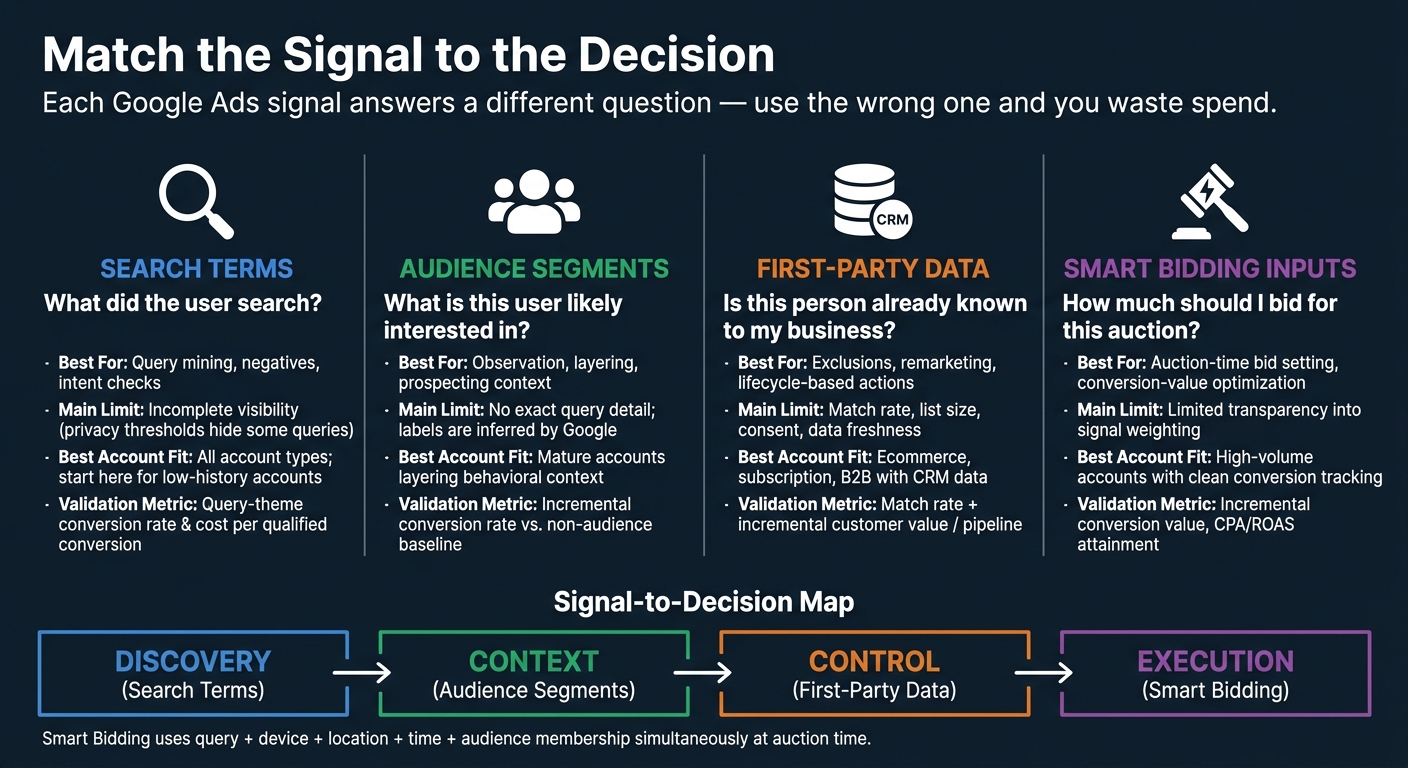
If I had to cut this down to one rule, it would be this: use search terms for what people want now, first-party data for who they are to your business, audience segments for extra context, and Smart Bidding for how bids change in each auction.
That’s the whole model in plain English. The article compares 4 Google Ads signal types - search terms, audience segments, first-party data/Customer Match, and automated bidding inputs - and shows that each one answers a different question. If I use the wrong signal for the wrong job, I can waste spend, miss intent, or feed weak conversion data into bidding, or use tools like Opteo to monitor and improve performance.
Here’s the short version:
- Search terms help me read active demand and find negatives, new themes, and query patterns.
- Audience segments help me add interest and behavior context, but they do not show exact queries.
- First-party data helps me act on customer status - like buyers, SQLs, churned users, or disqualified leads.
- Smart Bidding uses auction-time signals like query, device, location, time, and audience membership to set bids in real time.
A few points matter right away:
- Search term reports are not a full record of every query because of privacy thresholds and aggregation.
- Audience segments are often modeled by Google, while Customer Match comes from my own data.
- Smart Bidding is only as good as the conversion actions and values I feed into it.
- For B2B, offline conversion imports and pipeline data matter more than raw form fills.
- For ecommerce, revenue and margin signals matter more than clicks.
Google Ads Signal Types: Which Signal Does What?
Google Ads Smart Bidding: How AI Optimizes Your Bids (Full Guide)
sbb-itb-89b8f36
Quick Comparison
| Signal type | Best for | Main limit | Best question it answers |
|---|---|---|---|
| Search terms | Query mining, negatives, intent checks | Incomplete visibility | What did the user search? |
| Audience segments | Observation, layering, prospecting context | No exact query detail | What is this user likely interested in? |
| First-party data / Customer Match | Exclusions, remarketing, lifecycle-based actions | Match rate, list size, consent | Is this person already known to my business? |
| Automated bidding inputs | Auction-time bid setting | Limited visibility into weighting | How much should I bid for this auction? |
So when I optimize a Google Ads account, I shouldn’t look for one “best” signal. I should match the signal to the decision: queries for keyword work, lists for customer control, audiences for context, and bidding inputs for auction decisions.
1. Search Terms and Search Terms Insights
Intent Visibility
A search term is the exact query a user typed. A keyword is what you put into Google Ads for targeting. Those two things often overlap, but they are not the same. Google can match a keyword to related searches, not just the exact phrase, which is why the two do not always line up. The Search terms report shows the reportable searches tied to your ads.
Search terms insights go one step further. They group related queries into intent categories and subcategories, then layer in performance metrics. That makes them useful for spotting demand themes at a glance. If you need the exact wording people used - or you’re deciding what to block with negatives - the standard Search terms report is the better tool, though top PPC tools can offer deeper keyword research and competitive insights.
So the practical takeaway is simple: search terms help you read intent, but they do not give you a perfect read on identity.
Data Ownership
Search-term data is platform-owned query data, not first-party data that sits fully under your control. Google Ads gives you a filtered sample of query behavior, not a full export. To protect user privacy, Google leaves out queries that do not meet activity thresholds. That means the report should be treated as a sample of reportable activity, not a full record of everything users searched.
There’s another wrinkle. Low-volume queries may be rolled up into subthemes or placed in an other queries bucket. And insight labels reflect the last 56 days, so they can include terms that are no longer active or have already been excluded.
In plain English, this is a pattern-finding tool, not your master source of behavioral truth.
Actionability
The Search terms report becomes far more useful when you sort by business outcomes - like conversions, conversion value, or cost per acquisition - instead of clicks. Clicks can pull your eye in the wrong direction. Revenue and lead quality usually tell the better story. From there, you can decide whether a term or theme should be kept, expanded, refined, or excluded.
Take a cybersecurity provider. If searches like free, course, and jobs keep bringing in people who are not ready to buy, those terms likely belong on the negative list. On the other hand, if enterprise compliance software keeps showing up next to qualified conversions, that theme may deserve its own tighter buildout.
That’s the core use case: trim waste, keep what works, and split out what shows buying intent.
Account Fit
Different account types need to read search terms through different business lenses, often requiring the expertise of top PPC agencies to align query data with complex business goals. B2B and enterprise teams should judge terms by pipeline and closed revenue, not just form fills. A form submit sounds nice, but if it never turns into sales activity, it can send the wrong signal. Ecommerce teams, by contrast, should compare revenue by product, brand, and purchase-intent theme. Performance Max and Shopping can also surface demand themes through search terms insights.
The next question is whether that signal should change targeting, bidding, or both.
2. Audience Segments and Audience Signals
Intent Visibility
Audience segments help you estimate search intent, but they don’t show the actual query. Instead, they reflect what Google believes a person is interested in based on recent searches, browsing, app use, and other Google activity.
In-market segments usually give the clearest signal of intent because they’re built to reflect recent buying behavior. Affinity segments are broader. They point to interests and habits, which can help with awareness, but they’re less useful if you’re trying to judge whether someone is ready to buy now.
Custom segments fall in the middle. You can shape them around competitor URLs, product terms, or relevant apps. That makes them more specific than affinity segments. But there’s still a catch: they reflect Google’s read on the audience, not a direct match to your own customer data.
The next issue is control. Google can infer intent, but only your own data gives you direct ownership of the audience.
Data Ownership
Google-built segments are inferred. Your own segments come from site, app, and CRM data. That gives you more control over recency windows, exclusion rules, and value tiers. First-party segments still depend on tracking quality, list size, and consent, but they’re based on actual business relationships instead of modeled inference.
Actionability
Observation lets you measure an audience without limiting reach. Targeting restricts delivery to that audience. In plain terms, Observation is for reading performance alongside keyword traffic - not for replacing search-term analysis.
A simple setup works well here:
- Keep all keyword traffic eligible in your main Search campaign.
- Observe past purchasers in Observation mode.
- Run a separate campaign that excludes existing customers and uses custom segments as signals for automated prospecting.
That split matters most when you move from Google-inferred audiences to your own customer lists.
Account Fit
Newer accounts should start with a small set of high-relevance signals, such as a core in-market or custom segment. Mature lead-gen accounts can layer in qualified-lead and CRM-based lists to separate high-intent users from lower-quality traffic. Ecommerce accounts should focus on purchasers and cart abandoners when that data is available.
When modeled audiences don’t give you enough control, first-party data is usually the stronger signal.
3. First-Party Data and Customer Match
First-party data is the signal that comes from your own customer records, not Google’s best guess.
Intent Visibility
Unlike Google-inferred audiences, first-party data shows you who is already in your funnel. It tells you where someone sits in the customer lifecycle, not what they typed into search.
That changes the kind of question you can answer. Instead of asking, “What keywords drove clicks?” you can ask, “Which search campaigns drove actual pipeline?” You can explore top PPC advertising tools to help bridge this gap between search data and CRM outcomes. Compare SQLs, closed-won accounts, and lost opportunities against campaign results to see which campaigns lead to revenue, not just traffic.
When you pair this with enhanced conversions, the picture gets sharper. Enhanced conversions can use consented hashed identifiers to help match website conversions to Google Accounts, which can tie ad interactions to later CRM outcomes. Offline conversion imports can push that link even further into later sales stages. In short, this signal answers a different question than search terms.
Data Ownership
Customer Match only works with data you collected directly - through your website, app, physical location, or direct customer interaction.
That means no purchased lists and no third-party lists. If the data didn’t come from your own customer relationship, it doesn’t belong here.
So the strength of your Customer Match setup comes down to a few plain things:
- How you collect data
- How you handle consent
- How clean your CRM is
Keep lists up to date. Remove opted-out users. Clear out stale records. If your source data is messy, Customer Match will be messy too.
Actionability
Each list should drive one clear campaign move.
For example, you can exclude recent buyers from acquisition campaigns, bid more for open opportunities, suppress disqualified leads from remarketing, or run win-back campaigns for inactive customers. That’s where these lists start doing real work.
Google’s guidance ties better tagging and broader Customer Match usage to higher conversion rates and lower CPA. Match quality also matters. Using email, phone number, and mailing address together tends to perform better than leaning on just one identifier.
From there, these lists can shape both targeting and bid strategy.
Account Fit
Customer Match tends to work best when an account already has meaningful customer segments and a clear lifecycle plan.
The strongest fit usually looks like this:
- Large ecommerce accounts with repeat purchase data
- Subscription businesses that track active and churned users
- B2B advertisers with CRM stages and offline revenue data
Smaller or newer accounts usually get more mileage from fixing conversion tracking first. If list size is thin or CRM data is weak, Customer Match is harder to use well.
These lists become much more useful once they feed auction-time bidding, which is the next layer.
4. Automated Bidding Inputs
The signals above help with targeting and audience selection. Automated bidding uses them in the auction itself. It doesn't set one flat bid for every search. Instead, it sets a unique bid for each auction based on the signals available at that exact moment. Those signals include device, location, time, language, and audience membership. Smart Bidding blends those signals at auction time.
Intent Visibility
Smart Bidding can use the actual query that triggered the ad, not just the keyword that matched it. That means Google can bid one way for a query on mobile in Chicago at 8:00 a.m., and another way for that same query on desktop in Dallas later in the day.
Search terms show the query. Smart Bidding uses the query plus the surrounding context. Advertisers can see the results through conversion data and search-term reports, but Google does not show the full weighting behind each bid.
That shifts the focus. Conversion quality matters more than manual bid control by itself.
Data Ownership
Smart Bidding optimizes to the conversion actions and values you give it. Target ROAS needs enough recent conversion volume, plus enough variation in conversion value, to learn in a steady way. Conversion value rules can also adjust reported values for higher-value customer types, devices, or locations. That lets you reflect business priorities that raw conversion data may miss.
Put simply, the main job is to improve the inputs - not to micromanage each auction.
Actionability
You can't manually rebuild every auction-time signal, and that isn't the point. The better move is to improve what Smart Bidding learns from:
- Clean tracking
- Accurate conversion values
- Realistic targets
For lead gen, import qualified opportunities, closed deals, or pipeline value instead of using raw form fills alone.
Try not to change targets or budgets too often during the learning period. If you're making a major shift, use experiments first.
The best setup depends on account volume, value quality, and sales-cycle length, often requiring expert-recommended PPC tools and strategies to manage effectively.
Account Fit
| Account Type | Fit | Key Consideration |
|---|---|---|
| Large ecommerce | Strong | Accurate revenue values support value-based bidding. |
| Lead gen | Moderate to strong | Needs qualified or revenue-linked conversions. |
| Local businesses | Moderate | Location and time signals matter most. |
| B2B / long sales cycle | Moderate | Offline conversion imports are critical. |
| Small / low-volume | Weaker | Sparse data limits learning. |
Smart Bidding works best when the account has a stable objective, reliable conversion feedback, and enough volume for the system to spot patterns. When goals change often or tracking is messy, the model has less to work with - and performance usually shows it.
How Each Signal Affects Optimization Decisions
No single signal should drive every optimization decision. Search terms, audience segments, first-party data, and automated bidding inputs each answer a different question. Using Google Ads automation tools can help manage these signals at scale. That matters because the actions they support are not the same. The practical rule is simple: use each signal where it changes the outcome most.
Discovery and Keyword Refinement
Start with the signal that shapes keyword and ad decisions first: search terms.
Review search-term patterns on a regular basis. Move proven themes into keyword tests or new ad copy. Add negatives when intent is off-target. Search terms help you spot new keyword themes, tighten copy, improve landing pages, and filter out junk traffic. Judge performance by qualified leads, purchases, or conversion value - not clicks alone.
Audience segments and first-party data can help here, but they play a secondary role. They can show which groups respond to certain queries. What they can't do is replace the query-level detail you get from search terms.
Targeting and Exclusions
Use each signal for a different part of the job:
- Search terms qualify intent
- Audience segments add context
- First-party lists control who is eligible
- Smart Bidding adjusts bids
A local HVAC company might use all four at once: observe past converters as an audience signal, exclude current customers from a new-customer campaign, add negative keywords like "DIY" and "HVAC jobs", and let Smart Bidding account for location, device, and time of day. Google says audience segments added in Observation mode can inform Smart Bidding without limiting reach. That's a useful split when you want bidding input without narrowing eligibility.
Remarketing and Customer Acquisition
For suppression, first-party data is the clearest tool. If the goal is to keep current customers out of acquisition campaigns, this is the direct path. For win-back efforts, it also helps target known contacts based on lifecycle stage.
Audience signals fit prospecting better. They help find users who resemble current customers, which makes them useful for reach expansion when you don't want to start cold.
Search terms do something different. They show immediate demand. Someone searching "enterprise ERP migration vendor" is showing active buying intent. That's not the same as behavioral similarity, and it shouldn't be treated the same way.
Value-Based Bidding and Reporting
Once you define value, Smart Bidding becomes the execution layer.
Use CRM and value data to set bid priorities. A B2B advertiser may assign more conversion value to a sales-qualified opportunity than to a raw form fill. Smart Bidding then uses that value - along with query, device, location, and other context signals - to set bids.
The table below maps each signal type to the areas that matter most when you're deciding how to use it:
| Signal Type | Main Use Cases | Control Level | Reporting Depth |
|---|---|---|---|
| Search terms | Demand discovery, keyword refinement, negative keywords, intent analysis | Medium-high for exclusions and keyword planning; lower over query visibility | Strong: clicks, impressions, CTR, conversions, conversion rate, conversion value, and search volume |
| Audience segments | Prospecting, observation, audience layering, bid qualification | Medium; advertisers choose segments and settings, while delivery remains automated | Moderate: useful for segment-level performance comparisons, but not a complete explanation of user intent |
| First-party data / Customer Match | Remarketing, suppression, customer acquisition, value modeling | High over collection, segmentation, consent, list membership, and business rules; lower over match rates and platform delivery | Potentially very deep when CRM, purchase, margin, and lifecycle data are connected |
| Automated bidding inputs | Auction-time bids, conversion-value optimization, budget allocation | Low direct manual control; high control through goals, conversion definitions, values, constraints, and exclusions | Moderate to strong for aggregate outcomes and diagnostics, but limited visibility into the exact weight of each signal |
Reporting depth varies a lot. Search terms and first-party data are usually easier for analysts to interpret. Automated bidding scales more easily, but it gives less visibility at the single-signal level. Google describes Smart Bidding as using multiple auction-time signals and signal combinations, including the query, device, location, browser, language, and time of day.
Best Fit by Account Type
The right mix depends on how much query data, customer data, and conversion value the account can feed into the system.
| Account Type | Priority Signals | Key Constraint |
|---|---|---|
| Low-volume lead gen | Search terms, conversion quality | Offline imports required; skip complex audience segmentation until data supports it |
| E-commerce | Search terms + purchase data + value-based bidding | Track new vs. returning customers and product-level margin, not just ROAS |
| Enterprise B2B | First-party data + search terms + imported pipeline values | Connect ad interactions to opportunity stage, win rate, and payback period |
| Local services | Search terms + location/schedule signals | Exclude employment and DIY queries; align location settings with actual service area |
| Mature high-volume | All four signals simultaneously | Refresh lists often; use experiments before changing targets or budgets |
Pros and Cons of Each Signal Type
Each signal makes a different tradeoff between query precision, audience scale, customer control, and auction-time optimization. That matters because the same signal can play very different roles. One may help with discovery. Another may be better for targeting, suppression, or bidding.
Search terms give you the closest view of what someone actually typed. That’s the upside. The downside is that visibility is incomplete, which can hide demand and skew how you read patterns.
Audience segments add behavioral context. They can help you see who the user might be, or what they may care about. But those labels are based on inferred interest, not the query happening right now. Push too hard on audience signals - especially if you use them like strict targeting instead of guidance - and reach can shrink without a gain in lead or sale quality.
First-party data and Customer Match tie targeting to your own customer lifecycle. That’s a big plus. But reach is limited by match rate, consent, freshness, and list size. In practice, this makes it strongest for exclusion and customer-value control, not for finding new query themes.
Automated bidding can process query, device, location, time, language, browser, and audience signals at scale. That’s powerful. The catch is lower visibility into how each input is weighted. It also tends to magnify bad conversion data. If your setup rewards low-value conversions, the system can get very good at chasing the wrong thing.
The table below gives the fastest side-by-side view.
| Signal Type | Main Advantages | Main Drawbacks | Overuse Risk | Validation Metric |
|---|---|---|---|---|
| Search terms and Search terms insights | Precise view of expressed intent; supports keyword expansion, ad refinement, and negative-keyword discovery | Exact-query visibility is incomplete because privacy thresholds and aggregation hide some activity | Overfitting to visible queries or missing aggregated demand | Query-theme conversion rate and cost per qualified conversion |
| Audience segments and audience signals | Adds scale and behavioral context; supports bid prioritization across user groups | Weaker insight into exact language or immediate intent; definitions can be broad or overlapping | Narrow targeting or assuming audience membership equals purchase intent | Incremental conversion rate and cost per qualified lead versus a non-audience baseline |
| First-party data and Customer Match | Strong business relevance; supports retention, suppression, acquisition, and value-based segmentation | Match rate, consent, data freshness, and minimum-size requirements limit activation | Small or outdated lists, customer bias, reduced prospecting scale | Match rate plus incremental customer value, qualified pipeline, or payback |
| Automated bidding inputs | Combines many auction-time signals at scale; processes signal interactions beyond manual rules | Lower transparency; depends on accurate conversion tracking, values, and volume | Optimizing efficiently toward an incorrect or low-quality goal | Incremental conversion value, target CPA/ROAS attainment, and downstream revenue quality |
Conclusion
Each signal has a different role. Use search terms to gauge demand, audience signals to qualify traffic, first-party data to suppress waste and map value, and automated bidding to act at auction time. Which one should lead depends on the account and how clean your measurement is.
Match the signal to the account model. For low-history accounts, start with search terms. For B2B, lean on offline pipeline data. For ecommerce, use revenue or margin. The same idea holds at each stage of growth: start with the cleanest signal, then layer in the rest.
No single signal tells the whole story. Treat them as a hierarchy built on query intent, customer identity, and auction-time optimization. Let the business outcome decide what leads, then use the other signals to cover the blind spots.
FAQs
Which Google Ads signal should I prioritize first?
Put search term intent first. Start with the exact queries that triggered your ads. When your targeting and ad relevance match what people are actively searching for, performance usually improves and wasted spend tends to drop.
You can spot mismatches in the search terms report, especially when queries fall into different intent buckets like informational, commercial investigation, and transactional.
Why don’t search term reports show every query?
The material doesn’t say why some queries are missing from search term reports.
It only says that search term reports can help you find new queries, sharpen messaging, and manage negative keywords. It does not cover the specific reasons some terms may be left out, such as platform thresholds, low-volume filtering, or privacy limits.
When should I use Customer Match instead of audience segments?
Use Customer Match when you want to reach people with your own first-party CRM data, like email addresses or phone numbers.
Unlike broad audience segments that rely on Google’s interest or intent signals, Customer Match targets people who already know your business. That makes it a strong fit for retargeting, repeat purchases, and finding similar high-intent users.