Bid adjustments stack by multiplication, not addition - and that one rule changes how I set bids. If I start at $2.00, then apply +20% for device and +10% for location, the bid becomes $2.64. That means even small changes can pile up fast.
Here’s the short version:
- I treat device and location as the first layers to set
- I wait about 7 to 14 days before changing bids off early data
- I add schedule and audience only after performance holds steady
- I keep new manual changes small - often around +10% to +20%
- I remember that match type is not a bid modifier
- I use fewer manual layers when Smart Bidding is active or leverage automated bid management tools to handle the complexity.
- I watch effective CPC and ROAS each week to make sure stacked bids are not drifting too far
A simple rule guides the whole setup: the more signals I stack, the more careful I need to be. And once automation starts capping or steering bids, manual layers have less control than they seem to.
If you want a clean way to manage layered bidding, this article comes down to three things: know the math, set layers in the right order, and keep manual changes light when automation is in play.
How Stacked Bid Adjustments Are Calculated
Once the layers are set, the platform rolls them into a single final bid.
The Base Bid and Multiplicative Stacking Rule
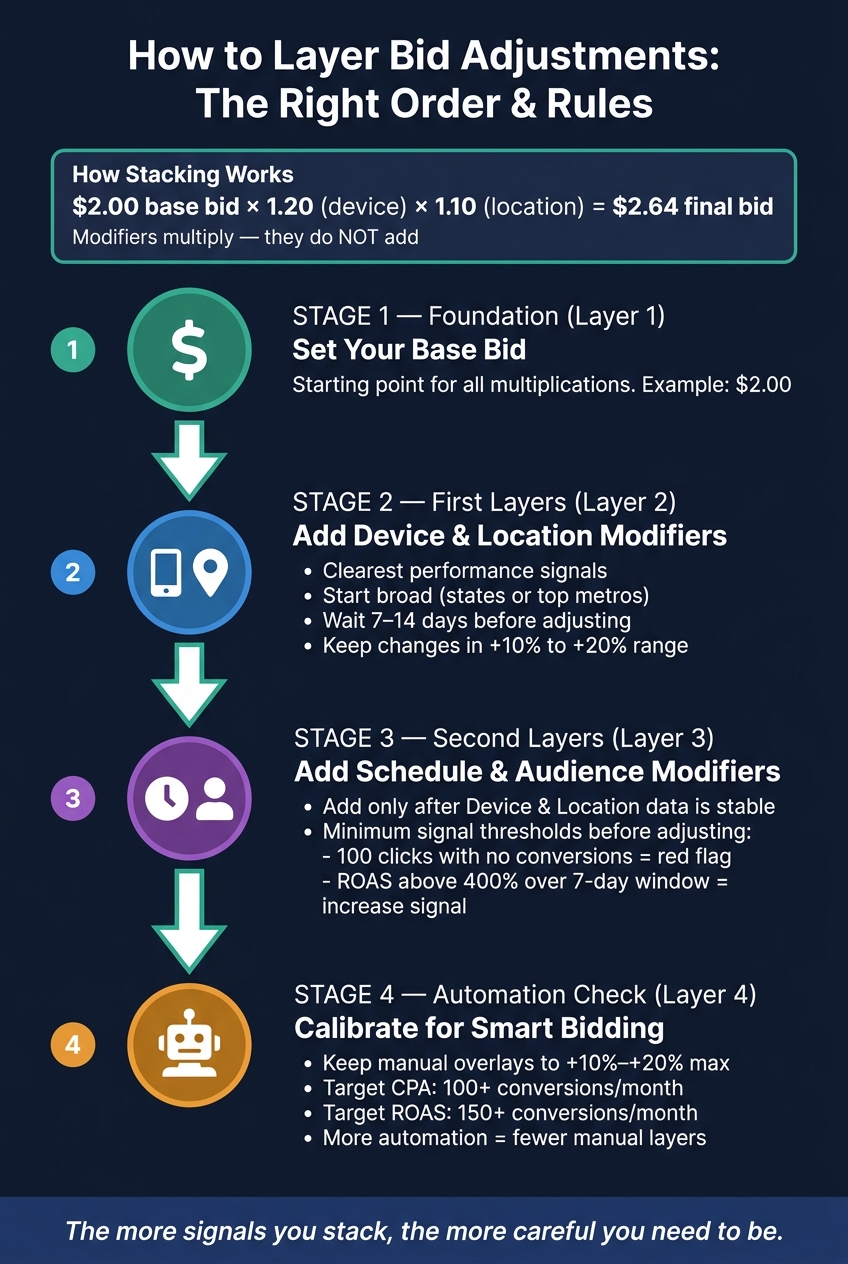
The base bid is just the starting point. Modifiers multiply - they do not add.
Each active modifier applies to the same base bid. So if you start with a $2.00 bid, then apply a +20% device modifier and a +10% location modifier, the final bid becomes $2.64:
$2.00 × 1.20 × 1.10
That’s the rule in plain English: each layer compounds the one before it. So the more signals that apply in the same auction, the more the final bid can drift from the original base bid.
Next, look at what happens when more than one modifier applies at the same time.
How Overlapping Location and Audience Signals Are Handled
If location and audience signals overlap, both modifiers apply to the same auction. The platform multiplies both against the same base bid.
Exclusions work differently. They do not change the bid. They block the auction.
Platform Limits and Bid Ceilings
Manual modifiers stop having much effect once the platform - or the campaign’s bidding strategy - caps the final auction bid.
When that cap kicks in, automation takes over the bid, often managed by top PPC agencies specializing in these strategies. At that point, stacked adjustments lose precision, because the final number is no longer driven only by the manual layers. Specialized tools like Adalysis can help audit these automated layers to maintain performance.
sbb-itb-89b8f36
How to Set Up Layered Bid Adjustments in the Right Order
How to Layer Bid Adjustments: The Right Order & Rules
Stacking rules show how bids combine. This section is about the order to use when you build those layers.
The simple rule: start with the signals you trust most. Then add the weaker ones later.
Start with Device and Location Before Adding More Layers
Begin with device and geography because they usually show the clearest performance gaps. At the campaign level, start broad - think states or top metros. Only go narrower after you see the same pattern stick.
Give it time before you touch anything. Let at least 7 to 14 days of data build before setting a device or location modifier.
Add Schedule and Audience Modifiers Once Data Is Stable
Once device and location are in place, move to time and audience.
These are less direct signals, so they need more proof. If you jump too soon, you're just reacting to noise. A segment with 100 clicks and no conversions is a red flag. On the flip side, a ROAS above 400% across a steady 7-day window can support a bid increase.
The point isn't to react to one good day or one bad stretch. Wait until click and conversion volume is strong enough to show a clear pattern. Then adjust.
Apply schedule and audience modifiers only after device and location data are stable.
Where to Set Each Modifier in Google Ads and Microsoft Advertising
The setup order stays the same in Google Ads and Microsoft Advertising. What changes is where you click.
| Dimension | Navigation Path (Google Ads) | Level of Control |
|---|---|---|
| Device | Campaign or Ad Group > Devices | Campaign or Ad Group |
| Location | Campaign > Locations | Campaign |
| Ad Schedule | Campaign > Ad Schedule | Campaign |
| Audience | Campaign or Ad Group > Audiences | Campaign or Ad Group |
| Match Type | Keywords tab > click the match type next to a specific keyword | Keyword |
In Microsoft Advertising, device, location, and schedule controls are in Campaign settings. Audience modifiers are in the Audiences tab.
Building a Bid Framework That Holds Up Over Time
Once your bid stack is in place, the job is to keep it disciplined. The aim is steady control, not piling on more modifiers.
Start with Conservative Ranges and Monitor Effective Bids
The main risk usually isn't one bad modifier. It's a few small ones that stack up and push bids too far.
Start new bid layers in the +10% to +20% range. Then watch whether CPCs and ROAS move together. If costs go up, results should improve too.
Check weekly CPC trends and conversion quality - not just the modifier itself. If CPCs keep climbing without a similar gain in conversion rate or ROAS, the stack is getting ahead of the account.
Once things settle down, use match type to decide where manual control still makes sense as part of your optimization checklist.
Align Match-Type Bids with Campaign-Level Modifiers
Match type shapes how much room you have for manual bidding. It is not a modifier on its own.
Broad match gives Google the biggest pool of signals and tends to work best with Smart Bidding. Phrase match sits in the middle, so it can work with limited manual bidding or Smart Bidding. Exact match shows the highest intent and gives you the most room for manual control.
| Match Type | Reach | Control | Bidding Recommendation |
|---|---|---|---|
| Broad Match | High | Low | Smart Bidding |
| Phrase Match | Medium | Medium | Limited manual or Smart Bidding |
| Exact Match | Low | High | Manual or Smart Bidding |
The simple rule is this: the more automated the match type and bidding setup, the fewer manual layers you should add.
When Automation Limits Manual Bid Layers
Smart Bidding already uses many of the same signals you'd try to handle with manual adjustments. That means manual overlays should stay small.
If you're using Target CPA or Target ROAS, keep any manual bid adjustments modest - no more than +10% to +20% - and only when you have clear performance proof. In lower-volume accounts, manual bidding or Enhanced CPC is often the better call until the campaign builds enough stable conversion data for automation.
In practice, stable automation often needs more data than the platform minimums suggest. A good working threshold is about 100+ conversions per month for Target CPA and 150+ for Target ROAS. Enhanced CPC gives you a middle path. It adjusts manual bids based on the chance of conversion, but it doesn't take full control away.
Use the smallest set of modifiers that still shows a clear difference in performance.
Conclusion: Key Rules for Smarter Bid Layering
Bid modifiers multiply. So each layer needs a clear reason to exist and it needs to be easy to review later.
When automation is on, keep manual layers light. Manual device or schedule changes can clash with automation because the platform is already optimizing around those signals. The simple rule is this: the more automated your setup is, the fewer manual overlays you should add.
Bid layering tends to work best after conversion volume is steady. Start with the smallest set of modifiers that still shows a plain gap in performance.
Use this quick audit before you change bids:
- Set base bids first.
- Keep manual device and schedule adjustments conservative when automated bidding is active.
- Check how your platform handles modifiers that can apply to the same auction.
- Check location and radius caps before launch.
- Audit effective CPC and ROAS weekly.
- Recheck manual layers after major bidding changes.
FAQs
How do stacked bid adjustments affect my final bid?
In major PPC platforms, bid adjustments stack multiplicatively, not additively. That means each percentage change applies one after another to the base bid - or to the bid after the last adjustment.
So the final bid can move more than you might expect at first glance.
Example: a $1.00 bid with +20% location, -50% time, and +10% device adjustments becomes:
$1.00 × 1.20 × 0.50 × 1.10 = $0.66
Combined increases are often capped at 900%.
Which bid modifiers should I set first?
For manual bidding, start with Auction Insights. It’s the easiest way to spot performance gaps before you touch bids.
Then test modifiers in observation mode for 30 to 60 days. Don’t jump in after a few clicks. Wait until you have enough data - for example, 1,000 impressions - before making changes. When you do adjust bids, keep it small, around 10% to 20% at a time.
For Smart Bidding, skip manual device, location, and audience modifiers. Google already factors in those signals in real time. In most cases, the only modifier that makes sense is -100% to exclude a specific segment.
When should I avoid manual bid adjustments?
Avoid manual bid adjustments when you’re using Smart Bidding. It already tunes bids for device, location, and audience signals in real time, so manual overrides can get in the way.
That matters even more during the learning phase, which often lasts 7 to 14 days or longer. The same rule applies after you change bidding strategy and the campaign goes back into learning.
If you need tighter control, split traffic into separate campaigns instead of layering on manual adjustments. And if conversion volume is low - fewer than 20 to 30 conversions per month - manual bidding may make more sense until you have more data.